
tinycast
One hotkey, everything you reach for all day.
Replaces Raycast Ai, Alfred, Launchbar
Who it's for
Tinycast covers the same daily workflow: app launching, clipboard history, snippets, quicklinks, and window management. It migrates your existing Raycast setup via the .rayconfig import. Extensions run natively. The main trade is giving up Raycast's cloud-synced AI and Pro features in exchange for no account and no telemetry.
You depend on Raycast's managed AI features or cloud sync, or you use Raycast Pro extensions that require Raycast's hosted backend.
Tinycast's AI chat accepts any API key, including Claude, OpenAI, and Codex. The Quick Actions feature (fix grammar, rewrite, translate, summarize selected text) works with the same key. Both features are off by default and store no conversation history until you enable them.
You need a full AI coding assistant integrated into your editor. Tinycast's AI chat is a palette-based tool, not a code-context-aware IDE integration.
Tinycast bundles 34 window-management actions covering all standard Rectangle layouts. If your current setup is Raycast plus Rectangle (or Magnet), Tinycast consolidates both into one tool with a single settings interface and one source of global hotkeys.
You use advanced window management automation (custom scripts, Hammerspoon, or Stage Manager workflows) that go beyond Tinycast's 34 built-in actions.
The problem
Raycast has become the default macOS launcher for developers, but its trajectory toward a cloud-connected AI platform means users trade privacy for convenience. AI features require a Raycast account, usage data flows to their servers, and the free tier limits are tightening as the Pro tier grows. Alfred and LaunchBar are solid alternatives that respect privacy, but neither runs Raycast extensions natively or includes window management in the same palette. The other pain point is Electron. Many cross-platform productivity tools run in a Chromium wrapper that can consume hundreds of megabytes of RAM just at launch, competing with real apps for resources. For developers running multiple resource-intensive tools at once, a launcher that adds another 300 MB overhead defeats its own purpose.
How it works
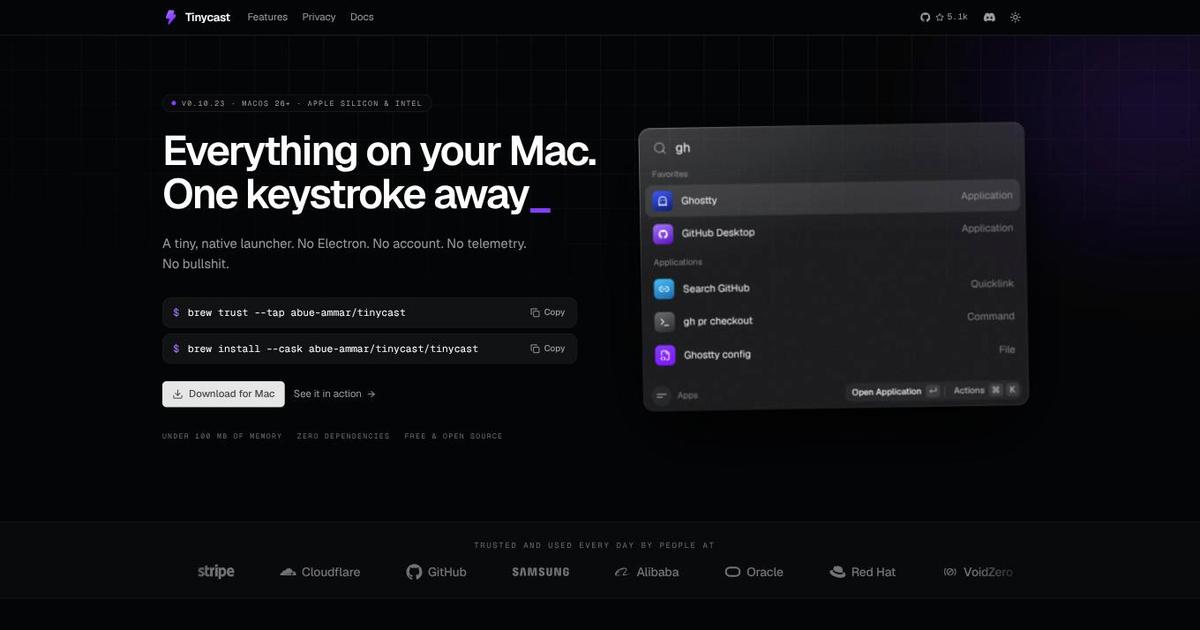
Searches every installed app with fuzzy matching and opens it with Return. Pin favorites for one-key access to your most-used apps, or bind a dedicated hotkey to any app: press once to focus, press again to hide. Quit apps or all open apps at once without reaching for the Dock.
Saves every text snippet, image, file path, and hex color you copy. The history is searchable from the palette and pastes straight back into the app you were using. Retention is configurable up to forever; all history stays on your Mac and never syncs to a server.
Evaluates math expressions, unit conversions, live currency and crypto rates, and date arithmetic (such as 'days until 9 Apr') directly in the search field. No need to open a separate app; results copy to clipboard with Return.
Covers halves, thirds, quarters, nudges, display moves, fullscreen, and Spaces assignments from the keyboard. Actions follow Rectangle's naming conventions, so existing muscle memory transfers. No mouse required for any window arrangement.
Installs and runs Raycast extensions from the store using JavaScriptCore for logic and SwiftUI for rendering. No Node.js, no toolchain setup. Tinycast also reads a .rayconfig export directly to bring over shortcuts, favorites, snippets, and quicklinks from an existing Raycast setup.
On a fresh install, only the launcher, calculator, and clipboard history are active. Every other feature (AI chat, extensions, snippets, calendar) is off until you enable it. Permissions are requested only when a feature needs them, never at launch.
Features
- Fuzzy app launcher with per-app hotkeys
- Clipboard history with image and file support
- Inline calculator with live currency and time zones
- Window management with 34 keyboard actions
- Raycast extensions running natively in SwiftUI
- Privacy-first defaults with granular permissions
How to install
Install via Homebrew by adding the tap first, then installing the cask.
brew trust --tap abue-ammar/tinycast
brew tap abue-ammar/tinycast
brew install --cask tinycast
Recommended for this setup
Strengths
- Zero third-party dependencies, native Swift 6: The entire app is built with SwiftUI and AppKit using only Apple's own frameworks. This means no supply chain risk from npm packages, no Electron binary, and no runtime beyond what macOS already provides. The result is a consistent under 100 MB memory footprint regardless of which features you enable.
- Raycast migration in three steps: Tinycast reads a .rayconfig export from Raycast v2.0 or later directly. Point it at the file, enter the passphrase, choose what to bring, and restart. Shortcuts, favorites, clipboard history, snippets, quicklinks, and aliases transfer. No manual re-entry.
- No account and no telemetry, by design: There is no registration step, no login screen, and no outbound analytics. AI features are off by default; when you enable them, you supply your own API key and the requests go directly to your chosen provider. No usage data is routed through Tinycast's servers because there are none.
- Free, AGPL-3.0, with full source access: The AGPL-3.0 license means the source is readable, buildable, and auditable. There is no paid Pro tier waiting behind a feature flag. Development is supported by voluntary tips; the feature set itself is deliberately scoped to stay small and fast.
Trade-offs
- macOS only, no Windows or Linux build: Tinycast runs only on macOS. There is no Windows or Linux build, and cross-platform teams cannot share a single launcher setup. The stable cask targets macOS 26; the macOS 15 Sequoia cask exists but is listed as no longer maintained in the current install documentation.
- Deliberately closed feature set: The project explicitly states its feature set is closed, and contributions that add features are rejected unless pre-approved in an issue. Users who need custom integrations or niche workflows that Tinycast does not ship may find the extension model insufficient for their needs.
- AGPL-3.0 restricts redistribution as a service: Using Tinycast on your own Mac is unrestricted. Modifying the source and distributing or deploying it to others as a service requires releasing those changes under AGPL-3.0. Teams building internal forks for redistribution should review the LICENSE file before doing so.
- Active development, pre-1.0 version stability: The project launched in June 2026 and is still at v0.10.x. The extension API, import format, and feature set continue to stabilize. With 51 open issues at the time of writing, workflows built around current behavior may need adjustment as the app matures.
Tech stack
FAQ
Yes. Tinycast is free to download and use with no feature limits. There is no Pro tier or paid plan. Development is supported by voluntary tips from users who want to keep it maintained.
Yes, if you are on Raycast v2.0 or later. Export your settings from Raycast (Settings then Backup, set a passphrase), then open Tinycast Settings then Backup and point it at the .rayconfig file. Shortcuts, favorites, clipboard history, snippets, quicklinks, and aliases transfer. The Raycast v1.x format is not supported.
You can run Tinycast on your own Mac, read and modify the source, and build it yourself without restriction. What AGPL-3.0 prohibits is distributing a modified version, including deploying it to others as a service, without releasing your changes under the same license. For personal and team use on your own machines, there are no restrictions.
Yes, via the tinycast-universal Homebrew cask, which requires macOS 26. An Apple silicon build is available as the default cask. A macOS 15 Sequoia build exists but is listed as no longer maintained in the current install documentation.
Raycast extensions run in JavaScriptCore (Apple's built-in JS engine) and are drawn in SwiftUI. No Node.js or build toolchain is required on your machine. You install extensions from the Tinycast store; they run entirely on your Mac with no external runtime.