
Screenshots
macOS screenshot and recorder, no cloud, no account, MIT licensed
Replaces Cleanshot X, Snagit, Xnapper, Shottr
Who it's for
The combination of numbered counters, blur for redacting sensitive values, and scrolling capture covers the most common documentation screenshot workflow: annotate a UI, number each step, blur any credentials or emails, and capture a full-page view. No recurring cost and no cloud upload.
Skip if you need to share captures via a cloud link directly from the screenshot tool, or if your workflow requires a webcam overlay or video trimming after recording.
Anyone capturing screens that show credentials, client data, or internal tools benefits from a tool with no network code. Screenshots sends nothing outside the Mac; OCR also runs on-device via Apple Vision. The MIT license lets a security team audit the full source to verify these claims.
Skip if your team requires a managed cloud storage archive for screenshots with access controls across multiple users.
Screenshots covers CleanShot X's core daily use: area capture, window capture, scrolling capture, annotation with 13 tools, and MP4 or GIF recording. If the reason for using CleanShot X was those features and not cloud sharing or video trimming, Screenshots replaces it at zero cost.
Skip if you rely on CleanShot X's cloud upload, share links, webcam overlay, or video trimming features.
The build is a single shell script using swiftc with no Xcode project and no package manager. End-to-end tests run on a virtual display without taking over the screen. Anyone who wants to audit, fork, or extend a native Swift screenshot tool has a complete, working reference under MIT.
Skip if building from source is not a requirement and the pre-built signed binary from the install script is sufficient for your use.
The problem
macOS's built-in ⇧⌘4 captures a static image and stops. There is no way to annotate that image directly, capture a scrolling web page, read text out of an image, or record the screen as a GIF without installing a separate tool. Historically that separate tool has been a paid one. CleanShot X charges $29 for a license plus $19 per year for updates, and Snagit carries a similar cost. Privacy is a second concern. Screenshot tools see everything on your screen. Most commercial options upload captures to their own servers to enable cloud storage and share links, which creates a data exposure risk for anyone capturing code reviews, credentials, client data, or internal communications. Auditing the network behavior of a closed-source commercial app is not possible without external tooling.
How it works
Captures areas, previous areas, full screens, windows, scrolling pages, and text extraction, plus video and GIF recording. Each mode has its own shortcut using ⌥⇧⌘ plus a number. A 3, 5, or 10-second timer is available via the menu for any mode that needs it.
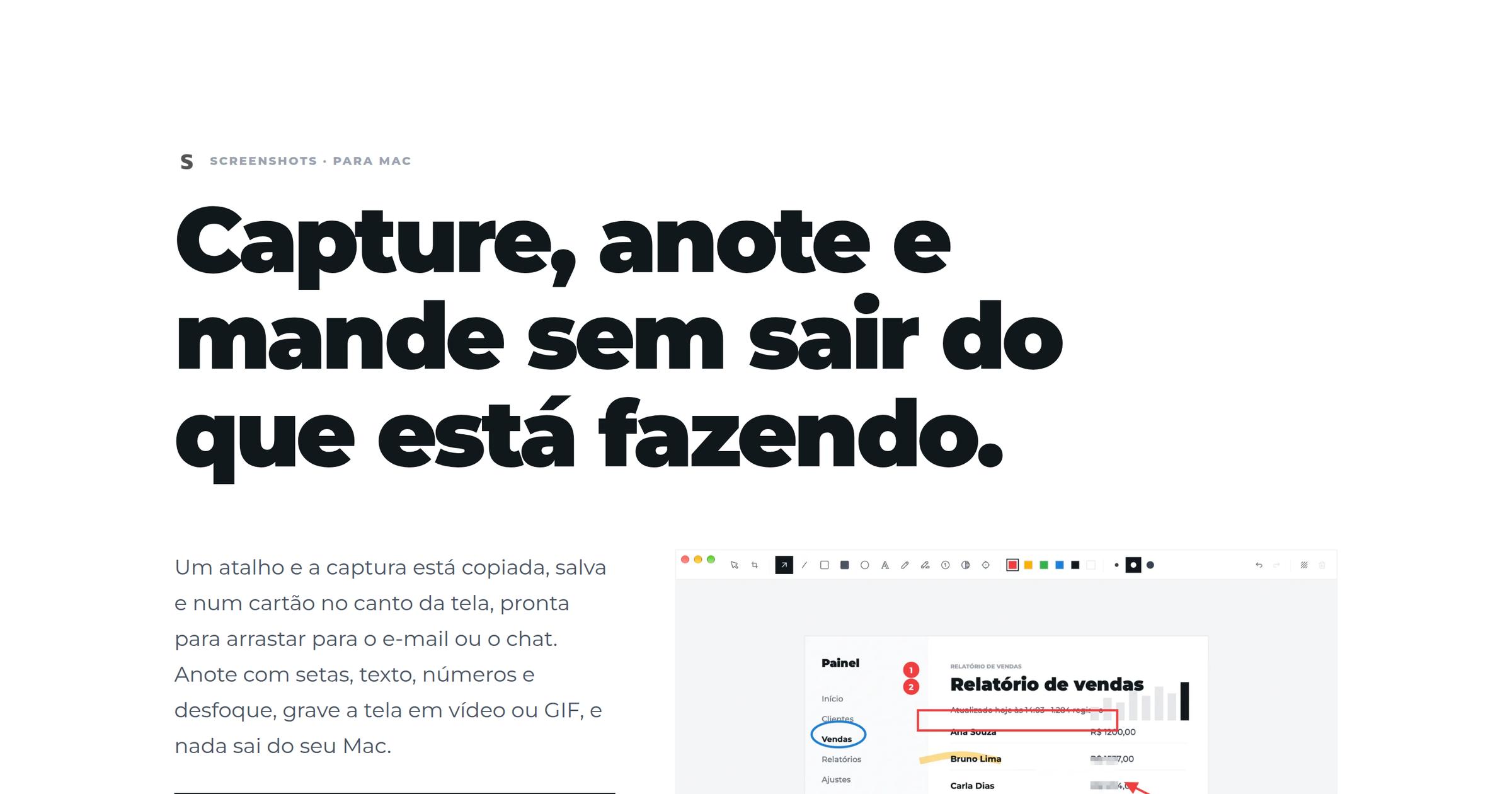
The editor includes arrows, lines, rectangles, ellipses, text, pencil, highlighter, blur, spotlight, and crop. The counter numbers sequential steps for tutorial screenshots. Blur redacts emails and values before sharing. All tools work at six colors and three thicknesses; undo, copy, and save use ⌘Z, ⌘C, and ⌘S.
Captures pages that extend beyond the visible viewport by stitching consecutive frames. You scroll manually or press 'Scroll by itself' with Accessibility permission. The Stitcher compares rows with color-noise tolerance and ignores scroll bars and rounded corners. Fixed headers and footers appear only once in the final image.
Text extraction mode selects any area and copies the recognized text to the clipboard. Recognition runs through Apple's Vision framework entirely on the Mac, in English and Brazilian Portuguese. No image data is sent to an external service; the recognized text never leaves the device.
Records H.264 MP4 with visible cursor and click indicators, optional system audio, and microphone input on macOS 15 or newer. GIF export is generated from the recorded video. A 4K resolution ceiling and a pool of 4:2:0 frames keep memory flat regardless of recording length.
The app contains no URLSession calls and no sockets; the only outbound actions go through NSWorkspace to open a file or System Settings. Captures stay in the folder you choose and in the local 30-day history. There is no account, no telemetry, and no cloud upload path.
Features
- Eight capture modes with dedicated keyboard shortcuts
- 13 annotation tools including blur and step counter
- Scrolling capture stitches long pages into one image
- OCR reads text from the screen on-device
- Screen recording to MP4 or GIF with optional audio
- No network code and no cloud dependency
How to install
Run the setup script to install on macOS 14+ Apple Silicon.
curl -fsSL https://blob.ciromaciel.click/tools/screenshots/install.sh | bashRecommended for this setup
Strengths
- MIT license with no usage restrictions: The MIT license means you can use Screenshots commercially, modify it, and distribute it without licensing fees. CleanShot X and Snagit are proprietary and require paid licenses. The full Swift source is at github.com/ciro-maciel/screenshots, so teams can audit the code or build custom versions.
- Signed and notarized by Apple, no Gatekeeper warning: Since version 0.2.0 the app is signed with a Developer ID certificate and notarized by Apple. The .dmg downloaded from the website or via the install script opens without a Gatekeeper warning on any compatible Mac, which is not guaranteed for less-maintained open source Mac apps.
- No Xcode required to build from source: The build system is a single shell script using swiftc directly, with no Xcode project file and no Swift Package Manager. You need only the Xcode Command Line Tools. End-to-end tests run on an invisible virtual display and exercise every capture mode with pixel-level checks.
- Minimal permissions beyond Screen Recording: The app requests only Screen Recording (required by macOS for any capture app), Accessibility (optional, only for auto-scroll in scrolling capture), and the microphone (optional, only for voice recording). It cannot phone home because there is no network stack in the binary.
Trade-offs
- Apple Silicon and macOS 14 or newer only, no Intel support: Screenshots runs only on M1 or newer Apple Silicon Macs running macOS 14 (Sonoma) or later. There is no Intel build and no mention of Intel support in the repository. Teams with older Macs or those on macOS 13 or earlier cannot use it.
- No cloud sharing, webcam overlay, or video trimming: Screenshots has no cloud upload, no share link generation, no webcam or picture-in-picture overlay during recording, and no video trimming. These features are common in paid alternatives like CleanShot X and Snagit. If they are part of your workflow, a paid tool is still required for them.
- New repository with limited real-world testing: The repository was created in October 2026 and has 2 GitHub stars and 0 forks. The codebase ships a full end-to-end test suite that exercises every capture mode with pixel checks, but community-tested edge cases are limited compared to established tools. Verify each capture mode your workflow depends on before fully committing to it.
Tech stack
FAQ
Yes. Screenshots is MIT licensed, which means you can use it commercially, modify it, and redistribute it without restriction. There is no paid tier, no subscription, and no feature locked behind a license key. The source is at github.com/ciro-maciel/screenshots.
Screenshots requires macOS 14 (Sonoma) or newer on an Apple Silicon Mac (M1 or newer). There is no Intel build. Microphone recording during screen captures requires macOS 15 or newer; on macOS 14 the app records system audio but not the microphone.
Screenshots covers CleanShot X's core daily features: area, window, and scrolling capture; annotation with 13 tools; GIF and MP4 recording; and a local capture history. CleanShot X adds cloud upload, share links, video trimming, and webcam overlay that Screenshots does not have. Screenshots is free and MIT licensed; CleanShot X costs $29 plus $19 per year for updates.
No. Screenshots has no network code, no cloud account, and no share link feature. Captures save to the folder you choose and the local history stays on the Mac for 30 days by default (configurable to 1 day, 1 week, forever, or off). The app requests only Screen Recording permission on first run.
Screen Recording is the macOS permission any app must have to see the screen contents. Without it, Screenshots cannot capture anything. A welcome window opens System Settings to the right panel on first run; once the permission is granted, the same window reopens the app because macOS grants the permission to a fresh process only.