
OBS Studio
Record and stream with multi-source scenes and hardware encoding
Replaces Vmix, Streamlabs Desktop, Xsplit Broadcaster
Who it's for
Build scenes for gameplay, webcam, browser overlays, alerts, and intermission screens, then switch between them with hotkeys or transitions while streaming.
You want a hosted service that manages overlays, chat widgets, monetization, and cloud backups from one account.
Capture screen, camera, browser tabs, and microphone into repeatable scenes for lectures, tutorials, and software demos without watermarks or export limits.
You only need quick async clips with automatic transcript sharing and comments.
Use Studio Mode, custom transitions, audio filters, and Multiview to control cameras, slides, guests, and holding screens before anything goes live.
Your team needs attendee registration, email reminders, and analytics inside the same product.
Use plugins, Lua/Python scripts, and the OBS API to build custom sources, controls, and broadcast automation around existing production hardware.
You need a locked-down tool for nontechnical users who should never touch scene or audio routing.
The problem
Short async video recorders work for quick clips, but they break down when someone needs a real broadcast: multiple scenes, webcams, capture cards, desktop or window captures, overlays, audio filters, and live transitions. Paid broadcast suites can put advanced production features behind subscriptions or accounts, and browser-based recorders often depend on cloud upload paths. Teams running tutorials, webinars, game streams, or internal demos need a local tool that records and streams reliably while keeping project files and media on their own machines.
How it works
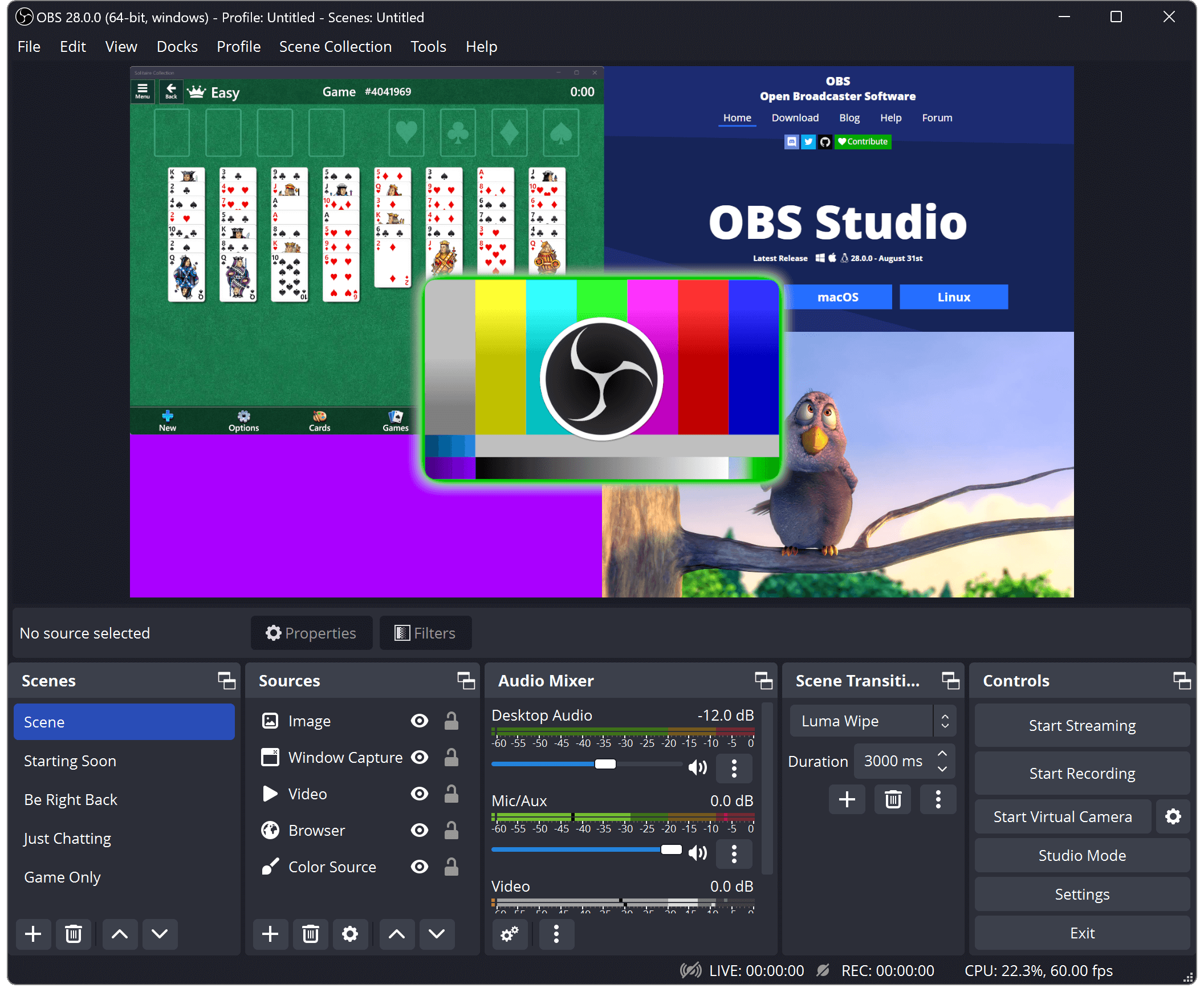
Combine windows, displays, images, text, browser sources, webcams, and capture cards into scenes for live switching or local recording.
Set up any number of scenes and move between them with custom transitions, which supports run-of-show layouts for streams, webinars, and tutorials.
Use the audio mixer to apply noise gate, noise suppression, gain, and VST plugin filters on individual sources before recording or streaming.
Preview scenes before they go live and monitor 8 scenes in Multiview, reducing on-air mistakes during multi-scene productions.
Extend OBS with native plugins plus Lua or Python scripts, useful when a workflow needs custom sources, automation, or integrations.
Features
- Real-time scene composition
- Unlimited scene switching
- Per-source audio control
- Studio Mode and Multiview
- Plugin and scripting API
How to install
# Ubuntu
sudo add-apt-repository ppa:obsproject/obs-studio
sudo apt update
sudo apt install obs-studio

# FreeBSD
pkg install obs-studio
Recommended for this setup
Strengths
- No cloud gate for core work: OBS records and composes locally, so local capture does not require creating a vendor account, uploading raw footage, or routing through a hosted recorder.
- Professional controls without subscriptions: Scene collections, source filters, hotkeys, Studio Mode, Multiview, and platform streaming are part of the core desktop app rather than paid add-ons.
- Extensible for specialized workflows: The OBS API, plugin support, and Lua/Python scripting let technical teams build custom controls instead of waiting on a proprietary vendor roadmap.
- GPL-2.0-or-later codebase: Teams can inspect, modify, and redistribute the software under the GPL terms, which matters for labs, schools, and production teams that need auditability.
Trade-offs
- Desktop app, not a hosted recorder: OBS does not give you a browser-based recording portal, automatic transcript workflow, or team clip library out of the box.
- Setup takes production knowledge: The Auto-Configuration Wizard helps, but good results still depend on choosing sources, scenes, audio devices, bitrate, and stream settings correctly.
- Linux capture can need system packages: The official install notes call out OpenGL 3.3 and v4l2loopback for virtual camera support, so Linux users may need package and kernel-module work.
- Collaboration is external: OBS focuses on capture, mixing, recording, and streaming. Teams still need separate tools for review, storage, editing, scheduling, and approvals.
Tech stack
FAQ
Yes. OBS Studio is free and open source under GPL v2 or later, with official builds for Windows, macOS, and Linux. There are no built-in watermarks or paid feature tiers in the core app.
Yes. OBS can record locally and stream live, and the same scene setup can serve both workflows. You can use it for tutorials, demos, podcasts, and screen recordings without connecting to Twitch or YouTube.
OBS Studio has official downloads for Windows, macOS, and Linux. The install docs also list supported Linux builds for Flatpak and Ubuntu, with unofficial packages maintained by distribution communities.
Yes, OBS Studio includes virtual camera support. On Linux, the official install notes say virtual camera support needs the v4l2loopback kernel module installed.
OBS Studio is the better fit when you want open source control, local recording, Linux support, and an extensible plugin or scripting model. Paid suites can still make sense when you want bundled templates, cloud workflows, or vendor support over lower-level production control.