
Superfile
Terminal file manager with multi-panel layout and 20+ themes
Replaces Directory Opus
Who it's for
Superfile fits a terminal-first workflow without requiring a context switch to a GUI file manager. The multi-panel layout and keyboard-driven operations handle tasks like copying build artifacts across directories, navigating deployment configs, or cleaning up log directories.
If you primarily manage remote filesystems over SSH on headless servers, a tool with better remote protocol support may fit better.
With 20+ built-in themes and fully remappable hotkeys, Superfile integrates into any terminal setup. Users building a Catppuccin, Nord, or Gruvbox aesthetic can match Superfile to their existing color scheme without custom configuration.
If you prefer the smallest possible binary footprint and no visual polish, lighter alternatives like nnn or lf use less memory and start faster.
The multi-panel layout and bulk operations make repetitive file management tasks faster. Fuzzy search reduces manual directory navigation, and image preview avoids opening a separate viewer to verify file contents before moving or deleting.
If your file management needs are primarily remote (SFTP, S3, or cloud storage), Superfile does not include remote protocol support.
The problem
File management in the terminal typically forces a choice between two frustrating paths. Staying in the shell means using bare `ls`, `cp`, `mv`, and `rm` commands without visual context, multi-pane layout, or feedback when moving large numbers of files. Opening a GUI file manager like Finder or Windows Explorer breaks the keyboard-centric flow that most terminal work depends on. For developers who spend extended periods in the terminal, these context switches compound. Tasks that take seconds with a visual file manager, like renaming a batch of files, comparing two directory trees side by side, or previewing an image before deciding to move it, require either memorized commands, custom scripts, or a GUI round trip.
How it works
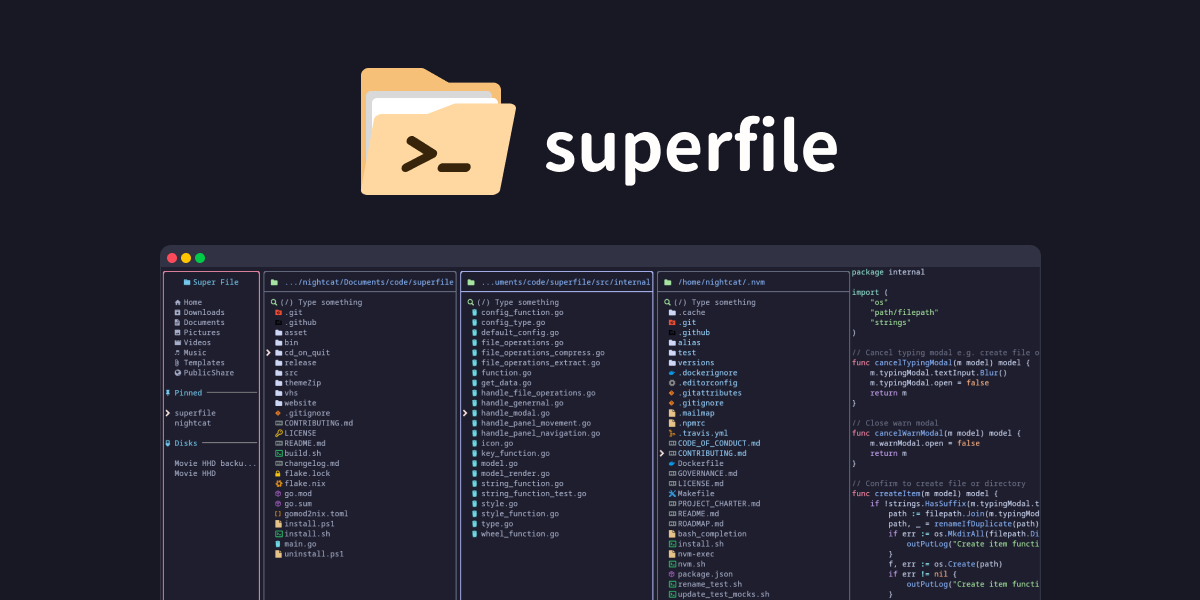
Split the terminal view into multiple directory panes simultaneously. Copy and paste files across panels with a few keystrokes, which makes side-by-side directory management and bulk transfers faster than switching between separate terminal windows.
Copy, move, delete, rename, and run bulk operations on selected files from the keyboard. Fuzzy search locates files by name across the current directory tree, and image preview lets you verify file contents before acting on them.
Ships with over 20 themes including Catppuccin, Nord, Tokyo Night, Dracula, Gruvbox, and Rose Pine. Every border, color, and UI element is theme-configurable, so Superfile fits any terminal color scheme without custom work.
Every key binding can be remapped in the config file. The README notes that vim and nvim users should switch to the vim hotkey profile for comfortable navigation. The full remapping surface is documented at superfile.dev.
Extend Superfile with community plugins: Git status integration shows repository state in the file panel, system monitoring surfaces resource usage, and custom commands let you wire any workflow into the file manager.
Features
- Multi-panel directory views
- Complete file operations with fuzzy search
- 20+ built-in themes
- Fully remappable hotkeys
- Plugin support
How to install
Superfile installs on macOS and Linux via a setup script; Homebrew is also available on macOS.
bash -c "$(curl -sLo- https://superfile.dev/install.sh)"brew install superfileRecommended for this setup
Strengths
- MIT licensed with no usage restrictions: The MIT license lets you use Superfile commercially, fork it, and modify it without any obligation to share changes. There is no dual-license tier, no proprietary cloud component, and no usage restriction for commercial teams.
- Active development and strong community uptake: 23,793 GitHub stars with a last push on 2026-10-10 indicate a project under active maintenance. Multiple community video reviews from channels like TechHut, Better Stack, and Seth Phaeno reflect real-world developer adoption.
- Single-binary install with no server required: Superfile runs as a local binary with no daemon, no database, and no network dependency. Install it with one command, run it with `spf`, and it is ready without further configuration. No Docker or server setup needed.
- Cross-platform package manager support: Available via Homebrew, Pacman (Arch Linux), Nix, Winget, Scoop, or a direct install script, covering the package managers most developers already use on macOS, Linux, and Windows.
Trade-offs
- Windows support is partial: The README explicitly marks Windows as not fully supported yet. Core file operations work, but features available on macOS and Linux may be absent or unreliable on Windows. Windows-primary users should test their specific workflow before depending on it.
- Plugin quality varies by maintainer: The plugin system is community-contributed with no official review or compatibility guarantee. Plugin documentation lives on the project wiki, and stability depends on each plugin's individual maintainer.
- Young project with 289 open issues: Created in March 2024 with 289 open GitHub issues, some edge cases and bugs are actively awaiting fixes. Users on less common terminal configurations may encounter undocumented issues.
Tech stack
FAQ
Yes. Superfile is MIT licensed and runs as a local binary with no cloud component, subscription, or usage fee. You can use it commercially, modify it, and distribute it with no restrictions under the MIT license.
Partial support. The README marks Windows as not fully supported yet. macOS and Linux have full support. Windows users can install via Winget (`winget install --id yorukot.superfile`) or Scoop, but should verify their specific use case works before depending on it.
On macOS or Linux, run the install script with `bash -c "$(curl -sLo- https://superfile.dev/install.sh)"` or use Homebrew: `brew install superfile`. On Windows, use Winget or Scoop. After install, launch Superfile by typing `spf` in your terminal.
Yes. Superfile ships with 20+ built-in themes including Catppuccin, Nord, Tokyo Night, Dracula, Gruvbox, and Rose Pine. Every hotkey can be remapped in the config file. The full customization surface is documented at superfile.dev.
Community plugins add Git status integration, system monitoring, and custom command support to the file panel. The full plugin list is on the project wiki at superfile.dev/list/plugin-list. Plugin quality varies by maintainer, so review each plugin's documentation before installing.