
Qualitylayer
Structured plan-build-review workflow for coding agents.
Replaces Devin, Factory Ai
Who it's for
QualityLayer gives your coding agent a fixed workflow: a plan you approve before code is written, test-first implementation, an independent check, and a final review before merge. The plan and all decisions land in your repository as Markdown, so the history of a feature is readable without opening a separate tool.
Skip if you are prototyping throwaway code or running quick experiments where approval steps add more time than the task saves. Chat mode is the lighter path for ad-hoc questions and one-off changes.
The independent Verify step adds a separate agent that reads your original request and checks the diff against it, running your project's tests, linters, and security scan before the change reaches you. Teams that care about catching regressions and reviewing with context, not just diff lines, benefit from this step.
Skip if your team already has a thorough human review process and the independent agent review would duplicate effort. The verify step can be configured to run project checks only.
The ql-peer skill lets connected agents hand work to each other. An engineer can instruct Claude Code to ask Codex for a review, and Codex's reply arrives in the same session without manual copying. This is useful when different agents have different strengths or when you want a second perspective on a specific change.
Skip if you work with a single coding agent. The ql-peer skill adds value only when multiple agents are connected and their different strengths are relevant to the task.
Product mode starts with a product brief rather than a technical plan. A product manager can describe the change in plain words, review clickable artifact screens, and approve the plan before an engineer writes any code. The PM's approval is recorded in the plan file in the repository.
Skip if the product manager is not involved in the approval step. Product mode adds value only when the PM or design lead wants to review the plan and the finished change.
The problem
Coding agents that work without a structured workflow tend to implement the wrong thing, skip tests, or produce large diffs that are hard to review. The speed benefit of AI-assisted coding disappears when the engineer's job shifts from writing code to untangling what the agent changed. The deeper problem is the absence of a shared contract. Without a plan the engineer has approved, the agent researches the codebase differently each session, makes its own architectural decisions, and leaves no record of what it tried or why. The result is changed code with no audit trail and no easy way to ask for targeted corrections once a large diff already exists.
How it works
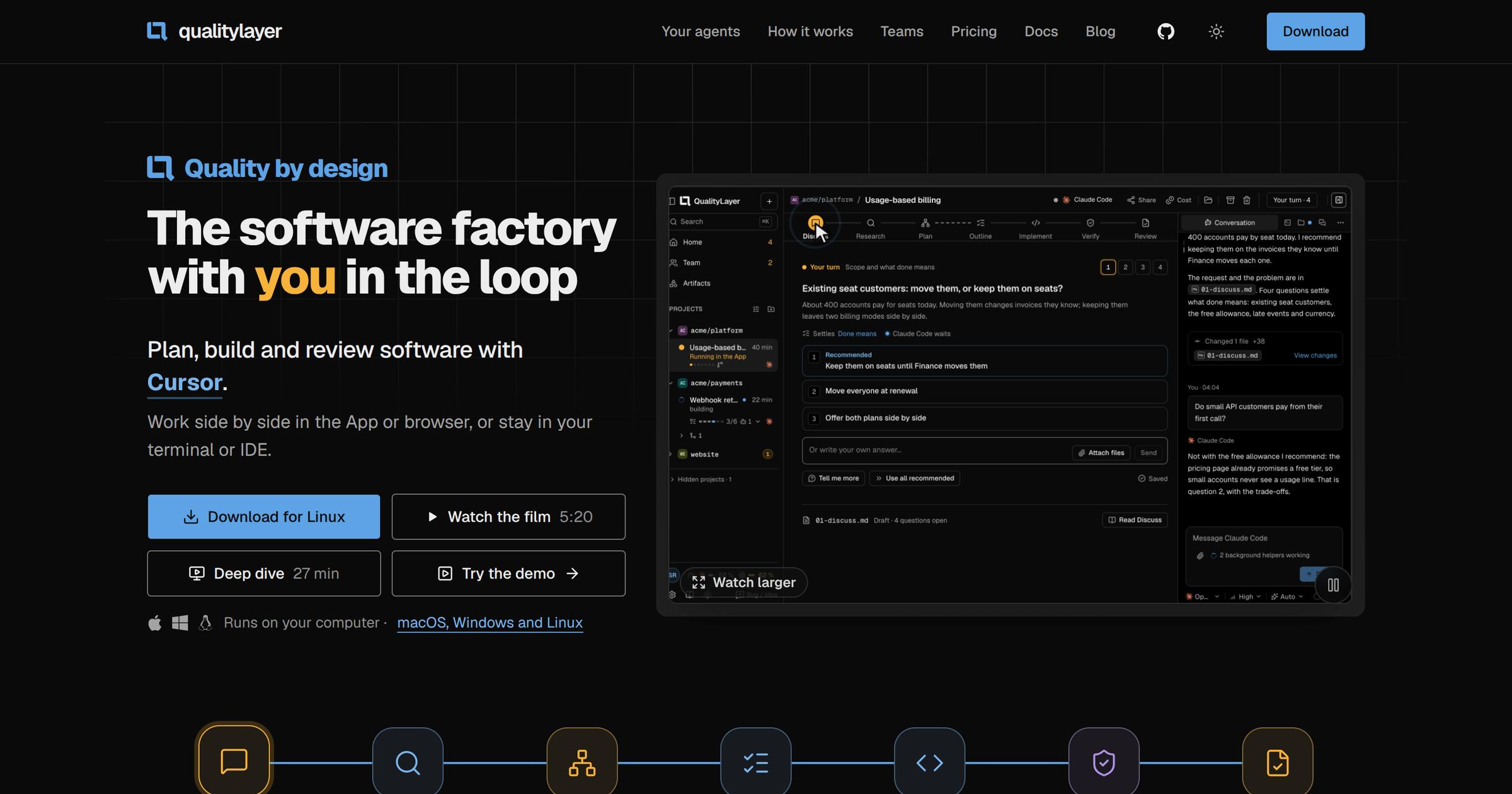
Every change moves through Discuss, Research, Plan, Outline, Implement, Verify, Review, and Pull Request. Each step saves readable Markdown files in your repository, so you can read, diff, and commit the history of decisions, questions, and test runs alongside the code.
Before any code changes, your agent produces a visual plan with diagrams and clickable artifact screens for you to review and comment on. You approve the plan before the agent starts building. The approval and any comments you leave are written to the plan file in your repository.
After implementation, a separate agent that did not write the code reviews the change against your original request. It runs your project's checks (tests, types, linters, code health, security scan) and reports findings to your agent to fix before the change reaches you in Review.
QualityLayer connects to Claude Code, Codex, Cursor, Grok, Antigravity, Pi, OpenCode, and GitHub Copilot. You sign in with the subscription or API key you already have. The ql-peer skill lets Claude Code ask Codex to review a change and receive its reply in the same session.
The App, your agent, and your repository all run on your computer. Task files stay on disk as Markdown files in your repository. Shared tasks are encrypted before leaving your machine. The CLI installs on macOS, Linux, WSL, and Windows with a single command.
Features
- Eight-step structured workflow
- Visual plan with diagrams and clickable mockups
- Independent verification by a separate agent
- Works with existing coding agents and subscriptions
- Local execution with files stored in your repository
How to install
Install the CLI on macOS, Linux or WSL; use the PowerShell installer on Windows.
curl -fsSL https://qualitylayer.dev/install.sh | bashRecommended for this setup
Strengths
- Works with the agents you already pay for: QualityLayer is a workflow layer, not a replacement agent. It connects to Claude Code, Codex, Cursor, and six other coding agents using your existing subscriptions. You are not switching tools or paying for a new model tier: the agents you already use get a structured workflow.
- Full audit trail in your repository: Every step writes Markdown files: the plan, decisions, questions, test run results, and review comments all land in your repository alongside the code. You can read what the agent tried and why it made its choices without opening a separate dashboard.
- Agent-to-agent collaboration via ql-peer: The ql-peer skill lets connected agents hand work to each other. Claude Code can ask Codex for an independent review and receive its reply in the same session, without you orchestrating the exchange manually. This extends to all eight supported agents.
- Two workflow levels for engineers and product managers: Engineering mode starts with a technical plan. Product mode starts with a product brief, so a product manager can describe the change in plain words and review clickable artifact screens before engineering starts. You choose the level in Settings.
Trade-offs
- Source-available license requires an active subscription: QualityLayer is not open source. The source code is available to inspect and modify for internal use, but redistribution, sharing with third parties, and offering it as a hosted or managed service are not permitted. An active paid subscription is required; use after expiry requires renewal.
- Workflow overhead on simple or quick changes: The eight-step workflow adds Discuss, Plan, and Review steps before and after implementation. For a quick one-line bug fix, the overhead is unnecessary. The README documents Chat mode to bypass workflow steps for one-off questions, and the ability to start existing plans directly at Plan.
- Requires a supported coding agent to function: QualityLayer does not include a built-in coding agent. It orchestrates Claude Code, Codex, Cursor, and others. If your team does not already use a supported agent, you will need to set one up and obtain a subscription or API key before QualityLayer can run a task.
Tech stack
FAQ
No. The App, your coding agent, and your repository all run on your computer. Task files stay on disk as Markdown files in your repository. When you share a task with a team member, the task data is encrypted before it leaves your machine. Your coding agent sends requests to its own provider, which is subject to that provider's terms.
Yes. QualityLayer connects to Claude Code, Codex, Cursor, Grok, Antigravity, Pi, OpenCode, and GitHub Copilot using your existing subscription or API key. You choose which model handles building and which handles independent review separately in Settings. QualityLayer does not include a built-in model.
Plan mode in Claude Code or Cursor is a single pre-implementation review before the agent runs. QualityLayer adds a full eight-step workflow: separate Discuss, Research, Plan (with visual diagrams and clickable mockups), Outline, Implement, Verify (independent agent review), Review (you approve the diff), and Pull Request steps. Each step writes Markdown to your repository. The key addition is the independent Verify step, where a separate agent checks the finished change against your original request before you see it.
No. QualityLayer is source-available with a subscription requirement. The source code is on GitHub and you may read and modify it for internal use, but redistribution, sharing with third parties, and offering it as a managed service are not permitted. An active paid subscription is required for continued use. The licence terms are in the LICENSE file in the repository.
Your plans and task history are Markdown files stored in your repository, so the files themselves stay after the subscription lapses. You would not be able to continue running new tasks without renewing, but all prior decisions, diagrams, and test run records remain in your repository indefinitely.