
Dokku
Git-push deploys to your own server, MIT licensed, Docker powered.
Replaces Heroku, Railway, Render, Fly Io, Digitalocean App Platform, Porter
Who it's for
Dokku turns a single low-cost VPS into a personal PaaS. Each project runs as an isolated app with its own domain, environment variables, and deploy history. A `git push` from any machine deploys updates without manual SSH access to the server.
Your projects each require dedicated server resources, or you need managed databases with automatic failover that Dokku plugins do not cover.
Teams using Heroku's buildpack-based workflow can move to Dokku with minimal friction. Existing Procfiles, buildpack configurations, and git-push habits transfer directly. The main adjustment is taking on server provisioning and maintenance in exchange for eliminating per-dyno fees.
Your team has no server administration experience and cannot absorb the overhead of managing a VM, or your apps depend on Heroku-specific add-ons with no Dokku plugin equivalent.
Dokku provides a consistent CLI interface for building, deploying, and managing internal tools across a single host. Teams that want a repeatable deployment process for small internal apps without standing up Kubernetes can use Dokku as a lightweight alternative.
Your internal apps require multi-region deployment, autoscaling, or tight integration with a cloud provider's managed services.
The problem
Managed hosting platforms charge per dyno, per service, or per seat. A small portfolio of five or ten apps on Heroku, Render, or Railway can cost more each month than a dedicated VPS running all of them, and that gap widens as the number of apps grows. Pricing changes are at the platform's discretion, with no cost floor and no path to reducing spend short of removing apps. Developers who control their own server sidestep per-app billing entirely. The obstacle is that setting up deployment infrastructure from scratch is tedious. Managing buildpacks, routing, SSL, environment variables, and access control manually means rebuilding the tooling that PaaS platforms provide, work that does not ship features.
How it works
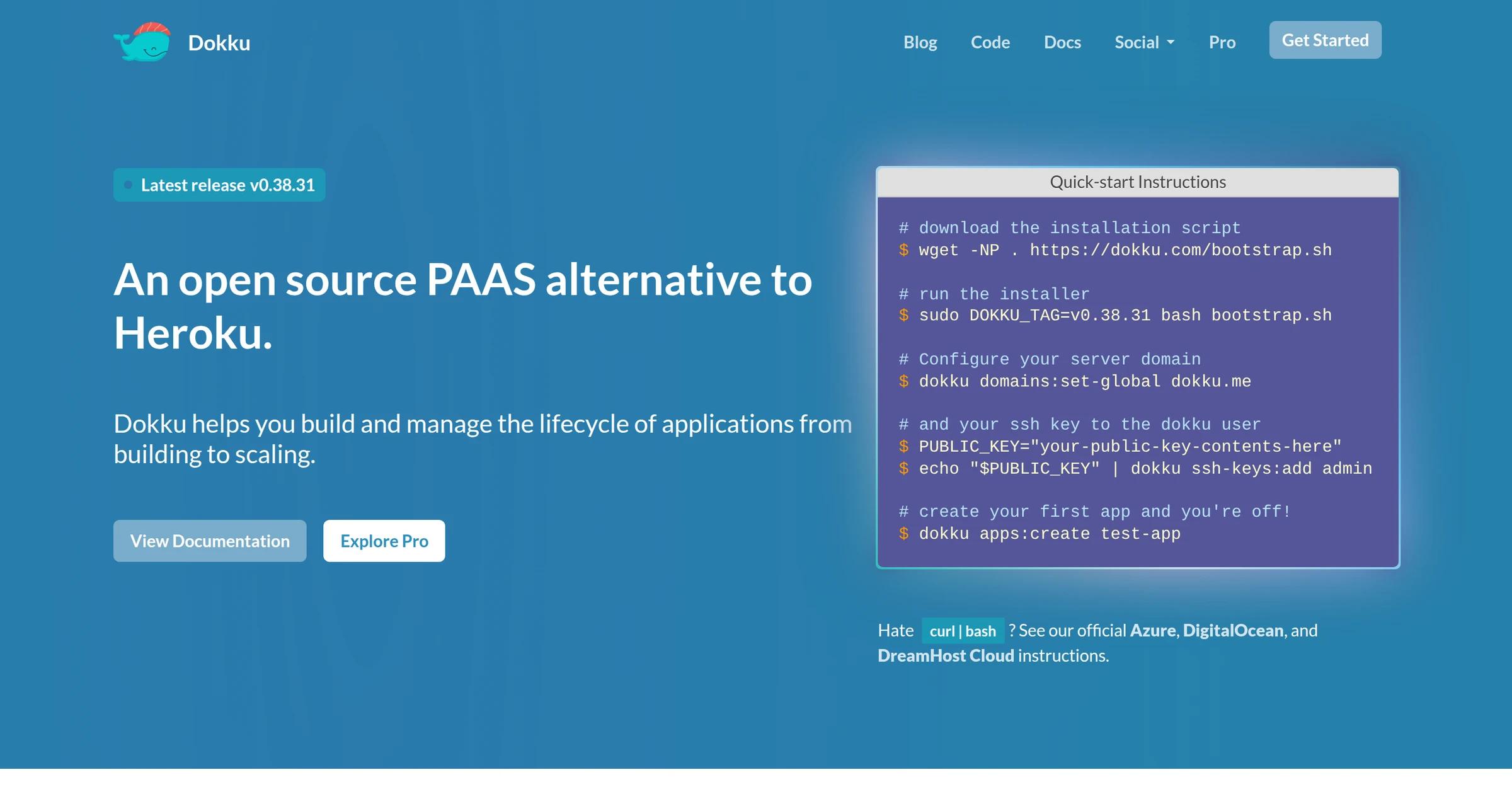
Running `git push dokku main` triggers a full build and deploy cycle. Dokku detects the app's buildpack, builds a Docker image, and swaps the running container. The workflow mirrors Heroku's git-push flow, so existing Procfiles and buildpack configurations work without modification.
Apps that use Heroku-compatible buildpacks deploy without configuration changes. Projects with a Dockerfile are also supported, letting you use any runtime or build process that containers can express.
Set a global server domain with `dokku domains:set-global` and add per-app custom domains as needed. Domain management is handled entirely through the Dokku CLI without touching the server's DNS configuration directly.
Deployment access is granted via SSH keypairs. Add a key with `dokku ssh-keys:add`, and that key gains push access to deploy apps. No web dashboard or OAuth flow is required to manage who can deploy.
Dokku tracks the full lifecycle from creation through deployment. The `dokku apps:create` command provisions a new app; subsequent git pushes deploy updates. Domains, environment variables, and SSH keys are managed through separate namespaced commands without touching the app's source code.
Features
- Git-push deployment workflow
- Buildpack and Dockerfile support
- Domain configuration via CLI
- SSH key access control
- App lifecycle management
Recommended for this setup
Strengths
- MIT license, zero platform fees: Dokku is MIT licensed and free to run on any server. Unlike Heroku, Render, or Railway where each deployed service adds to the monthly bill, Dokku's cost ceiling is the server itself. A single VPS can host any number of apps without per-app charges.
- Heroku-compatible workflow with low migration effort: Dokku replicates Heroku's buildpack and git-push conventions. Teams moving away from Heroku can bring their Procfiles, environment variables, and deployment habits with minimal rework. The learning curve is near zero for anyone who has used Heroku before.
- Over a decade of active development: Dokku reached version v0.38.31 in 2026 and has over 32,000 GitHub stars with 2,093 forks. The repository received its last push on 2026-10-22, showing continuous development since the project started in 2013.
- Minimal infrastructure requirements: Deployment requires only a fresh Ubuntu or Debian server with an SSH keypair. No Kubernetes cluster, no managed cloud provider, and no container registry are needed. For small to mid-sized workloads, a single VPS is the only dependency.
Trade-offs
- Single-server architecture limits horizontal scaling: Dokku is designed for a single host. Apps scale vertically (more CPU and RAM on one server) but do not distribute across multiple nodes out of the box. High-traffic applications that require horizontal scaling or geographic redundancy need a different deployment approach.
- Server management falls entirely on the operator: Unlike managed PaaS platforms, Dokku does not handle OS updates, security patches, server monitoring, or disk management. Teams that want hands-off infrastructure need to set up separate tooling for backups, uptime monitoring, and system maintenance.
- No built-in web dashboard: All management happens through the Dokku CLI. Teams expecting a visual UI for deployments, logs, or app configuration must build or integrate one separately. The CLI-only interface can be a barrier for non-technical team members who need deployment access.
Tech stack
FAQ
Dokku is MIT licensed and free to download, install, and run on your own server. You pay only for the server it runs on. There is no Dokku subscription, per-app fee, or SaaS tier.
Dokku supports Ubuntu 22.04, 24.04, and 26.04 (amd64 and arm64) and Debian 11 or newer. The README specifies a fresh server installation; installing Dokku on an existing production server alongside other services is not the documented setup path.
You add a Dokku remote to your Git repository and run `git push dokku main`. Dokku detects the buildpack, builds a Docker container from your app, and starts it. The process mirrors Heroku's git-push deploy without requiring a managed platform.
Yes. Dokku is Docker-powered: every app runs in a Docker container. Apps with a Dockerfile deploy using that file directly. Apps without one use Heroku-compatible buildpacks to produce a container automatically.
Dokku and Kubernetes address different scales. Dokku runs on a single host and handles the full deploy-and-serve loop with minimal setup, making it practical for small to mid-sized app portfolios. Kubernetes is built for multi-node clusters, autoscaling, and production workloads that need orchestration across many servers. Dokku's GitHub topics list both `kubernetes` and `nomad`, indicating plugin-level integrations exist, but the core tool is single-server.