
Blitzclean
macOS menu-bar monitor and storage cleaner for developers
Replaces Cleanmymac, Istatmenus, Sensei
Who it's for
Xcode simulator images, node_modules directories, and Docker layers accumulate across projects until disk space runs low. BlitzClean's reviewed cleanup shows each folder's size before removing anything, so you can prune old builds and simulators without touching active ones. The worktree cleanup category also helps developers who use git worktrees regularly.
You primarily develop on Linux or Windows and only occasionally touch a Mac. BlitzClean is macOS-only and the cleanup categories are specific to Mac developer workflows.
Running multiple AI coding agents such as Claude Code, Codex, and Cursor simultaneously creates RAM pressure that is hard to diagnose. BlitzClean ranks processes by memory in the menu bar panel and lets you pause or quit specific sessions without hunting through Activity Monitor. Whole projects can be stopped along with their dev servers.
You work with a single AI coding agent on a Mac with ample RAM and rarely experience memory warnings. The process management feature solves a problem that may not arise in that setup.
Podcast recordings, screen captures, and raw footage accumulate between editing sessions. BlitzClean can filter large media files by size, find exact duplicates, and compress video with FFmpeg, reducing storage consumed by footage you no longer need at full resolution.
Your media files are managed through a dedicated asset library or external NAS. BlitzClean identifies and removes local file clutter; it is not a media organizer or asset management tool.
Paid cleaners run routines in the background without showing you what they are about to remove. BlitzClean shows every item it finds before the removal runs, uses the Trash for personal files, and publishes its full removal rules in the GitHub documentation. Every permission it requests is optional and listed in Settings.
You want automatic scheduled cleanup with no manual review step. BlitzClean requires you to approve every removal and never runs background deletion.
The problem
Developers on macOS accumulate gigabytes of data that tools create and forget: Xcode build folders, simulator images, node_modules trees, Docker layers, and AI agent caches. These fill the disk slowly and quietly until a build fails or Xcode refuses to run. At the same time, RAM pressure from multiple dev servers, AI coding sessions, and background agents slows the system without a clear read on which process is the cause. The standard macOS tools do not help. Activity Monitor and Finder let you see the symptom but provide no fast path to fix it: there is no way to pause a memory-heavy AI session, browse build folder sizes, and remove outdated simulator images in the same window. Most developers either ignore the problem until the disk is full or reach for a paid cleaner that runs opaque background routines they cannot inspect.
How it works
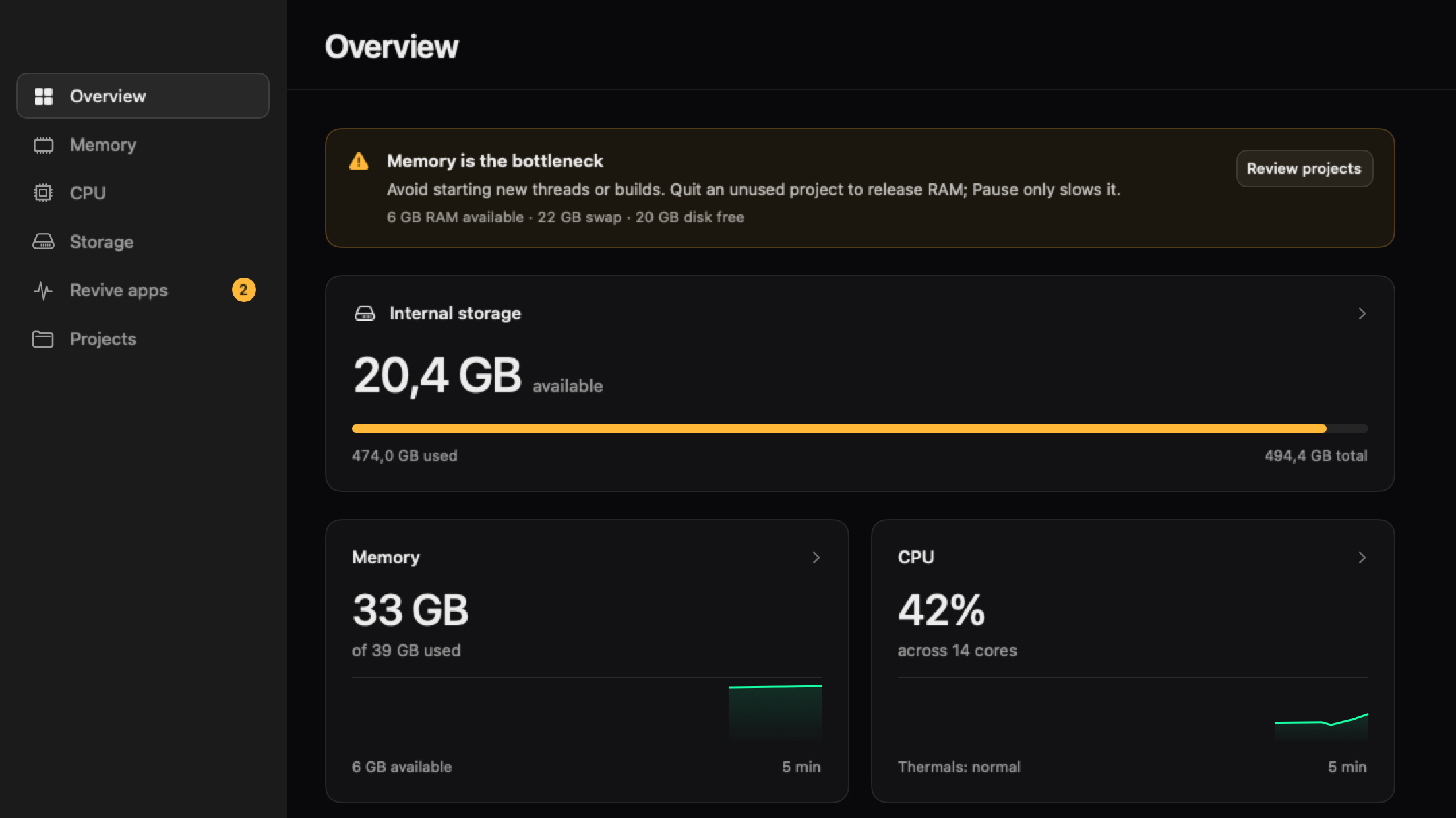
Shows available memory, CPU load, and free disk in the macOS menu bar with live numbers. A warning appears only when something needs attention, naming the bottleneck (memory, swap, disk reserve, or CPU) with one clear instruction. Monitoring continues when the dashboard is closed; you quit from the gear menu in the panel.
Ranks running apps and AI coding sessions such as Claude Code, Codex, and Cursor by RAM. You can pause, resume, or quit any process from the same list. Pausing a project stops its dev servers too. Force Quit and bulk actions always ask for confirmation first; nothing is force-quit or paused automatically.
Browse every drive with folder sizes shown inline, or rank the largest files across a volume. Lets you find what is consuming space before deciding what to remove, rather than accepting a scan's judgment. Large videos, images, and exact duplicates can be filtered from within the same view.
Scans for caches, node_modules, build output, Xcode simulators, Docker layers, and merged git worktrees, then shows each item for review before removing it. The scan also tracks when removed folders grow back. Only rebuildable data can be permanently deleted; personal files go to the Trash.
Detects apps that have stopped responding and lets you revive or force-quit them, with a confirmation step and a readout showing whether each app actually recovered. Requires the Accessibility permission, which is optional. The permissions setup section in Settings disappears once all requested permissions are granted.
Filters large video and image files, finds exact duplicates, and can produce smaller copies of video files using FFmpeg. Useful for creators who accumulate raw footage between editing sessions. FFmpeg must be installed separately (brew install ffmpeg); the rest of the app works without it.
Features
- Menu-bar resource monitor
- Memory and process control
- Disk usage browser
- Reviewed cache and build cleanup
- Frozen app recovery
- Media file management
How to install
Install BlitzClean from source using Xcode 16 on macOS 14 or later.
git clone https://github.com/blitzreels/blitzclean.git
cd blitzclean
./script/build_and_run.sh
Recommended for this setup
Strengths
- MIT license, no subscription: BlitzClean is MIT-licensed and free, with no account required and no paid tiers. Paid macOS cleaning tools like CleanMyMac require a subscription to access the same cleanup categories. The MIT license also means you can read the source code and verify exactly what the scan will do before you run it.
- No telemetry, no network calls: The app runs entirely on your Mac. Charts, scan results, and removal logs are stored locally in ~/Library/Application Support/BlitzClean with a size limit. No analytics SDK, no crash reporting service, and no cloud sync. Saved history never includes process arguments, environment variables, or window text.
- Review required before every removal: Nothing is removed automatically. Every scan shows items for review, running tools and open files block removal, and personal files are sent to the Trash rather than deleted permanently. The full set of removal rules is published in the project's Features documentation on GitHub.
- Native Swift app, signed and notarized: Built in SwiftUI for macOS 14 and later, BlitzClean runs natively on both Apple silicon and Intel Macs. Each release is Developer ID signed, notarized by Apple, and published with a SHA-256 checksum. It passes the same security checks as any Mac App Store app without requiring App Store distribution.
Trade-offs
- macOS 14 (Sonoma) or later required: BlitzClean requires macOS Sonoma (14) or later. Macs running Ventura (13) or earlier cannot install it. If your team includes older Mac hardware still on Ventura, this is a hard blocker.
- No package manager install path: Installation means downloading a release from GitHub Releases and moving the app to Applications, or building from source with Xcode 16. There is no Homebrew cask or Mac App Store listing at launch. For non-technical users or teams that manage software via a package manager, this adds friction.
- FFmpeg required for video compression: Producing smaller copies of video files requires FFmpeg to be installed separately (brew install ffmpeg). The core monitoring, cleanup, and disk browsing features work without it, but the video compression path in the media tab is unavailable until FFmpeg is present.
- Young project with small community: The repo was created in September 2026 and has 134 stars and 2 open issues. The core functionality is well-defined, but the community is small and some roadmap features are not yet shipped. Bug coverage and third-party documentation are thinner than established tools like iStatMenus.
Tech stack
FAQ
Yes. BlitzClean is MIT-licensed and free with no account, subscription, or paid tier. You download it from GitHub Releases or build it from source. The MIT license also permits commercial use and modification without restriction.
BlitzClean is open source and MIT-licensed, with no subscription cost. CleanMyMac and Sensei are paid proprietary tools. The main practical difference is transparency: BlitzClean shows every item it will remove before the removal runs and publishes its removal rules in the project documentation. CleanMyMac and Sensei offer broader feature sets including malware scanning and app uninstallation, which BlitzClean does not cover.
No. BlitzClean runs entirely on your Mac with no analytics, telemetry SDK, crash reporting, or cloud sync. Charts, scan results, and the removal log are stored locally in ~/Library/Application Support/BlitzClean with a size limit. Saved history never includes process arguments, environment variables, or window text.
All permissions are optional. Notifications enable warning alerts when a resource is short; Accessibility enables frozen-window detection; Full Disk Access allows scanning protected folders such as system caches. The app works without all three, and the permissions setup section in Settings disappears once every listed permission is granted.
Yes. Building requires macOS 14 or later and Xcode 16 (Swift 6 toolchain). Clone the repository and run ./script/build_and_run.sh, which builds, installs, and opens the app signed with your Apple Development identity. Without a signing identity, pass BLITZCLEAN_SIGNING_IDENTITY=- to build with an ad-hoc signature for local development.