Artcraft
Open source AI studio for artists who want real control
Replaces Runway, Rundiffusion
Who it's for
ArtCraft's character posing, Image to Location, and 3D compositing tools cover shot-blocking and visual development with AI generation for final renders. Multiple video model families (Kling, Veo, Seedance, Sora) give range across style and quality without switching tools.
Teams doing fully automated video production pipelines or needing an API for programmatic generation. ArtCraft is a manual studio tool, not a code-driven workflow.
The mixed-asset canvas, background removal, and 2D compositing tools let concept artists assemble reference scenes from photos and 3D objects, then generate a unified rendering. This fits visual development workflows where spatial accuracy matters more than generation speed.
Artists who only need text-to-image generation without compositing needs. A simpler generation tool will be faster for pure text-to-image workflows.
ArtCraft directly replaces the creative workflow that Runway and RunDiffusion serve, without the subscription billing. The 62-model catalog covers the same generation types, and the compositing tools exceed what either subscription service offers natively.
Teams that depend on Runway's specific fine-tuning or training capabilities, which ArtCraft does not currently document as supported.
Character identity transfer and Image to Location let designers place consistent visual elements across multiple scene configurations. Build scenes with mixed assets and generate renderings for rapid visual iteration on branded content.
Teams needing integration with design tools like Figma or Adobe. ArtCraft does not currently document integration with those workflows.
The problem
Text-based AI generation tools hand artists a prompt box and a generate button. The result varies with every run, and controlling precise compositional details, such as character placement, camera angles, and depth relationships, requires dozens of iterations. For filmmakers and concept artists who need specific, repeatable shots, that iterative overhead makes AI generation frustrating at production scale. Subscription platforms built around this model charge per render or per minute. Tools like Runway and RunDiffusion run on proprietary infrastructure, so every generation attempt costs something regardless of whether the output is usable. Artists with complex shot requirements accumulate costs without accumulating control.
How it works
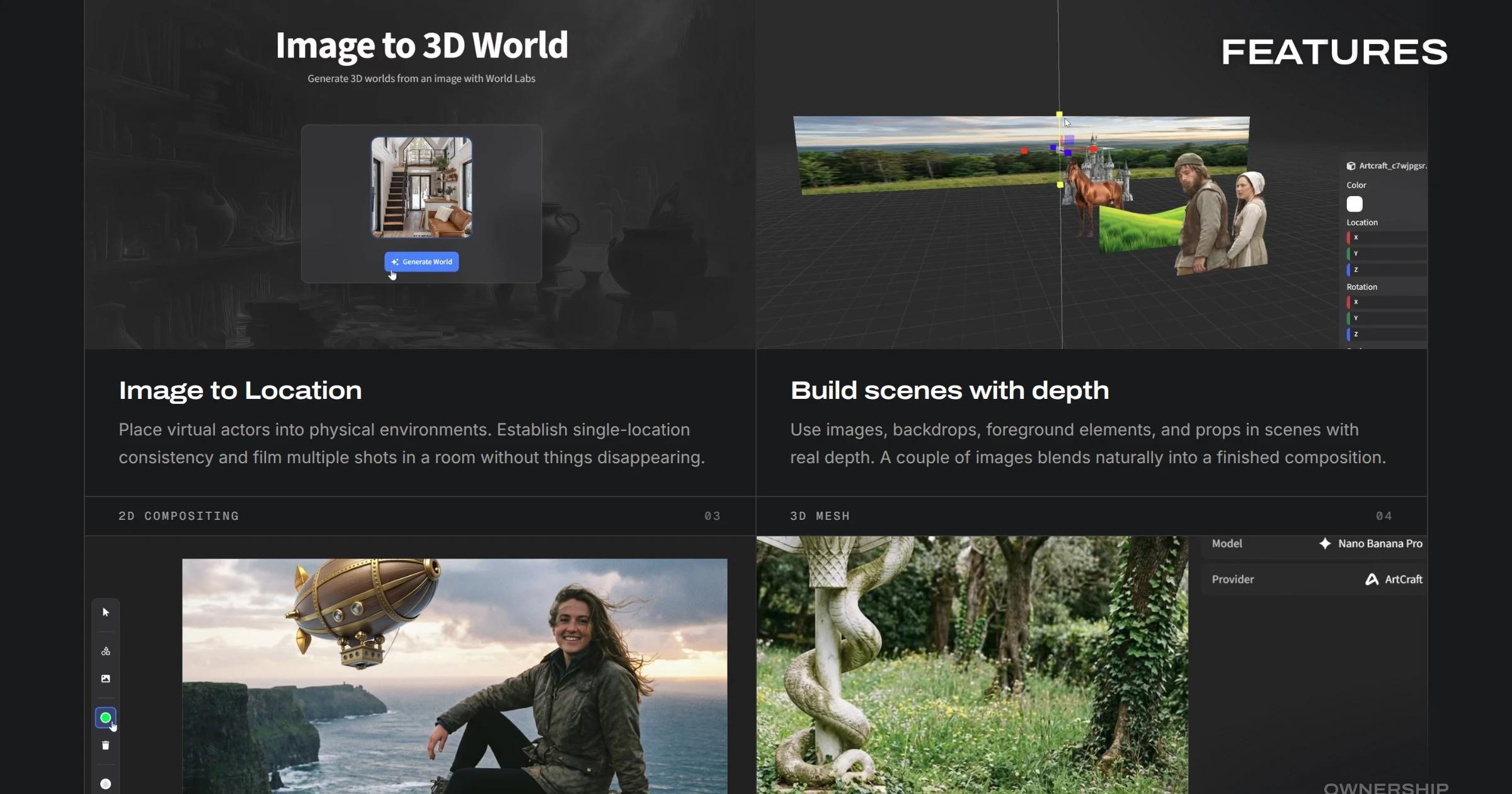
Layer images, backdrops, foreground elements, and 3D props in scenes with real depth. ArtCraft's 3D compositing environment lets you position elements spatially so the generation model works from a staged composition rather than a prompt description alone.
Pose characters and set camera blocking before generating the final shot. Mannequin-based identity transfer guides character placement and pose, giving the model a specific spatial reference instead of relying on text for positional detail.
Convert any image into a 3D object for precise positioning, rotation, and framing within a scene. Block complex compositions with intentional geometry instead of describing spatial relationships in prompts.
ArtCraft's catalog covers 16 image models (FLUX, Seedream, GPT Image families), 25 video models (Kling, Veo, Seedance, Sora families), 5 audio models, 11 3D mesh models (Hunyuan 3D, Tripo3D, Meshy), and 5 world generation models. Additional providers include Grok, Midjourney, Sora, and World Labs.
Place virtual actors into physical environments and establish single-location consistency across multiple shots. The mixed-asset canvas combines image cutouts, 3D meshes, and world backgrounds so you can build a complete scene before any model runs.
Run ArtCraft as a downloaded desktop app on macOS or Windows, or use the browser-based studio at app.getartcraft.com with no install. Both surfaces access the same model catalog and compositing tools.
Features
- 2D and 3D Image Compositing
- Character Posing and Identity Transfer
- Image to 3D Mesh Conversion
- 62-Model Catalog Spanning Image, Video, Audio, and 3D
- Image to Location and Mixed Asset Scenes
- Desktop App and Browser Studio
How to install
Install the desktop app for macOS or Windows from getartcraft.com, or build from source using the setup documented in the repository.
git clone https://github.com/storytold/artcraft.gitRecommended for this setup
Strengths
- Free Studio, No Usage-Based Fees: ArtCraft is free to download and use. The Apache-2.0 and MIT dual license means no subscription, no usage-based fees for the studio itself, and no vendor lock-in. Model API costs depend on which provider you use, but the studio adds no markup.
- Apache-2.0 and MIT Dual License: The source code is available on GitHub at storytold/artcraft under both Apache-2.0 and MIT, at your option. Either license permits modification, redistribution, and commercial use without restriction. The full studio source is forkable, not just a client library.
- Compositing Depth Rare at Zero Studio Cost: Most AI generation tools are prompt-in, image-out. ArtCraft ships character posing, 3D mesh conversion, 2D and 3D compositing, background removal, and a full asset canvas before any generation model is called. That depth is rare at no subscription cost.
- 14,000+ Stars and Active Development: The storytold/artcraft repository had 14,562 stars and 2,299 forks at the time of this entry, with the last commit pushed on 2026-10-10. 152 open issues reflects active use and ongoing triaging rather than abandonment.
Trade-offs
- Desktop and Browser App, Not an API: ArtCraft is a creative studio application, not a programmatic API. It fits manual creative workflows rather than automated pipelines. If you need to generate images or video in code, a direct model API from providers like Kling or Veo is the right tool.
- Generation Model Costs Are Separate: ArtCraft is free, but the generation models are not all free. ArtCraft's own catalog requires account credits; third-party providers like Midjourney and Sora use their own billing. The studio eliminates the subscription cost on the application itself, not the generation cost.
- 152 Open Issues on a Broad Feature Surface: With 152 open GitHub issues across compositing, generation, and multiple providers, some workflows may hit rough edges. The active commit pace suggests ongoing maintenance, but users should expect occasional instability on newer models or features.
Tech stack
FAQ
The ArtCraft studio is free to download and use. It is dual-licensed Apache-2.0 and MIT, so there is no subscription fee for the software itself. Generating content uses model credits or third-party API accounts, depending on which models you use.
Desktop apps are available for macOS and Windows. Building from source on Linux is supported via the repository's development setup documentation. A browser-based studio runs at app.getartcraft.com with no install required on any platform.
ArtCraft and Runway both offer AI video and image generation, but ArtCraft adds compositing-first tools (3D staging, character posing, mesh conversion) that Runway lacks. Runway operates as a subscription service on proprietary infrastructure; ArtCraft is open source with no subscription on the studio itself. Runway may suit you better if you need its specific fine-tuning or training features.
ArtCraft ships a 62-model catalog spanning images (FLUX, Seedream, GPT Image families), video (Kling, Veo, Seedance, Sora, MiniMax, Vidu, Flux families), audio (Suno, Seed Audio), 3D meshes (Hunyuan 3D, Tripo3D, Meshy, Rodin), and world generation (Marble, TripoSplat). Third-party providers include Grok, Midjourney, Sora, and World Labs.
Yes. The full studio source is on GitHub at storytold/artcraft under a dual Apache-2.0 and MIT license. You can fork it, modify it, and build from source. Third-party model integrations are subject to each provider's own terms, not the ArtCraft license.