
LTX Desktop
Local AI video generation with LTX models on your own hardware
Replaces Ltx Studio, Runway, Sora, Kling Ai, Pika
Who it's for
With local generation, you pay nothing per clip beyond hardware costs. Artists iterating through dozens of prompt variations or generating long sequences can do so without tracking cloud credits.
Your hardware falls below the thresholds (15+ GiB NVIDIA VRAM or Apple Silicon with 32+ GiB RAM). Without compatible hardware, the cloud API is required and the per-use cost returns.
Local mode keeps prompts, source images, and audio inputs entirely on-device. No clips, frames, or prompt text leave the machine unless you opt into API-backed features.
Your footage is not sensitive and you lack local-compatible hardware. The cloud API fallback is a viable option, but for workflows where data sovereignty matters, local hardware is the requirement.
LTX Desktop is Apache-2.0 licensed with a documented three-layer architecture: React+TypeScript frontend, Electron main process, and Python+FastAPI backend. Developers can inspect the generation pipeline or build on it for custom workflows.
You need a headless or API-native integration. LTX Desktop is a GUI application; scripting generation without the UI is not a documented integration path.
LTX Desktop supports local generation on Apple Silicon with 32+ GiB RAM via Metal Performance Shaders (MPS), providing a native on-device option for Mac users without requiring an NVIDIA GPU.
You have less than 32 GiB total RAM on your Mac, or you are on an Intel Mac. Both configurations fall to cloud API mode only for video generation.
The problem
Commercial AI video platforms charge per second of generated video, and those fees are hard to predict at scale. A typical clip can cost anywhere from a few cents to several dollars depending on length and quality settings, and generating dozens of variations for a project adds up quickly. On top of cost, every prompt and every source image you submit travels to a cloud server you do not control. Teams working with proprietary footage, unreleased product demos, or client material face a real privacy concern. Most commercial platforms offer no self-hostable path, so the choice has been between paying recurring cloud fees for AI video generation or going without the capability entirely.
How it works
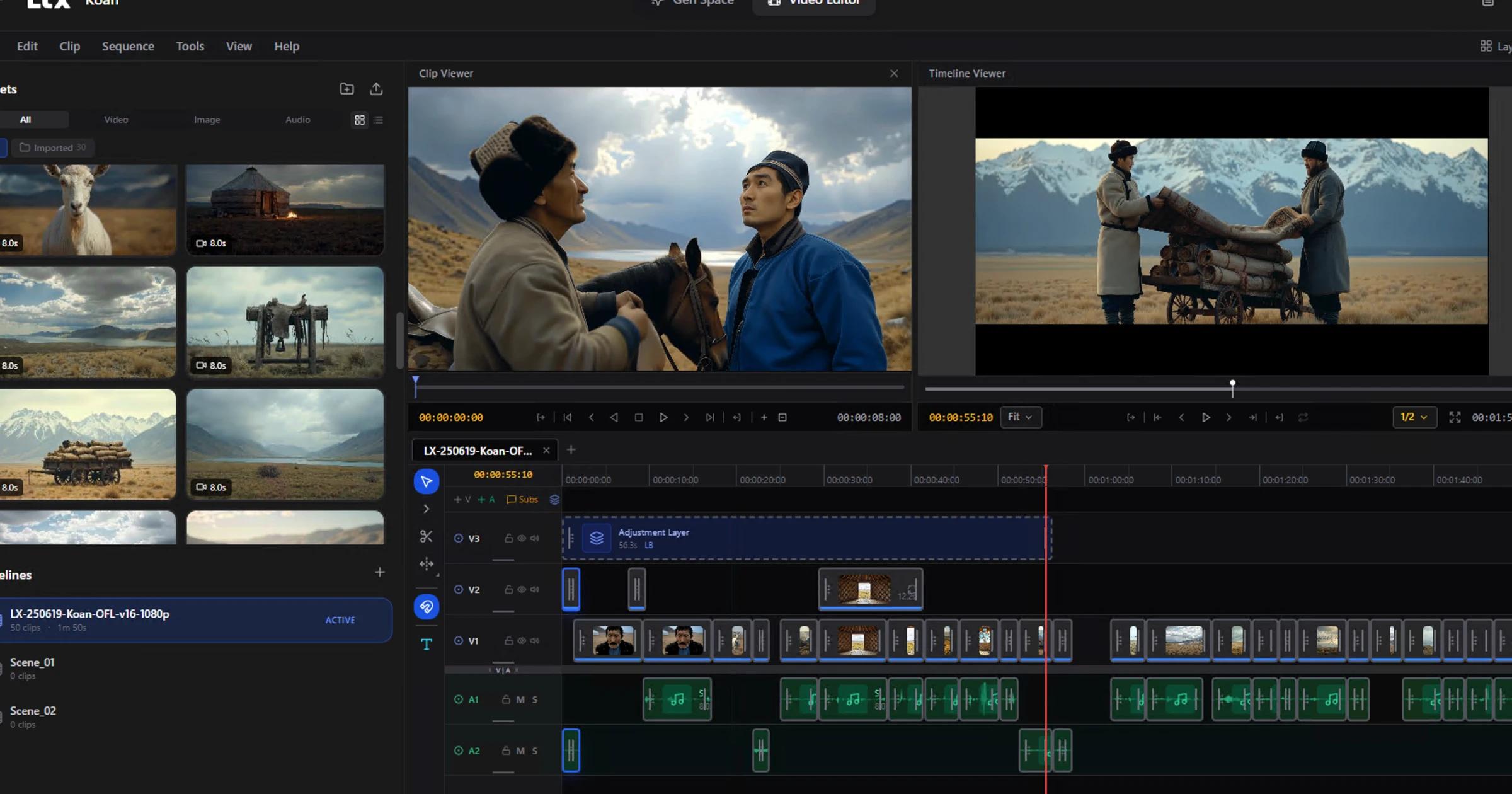
Generates videos from text prompts, images, or audio inputs. LTX 2.5 Fast is the default local checkpoint for text-to-video, image-to-video, and audio-to-video; switch to LTX 2.3 Fast in Settings to unlock Retake (video editing) and Extend in local mode.
Retake regenerates a section of an existing video clip based on your edit instructions. Running on LTX 2.3 Fast locally, it lets you fix a scene without re-generating the whole clip. The Pro model via cloud API is available for higher-quality edits.
LoRA adapters steer local generation toward a specific style or subject for text-to-video, image-to-video, and audio-to-video. A built-in browsable library lets you download official and community LoRAs directly in the app; drop your own .safetensors files into the loras/ model subfolder to use custom adapters.
The Enhance button rewrites your prompt using catalog context from the LTX model family, improving generation quality without manually crafting detailed prompts. Works locally with the Local Text Encoder (an extra download) or via the Gemini API as an alternative.
On hardware below the local generation threshold, the optional LTX API covers the same text-to-video, image-to-video, and audio-to-video workflows. Text encoding via the LTX API is free; video generation API calls are paid. The fal API can handle image generation and editing in API mode.
Features
- Multi-modal video generation
- Video editing via Retake
- LoRA and IC-LoRA library
- Catalog-aware prompt enhancement
- Cloud API fallback for unsupported hardware
How to install
Install from source by cloning the repository and running the bundled dev setup script (requires Node.js, Python 3.13+, and uv).
git clone https://github.com/Lightricks/LTX-Desktop.git
pnpm setup:dev
pnpm dev
Recommended for this setup
Strengths
- No per-use fees for local generation: Once the LTX 2.5 Fast weights are downloaded (~72 GB), generating videos costs nothing per clip beyond electricity. Runway and Pika charge per second of generated output; running locally removes that variable cost for anyone generating at volume or iterating through many prompt variations.
- Apache-2.0 license: The app code is permissively licensed, allowing commercial use, modification, and redistribution without restriction. Unlike proprietary video generation platforms, you can inspect the generation pipeline, contribute changes, or adapt the runner for custom workflows.
- Local privacy for inputs: In local generation mode, prompts, source images, and audio inputs are processed entirely on your machine. Nothing leaves the device unless you opt into API-backed features (LTX API for text encoding, Gemini API for prompt suggestions, or fal API for image editing).
- Active development on a recently released codebase: Released in March 2026, LTX Desktop shipped LTX 2.5 Fast as its default model and reached 2,096 GitHub stars and 436 forks within months. The last commit was in October 2026, and the maintainers are actively iterating on the frontend architecture.
Trade-offs
- High hardware requirements for local generation: Local generation requires a Windows or Linux NVIDIA GPU with 15+ GiB VRAM, or an Apple Silicon Mac with 32+ GiB RAM. Intel Macs, underpowered GPUs, and machines below those thresholds cannot run local generation and must use the cloud API instead, which costs per generated video.
- ~72 GB disk space for model weights: The LTX 2.5 Fast core pack (transformer, text encoder, VAEs) requires about 72 GB of free disk space. A fuller install covering LTX 2.3 Fast, image models, and the local text encoder is larger. Model weights are downloaded from Hugging Face on first run.
- Beta status with breaking changes expected: The README marks the project as Beta and states to expect breaking changes. The frontend architecture is under active refactor, and the maintainers note that large UI pull requests may be declined while this work is ongoing. Configuration and interface details may change between releases.
- LTX 2.5 Pro is cloud-only and paid: The highest-quality model, LTX 2.5 Pro, runs via the LTX API only and requires a paid API key. Local generation is limited to LTX 2.5 Fast and LTX 2.3 Fast. Workflows that require Pro-quality output still depend on cloud billing for those specific generations.
Tech stack
FAQ
A compatible GPU or Apple Silicon chip is required for local generation. On Windows and Linux, you need an NVIDIA GPU with 15+ GiB VRAM; on macOS, you need Apple Silicon (arm64) with 32+ GiB total RAM. Machines below these thresholds can still use the app in cloud API mode with an LTX API key, though local generation will not be available.
Yes, the app and local generation are free. You download the installer at no cost, and once model weights are on your machine (~72 GB for the core pack), generation has no per-use fees. Text encoding via the LTX API is also free. Paid API calls are only incurred when using API-backed video generation (LTX 2.5 Pro or cloud generation on unsupported hardware).
The LTX 2.5 Fast core pack (the default) requires about 72 GB of disk space. A fuller install covering LTX 2.3 Fast, image models, and the local text encoder is larger. Model weights are downloaded from Hugging Face on first launch; the LTX 2.5 weights require a free Hugging Face account and accepting the model license terms.
LTX Desktop supports text-to-video, image-to-video, and audio-to-video generation locally, as well as text-to-image and image editing (image-to-image). Video editing via Retake runs locally on LTX 2.3 Fast or via the Pro API. LoRA adapters apply to text-to-video, image-to-video, and audio-to-video in local mode.
Yes. Drop your .safetensors LoRA files into the loras/ subfolder of your models directory. The app scans that folder on load and shows a LoRA selector in the generation view when compatible local LoRAs are present. The LoRA must target the LTX 2.x model family; adapters built for other base models (SDXL, Wan, Hunyuan, or older LTXV 0.9.x) will not have any effect.