
Toaster
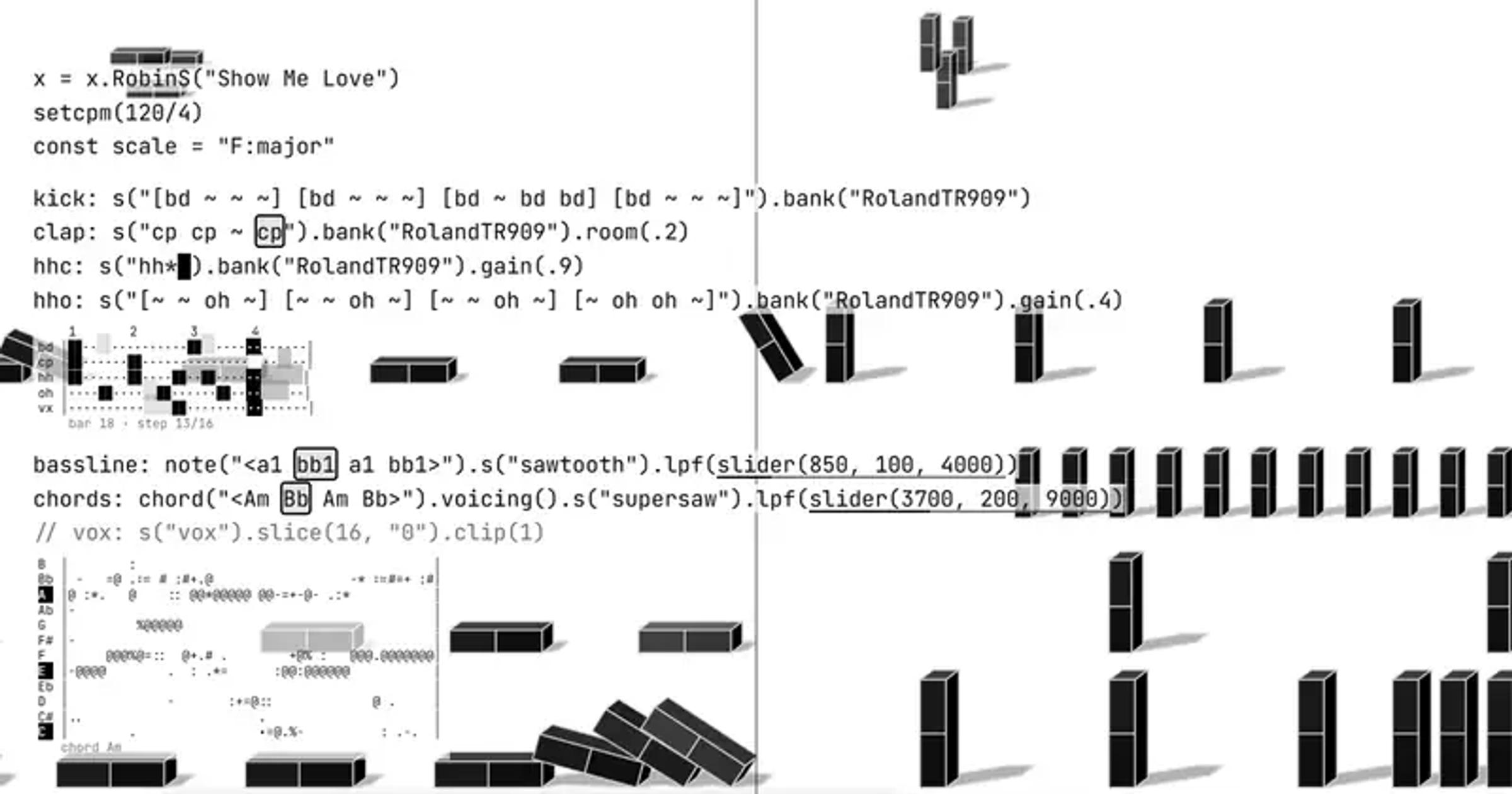
Live Strudel code and visuals from any song playing on your computer
Replaces —
Who it's for
Toaster writes a song's structure as Strudel code you can open and play in strudel.cc, giving a live coder a starting pattern for a song they want to perform. Press O to open the current code, edit it, and add it to a live set.
If you need a precise musical score or DAW clip rather than a Strudel sketch, Melodyne or Ableton Live's audio-to-MIDI is a better fit.
Z hides the code and leaves only the visuals: backgrounds reacting to the kick, bass, and drop. L activates a vertical layout for TikTok or Shorts; M records the window with sound. No external setup is needed beyond playing music.
For high-end broadcast or pixel-precise visual design, dedicated tools like TouchDesigner or Resolume offer a wider visual toolset.
Playing a song in Toaster while watching Strudel code write itself is a low-barrier way to see how the language maps to real music. The demo beat works with no mic or account, so there is no setup barrier.
If you already know Strudel well, Toaster's sketch-level output may be less useful for advanced compositions built by hand.
The problem
Live coding with Strudel or TidalCycles means building a song's patterns from scratch: estimating the tempo by ear, identifying the key, and working out the rhythm step by step while performing. Even for experienced coders, that takes minutes and demands musical ear training alongside coding skill. For beginners learning the language, the gap between hearing a track they love and knowing how to write its patterns in Strudel is wide enough to stall the learning process entirely. Music visualization is a parallel pain: building visuals that genuinely respond to a song's kick, bass, and chord changes requires either a DAW sending MIDI, a custom audio analysis pipeline, or manually mapping the music to animations, none of which are fast or free. For live DJ sets and streaming content, the barrier to adding reactive visuals is high.
How it works
Listens to any audio source (system audio, mic, file, radio stream) and writes runnable Strudel patterns for drums on a 16-step grid, the tempo, bass line, chords, and key. Press O to open the current code directly in strudel.cc, or X to export it as a Strudel file and MIDI.
The Windows and Mac desktop app hears everything playing on the computer without tab-sharing or screen-capture setup. Spotify, YouTube, any source plays straight through the system audio channel. In the browser, you share a tab's audio or the whole screen's audio through the browser's own picker.
Background options include thirteen scenery scenes (the campfire, koi pond, space, and more), the Earth in NASA's footage from the space station, liquid chrome, a spectrogram, and additional modes. All respond to kick, bass, and drop events. Z hides the code and runs Toaster as a pure visualizer for live sets.
X exports the current song as both a MIDI file and Strudel code into your Music folder. The exported code is decompiled back from the live patterns, so it opens in any MIDI editor or in Strudel's browser editor at strudel.cc.
C turns on the webcam. Making a frame with your fingers opens a filter window on whatever you frame. Making a circle with both hands opens a portal effect. Hand signs control playback and themes: two fingers for the next theme, thumbs-up to record, fist to hush.
Audio processing runs entirely on the device. The browser version counts visits via Cloudflare Web Analytics with no cookies; nothing else leaves the device. The desktop app has no account requirement and updates by checking GitHub for a newer version.
Features
- Real-time Strudel code generation
- System audio capture on desktop
- Music-reactive visuals
- MIDI and Strudel export
- Webcam integration with hand gestures
- No account, no server, local processing
How to install
Download the desktop app for Windows and Mac from GitHub Releases: https://github.com/StopBanning/toaster/releases/latest
Recommended for this setup
Strengths
- Free and MIT licensed: The desktop app and the browser version are both free with no subscription. MIT license means you can fork it, modify it, and build on it commercially. The source is on GitHub at StopBanning/toaster.
- No mic or account required to try it: The browser demo plays a built-in beat with no microphone, no sign-up, and no installation. The code types itself as the demo runs, so anyone can see what Toaster does in under ten seconds.
- Exports runnable Strudel code: The Strudel code Toaster writes is real: press O and it opens in strudel.cc's browser editor ready to run and edit. Unlike a MIDI-only export, the Strudel output is a live coding sketch you can perform from, not just a DAW import.
- Accurate tempo and bass line detection: The tempo and bass line come through most clearly from the detection, as the README notes. For steady, rhythmic music, the beat grid and bass patterns are close enough to use as a performance starting point.
Trade-offs
- Reconstruction, not exact transcription: Toaster is explicit that the output is a sketch of the song's parts, not a precise transcription. The README warns that a busy or sidechained bass can fool the kick detector, and the sounds are stand-ins on drum-machine samples and synths. Complex productions with heavy mixing or sidechain compression will produce less accurate code.
- Windows and Mac apps are not code-signed: Neither the Windows nor the Mac app is code-signed by its developer. Windows shows a protected-PC warning on first run (click More info, then Run anyway). The Mac requires a manual Open Anyway step in System Settings, then Privacy and Security. Users unfamiliar with these overrides may find the install confusing.
- New project with a small community: The repo was created in October 2026. With 4 open issues and 133 stars, the community is early. Expect rapid changes but fewer third-party resources, tutorials, or troubleshooting threads than a more established tool.
Tech stack
FAQ
Yes. Both the browser version at toaster.locust.lol and the desktop app download are free with no subscription or account. The source code is MIT licensed on GitHub.
No audio is uploaded. Processing runs locally on the device. The browser version counts visits with Cloudflare Web Analytics and no cookies; nothing else leaves the device. The desktop app checks GitHub for updates but sends nothing else.
Strudel is a browser-based live coding environment for making music as code, built on the same ideas as TidalCycles. Toaster writes the song's parts as Strudel patterns so you can open them in strudel.cc's editor and play, modify, or perform from them. The output is a creative starting point, not a precise musical transcription.
Yes, in the desktop app. The app hears Spotify playing on your computer like any other audio source. In the browser, Spotify's audio can be shared through the browser's screen/tab capture dialog, or played through a mic or line-in input.
The tempo and bass line come through most accurately. The kick, snare, and hats are identified from their frequencies and timing. The README notes that a busy or sidechained bass can fool the kick detector, and that the output is a reconstruction for show, not an exact transcription. Steady, rhythmic music works best.