
Shellgym
Interactive Linux command-line trainer via real shell reps
Replaces —
Who it's for
A backend developer who understands file permissions, signals, or process management conceptually but hesitates at the terminal uses ShellGym to run targeted reps until the actions become reflexive.
User already has strong Linux command-line fluency and is looking for a reference or documentation tool.
An instructor or DevRel author writes custom learning paths using the YAML-fronted unit format, using `shellgym validate` and `shellgym solve` to test content before publishing it to students.
User only needs to consume existing paths, not create new ones.
A platform team deploys ShellGym on a shared or per-user disposable VM and loads a custom path that covers the specific CLI workflows new hires need -- systemd, container debugging, log inspection -- so onboarding drills are hands-on from day one.
Team onboarding is documentation-only or handled by an existing LMS.
A learner with no Linux environment uses the iximiuz Labs playground to start a pre-configured Ubuntu VM with ShellGym running and the sample Linux 101 path loaded, requiring only a free GitHub sign-in.
User already has a suitable Linux VM or host available.
The problem
Reading documentation or following tutorials explains what a command does, but it does not build the muscle memory needed to use it fluently under pressure. Developers and sysadmins who learn Linux commands conceptually still hesitate at the terminal because they have never drilled the actions to the point of reflex. ShellGym addresses this gap by providing structured, repeatable practice in a real shell environment.
How it works
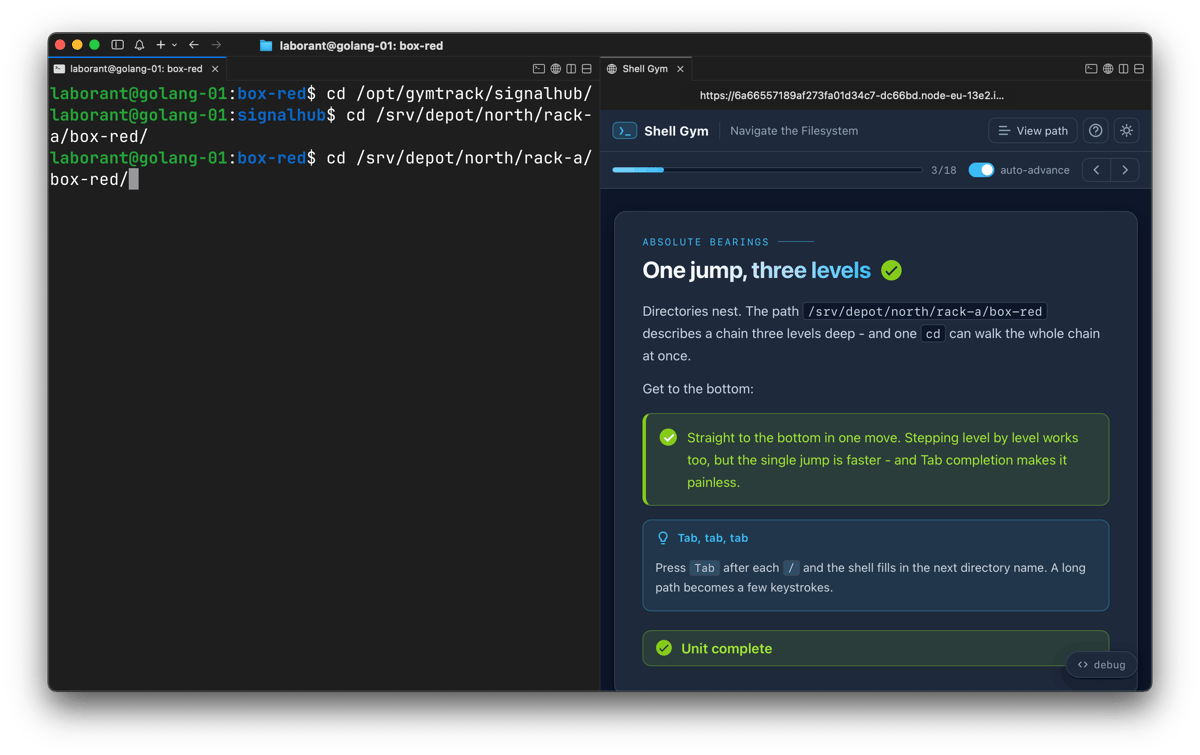
ShellGym observes the student's shell entirely from the outside using procfs, the kernel proc connector netlink interface, and plain state checks. No prompt hooks, wrappers, or special shell functions are injected, so the terminal behaves exactly as it would on any production system.
Each rep defines one concrete action and completes automatically the moment the system state matches -- no check button to click. Tasks cover entering directories, creating files, killing processes, freeing ports, and similar real operations.
Learning content is defined as a structured directory tree with a path.yaml, numbered modules, and unit.md files containing YAML frontmatter for setup scripts, verification tasks, hints, and reference solutions. Units can be parametric, come in variants, and depend on earlier unit state.
Progress is saved to /var/lib/shellgym by default and survives daemon restarts and reboots. Randomized parameters are sticky per attempt, so a half-finished unit presents the same state after resuming.
Running `shellgym skills` prints embedded authoring guides formatted for AI-assisted content work, enabling LLM clients to help write and validate new learning paths directly.
The `shellgym validate` command lints and renders a path without running it. The `shellgym solve` command auto-types reference solutions into a real pty shell, simulating a full student pass for automated testing.
Features
- Zero-instrumentation shell observation
- Auto-verifying reps
- Bring-your-own learning paths
- Persistent progress
- AI-assisted authoring
- Path validation and solve tooling
How to install
arch=$(uname -m | sed 's/x86_64/amd64/; s/aarch64/arm64/') curl -L "https://github.com/iximiuz/shellgym/releases/latest/download/shellgym_linux_${arch}.tar.gz" | tar xz sudo ./shellgym serve --path "$PWD/paths/sample-linux-101" --user $USER
Recommended for this setup
Strengths
- Real terminal, real commands: Because ShellGym never wraps or modifies the shell, every skill practiced transfers one-to-one to production environments. Students work in the same terminal they would use on a live server.
- Low setup overhead: A single binary serves the daemon and the web UI. Installation is a one-command tarball download. The iximiuz Labs playground provides a pre-configured VM with no local installation required at all.
- Extensible content format: The learning path format supports parametric randomization, unit variants, distro and capability filters, and inter-unit state dependencies, making it suitable for both simple drills and complex multi-step scenarios.
- No external services required: ShellGym runs entirely on a local or disposable Linux host. There is no cloud backend, no account requirement for self-hosted use, and no telemetry dependency.
Trade-offs
- Requires root and a disposable host: ShellGym must run as root because it uses kernel-level observation mechanisms. Because reps perform real actions on the live system, the project explicitly recommends using a VM, cloud instance, or other disposable host -- not a personal laptop or production machine.
- Linux only: The observation layer depends on Linux-specific kernel interfaces (procfs, netlink proc connector). It does not run on macOS or Windows.
- Noncommercial license: ShellGym is licensed under the PolyForm Noncommercial License 1.0.0. Commercial use or redistribution requires prior written permission from the author. Organizations evaluating it for internal training programs should review the license terms before deploying.
- System state resumability depends on preservation: Progress persists across restarts, but if another process modifies or removes files that a learning path expects to exist, the resumption may fail and progress for that unit may reset.
Tech stack
FAQ
No. ShellGym observes your shell entirely from outside using Linux kernel interfaces (procfs and the netlink proc connector). No prompt hooks, wrappers, or special shell functions are added to your environment.
The observation layer reads /proc entries and subscribes to kernel proc connector events, both of which require root. The project recommends running it on a disposable VM or cloud instance rather than a personal machine.
Yes. A learning path is a directory tree with a path.yaml at the root and numbered module and unit directories. Unit content is a markdown file with YAML frontmatter defining tasks, setup scripts, hints, and reference solutions. Running `shellgym skills` prints the embedded authoring guides.
Progress is persisted to /var/lib/shellgym by default. The daemon reloads it on startup and resumes from the last completed unit. Randomized parameters are sticky per attempt. Note that resumption may fail if system state the path depends on (files, processes, ports) was changed by another process while the daemon was stopped.
ShellGym is licensed under the PolyForm Noncommercial License 1.0.0. Personal learning and other noncommercial use is permitted. Commercial use or redistribution requires prior written permission from the author (ivan@iximiuz.com). Commercial licenses are available on request.