
Opencode Manager
Self-hosted command center for OpenCode
Replaces —
Who it's for
An agent is running a long task while you are commuting or between meetings. Push notifications land when the session needs a permission decision. You approve it from your phone, switch the session to Accept everything for the remainder, and check back on the activity sheet before your next meeting.
You only ever run OpenCode at a desk with a terminal open.
You maintain several repositories and want a single view of what is running or waiting across all of them. The cross-repository activity sheet, combined with the repo and session switcher, lets you move between codebases and check on background agents without juggling multiple terminal windows.
You work in a single repository and do not run concurrent sessions.
Scheduled prompts run nightly test sweeps, dependency checks, or documentation drift reviews in isolated git worktrees. Results are committed to a schedule branch and visible in the run history the next morning, without manual intervention.
You have no need for recurring or unattended agent tasks.
You split work between a laptop and a more powerful desktop or cloud VM. Linking the second machine's OpenCode instance makes its projects and sessions appear in the same switcher as your local work, so you can start a session on the build box and monitor it from the laptop or phone.
You work on a single machine only.
The problem
OpenCode runs as a local CLI tool, which means active sessions are tied to whichever terminal is open on your machine. There is no way to check on a running agent, respond to a permission request, or start new work from your phone or another computer. Scheduling recurring tasks, managing multiple repositories at once, and reviewing changes without opening a laptop all require infrastructure that OpenCode does not provide.
How it works
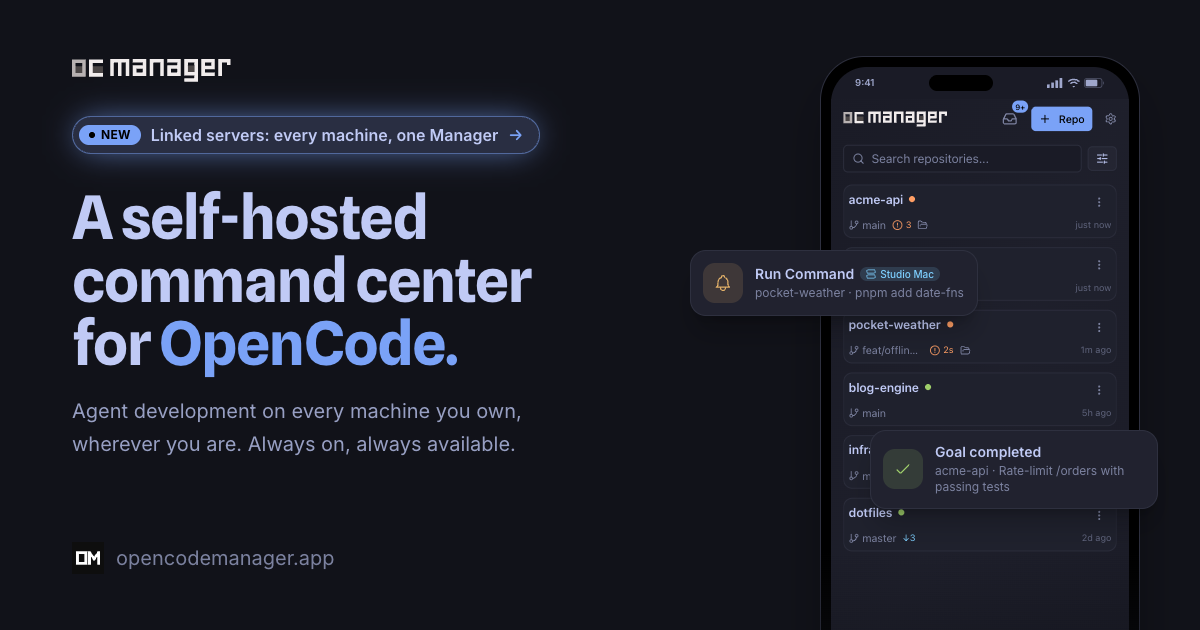
When an agent reaches a permission gate, a push notification arrives on your phone. You can read the request, deny it with a reason, allow it once, or create an always-allow pattern for that project. An "Accept everything" mode lets a session approve its own requests autonomously, with your deny rules still enforced, even when your browser is closed.
A single sheet groups every session across all linked repositories into three buckets: needs input, running, and recent. Each entry shows the repo, branch, goal, and elapsed time. You can switch to any session, nudge a running one, or start a fresh session in a different repo without losing your place.
Prompts can be scheduled on a cron expression or a repeating interval. Each run executes in a git worktree that is either fresh per run, kept between runs, or shared across runs. Changes are committed to a schedule branch, and a run history records what happened overnight.
A dedicated panel shows the diff, lets you stage files, and commits with an AI-written message. Branch switching, worktree management, and stash operations are available from the same panel, so a fix can go from prompt to pushed without opening a terminal.
A terminal opens beside the chat, scoped to the session's repo or worktree, with support for multiple tabs. A Preview panel discovers dev servers listening on the Manager's machine, lists the current repo's servers first, and renders the selected one through its own gateway with hot reload.
Running `ocm link` on another machine (a Studio Mac, a build box, or a cloud VM) prints a one-time QR code. After pairing in Settings, that machine's projects, sessions, and terminals appear in the same switcher as local work. Requires OpenCode 2.1.2 or newer on the linked machine.
Features
- Push notifications and permission requests
- Cross-repository activity view
- Cron and interval scheduler
- Source control panel
- Docked terminal and live preview
- Linked servers
How to install
curl -fsSL https://opencodemanager.app/install | sh
Recommended for this setup
Strengths
- Runs on hardware you control: OpenCode Manager is self-hosted via Docker Compose and uses your own AI provider credentials. No data passes through a third-party service, and the optional agent sandbox prevents commands from accessing your credentials or SSH keys.
- Mobile-first with offline app shell: The interface is designed around phone-sized screens and is installable as a PWA. Push notifications work over HTTPS via Cloudflare Tunnel, so approving or denying an agent request takes a single tap from anywhere.
- Free and MIT licensed: The software has no per-seat or per-session cost. The only ongoing expense is the AI provider charges for the models you use, which you would incur running OpenCode directly.
- Change walkthroughs: The docked Walkthrough panel splits a session's or schedule run's changes into named stops and explains each one. You can choose the diff source (this session, uncommitted, staged, a branch against its base, or a pull request) before paging through stop by stop.
Trade-offs
- Requires Docker: Installation depends on Docker with Compose v2, and the initial image download is about 1.2 GB. Machines without Docker or with limited storage cannot run OpenCode Manager directly.
- Remote access needs extra setup: Push notifications and phone access from outside your local network require a Cloudflare Tunnel (or equivalent HTTPS proxy). The installer does not set this up automatically; it must be configured separately.
- Linked servers have partial feature parity: When connecting a remote machine, the file browser, preview panel, worktrees, and change walkthroughs remain tied to the Manager's own machine. Chat, permission handling, terminals, schedules, multi-run, MCP, and skills work on linked machines.
- Wraps OpenCode, not a standalone agent: OpenCode Manager manages and extends OpenCode; it does not replace it. If OpenCode does not support a workflow, the Manager cannot compensate. Each linked machine must run OpenCode 2.1.2 or newer.
Tech stack
FAQ
Docker with Compose v2 (included in Docker Desktop) and an AI provider account such as Anthropic, OpenAI, or GitHub Copilot. The Docker image is about 1.2 GB.
Nothing. OpenCode Manager is free and MIT licensed. You pay only your AI model provider for the tokens your sessions use.
Only if you choose to allow it. The installer offers to import your existing config, logins, and chats, and the default answer is no.
Set up a Cloudflare Tunnel pointing at the Manager's port. The tunnel provides HTTPS from anywhere and is required for push notifications. The installer prints the local network URL for same-Wi-Fi access.
No. It runs and manages a real OpenCode server. The two projects are separate: OpenCode handles the AI agent logic, and OpenCode Manager provides the web interface, scheduling, notifications, and multi-machine management on top of it.