
Open Pdf Studio
PDF editor built for drawing review and markup
Replaces Bluebeam Revu, Adobe Acrobat
Who it's for
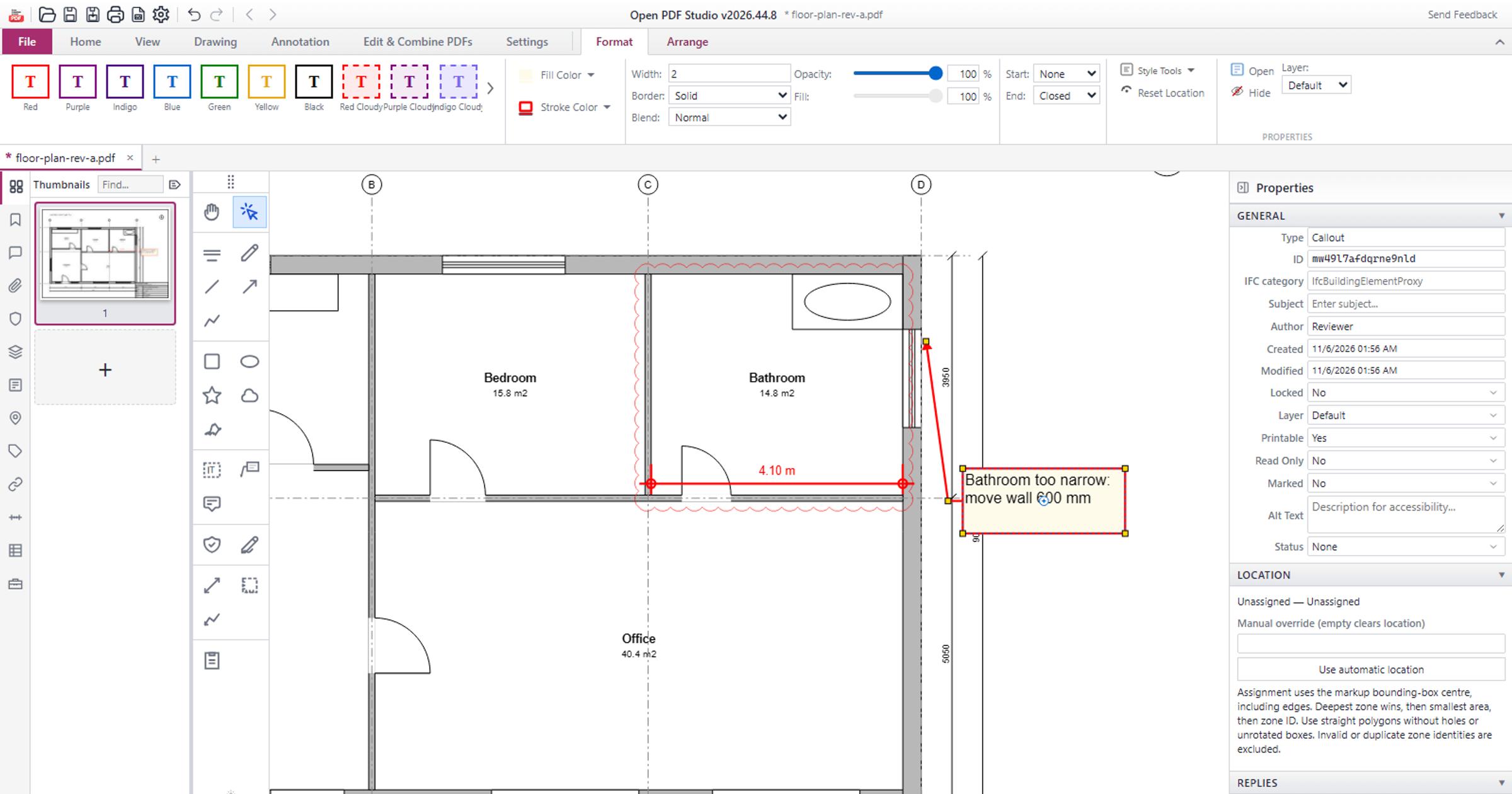
Mark up floor plans with revision clouds and callouts, measure distances and areas directly from the embedded scale, compare two revisions to see what changed, and export BCF issues for coordination with other teams. No subscription or cloud upload required.
Count objects by category on a drawing, collect counts, lengths, and areas into a schedule, and export it as CSV. Import a DWG directly and get a vector PDF with its original layers and measuring scale intact.
If the workflow is entirely within a BIM platform that already handles takeoff natively.
Use the embeddable web unit to add a scale-aware PDF viewer with annotation support to a web application. The ~10 KiB loader mounts into any div, shares the annotation model with the desktop app, and supports read-only mode, dark theme, and a postMessage iframe protocol.
If the application needs area measurement or XFDF round-trip in the embedded unit, as those are not yet supported.
Connect Claude or another MCP-compatible assistant to the desktop app via the built-in MCP server. The assistant can open files, navigate pages, place and edit annotations, set the measuring scale, run quantities takeoff, and export results, all while the document stays on the local machine.
If the team works with confidential drawings and cannot use a locally-running AI model.
The problem
Commercial PDF editors charge subscription fees and require accounts even for professionals who only need to mark up drawings, measure to scale, and track revisions. General-purpose PDF tools lack the domain-specific features architects and engineers depend on: scale-aware measurement, revision cloud markup, CAD import, BCF issue tracking, and quantities takeoff. Teams end up paying for bloated suites or passing files through cloud services that upload confidential drawings to third-party servers.
How it works
A drawing that carries its own scale, such as a CAD plot or an imported DWG, measures distances, areas, perimeters, and angles correctly without manual calibration. Snapping to drawing geometry is included.
The desktop app imports DWG and DXF files as vector PDFs with layers, viewports, and a measuring scale intact. A page can be exported back to DXF or DWG, preserving layers and markups.
Two revisions of a drawing can be compared side by side or overlaid, with a generated list of every detected change highlighted in the view.
The desktop app includes a local MCP server with 94 public tools, letting an AI assistant open files, navigate pages, create and edit annotations, set the measuring scale, take off quantities, and import or export CAD. It listens only on 127.0.0.1 and can be switched off under Settings.
Available as native installers for Windows, macOS (Apple silicon and Intel), Linux (.deb, .AppImage, .snap, Nix flake), Android (64-bit ARM), and as a browser app. No subscription, no account, and no watermark on output.
A separate lightweight build (~10 KiB gzip loader) lets any web application embed a drawing viewer with measuring and annotation. The embedded unit shares the same annotation model as the desktop app, so markups round-trip correctly.
Features
- Scale-aware measuring
- DWG and DXF import and export
- Revision compare
- Built-in MCP server
- Runs everywhere, no account required
- Embeddable web unit
How to install
git clone https://github.com/OpenAEC-Foundation/open-pdf-studio.git cd open-pdf-studio/open-pdf-studio npm ci npm run tauri:dev
Recommended for this setup
Strengths
- No telemetry, enforced in CI: The project ships with no telemetry and no account requirement. A unit test in CI fails automatically if the shipped source contains an unlisted internet address or a telemetry package is added, making the privacy guarantee verifiable rather than aspirational.
- Built for technical drawings, not generic documents: Tools like revision clouds, symbol libraries, quantities schedules, BCF 2.1 issue import and export, and IFCX export (beta) are aimed directly at AEC workflows, not retrofitted from a general PDF editor.
- Signed and verified releases: Windows installers are Authenticode-signed with Azure Trusted Signing; the macOS app is signed with a Developer ID and notarized by Apple. Linux packages ship with detached OpenPGP signatures verified against a public key in the repository. The release workflow checks all signatures before publishing.
- Extensive CI coverage: 798 unit test files run on Windows, Linux, and macOS for every pull request. CI builds and starts the app on all three desktop platforms, runs render regression tests on large-format drawings for rendering-related changes, and loads the web bundle in headless Chromium under a strict content security policy.
Trade-offs
- Desktop-only features are not in the browser version: Printing to scale, OCR, DWG/DXF import and export, compression, PDF/X, IFCX export, document protection, the MCP server, and digital signature validation require the desktop app. The browser version covers markup, measuring, compare, and page management.
- Android limitations: The Android app has no OCR and renders with PDF.js rather than the PDFium worker pool. Each release signs the APK with a new key, so updating requires uninstalling the previous version first.
- Only x86_64 on Windows and Linux: A Windows on ARM build exists only as an experimental workflow. There is no .rpm package, and the Flatpak is not yet on Flathub. Linux packages up to version 2026.44.8 also lacked the PDFium worker pool, causing slow rendering on large documents.
- MCP server shares document content with connected AI services: The MCP connection itself is local, but if the connected assistant uses an online AI service, page text, screenshots, and annotations read through the tools may be sent to that service. Teams with confidential drawings should use a locally-running model or disable the MCP server.
Tech stack
FAQ
No. The app itself has no telemetry and no account requirement, and documents do not leave your computer. The browser version processes documents entirely in-browser and does not upload them. If you use the MCP server with an online AI assistant, that assistant may send page content to its AI service; the README recommends checking that service's data terms before using it on confidential drawings.
Open PDF Studio is licensed under LGPL-3.0-or-later. The LICENSING.md file in the repository explains what this means in plain language and lists the licenses of all bundled components, including the MuPDF dependency.
Open the browser version at open-pdf-studio.open-aec.com and open a PDF from your computer. You get the same ribbon, markup, measuring, compare, symbol, and page tools as in the desktop app. Desktop-only features such as CAD import and OCR are visible but disabled, with a note explaining why.
Download open-pdf-studio.mcpb from the releases page and use it with any MCP client that supports .mcpb bundles. For other clients, mcp-stdio/README.md in the repository explains the stdio bridge. The server listens on 127.0.0.1 port 9223 by default and can be switched off or reconfigured under Settings > General.
Yes. Run npm run build:web-unit to produce the embeddable build in open-pdf-studio/dist-web-unit/. The host script is about 10 KiB gzip. It supports mounting via a JavaScript mount() function, a custom HTML element, or an iframe with postMessage. Options include read-only mode, dark theme, CSS variable overrides, a hidden toolbar, and local storage of page and scale per document.