Naps2
Open source document scanner with PDF and OCR
Replaces Vuescan, Abbyy Finereader Pdf, Paperscan, Readiris Pdf
Who it's for
A sole trader or small team that wants to digitize paper documents to searchable PDFs without paying for Adobe Acrobat or relying on vendor software.
An IT team that needs to standardize scanning software across Windows machines using an MSI installer and Group Policy configuration, without per-seat costs.
Organization requires a web-based or cloud-managed scanning solution.
A developer building a document management or archival application who needs scanner integration on Windows, Mac, or Linux without writing driver code.
Project is outside the .NET ecosystem.
A user on a Linux desktop who wants a GUI scanning tool compatible with their existing SANE-supported hardware, with PDF and OCR output.
Scanner lacks a SANE or ESCL driver.
The problem
Most scanner software is bundled by hardware vendors, runs only on Windows, and ships with bloatware or upsell prompts. Users who need cross-platform scanning, searchable PDFs, or scriptable batch workflows have had few clean, free options.
How it works
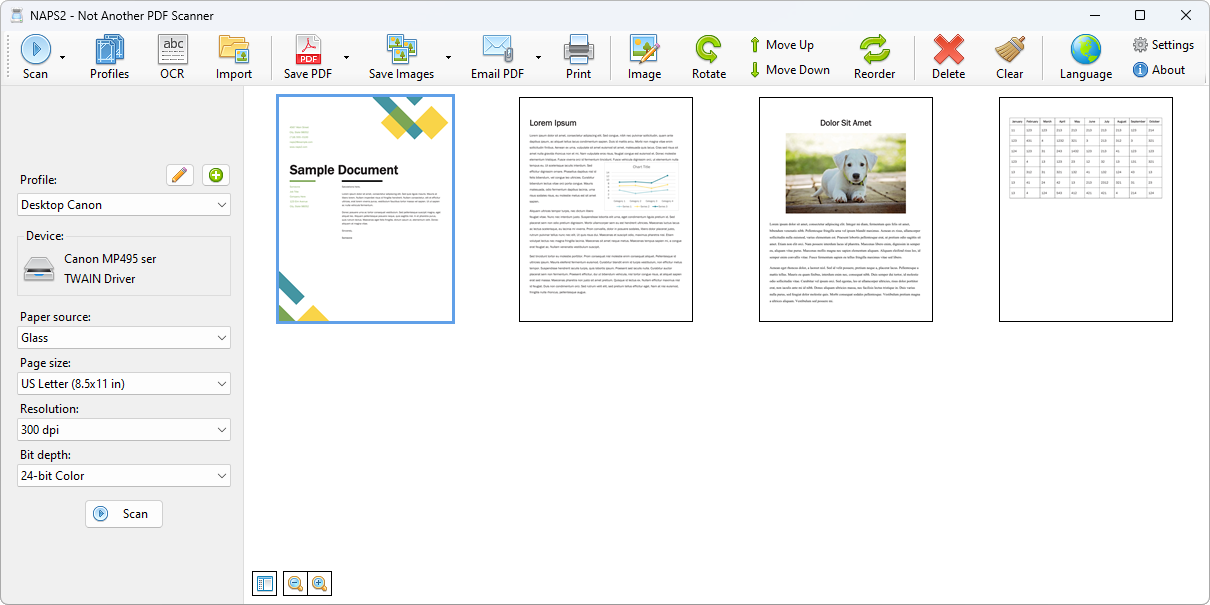
Works with WIA, TWAIN, SANE, and ESCL drivers, covering scanners from Canon, Brother, HP, Epson, Fujitsu, and others. Settings for DPI, page size, bit depth, and ADF duplex scanning are all configurable per device.
Save scanned pages as PDF, TIFF, JPEG, or PNG in a single click. PDFs can be made searchable when OCR is applied.
Optical character recognition powered by Tesseract works in more than 100 languages, embedding searchable text directly into output PDFs.
Reorder pages by drag and drop, interleave for manual duplex scanning, rotate manually or auto-deskew, crop, and adjust brightness and contrast before saving.
Share a USB scanner connected to one machine with other devices on the local network, enabling wireless scanning from laptops and phones without additional hardware.
An optional command-line interface supports automation and scripting. NAPS2.Sdk is a fully-featured NuGet library for .NET developers embedding WIA, TWAIN, SANE, and ESCL scanning in their own applications.
Features
- Multi-driver scanner support
- Flexible output formats
- OCR in 100+ languages
- Page editing tools
- Network scanner sharing
- CLI and .NET SDK
Recommended for this setup
Strengths
- Genuinely cross-platform: Native builds for Windows 7+, macOS 10.15+ (both Intel and Apple Silicon), and Linux (x64 and arm64) mean the same application works consistently across operating systems, unlike most vendor-bundled scanner tools.
- No cost, no ads, no bundleware: NAPS2 is free for individuals and businesses under the GNU GPL 2.0 with no advertising, no trial limitations, and no unwanted software bundled in the installer.
- Enterprise deployment support: An MSI installer with Group Policy (GPO) configuration and portable archives make it practical to deploy and manage across a business without per-seat licensing or special negotiations.
- Developer-accessible scanning: NAPS2.Sdk is published to NuGet under the LGPL 2.1, letting .NET developers add document scanning to their own applications without building driver integration from scratch.
Trade-offs
- Desktop application only: NAPS2 is a local desktop app. It does not offer a web interface or cloud-based scanning workflow, so teams that need browser-accessible or hosted document capture will need a different solution.
- Linux requires libsane: On Linux, NAPS2 depends on libsane for scanner access, GTK 3.20+, and glibc 2.27+. Scanners without SANE drivers or ESCL support may not work on that platform.
- OCR is local and requires download: Tesseract language packs must be downloaded separately. There is no cloud OCR fallback, so accuracy depends on the local Tesseract build and the quality of the scan.
Tech stack
FAQ
Yes. NAPS2 is completely free for both individuals and businesses under the GNU GPL 2.0. There are no licensing fees, ads, or feature restrictions.
NAPS2 works with scanners from Canon, Brother, HP, Epson, Fujitsu, and most others that expose WIA, TWAIN, SANE, or ESCL drivers.
Yes. OCR uses Tesseract, which runs locally. Language packs are downloaded on demand but no internet connection is needed during scanning or OCR processing.
Yes. NAPS2 includes an optional command-line interface (CLI) for scripting and automation, and a .NET SDK (NAPS2.Sdk on NuGet) for developers who need programmatic scanning.
A scanner connected by USB to one machine on the local network can be shared so other computers or phones on the same network can scan to it wirelessly, without additional hardware or a dedicated print server.