
Lap
Local-first photo manager with on-device AI and face clustering
Replaces Mylio Photos, Excire Foto
Who it's for
Lap indexes RAW files from all major manufacturers (Canon CR2/CR3, Nikon NEF, Sony ARW, Fujifilm RAF, and more) and displays RAW+JPEG pairs as single items. AI search across a 50,000+ file RAW archive lets you find photos by scene description rather than scrolling folder trees.
If your archive lives in Lightroom catalogs with extensive develop history and presets, Lap has no Lightroom catalog import and does not apply non-destructive RAW develop settings (curves, tone, color grading).
Lap runs face clustering, AI tagging, and visual similarity search entirely on-device. Nothing is uploaded. The library stays as ordinary files in existing folders, so leaving Lap later requires no export step from a proprietary catalog.
If automatic cross-device sync is a hard requirement, Lap has no built-in sync service. You would need a separate tool such as Syncthing or a NAS share to keep the same folder available on multiple machines.
Lap runs on macOS, Windows, and Linux, so mixed-OS households can use the same tool. Geotagged photos appear on an interactive map with timeline filters, making it practical to browse by trip or location without building albums manually.
Lap stores organizational data (albums, tags, ratings) in a local database, not in file sidecars. If multiple users need to share organization state from the same library on different machines, they need to share the Lap database directory, which Lap does not manage automatically.
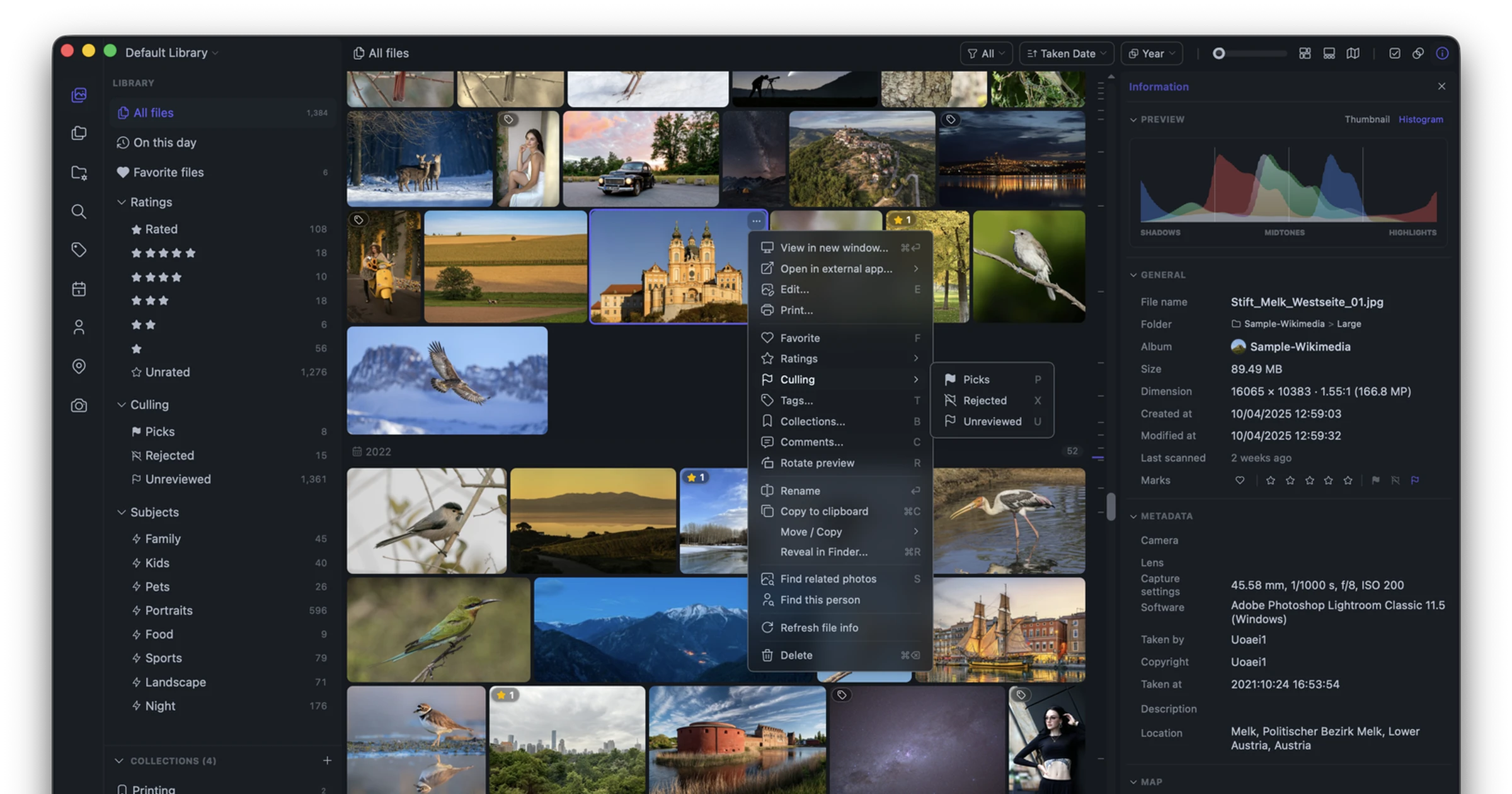
The four-pane comparison viewer and pick/reject culling workflow let you work through a batch of similar photos quickly. Smart Albums with rule-based grouping isolate a date range or event folder without creating a separate physical copy of those files.
The problem
As personal photo libraries grow into the tens or hundreds of thousands of files, finding a specific photo takes more time than it should. Searching by folder name and date range covers basic retrieval, but describing a scene in plain words, or finding photos visually similar to a reference image, requires tools that most file managers and basic viewers do not have. The tools that offer this kind of AI-powered search are almost all cloud services or proprietary paid applications. You hand over your library, accept a monthly fee, and accept that your photos and their organizational metadata live in a format tied to a specific vendor. Switching tools later means exporting from a closed catalog format, and face recognition data and custom tags rarely survive the migration.
How it works
Text prompts, visual similarity, and subject search run on-device using CLIP and ONNX Runtime. No image leaves your machine. Multilingual search covers 50+ languages, which serves teams or users working in languages other than English.
InsightFace models run locally to detect, group, and identify faces across your entire library. Identified people appear in browsable face groups, and all face data is stored in Lap's local database with no cloud component.
Lap indexes your existing folder structure directly without importing everything into a proprietary database. File operations (move, copy, rename, delete) happen inside Lap so linked metadata stays consistent, but your originals remain in their folders and are accessible from any other application.
Supported types include JPEG, HEIC/HEIF, AVIF, JXL, PSD, all major RAW formats (CR2, CR3, NEF, ARW, DNG, RAF, RW2, and more), and video up to MKV and MOV. RAW and JPEG/HEIC pairs display as one item and stay linked during file operations.
GPS-tagged photos and videos appear on an interactive Leaflet map in clustered groups. The map respects your current filters, so combining a date range or folder filter with the map view shows where photos from a specific period or trip were taken.
Smart Albums save rule-based views with custom grouping and sorting that update automatically as your library changes. The duplicate cleanup tool shows reclaimable-space summaries and lets you remove duplicates in bulk across matched sets.
Features
- Local AI search in 50+ languages
- On-device face clustering and recognition
- Folder-first library with no lock-in
- 60+ photo, RAW, and video formats
- Interactive map view for geotagged photos
- Smart Albums and duplicate detection
How to install
Install on macOS with the Homebrew cask; download signed installers for Windows or Linux from GitHub Releases: https://github.com/julyx10/lap/releases/latest
brew tap julyx10/lap
brew install --cask lap
Recommended for this setup
Strengths
- All AI features run with no cloud requirement: Text search, face clustering, smart tagging, and visual similarity all run locally using ONNX Runtime with bundled CLIP and InsightFace models. Mylio Photos requires a cloud account for device sync; Excire Foto requires a paid license for comparable features. Lap runs all of this at no cost, with no external connection needed.
- Built for libraries of 100,000+ files: The README cites large-collection performance as a core design goal. Browse, search, and face clustering are optimized for libraries that would slow down generic photo apps. SQLite-backed indexing keeps the database portable and local, and the application is written in Rust for performance-sensitive operations.
- GPL-3.0 with actively maintained source: The full source is available under GPL-3.0, built in Rust and Vue with Tauri. The project launched in August 2024 and had its most recent commit on October 30, 2026, with 4,144 GitHub stars and translations contributed in 14 languages.
- Folder structure stays intact; originals untouched: EXIF data (capture date, camera, GPS, lens) is read from each file and never overwritten by Lap. The folder structure of your originals is unchanged. Lap's local database holds its own organizational data (tags, ratings, collections, AI index), which you can back up separately in Settings > Storage.
Trade-offs
- Organizational metadata does not embed into files: Collections, tags, ratings, comments, and culling states are stored in Lap's local database, not written into EXIF, IPTC, or XMP sidecars. Moving or copying files outside Lap breaks the link to that organizational data. For workflows that depend on XMP sidecar compatibility with other tools, this is a real constraint.
- Windows installer is unsigned: The Windows MSI packages are not code-signed. Windows SmartScreen will block the download by default; users must click 'Keep anyway' to proceed. This is common for early-stage open source desktop apps but adds friction on managed Windows environments where SmartScreen enforcement is strict.
- 77 open issues as of October 2026: The tracker shows 77 open issues for a project created in August 2024. Active development continues (last commit October 30, 2026), but users should browse open issues before relying on Lap for a production workflow to confirm any edge cases relevant to their formats or platform.
- Linux video playback may need additional packages: On Debian-based Linux systems, video playback uses GStreamer plugins. If gstreamer1.0-libav and gstreamer1.0-plugins-good are not installed, videos will fail to play. The AppImage bundles GStreamer but still depends on system codec plugins, adding a setup step absent on macOS and Windows.
Tech stack
FAQ
Yes. Lap is licensed under GPL-3.0 and free to download and use. There is no subscription, no free tier with limits, and no paid features. The GPL-3.0 license permits personal and internal commercial use; it requires that you distribute source code if you distribute a modified version of the application to others.
No. Every AI feature in Lap, including image-text search, face clustering, and visual similarity, runs locally using models bundled with the application. Lap's privacy policy notes optional online services (such as map tile fetching), but the core photo library and AI features work entirely offline with no account required.
Your original photo files are not affected. Lap stores its organizational data (tags, collections, ratings, AI index, thumbnails) in a separate local database outside your photo folders. Deleting the app and its database removes that organizational data but leaves all original media files in place in their folders.
Lap is a photo manager and organizer, not a full RAW editor. Its built-in editing covers crop, rotate, flip, resize, and basic image adjustments, but it does not offer the non-destructive RAW develop pipeline (curves, tone, color grading) that Lightroom provides. Lap works alongside a dedicated RAW editor rather than replacing one.
Lap runs on macOS (Apple Silicon and Intel), Windows 10/11 (x64 and ARM64), and Linux x64 and ARM64. Debian-based Linux distributions can install via DEB package; other distributions use the AppImage. Video playback on Linux requires GStreamer; installing gstreamer1.0-libav and gstreamer1.0-plugins-good on Debian-based systems resolves most playback issues. No GPU is required for core features.