
Ice
Menu bar manager for macOS with item search and appearance controls.
Replaces Bartender, Vanilla
Who it's for
If you run a full set of tools in the menu bar, Ice lets you organize them into visible, hidden, and always-hidden sections. The drag-and-drop interface handles the initial layout, and hotkeys let you toggle sections without touching the mouse.
Skip if you are on macOS 13 or earlier: Ice requires macOS 14 and will not install on older versions.
On MacBooks with the camera notch, icons in the center of the menu bar can disappear behind the cutout. The Ice Bar moves hidden icons to a second row below the menu bar, keeping them accessible without the notch overlap problem.
Skip if your Mac does not have a notch (Mac mini, Mac Pro, iMac, or non-notch MacBook): the Ice Bar still works but its primary value is for notch models where icon visibility is a problem.
Ice covers Bartender's core feature set at no cost: hiding icons, sections, hotkeys, auto-rehide, drag-and-drop layout, and appearance controls. Users who want a free, source-available replacement with comparable day-to-day functionality will find Ice covers the main workflow.
Skip if you depend on Bartender's per-app automation rules or trigger-based show/hide conditions: those features are on Ice's roadmap but are not yet implemented.
The problem
macOS provides no built-in controls to hide or reorganize icons in the menu bar. As users install more utilities, monitors, cloud clients, and communication apps, the bar fills up with icons for background processes. On MacBooks with the notch, overlapping icons can disappear behind the camera cutout entirely. The only workarounds Apple provides are quitting applications or accepting the clutter. Paid tools like Bartender and Vanilla have addressed this gap for years, but they carry a license cost. Users who want full menu bar control without paying for a third-party license have no Apple-native option.
How it works
The Ice Bar places your hidden menu bar icons in a separate bar that appears just below the main bar. It is particularly useful on MacBooks with the notch, where the camera cutout can obscure icons in the center of the bar. The Ice Bar gives you a persistent display area for hidden items without cluttering the visible menu bar.
Rearrange any menu bar icon by dragging it to a new position directly in the bar. The layout is applied immediately and persists across reboots. This covers the same workflow as paid alternatives while remaining free and source-available under GPL-3.0.
Hidden icons can be revealed by hovering over the menu bar, clicking an empty area, or scrolling in the bar. Auto-rehide kicks in after a configurable delay so icons tuck away again without manual action. All three trigger methods can be enabled or disabled independently.
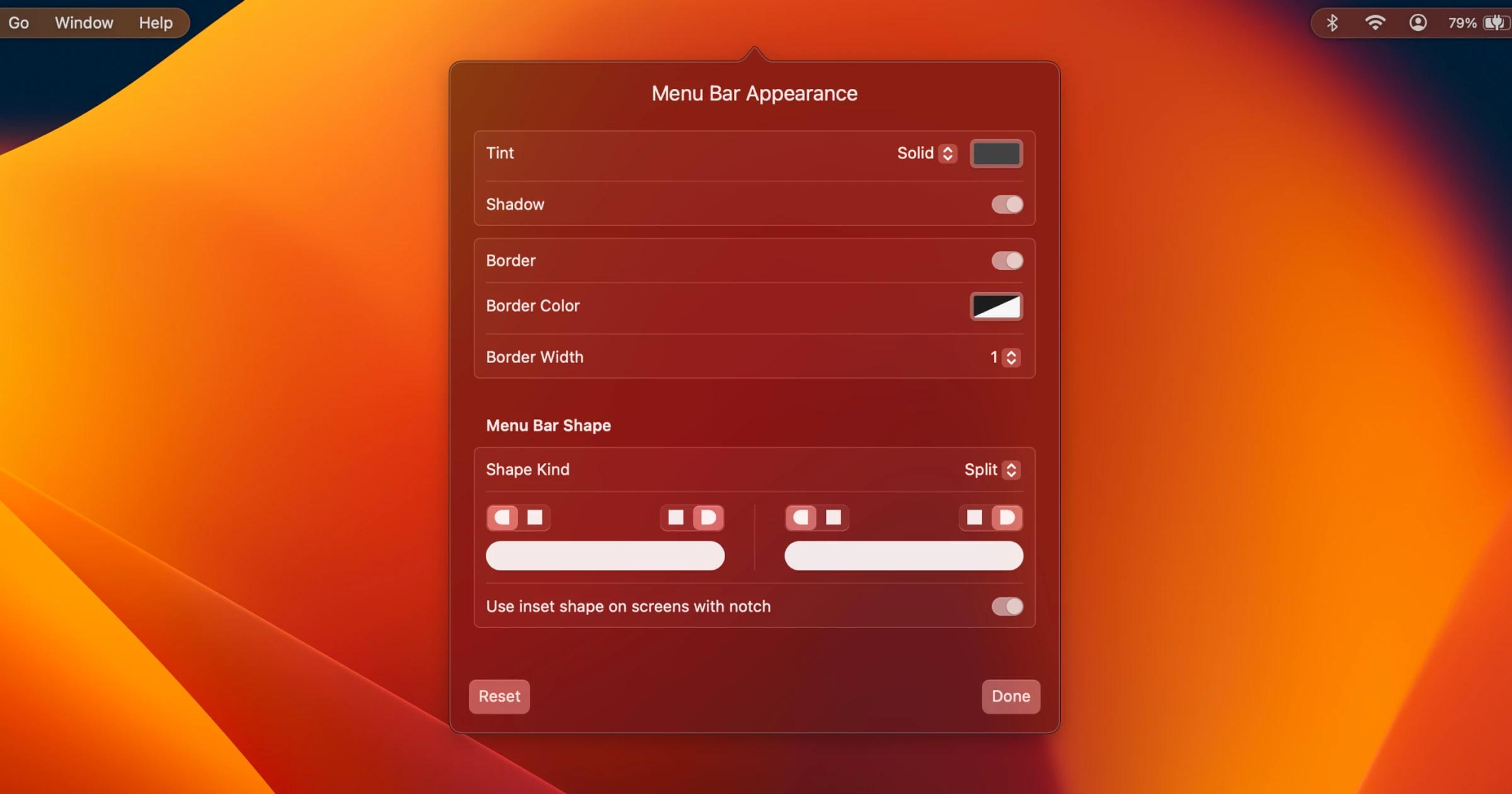
Apply a solid color or gradient tint to the menu bar, add a shadow, draw a border, or switch to a rounded or split shape. These visual controls go beyond the basic hide-and-show feature set and let you match the menu bar's look to your wallpaper or desktop setup.
A built-in search panel lets you find any menu bar icon by name without scrolling through hidden sections. Trigger it with a configurable hotkey. Useful when many items are spread across visible and hidden sections and you need to reach one quickly.
Assign keyboard shortcuts to toggle the hidden section, the always-hidden section, the Ice Bar, and section dividers. A separate hotkey can toggle application menus, which helps when menu bar items and app menus overlap on smaller screens.
Features
- Show Hidden Items Below the Menu Bar
- Drag-and-Drop Item Arrangement
- Show Hidden Items on Hover, Click, or Scroll
- Menu Bar Appearance Customization
- Menu Bar Item Search
- Section Toggle Hotkeys
How to install
Install Ice on macOS 14 or later using the Homebrew cask.
brew install --cask jordanbaird-iceRecommended for this setup
Strengths
- Free and GPL-3.0 Licensed: Ice costs nothing to download and run. The GPL-3.0 license makes the source fully available: you can read it, fork it, and self-build on any macOS 14+ machine. Bartender requires a paid license; Vanilla's permanent-hide feature is locked behind a one-time $10 Vanilla Pro purchase.
- Nearly 30,000 GitHub Stars Since 2023: Ice accumulated nearly 30,000 GitHub stars and over 1,000 forks since its initial release in August 2023, with active development continuing as of October 2026. This level of adoption for a macOS desktop utility reflects strong community uptake and consistent maintenance.
- Appearance Controls Beyond Basic Hiding: Ice adds visual customization not available in simple hide-and-show tools: a solid or gradient menu bar tint, a drop shadow, a border, and custom rounded or split shapes. These features are built into the app and require no additional configuration.
Trade-offs
- Requires macOS 14 (Sonoma) or Later: Ice uses system APIs introduced in macOS 14 and there are no plans to support earlier macOS versions. Users on macOS 13 (Ventura) or earlier cannot install or run it. If you are on an older macOS version, Bartender 4 or Vanilla remain the available menu bar manager options.
- Several Planned Features Not Yet Shipped: As noted in the README, some features have not yet been implemented: layout profiles, individual spacer items, item groups, trigger-based show/hide rules, light/dark mode setting separation, and menu bar widgets. Users who need these features today will need to wait for them to ship or work within the current feature set.
- 403 Open Issues on GitHub: With 403 open issues reported as of the research date (pull requests excluded), Ice carries an active backlog. The project is maintained primarily by one developer, which means issue resolution depends on a single contributor's availability. Users who run into edge cases may need to work around issues or contribute fixes.
Tech stack
FAQ
Yes. Ice is GPL-3.0 licensed and costs nothing. Download it from GitHub Releases or install it via Homebrew with `brew install --cask jordanbaird-ice`. There are no paid tiers, no subscription, and no license key required.
Ice requires macOS 14 (Sonoma) or later. It uses system APIs introduced in macOS 14, and the project has no plans to support earlier versions. If you are on macOS 13 (Ventura) or earlier, Bartender or Vanilla are the available alternatives.
Ice covers Bartender's core feature set at no cost: hiding icons, organized sections, hotkeys, and auto-rehide. It is GPL-3.0 licensed and free, while Bartender requires a paid license. Ice also includes appearance customization (menu bar tint, shadow, border, shapes) not listed in Bartender's feature description. The main gap is Bartender's automation rules and trigger-based controls; those are on Ice's roadmap but are not yet implemented.
Yes. Ice includes an "Ice Bar" that displays hidden menu bar icons in a separate bar just below the main menu bar. This was designed for MacBooks with the camera notch, where the cutout can obscure icons in the center of the bar.
Install via Homebrew with `brew install --cask jordanbaird-ice`, or download the "Ice.zip" from the latest release at https://github.com/jordanbaird/Ice/releases/latest, unzip it, and move Ice.app to your Applications folder. Ice can be set to launch at login from its preferences.