
Helpdesk
Open source helpdesk with unlimited agents
Replaces Zendesk, Freshdesk, Zoho Desk, Help Scout
Who it's for
A team of 10 to 20 sharing one Gmail inbox with no ticket ownership or SLA visibility can connect that email address, add every agent, and immediately get routing rules, overdue alerts, and a full audit trail without paying per seat.
Companies on ERPNext can sync their customer records into Helpdesk, keeping support context and customer data in one ecosystem without a separate integration layer.
The team does not use ERPNext and has no plans to.
Support operations that track orders by shipment ID, categorize tickets by product line, or route by geography can add custom fields, build custom views, and write assignment rules without waiting on a vendor to ship the feature.
The team's workflow maps directly to a standard helpdesk and no customization is needed.
Teams that must keep support data on their own infrastructure can self-host Frappe Helpdesk using Docker or the easy install script, retaining full control over data and the ability to move providers without export risk.
The team has no data residency or self-hosting requirements.
The problem
Small and mid-size support teams sharing a single email inbox have no visibility into who owns which issue, what is overdue, or how the team is performing. Tickets get missed, duplicate work happens, and there is no way to hold agents or customers to a response time standard.
How it works
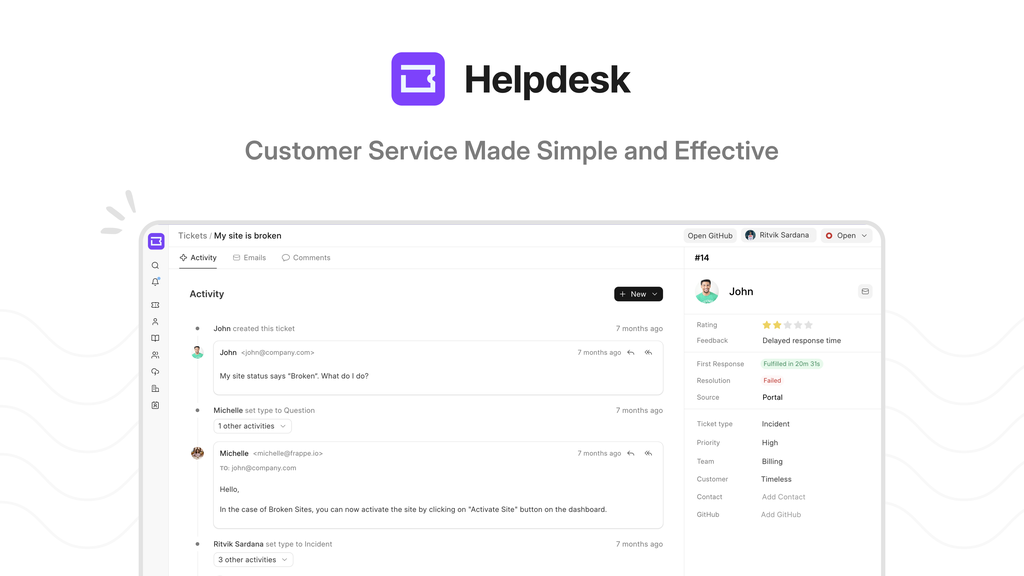
Connect an existing support email address and every inbound message automatically becomes a ticket with an owner and a status. Customers do not need to change how they reach the team.
Tickets are assigned automatically based on priority, issue type, or workload using round-robin or custom rules. SLAs show response and resolution deadlines on every ticket, and escalations fire when they are missed.
Customers raise tickets, track their status, and reply through a dedicated portal. A public knowledge base with advanced article search lets them find answers without writing in.
Agents can save common answers and send them in a single click. Custom fields like a shipment ID can be added to tickets and appear on every ticket in the queue.
A dashboard shows pending and overdue tickets, response times, ticket volume, and SLA performance. Each individual ticket also carries its own analytics with a conversation timeline and response time breakdown.
Customer records sync between Helpdesk and ERPNext. The telephony integration lets agents take support calls and log them directly on the relevant ticket.
Features
- Email-to-ticket inbox
- Assignment rules and SLAs
- Customer self-service portal
- Saved replies and custom fields
- Reporting and per-ticket analytics
- ERPNext integration and telephony
How to install
# Download and run the easy install script wget https://frappe.io/easy-install.py python3 ./easy-install.py deploy \ --project=helpdesk_prod_setup \ --email=your_email@example.com \ --image=ghcr.io/frappe/helpdesk \ --version=stable \ --app=helpdesk \ --sitename subdomain.domain.tld
Recommended for this setup
Strengths
- No per-agent pricing: The entire team can use Frappe Helpdesk without paying per seat. Hosting on Frappe Cloud starts at $5 per month regardless of agent count, which makes it cost-effective for teams that would pay hundreds of dollars monthly on per-agent plans.
- High customizability: Custom fields, views, and workflows are built in. Because the codebase is fully open source under AGPL-3.0 and built on the Frappe Framework, teams can extend it further without restrictions. Customer Safvan Hussain from Location Solutions Telematics cited customisation as a key strength.
- Self-hosting flexibility: Frappe Helpdesk can be deployed with Docker or the easy install script in about five minutes. Teams are not locked into Frappe Cloud and can move to another provider at any time.
- Proven at scale by its own team: The Frappe Helpdesk team runs the product on their own support operations and has handled over 60,000 tickets across 7,000+ customers, which provides direct production feedback into the project.
Trade-offs
- Requires Frappe Framework infrastructure: Frappe Helpdesk runs on the Frappe Framework, which adds operational complexity compared to a standalone SaaS tool. Self-hosting requires setting up a bench environment, and article search needs Redis with the RediSearch module, such as Redis Stack.
- ERPNext integration is Frappe-specific: The native customer sync integration is with ERPNext only. Teams using other CRM or ERP systems will need to build their own integrations via the Frappe Framework's APIs.
- Not a fit for teams wanting zero setup: Teams that need a helpdesk running in minutes with no infrastructure decisions will find Frappe Cloud the easiest path, but those wanting fully managed SaaS with no server ownership will be comparing that hosted cost against alternatives.
Tech stack
FAQ
There is no per-agent fee. You pay for hosting: Frappe Cloud starts at $5 per month and lets you add the whole team. You can also self-host at no software cost.
Yes. Connect your existing support email and inbound messages automatically become tickets. Your customers continue emailing the same address they already use.
Yes. Customers get a self-service portal where they can raise tickets, follow progress, reply to agents, and search a knowledge base for answers without writing in.
AGPL-3.0. The full source code is on GitHub at frappe/helpdesk with over 3,500 stars and 950 forks.
Yes. Frappe Helpdesk includes a native ERPNext integration that syncs customer records between both systems.