
Bt
Rule-based browser router for Windows and Linux, zero tracking.
Replaces Switchbar, Proxly
Who it's for
Route links from work applications directly to a dedicated work Chrome or Edge profile while personal links open in Firefox. Rules can match the calling process name, so links from your company Slack client or internal ticket system fire the correct profile automatically without manual copy-paste.
Not useful if you only use a single browser with one profile. If all links go to the same place, Browser Tamer adds configuration overhead without benefit.
Route banking and government sites into a hardened Firefox profile with no extensions, send social media to a container with no persistent history, and trigger Tor mode in Brave automatically for specific domains. Each site category gets its own isolated context without manual profile switching per click.
If cross-site authentication matters to your workflow, strict compartmentalization will break sessions that rely on cookies shared across categories.
Browser Tamer auto-detects Multi-Account Containers and Brave Containers as routing targets. A rule matching a work domain fires the Work container; a rule matching known social domains fires the Social container. Eliminates the per-click container selection prompt for regularly visited sites.
The built-in Firefox Multi-Account Containers extension handles domain-to-container rules within Firefox itself. If you only need intra-Firefox routing without cross-browser switching, that extension may be sufficient.
The URL-processing pipeline automatically unwraps Office 365 tracking redirect URLs before routing, so the browser sees and opens the real destination URL. Links shared through Microsoft 365 mail or Teams no longer pass through Microsoft's redirect chain, and the real URL appears in the address bar.
If your organization's IT policy prohibits changing the system default browser, you may not be able to register Browser Tamer as the system default.
The problem
Managing multiple browsers on one machine means every link click opens in the wrong context. Work links land in your personal Chrome profile, banking URLs skip the hardened Firefox you set up for them, social media invitations open inside your focus session, and video-call links ignore the minimal window you reserved for them. The only workaround is manually copying URLs and switching browsers yourself, which breaks all link-click workflows across every application on the machine. Container isolation makes the gap clearer. Firefox Multi-Account Containers and Brave Containers isolate sites effectively, but they cannot automatically fire when another application opens a link. You end up clicking through a container-selection prompt for each link, or abandoning the isolation entirely.
How it works
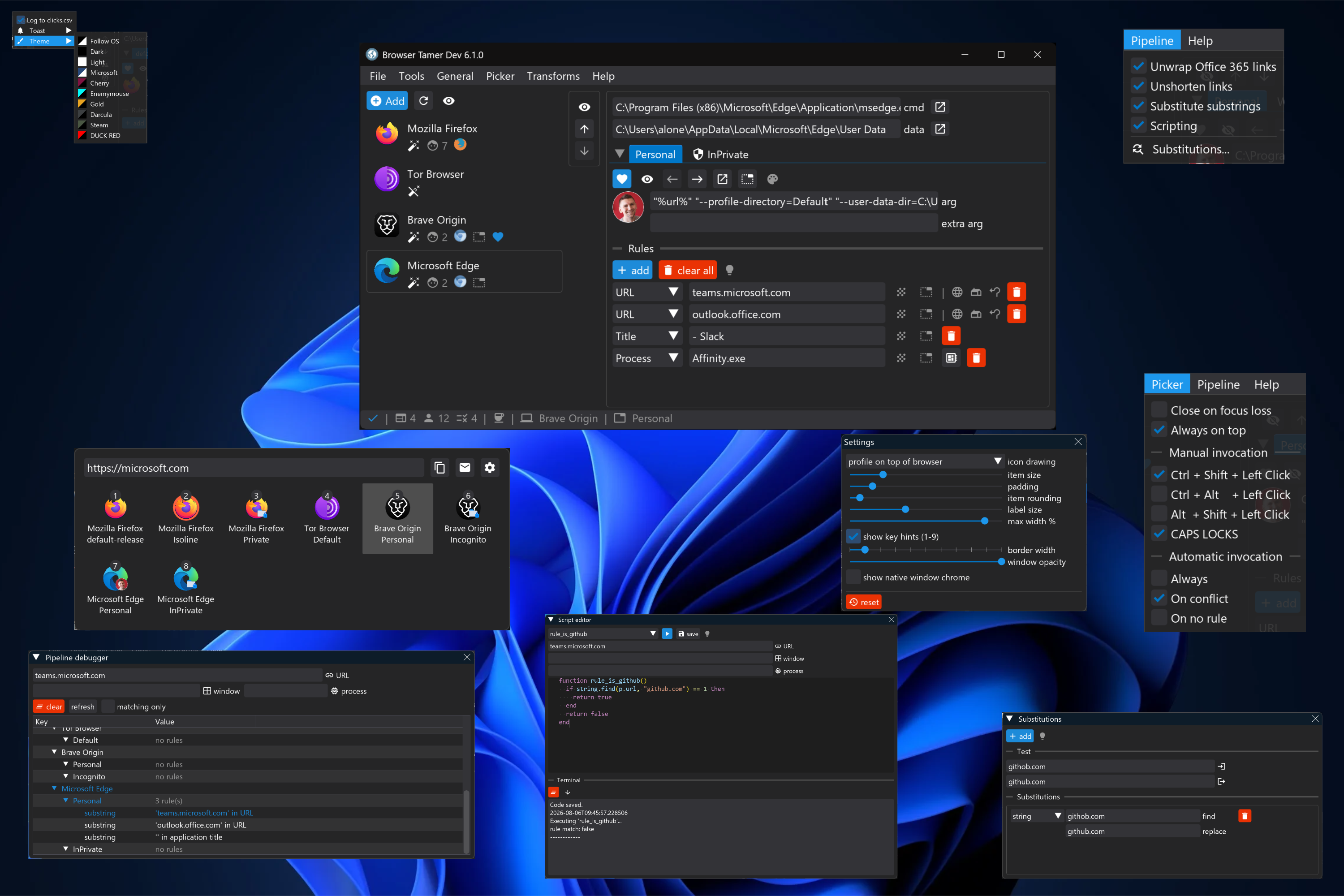
Configures which browser or profile handles which link using rules that match on URL domain, path, substring, or full regular expression. Rules can also fire on the name of the calling application or its window title, so links opened from Thunderbird, Slack, or a terminal go directly to the profile you set for that source.
Discovers installed browser profiles on startup, including Chrome and Edge profiles, Firefox profiles and Multi-Account Containers, Brave profiles and Containers, and Tor mode in Brave. Detected profiles become routing targets without manual path configuration. Running discovery again picks up newly installed browsers.
Each link passes through an optional processing pipeline before routing. The pipeline unwraps Office 365 tracking URLs, resolves shortened links to their final destination, applies find/replace substitutions with optional regex, and strips tracking parameters via ClearURLs (added in v6.3.0). Pipeline steps run in sequence and each can be disabled independently.
Lua scripts can handle routing logic and URL pre-processing beyond what the built-in rule types cover. A script can inspect the URL, calling process, window title, or any value in the pipeline state. Useful for routing rules that require conditional logic beyond substring and regex matching.
A built-in pipeline debugger shows how a URL moves through each rule and transformation step in real time, displaying the URL state after each stage. Useful when diagnosing why a link did not route to the expected browser or why a URL-transform step produced an unexpected result.
Optionally writes every rule hit to a CSV file with timestamp, browser id, browser name, profile name, raw URL, processed URL, matched rule description, calling process name, and calling window title. Enabled from General settings. Useful for debugging rules and auditing which applications open which domains.
Features
- Rule-based URL routing by domain, path, regex, or process
- Browser profile and container auto-detection
- URL-processing pipeline with ClearURLs and un-shortening
- Lua scripting for custom rules and URL transforms
- Pipeline debugger for diagnosing routing setups
- Click audit log to CSV
How to install
Install on Windows via WinGet; for Linux, download the .deb package from GitHub Releases.
winget install aloneguid.btDownload the Linux .deb installer: https://github.com/aloneguid/bt/releases/latest
Recommended for this setup
Strengths
- Single executable under 3 MB with no runtime dependencies: The Windows build is a self-contained .exe under 3 MB, written in C++23 with no .NET runtime, no Visual C++ redistributable, and no Electron overhead. It registers as the system browser and handles link routing without any resident background service or tray daemon that consumes memory between clicks.
- 100% local processing, no telemetry, no login: Every link is processed locally. Browser Tamer requires no cloud account, sends no usage data, and has no registration step. The GitHub repo description states this explicitly: '100% local, no tracking, no registration.' Paid switchers like Switchbar and Proxly do not offer a comparable privacy guarantee in their documentation.
- Apache-2.0 licensed, no paid tier: The Apache-2.0 license permits commercial use, modification, and redistribution without fee. There is no paid tier, subscription, or per-seat pricing. Switchbar and Proxly both carry paid pricing; Browser Tamer has none.
- Active development with recent platform expansion: Created in November 2022, last pushed October 29, 2026. Linux support was added in v6, and recent versions added ClearURLs integration, Brave Container support, a pipeline debugger, and Lua scripting. The 520 GitHub stars and active commit history show ongoing maintenance rather than passive archival.
Trade-offs
- Windows and Linux only; macOS not yet available: The project website states a macOS version is in development, but no release date or timeline is given. Mac users cannot use Browser Tamer today. The comparable paid alternatives, Switchbar and Proxly, are also Windows-only, so there is no obvious free macOS substitute in this exact category.
- No built-in multi-device sync: Rule sets and configuration live in a local file on each machine. Browser Tamer provides no built-in mechanism to sync rules across multiple computers. Users who run it on a home machine and a work laptop manage separate rule sets manually or copy the configuration file between machines.
- 13 open issues: The repository has 13 open issues (pull requests excluded). For a small, focused utility this is a modest backlog, but users with edge-case browser profiles, unusual Linux distributions, or complex Lua scripting needs may encounter bugs or missing features that require workarounds.
Tech stack
FAQ
Not yet. The project website states a macOS version is in development but does not give a release date. The current stable releases support Windows and Linux (Linux added in v6). Mac users have no current install path.
Browser Tamer is free with no paid tier. The Apache-2.0 license lets you use it personally, commercially, and internally without restriction. You can also modify the source and redistribute it, provided you include the license notice. There is no subscription, per-seat fee, or usage limit.
Browser Tamer automatically detects Firefox Multi-Account Containers during initial browser discovery. Detected containers appear as routing targets in the browser list. Clicking a URL that matches a container-targeted rule opens it directly in that container, bypassing the container-selection prompt.
Yes. Rules can match on the process name or window title of the calling application. A rule matching 'thunderbird.exe' as the process name will fire for every link clicked inside Thunderbird, regardless of the URL. Process-name matching works alongside URL matching in the same rule.
Yes. Browser Tamer lets you define a custom application entry pointing to any executable with custom command-line arguments. The %url% placeholder passes the URL to the command. The documentation shows an example routing certain links to a PowerShell script that copies the URL to the clipboard instead of opening a browser.