
ytm-rs
YouTube Music client in Rust, with karaoke lyrics and 30 themes.
Replaces Spotify, Apple Music
Who it's for
ytm-rs replaces the YouTube Music browser tab with a window that starts faster, sits in the tray, responds to media keys with a seekable timeline, and updates itself in the background. Your home feed, liked songs, saved albums, playlists, and history are all there after signing in with your Google account.
Your music library is on Spotify or Apple Music. ytm-rs plays YouTube Music's catalogue only and cannot stream from other services.
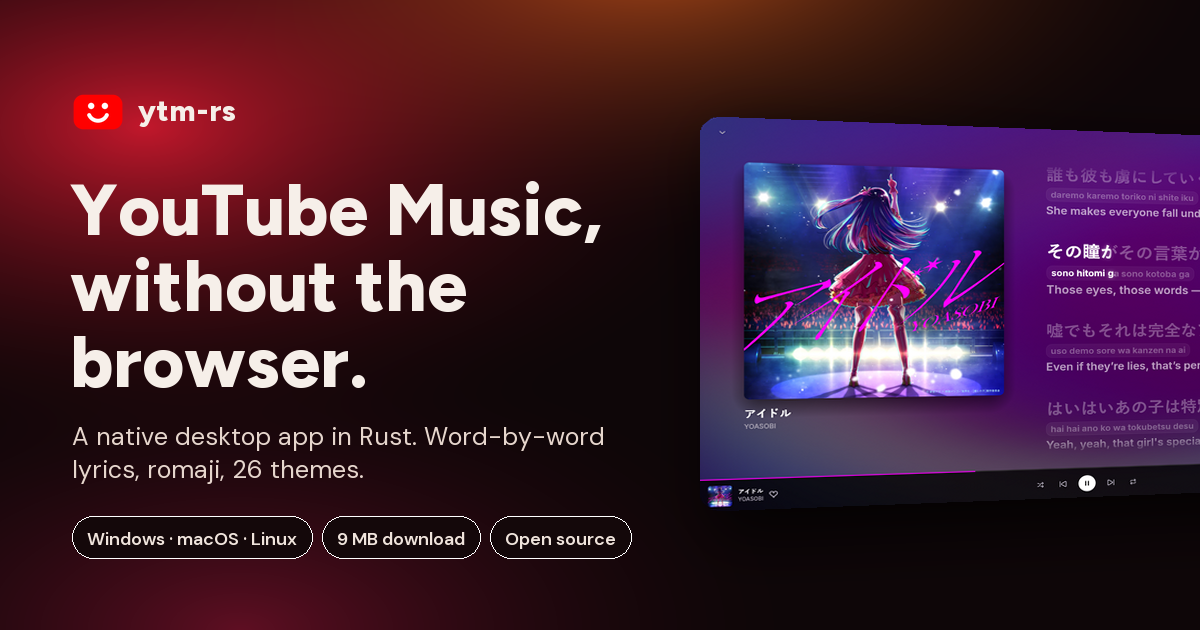
The karaoke lyrics renderer ports Better Lyrics' word-by-word display natively, with romanization for Japanese, Korean, and Chinese text. Twenty-seven community themes are rebuilt as native Rust code, each restyling the full app. Click any lyric line to jump there, or tune the timing offset per song.
You rarely look at lyrics or never use themes. These are the app's most distinctive features; if neither matters to you, any YouTube Music client covers the basics.
A one-line curl command installs ytm-rs to the home directory on Linux without root access, with MPRIS support for system media controls and Wayland close-to-tray. YouTube Music has no official desktop app on any platform; ytm-rs fills that gap for YouTube Music users on Linux.
You need Spotify's catalogue or Apple Music's lossless audio. ytm-rs plays YouTube Music only, and audio quality peaks at Opus ~256 kbps with YouTube Premium.
Start a jam and share the code or link. Up to 16 people hear the same song at the same second, each streaming from YouTube directly. The host controls whether guests can add songs, control playback, both, or neither. The relay, built on Cloudflare Durable Objects, keeps everyone within a tenth of a second.
Not everyone in your group uses ytm-rs. The session requires all participants to have the app installed.
The problem
The official YouTube Music experience has no native desktop app. Users either keep a browser tab open or use an Electron wrapper that bundles a full web browser, consuming several hundred megabytes of RAM just to play a song. Neither option provides karaoke lyrics, true close-to-tray behavior, or any way to reduce the memory footprint on machines where RAM is limited. A browser-based player imposes the browser's constraints on what a music app can do. There is no mini player, no native Discord Rich Presence, and no synchronized listening feature that works independently of the browser's sharing model. Users who want YouTube Music to behave like a first-class desktop application have had no first-party path to get there.
How it works
Synced lyrics fill in word by word as they are sung, drawing the same way the Better Lyrics browser extension does. Sources include Better Lyrics, Unison, Musixmatch, LRCLib, and others; if one has nothing for a track, the next takes over. Japanese, Korean, and Chinese lines get romanization and translation in their own rows. Click any line to jump to that point in the song, or dial in a timing offset per track.
The interface is egui on OpenGL, the audio stack is rodio and Symphonia, and the whole app compiles to a single executable. ytm-rs downloads at 11 MB on Windows and uses around 130 MB of memory while a song plays, compared to 496 MB for YouTube Music in Chrome and 638 MB for Pear Desktop on the same hardware. When the window is idle, it draws zero frames.
Twenty-seven of the 30 themes are native Rust ports of community CSS themes from the Better Lyrics project, including Apple Music, Material 3, Spicy, Spinning Record, and reCover. Each theme restyles the whole app, in light or dark mode, with real frosted glass where the theme calls for it. Three themes are native to ytm-rs: ytm-rs, Classic, and Fluent in the style of Windows 11.
Start a listening session and share a code or link. Up to 16 people hear the same song at the same moment, each streaming from YouTube directly. The relay keeps everyone within a tenth of a second of the host. The host decides whether guests can add songs, control playback, both, or neither. Guest picks play next, marked with who added them.
Bring playlists and Liked Songs from Spotify to YouTube Music in the background. ytm-rs asks for confirmation when it is not sure about a match, then creates a private playlist. Liked Songs transfer in the same order as on Spotify, and the process resumes from where it left off if interrupted. No Spotify Premium account is required: paste any public playlist link to transfer it without signing in.
Save any song as a tagged .m4a file with its cover art, at the best quality your account provides, and play it offline from Library, then Downloads. Upload your own MP3, M4A, FLAC, OGG, or WMA files by dropping them on the window; tags and cover art are read from the file and uploaded to your YouTube Music library.
Features
- Word-by-word karaoke lyrics
- Native Rust renderer, no browser in the player
- 30 themes, natively rendered
- Listen Together for up to 16 people
- Spotify library transfer
- Offline downloads and local file uploads
How to install
Download from GitHub Releases at https://github.com/grapedjuice/ytm-rs/releases/latest on Windows and macOS, or install on Linux with:
curl -fsSL https://raw.githubusercontent.com/grapedjuice/ytm-rs/main/linux/install.sh | shRecommended for this setup
Strengths
- Minimal footprint, native renderer: 11 MB download on Windows, around 130 MB of RAM with a song playing, and zero frames rendered when the window sits idle. egui on OpenGL redraws only when something changes, so the app is not pulling CPU in the background.
- GPL-3.0, free to use: No ads, no accounts of its own, no paid tiers. The source is on GitHub and the GPL-3.0 license allows anyone to read, modify, and redistribute it, including using it internally at a business.
- Full system integration on Windows, macOS, and Linux: System media controls with a seekable timeline on Windows (SMTC), macOS, and Linux (MPRIS); close to tray including Wayland; taskbar thumbnail buttons; mini player; and system-wide keyboard shortcuts configurable in Settings. Discord Rich Presence, Last.fm scrobbling, and ListenBrainz support are built in.
- Automatic background updates: The installed app checks GitHub for new releases, downloads them in the background, and installs when you close the app. The nightly channel offers builds of the newest changes. Portable versions on all three platforms also auto-update. Turn updates off, or stay on a specific version, in Settings.
Trade-offs
- Unofficial client, subject to YouTube API changes: ytm-rs is not a Google product and uses an internal YouTube Music API that is not documented publicly or guaranteed to remain stable. Changes YouTube makes can break playback, sign-in, or lyrics without warning. The 7 open GitHub issues at time of writing reflect active maintenance, but upstream API changes can outpace fixes.
- macOS app not notarized: The macOS release is not notarized by Apple. The first time you open it, macOS Gatekeeper will block it. You must right-click the app and choose Open, or run xattr -dr com.apple.quarantine on it from the terminal. This is a one-time step, but it asks more of users than a notarized app would.
- Audio quality depends on your YouTube account tier: Free listening works without signing in, but audio runs at Opus ~130 kbps. Signing in without YouTube Premium gives you your library but the same quality ceiling. YouTube Premium raises that to Opus ~256 kbps and unlocks Premium-only tracks. Users who want the highest audio fidelity from a streaming service should compare this against Apple Music's lossless tier.
Tech stack
FAQ
No. ytm-rs is an unofficial client built by an independent developer and is not affiliated with Google or YouTube. It talks to the same internal API that music.youtube.com uses, so changes YouTube makes can occasionally affect playback, sign-in, or lyrics.
Yes. ytm-rs is free and open source under the GPL-3.0 license. It has no ads, no accounts of its own, and no paid tiers. If your Google account has YouTube Premium, songs play at Opus ~256 kbps and Premium-only tracks are available; without Premium, audio plays at ~130 kbps.
No. You can browse, search, and play without signing in at all. Signing in with a Google account adds your home feed, library, liked songs, and history. YouTube Premium raises audio quality to Opus ~256 kbps and unlocks Premium-only tracks.
Synced lyrics come from every source the Better Lyrics browser extension uses: Better Lyrics, Unison, Musixmatch, LRCLib, and others. If one source has nothing for a track, the next takes over. Machine translations and romanization for Japanese, Korean, and Chinese text can have rough spots.
Windows: download and run the installer from GitHub Releases. macOS: download the disk image, drag ytm-rs to Applications, then right-click it and choose Open the first time (the app is not notarized yet). Linux: run the one-line curl installer. Once installed, ytm-rs downloads new versions in the background and installs on close.