
Voxos
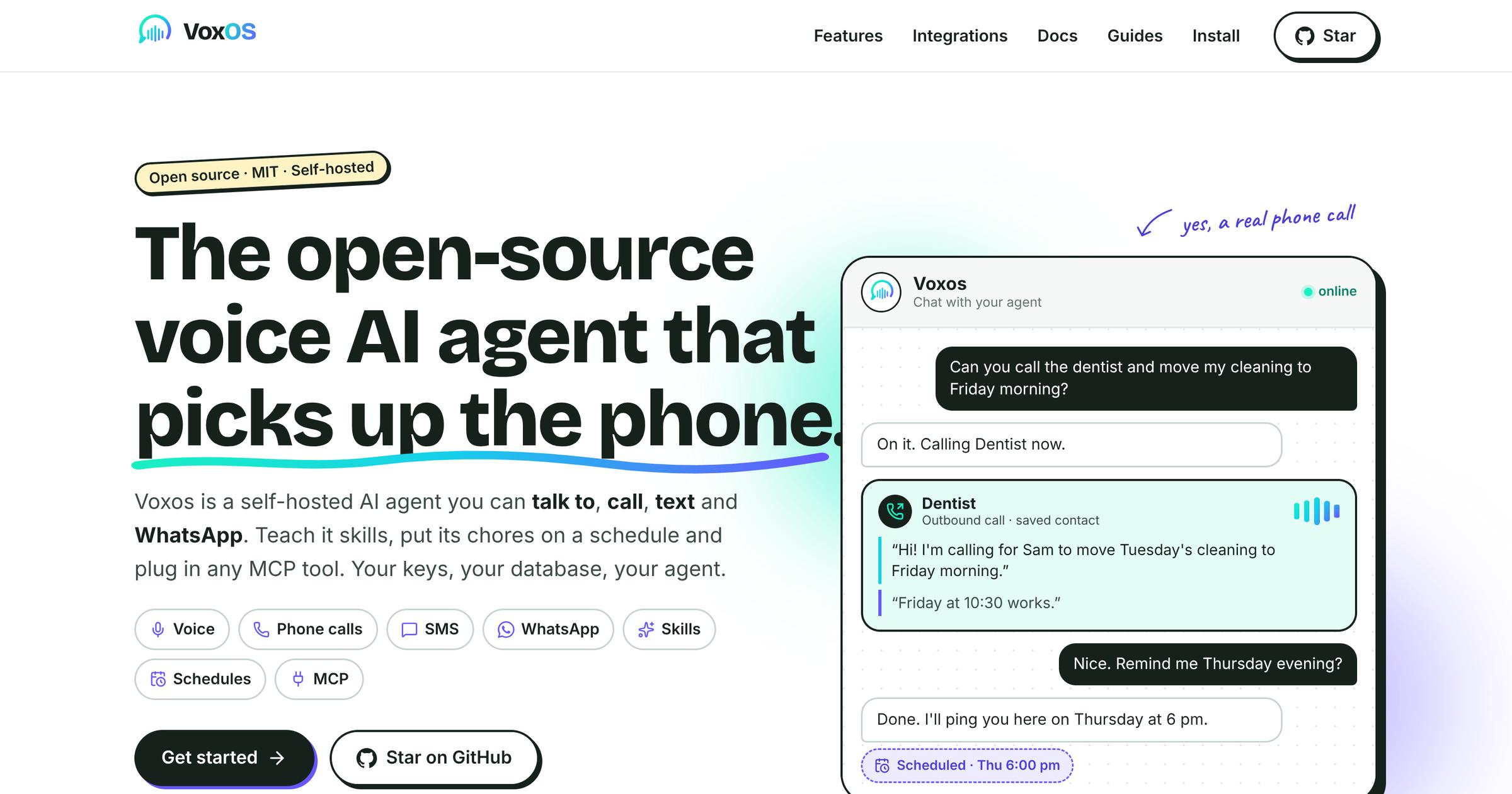
Self-hosted voice AI agent for calls, SMS, WhatsApp and web chat.
Replaces Vapi, Retell Ai, Bland Ai
Who it's for
Voxos gives a developer a single agent that picks up phone calls, replies to texts, reads WhatsApp, and runs MCP tools like GitHub, Google Calendar, and Gmail. Skills encode repeating workflows once; schedules run them on a timer. The Docker Compose stack runs on a home server or a small VPS.
You need a managed service with guaranteed uptime SLAs and no server administration. Voxos requires you to provision and maintain the backend infrastructure.
Postgres row-level security and per-user encrypted credentials mean multiple people can share one Voxos server without accessing each other's data. Each user gets their own agents, memories, and tool grants. Teams can run shared skills from a curated catalog while keeping personal contact and calendar data isolated.
Your team needs an enterprise voice platform for high-volume customer-facing calls or a managed contact center. Voxos is built for internal agent use, not for call center automation at scale.
Voxos is one of few open source agents that connects realtime voice to MCP servers. A builder can wire GitHub, Linear, Notion, Sentry, or any custom MCP server to a voice-capable agent that answers phone calls and responds to texts about the same project context.
Your MCP use case is text-only. If you do not need voice or phone call integration, a lighter agent framework without the LiveKit and telephony stack is simpler to operate.
Text chat can point at any OpenAI-compatible local model (Ollama, LM Studio, vLLM, llama.cpp), so the conversation never leaves your machine. The web console and Flutter app connect to your own server, and your keys and memories stay in your own Postgres instance.
You also need local realtime voice. Voice sessions require OpenAI Realtime, Gemini Live, or xAI Grok, which send audio to an external API.
The problem
Hosted voice AI platforms charge per-minute fees that add up fast. A single voice agent handling phone calls and SMS on a platform like Vapi or Retell AI can cost hundreds of dollars a month once usage scales, and the meter never stops. Your API keys live on the platform's servers, your call data flows through their infrastructure, and switching to a different model or adding a new tool integration requires their cooperation. The deeper challenge is scope. Voice automation platforms are built for calls. The person who actually wants to call a dentist, text a friend, check a WhatsApp group, or run a weekly calendar review needs four separate tools and no way to share context between them. Memory, schedules, and the ability to carry work across conversations are either missing or locked behind additional paid services.
How it works
One agent handles real-time voice in the web console, inbound and outbound phone calls via Twilio or Telnyx, two-way SMS, and WhatsApp direct and group messages. Context carries across all channels. Start a conversation on a phone call and continue it in a text without losing agent state or memory.
Voice sessions run over LiveKit using OpenAI Realtime, Google Gemini Live, or xAI Grok voice models. The LiveKit worker starts per-project on demand, retains briefly for burst reuse, and shuts down cleanly. Transcripts are saved with chat history. A Flutter iOS and Android app provides one-tap voice calls connecting to your own Voxos server.
Skills are reusable playbooks the agent finds and follows, editable by the user; suggested edits wait for approval before they take effect. Schedules are one-off or repeating tasks that post results back to the originating chat. Both persist across sessions so the agent carries work from one conversation to the next.
Voxos connects to remote MCP servers over Streamable HTTP or SSE, handling OAuth, bearer, and API-key auth. Each agent gets only the tools explicitly granted; the model never picks whose data it touches. The built-in catalog covers GitHub, Linear, Notion, Gmail, Google Calendar, Google Drive, Brave Search, and Browserless.
Text chat can point at any OpenAI-compatible endpoint, including Ollama, LM Studio, vLLM, or llama.cpp on the same machine or network. Realtime voice still requires a hosted provider (OpenAI, Gemini, or xAI), but the text path is fully air-gappable for self-hosted deployments that need data isolation.
Provider keys and tokens are encrypted per user with AES-GCM for local development and AWS or Google Cloud KMS envelope encryption for production deployments. Postgres row-level security partitions every user's agents, chats, memories, and tool grants. Agents only get the tools they have been explicitly granted.
Features
- Multi-channel voice and messaging
- LiveKit real-time voice with OpenAI, Gemini, and xAI
- Skills and scheduled tasks
- MCP tool integration
- Local and self-hosted model support for text
- Per-user encrypted credentials and row-level security
How to install
Self-hosting uses Docker Compose with Postgres, pgvector, and LiveKit workers.
git clone https://github.com/s-block/voxos.git
cd voxos
make env
make up
Recommended for this setup
Strengths
- MIT license with no platform fee: The backend is MIT licensed, so you run it on your own infrastructure without licensing fees and use it commercially without restriction. Unlike Vapi or Retell AI, which bill per-minute for managed service, you pay your phone provider, voice model provider, and server host directly. No subscription meter.
- Multi-channel with shared agent state: Voice, phone calls, SMS, WhatsApp, and web chat all reach the same agent with the same memory, skills, and tool access. This is a structural difference from voice-only platforms: a single session can start on a phone call and continue in a text without losing context.
- Data ownership and per-user encryption: Keys and tokens are encrypted per user before storage, with AES-GCM for local development and AWS or Google Cloud KMS envelope encryption for production. Postgres row-level security isolates each user's data at the database layer. For teams running Voxos on shared infrastructure, one user's data is inaccessible to another's queries.
- Self-hosting on Docker Compose or Kubernetes: `make up` starts the entire stack (FastAPI, LiveKit, Postgres with pgvector, and workers) in one command on a laptop or VM. A Helm chart deploys the database and application as separate Kubernetes releases for production. Both paths are documented in the repository.
Trade-offs
- Very new project with minimal community: The repository was created in October 2026 and has 2 GitHub stars. There is no community forum, extension marketplace, or production case studies. Early adopters will find the codebase moving fast and documentation still expanding.
- Realtime voice requires a hosted provider: OpenAI Realtime, Google Gemini Live, and xAI Grok are the only supported voice models. There is no local realtime voice option; every voice session sends audio to an external API. Text chat supports local models (Ollama, LM Studio, vLLM), but voice is unavoidably tied to a cloud provider.
- Firebase required for authentication: Sign-in is Firebase bearer auth. Running Voxos requires a Firebase project; there is no built-in username/password auth or alternative identity provider support as of the current release. For deployments that cannot use Firebase, authentication is a blocker.
- Not suited for high-volume outbound calling: The product FAQ explicitly states it is not built for bulk dialing campaigns. It is designed for one-to-one or small-group personal agent use, not enterprise call center automation at scale. Bland AI or a dedicated outbound dialer is a better fit for high-volume campaigns.
Tech stack
FAQ
Yes. The code is MIT licensed and you run it on your own infrastructure. You pay your phone provider for numbers and minutes, your voice model provider for usage, and whoever hosts your server. There is no platform fee from Voxos itself.
Yes, if you want a self-hosted agent rather than a hosted call platform. Voxos is MIT licensed, charges no platform fee, and covers voice, phone calls, SMS, WhatsApp, chat, memory, and MCP tools. It is not built for bulk dialing campaigns, and realtime voice still runs on OpenAI, Gemini, or xAI.
Realtime voice runs on OpenAI Realtime, Google Gemini Live, and xAI Grok voice models through LiveKit. Text chat supports OpenAI, xAI, and any OpenAI-compatible endpoint, including Ollama, LM Studio, vLLM, and llama.cpp for fully local text conversations. Hume, ElevenLabs, and Mistral credential storage exists in the current code but their voice worker adapters are not yet complete.
Docker with Docker Compose, a Firebase project for sign-in, and API keys for the providers you want to use. Running `make up` starts the FastAPI backend, LiveKit, Postgres with pgvector, and the durable run workers. A Helm chart covers Kubernetes deployments for production.
Yes. Connect a Twilio or Telnyx phone number and your agent answers inbound calls through LiveKit. For outbound, the agent calls your saved contacts with a stated goal; caller access is configured per contact. The same number handles two-way SMS, so text replies come back to the same agent.