
Termix
Self-hosted, plugin-based server manager with SSH and remote desktop.
Replaces Termius, Mobaxterm, Royal Ts, Securecrt, Ctrlops
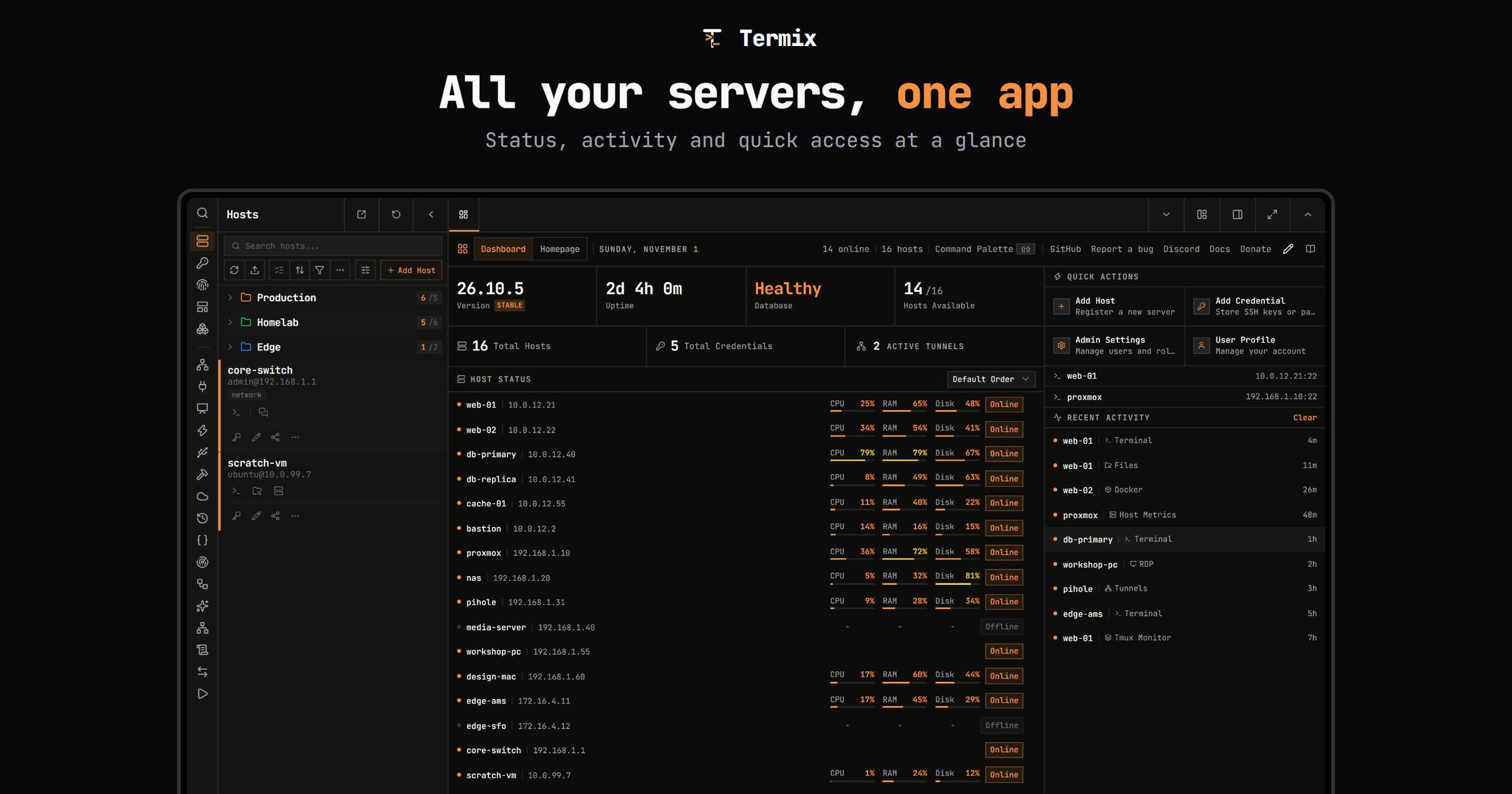
Who it's for
Termix covers exactly what a homelab needs: SSH terminals, RDP and VNC for headless machines, Docker and Proxmox management, Tailscale integration, and a homepage widget for services. One Docker container on the homelab gives a web and mobile interface for the whole fleet without additional services.
If you manage one or two servers and prefer a lightweight native client, a standalone SSH client is simpler to maintain than a self-hosted server.
Teams with shared server credentials and mixed access levels benefit from Termix's four-level role system: developers get connect access, seniors get view, ops gets edit. Session recording adds an audit trail. LDAP and SSO plugins integrate with existing identity providers so staff use their corporate login.
If your team already uses a zero-trust network access tool like Tailscale SSH or Cloudflare Access, adding a full server manager may add complexity without proportional benefit.
Termix replaces Termius for teams that want a web and mobile interface for SSH, remote desktop, and file management without per-seat licensing fees. Deploy once on a VPS, share the URL with team members, and add or remove users through the admin panel.
If you need a polished, zero-infrastructure mobile SSH client and do not want to manage a server, Termius's managed tier offers a faster out-of-box experience than self-hosting Termix.
The problem
Managing remote servers typically means juggling multiple tools: one SSH client for terminals, another for file transfers, a third for remote desktop sessions, and paid services that charge per seat for team access. Commercial tools like Termius and MobaXterm split their best features behind subscription tiers or Windows-only installers, leaving teams either paying ongoing licensing fees or working around capability gaps. The problem compounds at the team level. Shared credentials are hard to manage securely, audit logs are absent or locked behind premium tiers, and there is no way to give a junior team member read-only access to a subset of servers without granting full access. Cloud-hosted tools add a third concern: session data and host credentials live on the vendor's servers, not yours.
How it works
Termix ships with 50 official plugins covering SSH terminals, remote desktop, file management, Docker, Kubernetes, Proxmox, monitoring, security, and productivity. Admins enable, disable, or remove plugins from the admin panel; users see only what admins expose. A community registry adds third-party plugins, and a TypeScript SDK lets you build your own and deploy to your server in minutes.
The Remote Desktop plugin streams RDP, VNC, and Telnet sessions directly in a browser tab, with clipboard sync, file transfer, screen sharing, and session recording. All three protocols run from the same Docker container: no sidecar service is needed. Sessions can be shared with another user or broadcast to a group in a meeting room.
The Fleets plugin groups hosts into named sets and runs shell commands, package manager actions, and file transfers across all of them in one operation. Useful for patching, config distribution, or running checks across a whole tier of servers at once without opening individual terminals.
Termix's sharing model assigns four access levels (connect, view, edit, manage) to individual hosts, folders, and credentials. A junior team member with connect-only access cannot read credentials or change host settings. Roles apply to groups of users and can inherit access from parent folders.
The Docker plugin manages containers, images, and networks on remote hosts over SSH, with logs, stats, and an exec console per container. The Kubernetes plugin connects to clusters through SSH-tunneled kubeconfig, with log tailing, resource YAML editing, metrics, and a shell. Both work without opening any additional ports beyond SSH.
Features
- 50-plugin architecture you configure
- RDP, VNC, and Telnet in the browser
- Fleet commands across multiple hosts
- Four-level role-based host access
- Docker and Kubernetes management over SSH
How to install
Self-host Termix on your server using Docker.
docker run -d -p 8080:8080 -v termix-data:/app/data -e PORT=8080 --name termix --restart unless-stopped ghcr.io/termix-ssh/termix:latestRecommended for this setup
Strengths
- Free forever with no paid tier: Termix has no subscription, no per-seat pricing, and no feature gating behind paid tiers. The full plugin catalog is available to every install. Development is funded by donations. Compared to Termius, which charges per seat on team plans, the cost difference becomes significant for teams of five or more.
- Active development with 15,800+ stars in under two years: Termix was created in November 2024 and reached 15,837 GitHub stars with 9 open issues as of November 2026, reflecting active triage and fast issue resolution. Consistent daily pushes and an expanding plugin catalog show ongoing development with no sign of project dormancy.
- Per-user credential encryption with optional disk encryption: Each user's passwords and SSH keys are encrypted with their own key; no other user (including admins) can read them. The database can also be encrypted on disk. The Secret Sources plugin integrates with 1Password to pull credentials at connection time rather than storing them in Termix at all, for teams with stricter key hygiene requirements.
- Short-lived SSH certificates via Vault, Step CA, or OPKSSH: Three plugins issue short-lived SSH certificates instead of permanent keys: HashiCorp Vault integration, smallstep step-ca, and OpenPubkey SSH (OPKSSH) for identity-provider-signed certs. All three avoid storing long-lived private keys on each host, reducing the blast radius of a compromised credential. No password manager or key rotation script needed.
Trade-offs
- Project launched November 2024, limited long-term track record: Termix was created in late 2024, giving it about two years of production use as of late 2026. While it is actively maintained with strong community adoption, it lacks the multi-year production track record of commercial tools like SecureCRT or Royal TS. Teams running critical infrastructure should validate Termix thoroughly before full adoption.
- Self-hosting required, no managed cloud tier: Termix has no managed cloud option. If your team needs to be running in minutes without infrastructure work, a managed alternative like Termius starts faster. Running Termix on the same network it manages also creates a dependency: if the host Termix runs on is unreachable, so is the management interface. A separate VPS or cloud host mitigates this, as the README suggests.
- 50-plugin catalog requires deliberate configuration choices: With 50 official plugins, selecting the right set for a team requires planning. Plugins for LDAP, SSO, HashiCorp Vault, and certificate authorities need external systems to integrate with. Teams wanting only SSH and file transfers will find the catalog offers more than they need and must actively decide which plugins to disable or leave uninstalled.
Tech stack
FAQ
Yes. Termix is Apache 2.0 licensed and free to self-host for any team size. There are no paid plans or premium tiers; development is funded by donations. You pay only for the infrastructure you host it on.
Yes. The Remote Desktop plugin handles RDP, VNC, and Telnet sessions directly in the browser, with clipboard sync, file transfer, screen sharing, and session recording. All three protocols run from the same Docker container: no sidecar service is needed alongside Termix.
Termius is a commercial SSH client with managed sync, per-seat pricing on team plans, and no self-hosting option. Termix is a free, self-hosted alternative: you deploy it on your own server, all credentials and session data stay on your infrastructure, and there is no subscription fee. Termix also covers remote desktop (RDP, VNC, Telnet) in the browser, which Termius does not offer.
Yes. Termix provides a TypeScript SDK and a plugin template at github.com/Termix-SSH/Termix-Plugin-Template. Plugins built with the SDK run as tabs inside Termix and have access to the host, credential, and session APIs. Completed plugins can be submitted to the community registry or served from a private registry you host yourself.
Credentials in Termix are encrypted per user; no other user (including admins) can read another user's secrets. The database can also be encrypted on disk. The Secret Sources plugin integrates with 1Password to pull host passwords and keys at connection time instead of storing them in Termix at all, for teams with stricter key hygiene requirements.