
Stayput
136 file tools for images, PDFs and video, no uploads or accounts.
Replaces —
Who it's for
People handling medical records, legal documents, tax forms, or personal photos who need file conversion without routing files through third-party servers. Stayput's no-upload architecture removes the data-handling risk without installing any software beyond visiting the site.
If you are converting large video files on a mobile device, the browser tab's memory ceiling may be a practical obstacle on phones with limited RAM.
Teams that want one internal tool for image compression, PDF signing, and video trimming without routing files through cloud services. The static Astro build deploys to any hosting infrastructure in three documented commands, with no server-side dependencies.
Teams that need collaboration features, shared cloud storage, or document workflow automation will need a different tool: Stayput has no backend and no persistent state.
Engineers connecting file conversion to an LLM client via Model Context Protocol. The stayput-mcp server exposes Stayput's PDF and image tools as MCP tool calls with no network access and no uploads, configured with a single JSON block in the MCP client.
If you need to run file conversions in a server-side pipeline rather than in an MCP client workflow, a server-side library is more appropriate than a browser-based or local MCP tool.
The problem
Most browser-based file tools are cloud services. Drop a PDF into a merge tool and it travels to a third-party server; upload an iPhone photo to convert it and the image leaves your device. For legal documents, medical records, employee data, or personal photos, that is not a minor privacy concern. File conversion services typically state that they delete files after a set period, but the deletion claim is difficult to verify and the file has already crossed their infrastructure. Paid platforms like SmallPDF and CloudConvert also impose usage limits: a file size cap, a daily conversion ceiling, or a watermark on the free tier that forces an upgrade. For anyone converting files regularly, the cost adds up and the data-handling risk remains.
How it works
The toolset covers image conversions (HEIC to JPG, compress, resize, background removal), PDF operations (merge, split, compress, sign, OCR, fill forms), video tools (trim, compress, convert format, blur faces), and audio tools (convert, trim, vocal remover, Whisper transcription). All 136 run as JavaScript and WebAssembly in the browser tab with no server processing.
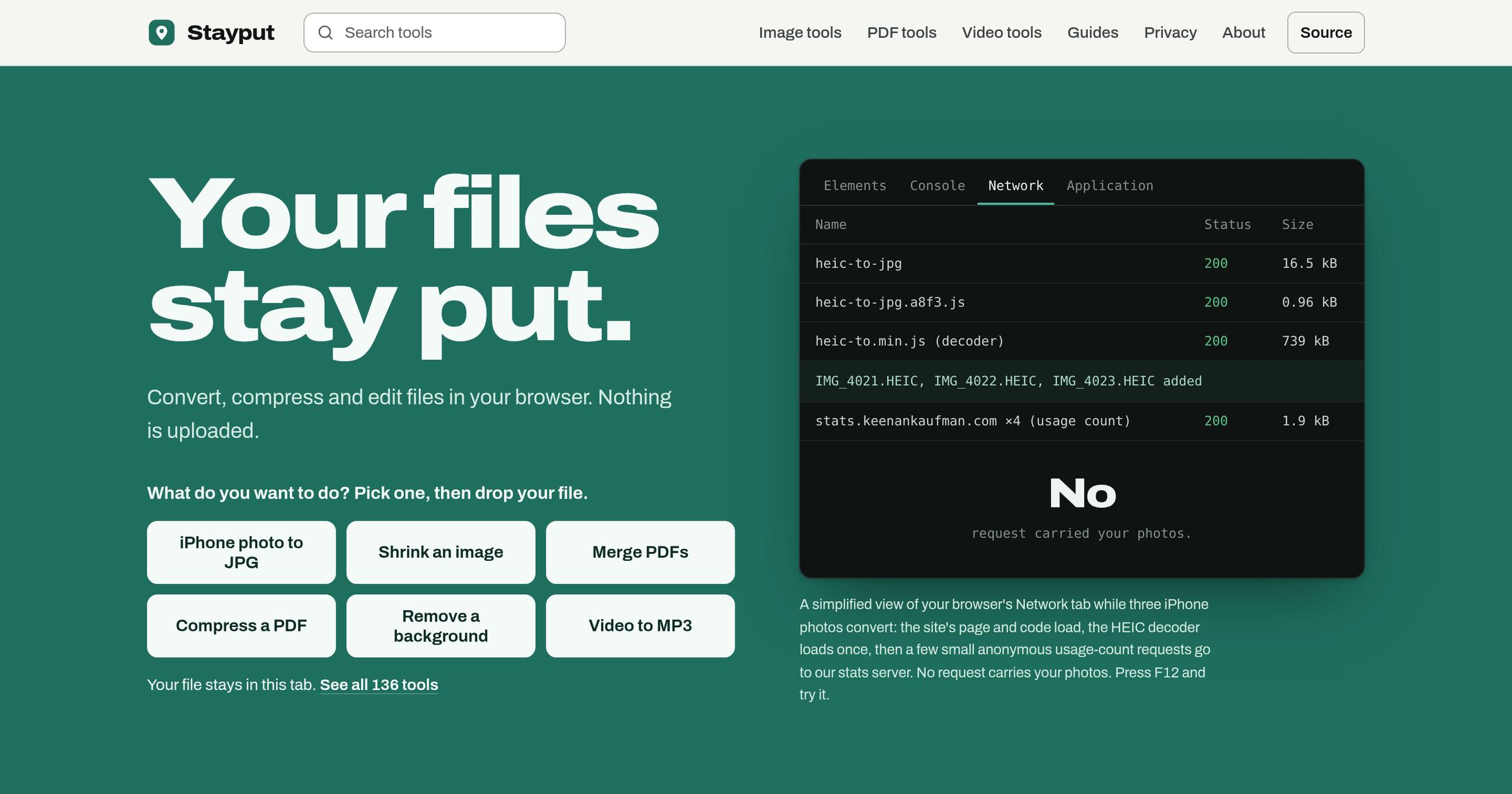
Every tool page counts the network requests made after a file is added and displays the list in the UI. Opening the browser's network tab shows no request carrying your file, because the site is static HTML and JavaScript with no backend. The same conversion works in airplane mode after one visit: load the tool, switch to airplane mode, and it keeps working.
A service worker caches the site after the first visit, so most tools keep working with no network. Tools that use a downloaded AI model (background remover, vocal remover, audio transcription with Whisper) need one online run to download the model; subsequent uses are fully offline.
Stayput ships as a local Model Context Protocol server (stayput-mcp) that exposes the same PDF and image tools as MCP tool calls for LLM clients. Configuration is one JSON block in an MCP client config file using `npx -y stayput-mcp`. No uploads, no network access.
Every tool is free to use without creating an account. Output files carry no watermarks, and conversion is limited only by device memory rather than daily quotas or file-size tiers. A batch of 100 photos processes the same as a single file.
Features
- 136 browser-side tools across images, PDFs, video, and audio
- Verifiable no-upload architecture
- Offline-capable after one visit
- MCP server for LLM tool calls
- Unrestricted access with no account or watermark
How to install
Deploy a self-hosted instance from the source repository.
git clone https://github.com/keenanlk/stayput
npm install
npm run build
node scripts/serve.mjs
Recommended for this setup
Strengths
- No file data leaves the device: The site is static files; every conversion runs in the browser tab. There is no server that could receive files, so no data-handling policy, retention period, or breach risk applies. This is verifiable: open the browser's network tab, add a file, and no request carries it.
- MIT license with self-hosting: The MIT license permits running a private instance for personal, team, or commercial use without restriction. Deployment is a static Astro build documented with three commands: `git clone`, `npm install`, `npm run build`. The compiled `dist/` directory deploys to any static host.
- 136 tools in one place with no account switching: Image conversion, PDF editing, video compression, audio tools, OCR, QR code generation, background removal, and vocal remover are all available without switching between multiple online services or creating accounts on each.
Trade-offs
- Device memory is the processing ceiling: Server-based tools offload heavy conversion to dedicated hardware; Stayput runs in the browser tab, so large video files or batch operations on a low-memory phone may run slowly or fail. The site documents this constraint explicitly: phones hold less memory than desktops.
- AI-model tools require one online run to download the model: Tools that use a local AI model (background remover, vocal remover, noise reduction, Whisper transcription) download their model on the first run. Until the model is cached on the device, those specific tools require a network connection.
- New project with no production track record beyond the hosted site: Stayput was created in September 2026 and had 0 GitHub stars at time of writing. The codebase is actively maintained (last push November 2026) and the hosted site is live, but there is no public community, no issue history, and no verified deployment record for self-hosted instances.
Tech stack
FAQ
Most tools work offline after one visit, which triggers a service worker that caches the site's files. Tools that use a downloaded AI model (background remover, vocal remover, Whisper transcription) need one online run to download the model; after that they work offline. You can confirm this yourself: load a tool, switch to airplane mode, and use it.
Open your browser's developer tools (F12 or Cmd-Option-I on a Mac), go to the Network tab, open any tool, and add a file. You will see requests for the page's code and decoder files, plus small anonymous usage-count requests, but no request carrying your file. The tool page also lists its own requests after you add a file. Switching to airplane mode after loading the page confirms the conversion still works locally.
Yes. Stayput is a static Astro build with an MIT license. Clone the repository, run `npm install` and `npm run build`, and the compiled site is in the `dist/` directory. Run `node scripts/serve.mjs` to serve it locally, or deploy the `dist/` folder to any static hosting service. There is no server-side code or database to configure.
There is no server-imposed file size limit. The constraint is your device's available memory, since all processing happens in the browser tab. Desktop computers with several gigabytes of free memory handle large video files. Phones hold less memory and may run slowly or fail on very large files, which the site documents on its homepage.
No file names or contents are tracked. The site sends a small anonymous usage count (which tool was used and rough ranges such as file count and size, never your file or its name) to a stats server. The full list of requests the site makes is published at stayput.dev/privacy. Cookie-free, and no account means no user profile is built.