
Srs
Self-hosted real-time media server with RTMP, WebRTC, HLS, and SRT
Replaces Ant Media Server, Wowza Streaming Engine, Nimble Streamer
Who it's for
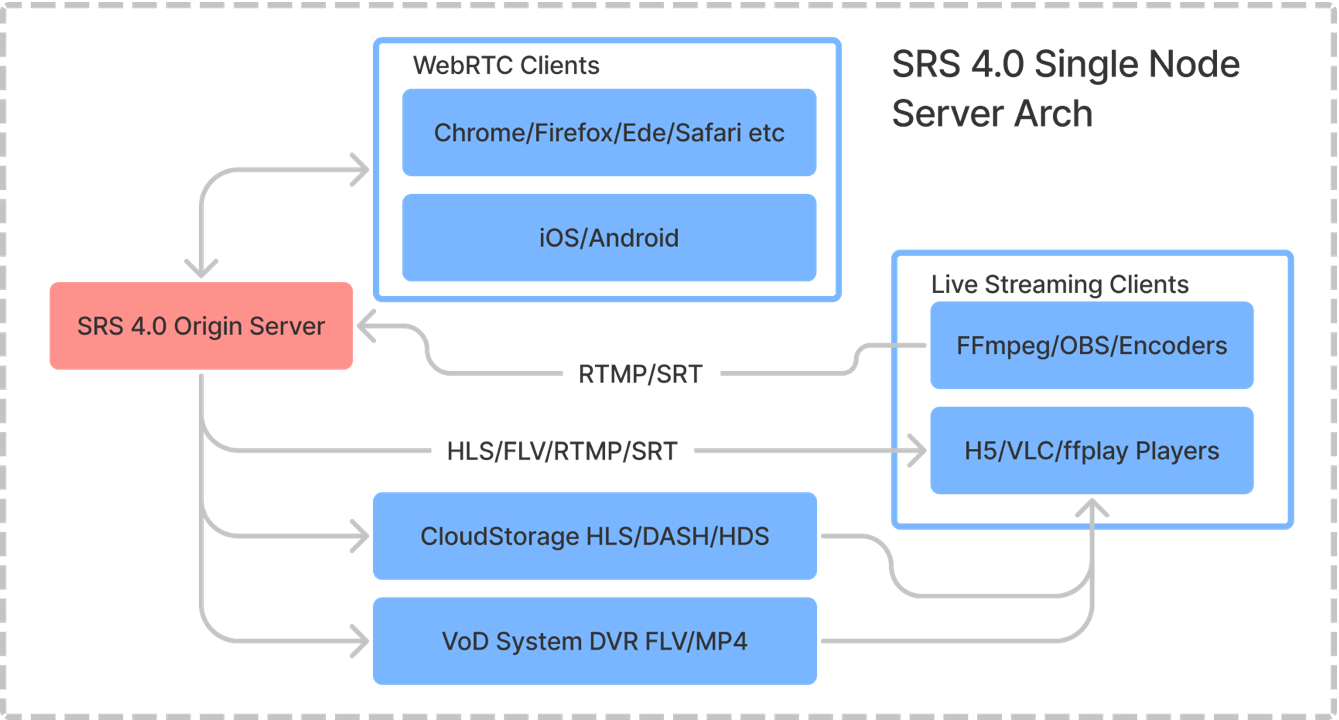
SRS handles RTMP ingest from encoders like OBS and FFmpeg, packages to HLS and HTTP-FLV for delivery, and re-streams to WebRTC for browser playback in a single process. Teams building platforms for user-generated live content avoid assembling and maintaining multiple media processing services.
Your streaming volumes are low enough that a managed cloud CDN or a hosted streaming API is cheaper than the engineering cost of self-hosting a media server.
SRS covers the same protocol matrix as Wowza Streaming Engine and Ant Media Server: RTMP, WebRTC, HLS, SRT, and MPEG-DASH. Teams migrating off a paid streaming platform can replace the media server layer with SRS while keeping their existing ingest and delivery architecture.
Your existing deployment relies on vendor-specific transcoding pipelines, hosted cloud infrastructure, or a graphical management console that SRS does not provide.
SRS supports GB28181, the Chinese national standard for IP surveillance cameras. Integrators building systems with cameras that speak GB28181 can use SRS as the platform server without a separate video management system for the protocol translation layer.
You need full video management system features like motion detection, long-term storage management, and NVR interfaces. SRS handles the streaming layer only.
SRS natively bridges RTMP and WebRTC, converting OBS or FFmpeg streams to WebRTC for real-time browser playback, or relaying WebRTC streams as RTMP for recording and distribution. Built-in WHIP and WHEP support covers modern WebRTC ingest and playback standards.
You need a full conferencing platform with scheduling, recording management, and participant controls. SRS is the media transport layer only; application logic lives above it.
The problem
Running a live streaming or WebRTC service means picking a media server. The commercial options charge per concurrent stream or per server, and both Wowza Streaming Engine and Ant Media Server require paid licenses before you can test at any meaningful scale. Even modest deployments cost thousands of dollars a year, and the license terms typically prohibit running a modified version as a managed service. Building from scratch means assembling separate services for RTMP ingest, HLS packaging, WebRTC signaling, and SRT relay. Most event-loop-based open source servers are hard to extend because adding a new protocol means threading async callbacks through layers of existing code. Teams end up with fragile pipelines that break under load or fail silently when a codec mismatch occurs.
How it works
SRS accepts RTMP, WebRTC (WHIP/WHEP), HLS, HTTP-FLV, HTTP-TS, SRT, MPEG-DASH, and GB28181 in the same process. No separate services or adapters are needed to bridge protocols: a single SRS instance can accept an RTMP stream from OBS and relay it as HLS, WebRTC, and SRT simultaneously.
Built on the State Threads library, SRS uses coroutines instead of async callbacks. Each connection runs in its own coroutine context, making the server easier to extend than event-loop alternatives and more predictable under load spikes.
H.264, H.265 (HEVC), AV1, VP9, AAC, Opus, and G.711 are supported natively. This covers the codec matrix for modern WebRTC deployments, low-bandwidth surveillance streams, and broadcast contribution workflows in a single server binary.
SRS exports metrics in Prometheus format without a sidecar process. CPU usage, client counts, stream bitrates, and protocol breakdowns are available to standard observability stacks without custom integration work.
Official Docker images cover x86_64, ARMv7, AArch64, Apple M1, RISC-V, LoongArch, MIPS, and Windows x64. The same image tag runs on a Raspberry Pi, an Apple Silicon Mac, and a cloud VM without separate build steps.
SRS supports horizontal scaling via origin-edge clustering and integrates with standard container orchestration tooling. The project documents Kubernetes deployment with cloud-native telemetry, making it usable within existing infrastructure pipelines.
Features
- Multi-Protocol Ingest and Delivery
- Coroutine-Based Architecture
- Multi-Codec Support
- Built-In Prometheus Telemetry
- Multi-Architecture Docker Images
- Kubernetes and Cloud-Native Deployment
How to install
Self-hosting SRS uses a single Docker command with ports for RTMP, HTTP API, HTTP server, and WebRTC UDP.
docker run --rm -it -p 1935:1935 -p 1985:1985 -p 8080:8080 \
    -p 8000:8000/udp -p 10080:10080/udp ossrs/srs:6
Recommended for this setup
Strengths
- MIT License with No Commercial Restrictions: SRS is MIT licensed, which means you can run it commercially, modify it, embed it in a product, or include it in a managed service without royalty payments. Wowza Streaming Engine and Ant Media Server both require paid licenses for commercial use at scale; SRS imposes none of those restrictions.
- Single-Process Multi-Protocol Coverage: A single SRS process handles RTMP, WebRTC, HLS, SRT, and MPEG-DASH without an adapter layer. No separate services are needed to bridge ingest and delivery protocols, which reduces operational complexity compared to assembling multiple specialized servers.
- Actively Maintained with Rapid Release Cadence: The project released v8.0-d3 on October 30, 2026, and maintains three parallel release tracks: a stable series (v6), an alpha series (v7), and a dev series (v8). Only 7 open issues on a codebase with over 29,000 GitHub stars indicates strong maintenance hygiene.
- Wide Architecture Support Without Custom Builds: Official Docker images cover x86_64, ARMv7, AArch64, Apple M1, RISC-V, LoongArch, MIPS, and Windows x64 from the same registry. Scaling from a Raspberry Pi edge node to a cloud cluster uses the same image and identical deployment steps.
Trade-offs
- C++ Codebase Requires Expertise to Modify: SRS is written in C++, which limits the pool of contributors and teams who can debug it themselves. Building custom protocol extensions or patching unusual behavior requires C++ proficiency. Teams without that background depend on the upstream project for bug fixes in edge-case scenarios.
- No Vendor Support or SLA: There is no paid support tier for SRS. Debugging production issues means reading the documentation, searching GitHub Issues, or posting in the community Discord and Telegram groups. Teams running SRS in regulated or revenue-critical environments should factor in the absence of a vendor SLA.
- Self-Managed Infrastructure Overhead: Running SRS in production means managing server provisioning, network configuration, TLS termination, and capacity planning yourself. Wowza Streaming Engine and Ant Media Server include hosted deployment options; SRS does not offer a managed cloud path.
Tech stack
FAQ
Yes. SRS is MIT licensed, which permits commercial use, modification, and distribution without royalty payments. You can run SRS as part of a revenue-generating service, embed it in a product, or include it in a managed service. The MIT license places no restrictions on commercial use.
Run the official Docker image with the required ports exposed: `docker run --rm -it -p 1935:1935 -p 1985:1985 -p 8080:8080 -p 8000:8000/udp -p 10080:10080/udp ossrs/srs:6`. Port 1935 is RTMP, 1985 is the HTTP API, 8080 is the HTTP server and player, and 8000/10080 UDP handle WebRTC transport. Once running, open `http://localhost:8080` to verify and push an RTMP stream from OBS or FFmpeg.
Yes. SRS supports WebRTC natively, including WHIP for ingest and WHEP for playback. It bridges RTMP and WebRTC bidirectionally: an OBS stream comes in as RTMP and plays back in a browser over WebRTC, or a browser WebRTC stream goes out as RTMP for recording. UDP ports 8000 and 10080 handle the WebRTC media transport.
SRS is the core C++ media server. Oryx (also from the ossrs project) is an all-in-one video service layer built on top of SRS: it adds a web UI, preset configurations for live streaming and WebRTC, and a simplified setup experience for teams who do not want to configure SRS directly. SRS is for teams building custom infrastructure; Oryx is for teams who want an out-of-the-box streaming service.
SRS runs on Linux and macOS across x86_64, ARMv7, AArch64, Apple M1, RISC-V, LoongArch, and MIPS architectures, and natively on Windows x64. Official Docker images are published for the same architecture matrix. This means the same image and deployment steps work on a Raspberry Pi edge node, an Apple Silicon Mac, and a cloud VM.