SparkyFitness
Self-hosted fitness tracker with AI coaching and wearable sync.
Replaces Myfitnesspal, Cronometer, Macrofactor
Who it's for
Users who log nutrition, workouts, and body weight daily and want their data on their own server instead of MyFitnessPal's or Cronometer's cloud. SparkyFitness covers the same core diary and progress tracking but stores everything locally, with free data export and no premium paywall for historical charts.
If you are not comfortable managing a Docker deployment or setting environment variables, the self-hosting path requires basic server knowledge. Cloud providers like PikaPods and Zenith offer managed hosting, but that reintroduces third-party data storage.
Households where two to five people each want individual nutrition and fitness logs under one server. The granular permission system lets each person see only what they choose to share, and the Apple Watch and Wear OS companion apps let everyone log from their own wearable device.
Family and Friends access is currently in beta. If shared household tracking is the primary use case rather than a convenience feature, wait for the beta to stabilize or run separate installs per user until the permission system matures.
Users with Apple Watch, Garmin, Oura, Fitbit, or Polar devices who want all health data in one dashboard rather than four separate app silos. SparkyFitness auto-syncs steps, sleep stages, workouts, and body metrics from connected platforms and displays them on unified charts across any date range.
Several integrations are noted as partially tested or using unofficial APIs (Strava, Yazio). If reliable sync with a specific service is a hard requirement, verify it works before committing to a full migration.
Technical users who want to query their health data through an AI assistant. SparkyFitness exposes an MCP server that connects to any LLM supporting the Model Context Protocol, enabling natural-language queries over nutrition logs, activity trends, fasting history, and progress data.
The AI chatbot feature is in beta and requires configuring your own LLM. If a polished out-of-the-box AI coaching experience is the goal, MacroFactor's built-in adaptive coaching is more mature for this use case.
The problem
Most fitness tracking setups require juggling several separate apps (a nutrition tracker, a workout logger, a sleep app, a fasting timer), each charging $40-$100 per year per person with no shared data between them. The result is fragmented health history you cannot analyze in one place, subscription costs that compound across a household, and no way to export your own records without paying for premium tiers. The deeper pain is data lock-in. Commercial fitness platforms store years of nutrition logs, workout history, and health metrics on third-party servers. When a service raises prices, changes features, or shuts down, that history is at risk. Users who want to own their health data have had no production-ready self-hosted option that covers nutrition, workouts, sleep, and wearable sync in one place.
How it works
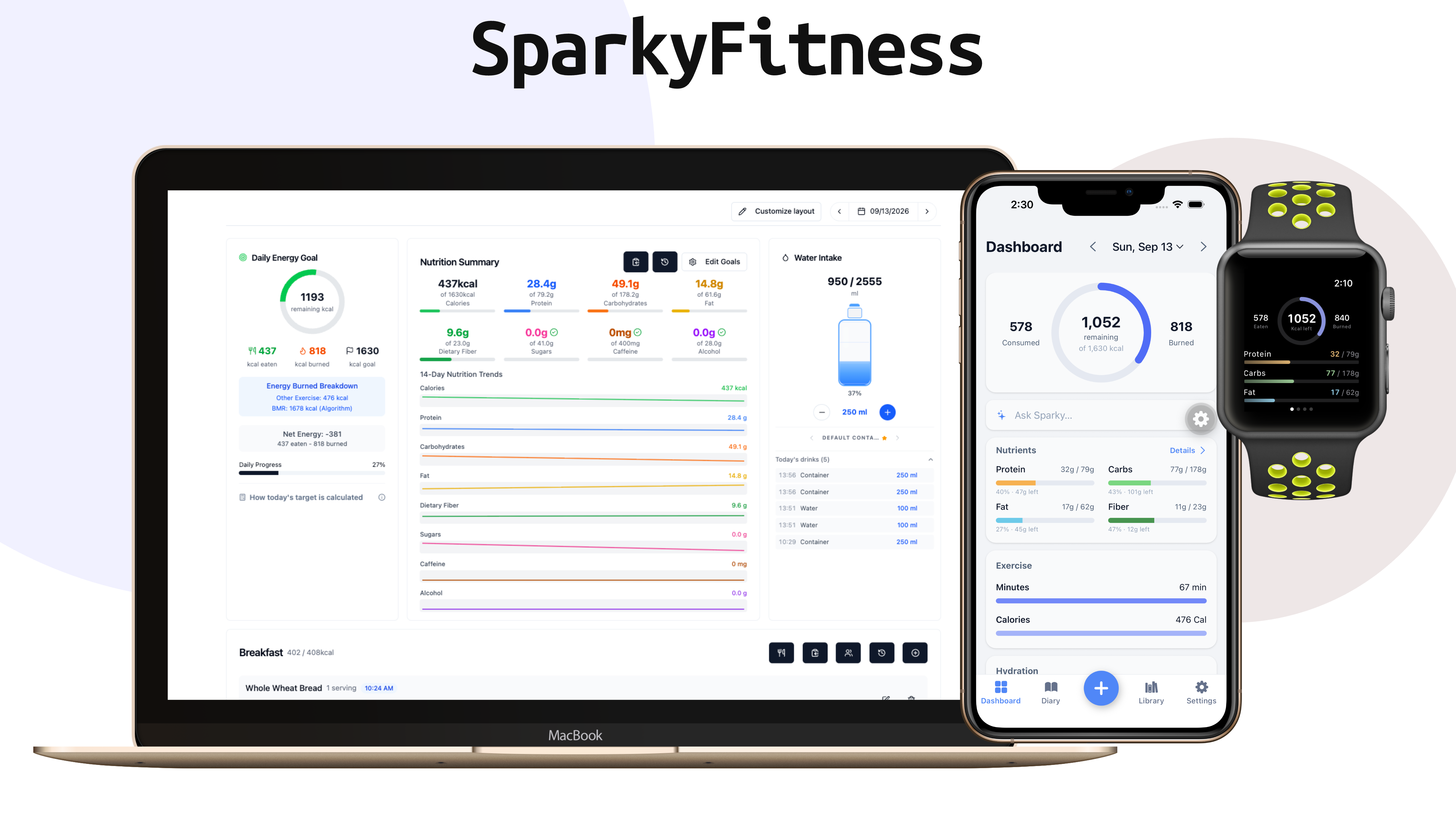
Covers nutrition, exercise, hydration, sleep, fasting, mood, and body measurements as a single application. Each category includes goal setting, daily check-ins, and interactive charts with configurable date ranges. There is no need to export and combine data from separate apps to see a complete health picture.
Syncs with Apple Health, Google Health Connect, Fitbit, Garmin Connect, Withings, Polar Flow, Oura, and Hevy, among others. Nutrition data pulls from OpenFoodFacts, USDA, Fatsecret, and Nutritionix. Data flows automatically: steps, workouts, sleep metrics, and body weight sync without manual entry after initial setup.
Supports multiple user profiles under one installation with 7 permission tiers, letting household members share a server without exposing each other's data. A parent can view a child's nutrition and activity without the reverse being true. Family and Friends access is currently in beta.
iOS and Android apps sync health data directly from Apple Health and Google Health Connect. Apple Watch and Wear OS companion apps log water intake, weight, fasting state, medications, and workouts from the wrist, and support watch face complications for at-a-glance progress toward daily goals.
SparkyAI is a conversational interface for logging food, exercise, body stats, and steps via chat, with an image upload path for automatic meal logging from photos. It retains conversation history for follow-up queries. An MCP server lets you connect any LLM that supports the Model Context Protocol. Currently in beta.
All health data can be exported as CSV at no cost. MyFitnessPal restricts data export to paid tiers; SparkyFitness provides full export on the free self-hosted install. CSV import lets you migrate existing logs without losing history when moving from another tracker.
Features
- Comprehensive health tracking in one app
- 20+ wearable and health platform integrations
- Family access with granular permissions
- Native mobile apps with wearable companions
- AI chatbot for conversational logging
- Free data export and CSV import
How to install
Self-hosting uses Docker Compose to deploy the full server stack.
curl -L -o docker-compose.yml https://raw.githubusercontent.com/CodeWithCJ/SparkyFitness/main/docker/docker-compose.prod.yml
curl -L -o .env https://raw.githubusercontent.com/CodeWithCJ/SparkyFitness/main/docker/.env.simple.example
docker compose pull && docker compose up -d
Recommended for this setup
Strengths
- All-in-one coverage with no subscription fees: Nutrition, exercise, sleep, fasting, hydration, mood, and body metrics are tracked in one app on your own server. Covering the same ground with separate paid apps can mean three or four subscriptions at $40-$100 each per year, per person, as noted in the project's own comparison. SparkyFitness eliminates that cost for personal and nonprofit use.
- Complete data ownership with no cloud dependency: Health data stays on your own server and never reaches third-party cloud providers. No advertising targeting, no data sharing agreements, no export paywalls. For users who want full control over years of nutrition logs and health metrics, this is the only production-ready all-in-one option among fitness trackers.
- Active development with 6,500+ stars: The repository was created in June 2025 and received its last commit on October 30, 2026, with 6,521 GitHub stars and 444 forks. Translations are active across 20 languages including Chinese, Japanese, Korean, Arabic, and Portuguese through the project's Weblate instance, indicating a broad international contributor base.
- Household-scale deployment at no additional cost: A single Docker Compose install serves an entire household with family-sharing profiles and 7 granular permission tiers. Unlike MyFitnessPal's per-account pricing or Cronometer's per-seat premium, one server installation covers multiple people for personal use with no added cost beyond the server itself.
Trade-offs
- Non-Commercial license restricts business use: SparkyFitness uses a Non-Commercial License, not an OSI-approved open source license. Personal, educational, and nonprofit use is permitted without restriction. Any use in a revenue-generating product or service requires prior written permission from the author. Derivative works must carry the same non-commercial terms. The README itself states: 'SparkyFitness is source-available, not open source.'
- Breaking changes between releases require manual review: The README explicitly warns that breaking changes may occur between releases and that auto-updating containers is not recommended. Upgrading requires reviewing release notes manually before applying. Users on a set-and-forget self-hosted setup need to plan for active maintenance rather than automated updates.
- Several prominent features are still in beta: The AI chatbot, family and friends access, and API documentation are all marked as beta in the README, with a note that bugs and incomplete functionality should be expected. These are prominently featured in the comparison table but do not carry the same reliability as the core nutrition and exercise tracking modules.
- 169 open issues as of October 2026: The repository carries 169 open issues (excluding pull requests), a moderate backlog for an application launched in mid-2025. Users relying on less-common integrations (Strava is noted as partially tested, Yazio uses an unofficial API) or platform-specific edge cases may encounter unresolved bugs before they reach a fix.
Tech stack
FAQ
SparkyFitness is free to install and run for personal, educational, and nonprofit use under its Non-Commercial License. There is no subscription fee for the self-hosted version. Commercial use in a revenue-generating product or service requires written permission from the author. Managed cloud hosting through providers like PikaPods and Zenith is available for a fee if you prefer not to run your own server.
No. SparkyFitness uses a Non-Commercial License that restricts commercial use, making it source-available rather than open source by the OSI definition. The project's README states this explicitly: 'SparkyFitness is source-available, not open source.' The source code is publicly available on GitHub and you can run it freely for personal or nonprofit purposes, but the license terms differ from MIT, Apache, or GPL.
The primary install path uses Docker Compose. Download the production docker-compose.yml and a minimal .env file, fill in four required values (database password, encryption key, auth secret, and your server URL), then run `docker compose pull && docker compose up -d`. The app starts on port 3004. The project provides an interactive browser-based .env generator to handle key generation. Full documentation is at the project's documentation site.
Yes. Native iOS and Android apps are available. Apple Watch and Wear OS companion apps are also available for logging water, weight, fasting state, medications, and workouts from the wrist, with watch face complications for at-a-glance goal progress.
SparkyFitness integrates with Apple Health, Google Health Connect, Fitbit, Garmin Connect, Withings, Polar Flow, Oura, Hevy, Strava (partially tested), and COROS for activity and wearable data. Nutrition data pulls from OpenFoodFacts, USDA, Fatsecret, Nutritionix, Mealie, and Tandoor. Exercise data sources include Free Exercise DB, Wger, and Intervals.ICU. The Swiss Food Database, Canadian Nutrient File, and Swedish Food Agency databases are also supported.