
Scryer
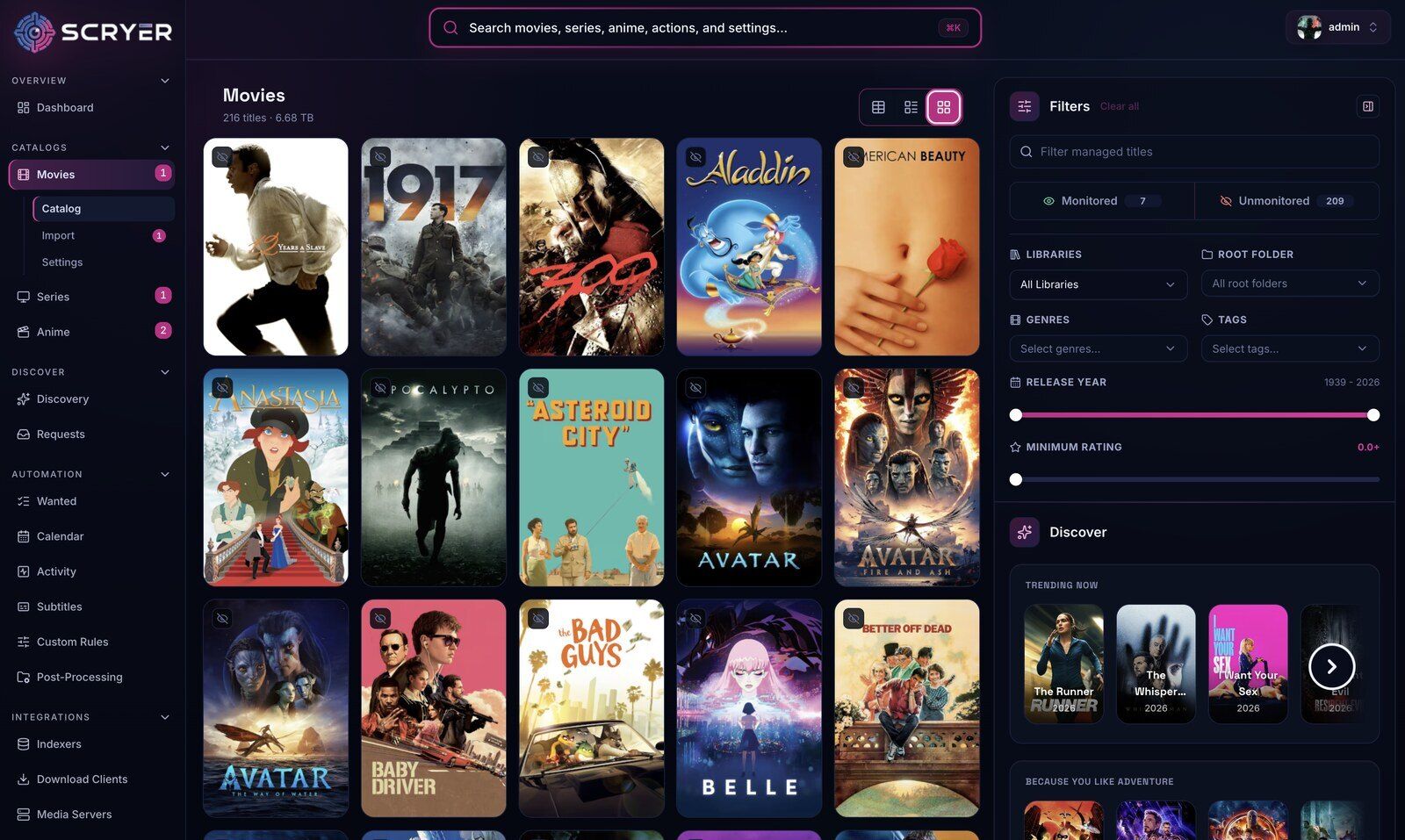
Self-hosted media manager replacing Sonarr, Radarr, and Bazarr.
Replaces —
Who it's for
If you currently maintain Sonarr, Radarr, Bazarr, and Seerr as separate containers, Scryer collapses all four into one binary with one config store. The migration target is the same functionality with less maintenance overhead.
If your current setup works reliably and you prefer established, community-documented tools, the *arr stack has a larger support base and more third-party integrations than a project created in early 2026.
Scryer uses AniDB, AniList, and MAL as concurrent metadata sources and understands anime-specific conventions: split-cour season numbering, episode and multi-season pack handling, and the filler vs canon distinction. This covers the metadata accuracy gap that makes Sonarr unreliable for large anime libraries.
If your anime library is small and you are already satisfied with Sonarr's handling or a dedicated tool, the additional migration effort may not be worthwhile.
Scryer runs as a single native binary, which uses less memory than running Sonarr, Radarr, and Bazarr as separate Docker containers. The first-party Unraid community app makes installation a one-click process on that platform, and native binaries are published for macOS ARM and Intel.
If your NAS runs a platform with no Docker or native binary support, verify that a Scryer binary exists for your architecture before committing to it.
The problem
Running a home media automation setup typically means maintaining Sonarr for TV, Radarr for movies, Bazarr for subtitle management, and Seerr for discovery requests as separate services. Each runs its own database and requires individual upgrades; a broken indexer or misconfigured quality profile in one affects the others, and debugging spans multiple admin interfaces. Anime adds another layer of complexity. The standard *arr tools were designed around Western TV conventions and struggle with anime's distinct numbering systems: multi-season packs, split-cour seasons, and the difference between filler arcs and canon episodes often result in mismatched library entries. Users typically bolt on separate anime-specific tooling or accept persistent metadata mismatches.
How it works
Monitors libraries and tracked titles, queries indexers, evaluates releases against quality and rules policies, coordinates downloads, and organizes files for your media server, all within a single Rust binary. No cross-service communication or shared database setup required.
Uses AniDB, AniList, and MAL simultaneously as metadata sources rather than relying on a single database. Understands anime season and episode numbering conventions, handles multi-season and episode packs cleanly, and distinguishes filler episodes and arcs from canon material.
Finds missing subtitles across configured providers and downloads them automatically. Includes timing correction to resync subtitle tracks when release timing drifts from the reference, which covers the most common reason subtitles go out of sync with a video file.
An embedded plugin runtime handles indexers, download clients, subtitle providers, and notification targets. The GraphQL API and SQLite or PostgreSQL-backed state make it straightforward to integrate with existing home-lab tooling without additional middleware.
Features
- Unified acquisition pipeline
- Anime-native metadata handling
- Subtitle management with timing correction
- Plugin runtime for indexers and clients
How to install
Self-hosting setup starts from the official repository.
git clone https://github.com/scryer-media/scryerRecommended for this setup
Strengths
- Single binary cuts five services to one: The entire acquisition stack (library monitor, indexer search, download coordination, file organization, subtitle sync) runs as one Rust process. Replacing four to six Docker containers with one binary reduces memory footprint and eliminates cross-service config drift.
- GPL-3.0 licensed with no paid tiers: Scryer is free under GPL-3.0 with no premium features behind a paywall. Self-hosters get the full feature set including subtitle sync, quality upgrade automation, and anime metadata without a subscription. The GPL-3.0 license requires sharing source changes if you distribute a modified version, but has no restriction on private or commercial internal use.
- Accurate anime metadata across multiple databases: Uses AniDB, AniList, and MAL as concurrent sources, which is more accurate than the *arr tools' single-database approach. Handles the specific numbering conventions that cause mismatches in Sonarr: split-cour seasons, multi-episode packs, and the filler vs canon distinction.
Trade-offs
- Young project with an active issue backlog: Created in February 2026 with 362 stars and 42 open issues as of October 2026. Eight months is a short track record for production media automation software. Users who need a battle-tested, community-supported system may prefer the established *arr tools while Scryer matures.
- macOS requires a quarantine bypass on first launch: Scryer is not signed with an Apple Developer ID and is not notarized. On macOS 15 and later, users must open it once, dismiss the warning, then approve it in System Settings under Privacy and Security. On macOS 14 and earlier, right-clicking and selecting Open works instead. Either step is a one-time action, but it will block users unfamiliar with macOS security prompts.
- Acquisition only, no media server included: Scryer manages the acquisition and organization pipeline but does not include a media server for playback. You still need Jellyfin, Emby, Plex, or a similar tool to serve files to your devices. This is by design but requires maintaining a separate media server alongside Scryer.
Tech stack
FAQ
Yes. Scryer is designed as a single-binary replacement for the combined Sonarr, Radarr, Bazarr, and Seerr stack. It handles TV, movies, and anime library monitoring, release search, quality management, file organization, and subtitle sync in one service. The README describes it as 'Sonarr + Radarr + Seerr + Bazarr, with some extra bits from other *arr tools.'
Yes, and anime handling is an explicit design goal. Scryer pulls metadata from AniDB, AniList, and MAL simultaneously rather than a single source, which improves accuracy for titles with complex episode numbering. It also understands which episodes are filler and which are canon, and handles multi-season and episode packs without the manual corrections Sonarr often requires.
Scryer is released under GPL-3.0. This means you can run it freely on your own infrastructure, use it for internal commercial purposes, and modify it. If you distribute a modified version to others, GPL-3.0 requires you to share those changes under the same license. Running it self-hosted for personal or team use does not trigger that requirement.
Yes. The website explicitly lists a Raspberry Pi and a NAS as target deployment environments. Scryer runs as a single native binary, which keeps resource usage lower than running multiple separate arr containers. Docker, native binaries, and a first-party Unraid community app are the available install paths.