
Rockxy
Open-source HTTP/HTTPS debugger for macOS apps, devices, and AI APIs
Replaces Proxyman, Charles Proxy, Fiddler Everywhere
Who it's for
A macOS or iOS developer who needs to see the exact HTTP requests a Swift app sends, beyond what Xcode's network debugger exposes. Rockxy captures the full stack from the app process, iOS simulator, and physical device in one workspace.
The developer only needs to inspect browser traffic, where Chrome or Safari DevTools already provide full visibility.
A developer building a product on top of OpenAI, Anthropic, Gemini, or a local Ollama endpoint who needs to see the exact prompt, response, latency, and token data for each call. Rockxy's protocol labels and AI traffic inspector surface model API calls without manual filter configuration.
The team already uses a provider-side observability tool or logging middleware that captures prompt and response payloads with the needed latency resolution.
A developer who needs to verify that an app behaves correctly when an API returns 401, 503, or times out, without changing the backend. Rockxy's breakpoints and block list inject these states at the proxy layer for any app process.
The team has an existing contract testing setup or a mock server layer that covers these failure scenarios already.
A developer who needs to send captured traffic to a colleague, a third-party API's support team, or a security reviewer, without exposing auth tokens or customer data in the export. Rockxy's redaction workflow strips sensitive values from HAR, CSV, or session archives before export.
The organization requires all traffic exports to pass through a central log aggregation system rather than originating from a developer workstation.
The problem
Browser DevTools stop at the browser's network stack. Native macOS apps, iOS simulators, Electron apps, CLI tools, AI agents calling OpenAI or Anthropic, Web3 RPC calls, and backend services running in Docker all generate HTTP/HTTPS and WebSocket traffic that browser DevTools cannot see. Traditional tools fall into two camps: Java-based cross-platform proxies like Charles Proxy that feel foreign on macOS and require ongoing paid licenses, or commercial native macOS tools like Proxyman that lock full HTTPS inspection or team features behind a subscription. Developers debugging AI-integrated products face an extra gap: LLM API calls to OpenAI, Anthropic, or local Ollama endpoints look like any other HTTPS stream, so inspecting prompt payloads, token counts, and latency requires a tool that understands those endpoints as first-class traffic. Rockxy's community source edition covers the full capture-inspect-replay loop under AGPL-3.0 at no cost, with HTTPS decryption, WebSocket and GraphQL inspection, mobile device capture, and AI API visibility built in from the first launch.
How it works
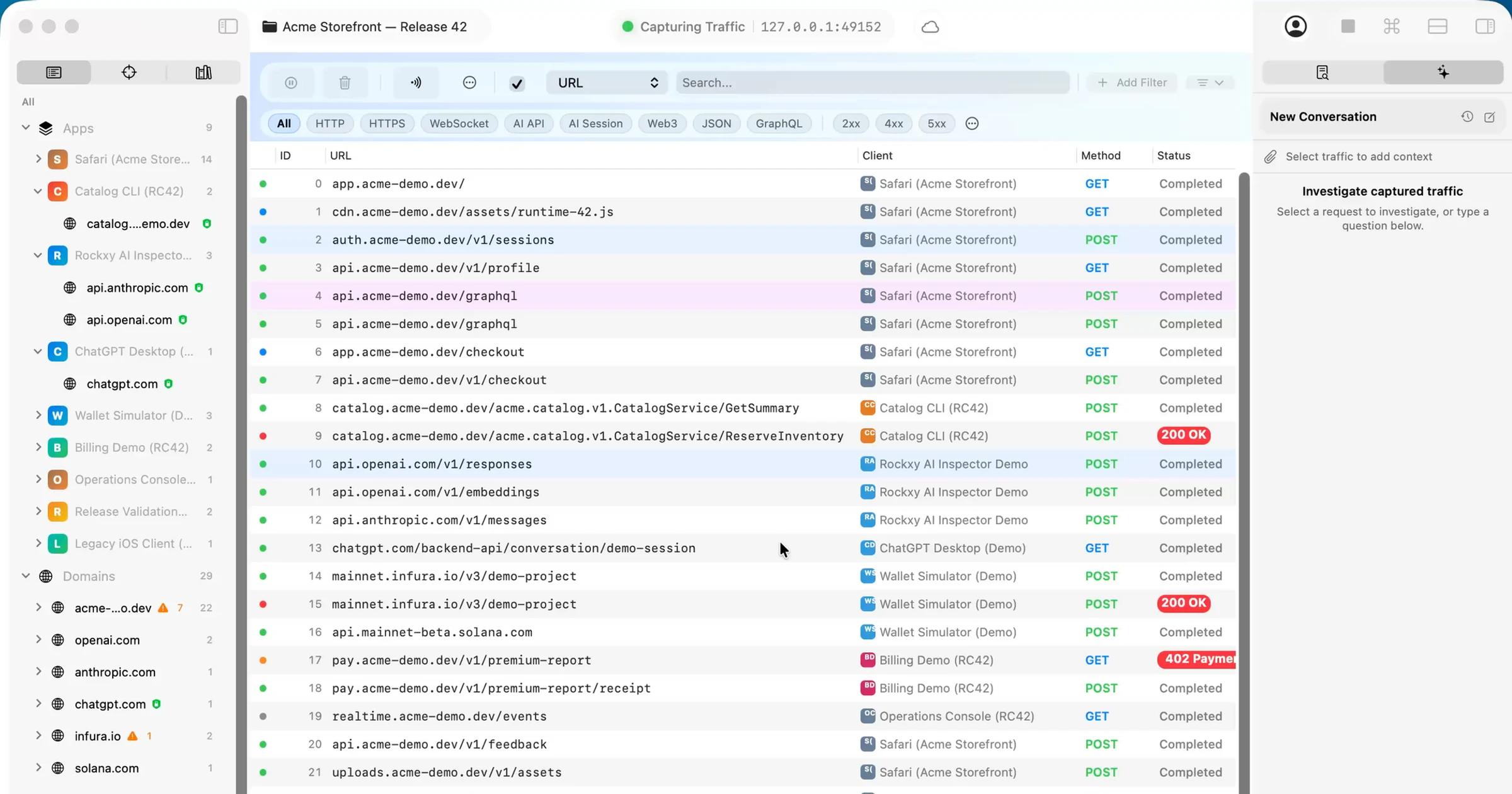
Captures HTTP, HTTPS, WebSocket, and GraphQL traffic from Mac apps, iOS devices and simulators, CLI processes, and browsers. Each captured row shows the app process, timing waterfall, headers, and body in one native workspace. Browser DevTools end at the browser; Rockxy sees the rest of the stack.
A built-in local MCP server exposes captured traffic through ten read-only tools to Claude Desktop, Claude Code, Cursor, and other MCP clients. Ten more tools for creating mocks, breakpoints, blocks, and redirects stay off until you explicitly enable them, keeping the default safe for daily use.
Generates a P-256 ECDSA root CA on first launch and seals it in your Mac Keychain. Per-host wildcard rules choose which connections to decrypt; pinned hosts pass through automatically. TLS 1.2 and 1.3 are both supported.
Rebuild any captured request by changing method, URL, headers, query parameters, or body, then resend without leaving Rockxy. Compose supports importing cURL and exporting requests as Swift, Python, JavaScript, or Go snippets.
Select one or more captured requests and ask why a request failed, what changed, or what to verify next. Rockxy runs local analysis first; it calls Ollama or a configured provider model only after you review and confirm the exact bounded, redacted context it will send. The assistant never mutates traffic or executes follow-up actions automatically.
Strip credentials, tokens, and sensitive values from HAR exports, session archives, CSV, or Postman files while keeping the original captured session intact. Redaction is also active on MCP exports by default.
Features
- Traffic capture across your full stack
- Local MCP server for AI clients
- HTTPS decryption with Keychain-sealed CA
- Request replay, compose, and modification
- AI Assistant for traffic analysis
- Redaction before sharing
How to install
Install Rockxy on macOS 14 or later using Homebrew or the signed universal .dmg from GitHub Releases.
brew install --cask rockxyDownload the signed universal .dmg: https://github.com/RockxyApp/Rockxy/releases/latest
Recommended for this setup
Strengths
- Fully native Swift and SwiftUI on macOS: Built entirely in Swift with SwiftUI, AppKit, and SwiftNIO rather than ported from a cross-platform framework. The result is a workspace that respects macOS conventions, runs at native speed, and integrates with Keychain, system proxy settings, and certificate trust the way Mac apps are expected to.
- Local-first with no account required: Captured traffic stays on your Mac, routed through a local listener with no cloud relay. No account is required to start debugging. The app never phones home with captured payloads; the only network activity in the core workflow is the system proxy setting that points traffic at Rockxy's local port.
- Active, responsive development: The project ships README translations in 20 languages, maintains a detailed public changelog with per-release notes, and has closed specific bug reports within the same public GitHub and Reddit threads where they were raised. The maintainer shipped localization because users asked for it in public threads, a signal that community feedback reaches the roadmap.
Trade-offs
- macOS 14 and later only: Rockxy requires macOS Sonoma (14) or later and does not run on Windows or Linux. Developers on older macOS versions or non-Mac operating systems need a different tool. Charles Proxy and Fiddler Everywhere remain the cross-platform options in this category.
- Official binary carries additional license terms: The community source code on GitHub is AGPL-3.0 and builds made directly from the repo are AGPL builds. The official signed .dmg carries an additional Binary EULA v1.0 that permits personal and team use but restricts redistribution and resale of the official binary as a hosted or managed service. Builds made from the AGPL source repo are governed by AGPL-3.0 only.
- Active development with 85 open issues: With 85 open issues and a codebase public since March 2026, Rockxy is in active but early development. Edge cases in upstream proxy routing, TLS handling, and WebSocket upgrades have required multiple fix passes per the changelog. Teams should track release notes before relying on specific behavior in production debugging workflows.
Tech stack
FAQ
No. HTTPS decryption is available in the free Community edition. Rockxy generates a P-256 ECDSA root CA on first launch, seals it in your Keychain, and decrypts HTTPS from any host you configure with per-host wildcard rules. Pro capabilities cover features like deeper replay, scripting, and collaboration, not the core debugging workflow.
The community source code on GitHub is licensed AGPL-3.0-or-later; builds made solely from that repo are AGPL builds. The official signed .dmg distributed by Rockxy carries an additional Binary EULA v1.0. That EULA permits personal and team use but restricts redistribution and resale of the official binary as a hosted or managed service. Building from the source repo is governed by AGPL-3.0 only. See LICENSING.md in the repository for the artifact-by-artifact licensing boundary.
Rockxy is built for macOS and captures traffic from macOS apps, iOS simulators, and iOS physical devices. Android capture is not documented in the README or release notes as of the 0.41.0 release. The tool's GitHub topics and feature set are focused on the Apple platform. Community Reddit threads have raised Android capture as a question; the README does not confirm it as a supported workflow.
Rockxy runs a local MCP server over stdio, token-authenticated, that lets MCP clients like Claude Desktop or Claude Code read captured traffic through ten read-only tools. A second set of ten tools that can create or modify rules (mocks, breakpoints, blocks) stays disabled until you explicitly enable 'Allow MCP Clients to Change Rules and Capture'. The read-only tools pose no mutation risk; leaving the read-only server running is safe for daily use.
By default, captured traffic stays on your Mac. The AI Assistant runs local analysis first and only sends a bounded, redacted payload to Ollama or a configured provider after you review the data and confirm the send. The local MCP server exposes traffic only to processes on the same Mac through an authenticated stdio connection. Redaction is on by default for both MCP exports and AI payloads.