
Rataflow
Node-based flow graph library for the terminal, in Rust.
Replaces —
Who it's for
Teams building terminal applications sometimes need a visual graph layer: a dependency graph, a pipeline view, a network topology display. Rataflow provides that layer as a Cargo dependency, keeping the binary self-contained without requiring a web frontend.
If the graph is static and read-only with no user interaction, a simpler ASCII diagram library or an SVG-to-text renderer avoids the interaction overhead rataflow adds.
Full interaction coverage is included: multi-select, drag, connection validation with custom validators, context-menu events on nodes and edges, and node resizing. These are the features a terminal-based visual editor needs beyond basic display.
If the graph has 40,000 or more nodes that all need to be rendered simultaneously, check the README performance benchmarks first. At that scale, drag frames average ~18ms in release builds.
Rataflow directly mirrors the xyflow API: nodes, edges, FlowEvents, handles, and companion widgets map across with the same conceptual model. Teams that have built web apps with xyflow can apply the same graph design patterns in a terminal application.
If the target users access the application from a browser, xyflow in a React app is the appropriate tool. Rataflow targets native terminal processes, not web pages.
The problem
Terminal UI frameworks give developers a fixed grid of character cells and nothing more. Building a node graph on top of that grid requires solving a chain of problems: tracking world-space float positions that exceed the terminal's u16 coordinate range, rendering nodes that scroll partially off screen, drawing edges that cross each other without overwriting glyphs, and processing mouse events at 125-1000Hz before they queue up and lag the display. The practical result is that adding a flow graph to a TUI application without a library means writing the layout engine, coordinate transforms, z-ordering, edge routing, and input coalescing from scratch before anything visible exists. Teams typically avoid it and reach for a web frontend instead, adding a browser dependency to what would otherwise be a lightweight terminal tool.
How it works
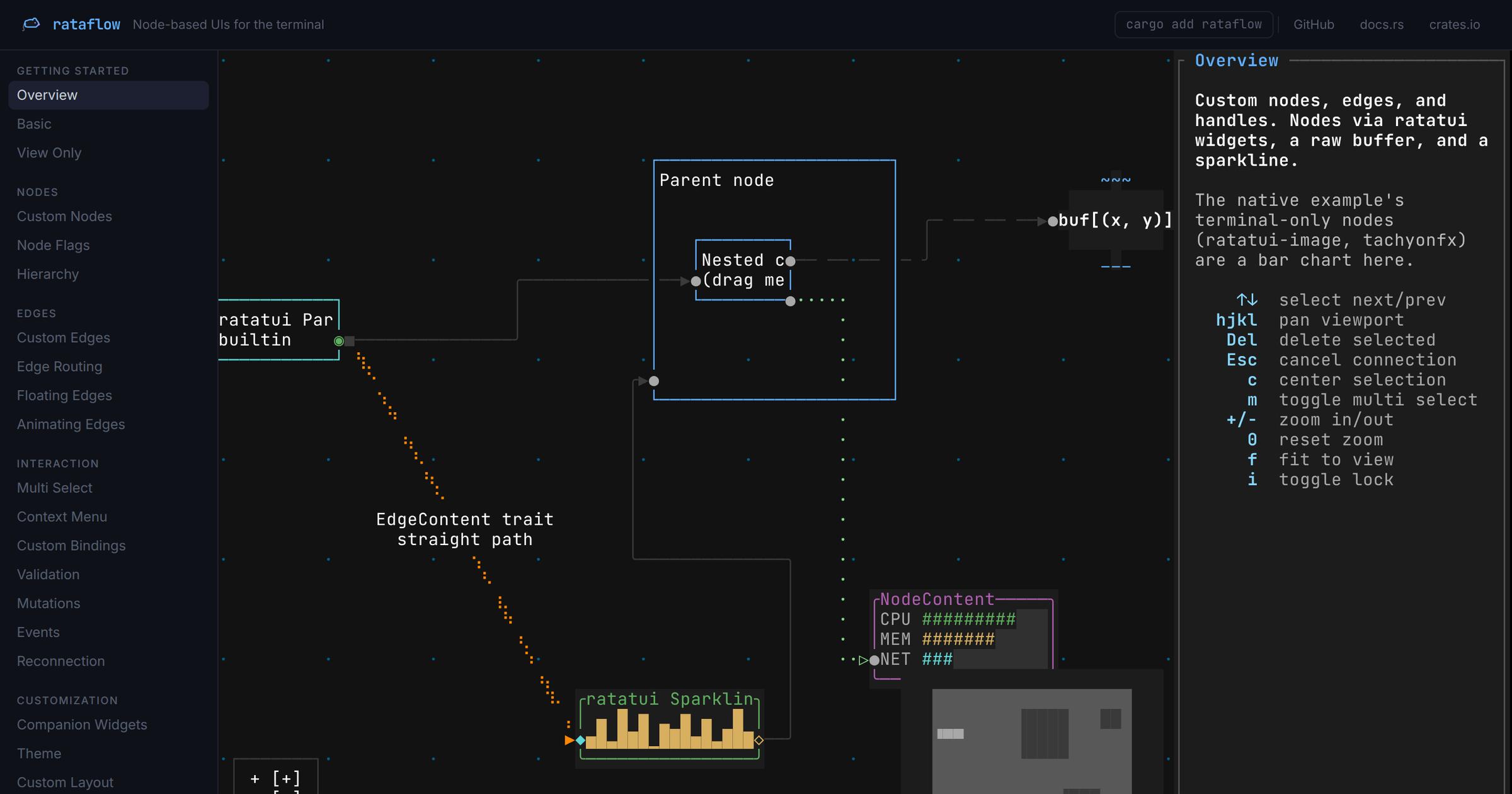
Node and edge content is defined by the NodeContent and EdgeContent traits, so each node can render any Rust type: a text block, a sparkline chart, a live image via ratatui-image, or a custom shader effect via tachyonfx. The graph model stores the content; rataflow handles positioning, z-ordering, and interaction.
Panning, zooming, dragging, and multi-selection work from the first frame with no configuration. Box selection runs on right-drag, node resizing uses a bottom-right grip, and keyboard navigation supports both spatial arrow-key and sequential Tab movement. All keybindings are rebindable via an actions API. Auto-pan activates when dragging near the canvas edge.
Pass a list of edges and rataflow assigns node positions using a layered Sugiyama algorithm, with configurable direction (top-to-bottom, left-to-right) and spacing. For custom positioning, compile out the sugiyama feature flag and set positions via set_node_positions with any external algorithm.
Step, straight, and floating edge types are built in. Crossing edges resolve to proper junction glyphs instead of overwriting each other. Braille edges merge by combining dot patterns within a cell, producing smooth diagonal lines in the terminal without ASCII artifacts.
The serde feature flag enables serialization and deserialization of graph snapshots covering both topology and content. The examples directory includes save_restore and undo_redo demonstrations using this API.
The ratzilla feature flag targets WebAssembly, allowing rataflow graphs to run in a browser using a WebGL2 canvas. The overview demo at rataflow.furkankly.dev runs the native example compiled to WASM, with the same graph topology and portable node types.
Features
- Generic node and edge content types
- Pan, zoom, drag, and multi-select built in
- Automatic Sugiyama graph layout
- Edge routing with junction glyphs and braille strokes
- serde serialization for save and restore
- WASM portability via ratzilla
How to install
Install rataflow into your Rust project with Cargo.
cargo add rataflowRecommended for this setup
Strengths
- MIT license with no commercial restrictions: MIT licensed, so commercial products built on rataflow require no paid tier, no per-seat fee, and no licensing agreement beyond attribution. Source modifications and redistribution are permitted without restriction.
- Measured performance at large graph sizes: Benchmarks against 625 nodes at a 200x60 terminal buffer average ~1.0ms per drag frame in native release builds (roughly 1,000 FPS). At 10,000 nodes the average stays at ~6.6ms. The WASM build handles 10,000 nodes at ~8ms, the same frame time xyflow needs for 625 nodes according to the README benchmarks.
- Backend-agnostic input layer: Works with crossterm (default), termion, termwiz, and WASM via ratzilla. Switching terminal backends does not change graph model code, only the event conversion shim. All four backends share the same rendering pipeline.
- Off-screen node rendering: Nodes render into per-node scratch buffers, so a node at a negative world-space position draws the visible portion correctly. ratatui's u16 buffer cannot address negative coordinates; rataflow handles that at a signed-integer clipping stage before the final cast.
Trade-offs
- Rust-only, no cross-language bindings: Rataflow is a Cargo crate with no bindings to Python, Node.js, Go, or other languages. Teams not writing Rust cannot use it. There is no higher-level scripting interface.
- Mouse event drain loop required: Terminal backends deliver raw mouse events at 125-1000Hz. During a drag, unprocessed events queue up and the UI lags visibly unless the application drains all pending events before each render frame. The README documents the drain loop pattern, but it is an integration requirement on the caller, not an automatic behavior.
- Pre-1.0 API stability: The repository was created in August 2026 and has not reached a stable 1.0 release. The API may change in minor versions. Teams building long-lived tools should pin the exact version in Cargo.toml and review the changelog before upgrading.
Tech stack
FAQ
Yes. The examples directory includes basic_async.rs, which shows the tokio event loop pattern. The library itself is not async, but it integrates with an async runtime by processing events forwarded from the runtime's input loop. The async and sync examples differ only in how events are polled, not in how the graph is used.
crossterm is the default and ships with the library. termion and termwiz are opt-in feature flags. WASM builds use ratzilla. All four share the same graph model and rendering code; only the input event conversion differs by backend.
Yes, with the serde feature flag. It enables serialization and deserialization of graph snapshots covering both topology and content types. The examples directory includes save_restore and undo_redo demonstrations using this feature.
Nodes render into per-node scratch buffers, so a node at a negative world-space position draws the visible portion correctly. ratatui's u16 buffer cannot address negative coordinates; rataflow handles that at a signed-integer clipping stage before the final u16 cast.
The crate is MIT licensed and functional, with published examples covering every major feature. The repository was created in August 2026 and has not yet reached a 1.0 release, so the API may change in minor versions. For production use, pin the exact crate version in Cargo.toml and review the changelog before upgrading.