
Prism Download Manager
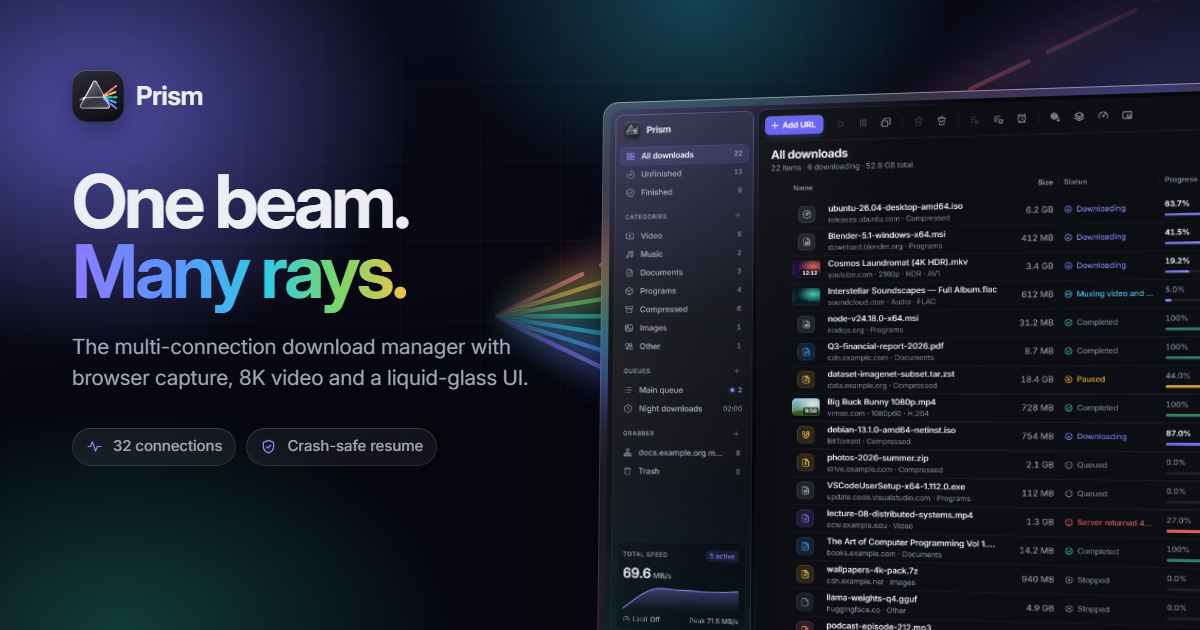
Cross-platform download manager: 32-connection engine, browser capture
Replaces Internet Download Manager, Folx Pro
Who it's for
Prism's multi-connection engine reduces transfer time when fetching multi-gigabyte files from CDNs and mirrors that enforce per-connection bandwidth limits. The crash-safe resume means an interrupted transfer picks up from the last checkpointed byte rather than starting over, which matters when downloading a 4+ GB ISO over an unreliable connection.
Your source files come from a single high-speed unthrottled server such as a local NAS or dedicated mirror. On an unthrottled connection, all tools saturate the same line speed; Prism adds no advantage over a browser download in that scenario.
The browser extension adds a download button directly on the video player. Users pick quality from MP4 at resolutions up to 8K HDR down to audio-only MP3, with optional SponsorBlock chapter trim. Prism installs and maintains a verified yt-dlp and ffmpeg automatically, removing the manual update cycle those tools typically require.
You need advanced yt-dlp features like batch channel downloads with custom naming templates or extensive metadata writing. A standalone yt-dlp command-line workflow with a config file gives more control than Prism's UI exposes for those cases.
Prism replicates the core features those tools are known for: multi-connection engine, browser integration, scheduler, queue management and torrent support. It adds cross-platform coverage and removes the licensing cost. The browser extension registers the same way IDM's does, so the transition is straightforward for users familiar with those tools.
You rely on IDM-specific features like site login capture, complex download categories with per-category folder rules, or the IDM floating download panel. Prism's feature set is newer and not yet as deep as IDM's 20-year feature history.
Prism collects no usage data, requires no account, and embeds no ads. The browser extension talks only to the local application, and the source code is auditable under the MIT license. For users replacing a commercial download manager over concerns about what data the app sends home, Prism is telemetry-free by design and verifiable.
You need cloud sync of your download history or remote management of downloads from a mobile device. Prism is a local desktop application with no cloud component.
The problem
Browser downloads use a single connection, which leaves most of a server's available bandwidth untouched when the server throttles each connection individually. At 4 MiB/s per connection, a 1 GiB file takes over four minutes from a server that would happily serve 16 connections at once. Paid tools solve this with multi-connection engines, but each is platform-specific. Internet Download Manager is Windows-only with a per-license cost and a browser plugin that takes over all downloads by default. Folx Pro covers macOS but nothing else. Users who work across operating systems have had to juggle two different paid apps, or accept slower single-connection transfers everywhere.
How it works
Splits every file into segments and keeps up to 32 connections busy until the last byte. When a connection finishes its range, it immediately takes over half of the largest segment still in progress, so no connection idles waiting for a slow tail. On servers that throttle each connection to 4 MiB/s, this produces up to 15 times the throughput of a single-connection browser download.
Progress is checkpointed only after data is flushed to disk. On resume, Prism validates the remote file using ETag and Last-Modified headers with If-Range requests. If the file on the server has changed, Prism starts fresh; if unchanged, it continues from the last safe byte. A pulled power cable or sleep interrupt loses at most a few seconds of transfer.
A companion extension for Chrome, Edge, Brave, Opera, Vivaldi and Firefox intercepts download links and opens Prism in about 250 milliseconds, with the file name and size already known. Rules based on file type, MIME type and minimum size control which downloads Prism takes automatically. Logged-in downloads work because cookies go only to the local app, not to any external server.
A download button appears directly on the video player in the browser. Prism manages a verified copy of yt-dlp and ffmpeg, installing and updating them automatically. Quality choices include MP4 up to 8K HDR or audio-only MP3, with optional subtitles, chapters and SponsorBlock support. The 1,000+ site count comes from yt-dlp's own supported-sites list.
Handles HTTP/1.1, HTTP/2, FTP and FTPS, HLS and DASH adaptive streams, BitTorrent and magnet links in a single interface. The torrent client is built in; no separate application is needed. Server-side connection limits are detected automatically and respected, with per-host memory so the same limit applies on the next session without re-testing.
Each download queue has its own concurrency limit, speed cap and schedule. A queue can shut the computer down or run a command when it finishes. The site grabber points at a page URL and downloads files matching type and depth rules, which fits use cases like archiving a documentation set or a photo gallery.
Features
- Work-Stealing Multi-Connection Engine
- Crash-Safe Resume
- Browser Integration
- Video Extraction from 1,000+ Sites
- Multi-Protocol Support
- Queue and Schedule System
How to install
Install the prerequisites listed in BUILD.md, then build Prism from source with the commands below.
git clone https://github.com/FortoGraphy/prism-download-manager
npm ci --prefix app
npm ci --prefix extension
npm run build --prefix extension
cd app && npm run tauri:build
Recommended for this setup
Strengths
- MIT License with No Usage Restrictions: The MIT license covers Prism's own code with no usage restrictions, no commercial-use clauses, and no copyleft requirements. Compared to Internet Download Manager's proprietary license with per-machine activation limits, there is no trial expiration, no license key to manage, and no per-device cost. The codebase is auditable and forkable without restriction.
- Cross-Platform Where Paid Alternatives Are Not: Internet Download Manager is Windows-only; Folx Pro is macOS-only. Prism ships native installers for Windows 10/11, macOS 11 and later (both Apple Silicon and Intel), and major Linux distributions including .deb, .rpm and AppImage packages. One tool covers the whole team, regardless of operating system.
- No Telemetry, No Account, No Tracking: The app collects no usage data and requires no account or login. The browser extension communicates only with the local Prism process; no data passes through any external server. Cookies captured from the browser stay on the local machine. This is verifiable from the open source codebase, not just a privacy policy claim.
- Benchmarked Engine with Published Results: Performance benchmarks are published in the repository and reproducible with the included bench.sh script. On an unthrottled localhost connection, Prism reached 1,029 MiB/s, 3.2 times higher than aria2c on the same hardware. On a server with a 2% per-chunk drop rate that caused aria2c to give up, Prism completed the transfer at 37.7 MiB/s.
Trade-offs
- New Project with a Short Track Record: The repository was created in October 2026 and had 222 stars as of launch. With 11 open issues and no established release history beyond v1.1.6, the project is too new to judge long-term maintenance reliability. Users who depend on stable, battle-tested tooling may prefer to wait for a longer release history before adopting Prism as their primary download tool.
- Installers Not Code-Signed: The Windows installer triggers a SmartScreen warning because it lacks a paid code-signing certificate. The macOS package is not notarized by Apple, so users must run a Terminal command (xattr -dr com.apple.quarantine /Applications/Prism.app) or approve it in System Settings on first launch. Users in managed environments where SmartScreen or Gatekeeper enforces strict policies will be blocked.
- Linux AppImage Requires Manual ffmpeg Install: On Linux, the .deb and .rpm packages install ffmpeg and register the browser helper automatically. The AppImage package does not: ffmpeg must be installed from the distribution's package manager separately for video features, and browser helper registration is not automatic.
Tech stack
FAQ
Yes. Prism is MIT licensed and completely free, with no ads, no trial period, and no account required. The only optional cost is a donation through Ko-fi, which the developer accepts but does not require.
Yes, with a one-time setup step. Prism supports macOS 11 Big Sur and later on both Apple Silicon (M1 to M4) and Intel Macs. Because the app is not yet notarized by Apple, macOS blocks it on first launch. Running xattr -dr com.apple.quarantine /Applications/Prism.app once in Terminal removes the restriction, or you can approve it through System Settings under Privacy and Security.
For most use cases, yes. Prism matches IDM's core capabilities: multi-connection downloading, browser integration, crash-safe resume, queue management, scheduler and torrent support. It runs on Windows, macOS and Linux rather than Windows only, and it costs nothing. Users who depend on IDM-specific features like the floating download panel or advanced site login capture may find Prism's feature set less complete for those specific workflows.
Prism uses yt-dlp for video extraction, which supports over 1,000 sites according to yt-dlp's own list. Prism installs and keeps yt-dlp and ffmpeg up to date automatically. A download button appears directly on the video player in the browser; users pick from MP4 at resolutions up to 8K HDR or MP3-only output. YouTube, Vimeo and most major video platforms are covered.
Yes, with one note for Flatpak users. The browser extension is available for Firefox as well as Chrome, Edge, Brave, Opera and Vivaldi. Flatpak-packaged browsers cannot communicate with desktop applications due to Flatpak's sandbox design. If you use a Flatpak Firefox build, install the .deb or .rpm version of Firefox from your distribution's standard packages to enable full extension support.