PokeTokenBar
AI token tracker with a Pokémon companion
Replaces Tokenbar
Who it's for
A developer using Claude Code and Cursor throughout the day can see the combined token count and estimated cost in the menu bar without opening any dashboard, and get an alert before hitting a 5-hour rate limit mid-task.
Someone running automated coding agents burning hundreds of millions of tokens per day can track per-provider breakdowns, watch burn-rate forecasts for each 5-hour window, and use the difficulty slider to reach Pokémon evolution milestones at a reasonable cadence.
User is on a low-volume plan where limits are rarely approached.
The companion mechanic gives a reason to open the popover beyond emergencies: checking egg hatch progress, watching an evolution animation, or browsing the Pokédex turns routine usage review into a small daily ritual.
User only needs raw numbers and has no interest in the companion layer.
A developer trialling several AI coding tools can track all of them simultaneously via per-provider tabs and stacked bar charts, seeing which tool accounts for the most token spend across a week or month.
User works exclusively with a single AI coding tool.
The problem
Developers using multiple AI coding tools have no single place to see how many tokens they have burned today, how close they are to a provider's rate limit, or when that limit resets — leaving them to either open several dashboards or get cut off mid-session without warning. Existing token trackers are purely utilitarian, giving users no reason to open them until something breaks.
How it works
Reads `totalTokens` (input + output + cache) directly from local session files for Claude Code, Codex, Gemini CLI, Antigravity, OpenCode, Hermes Agent, Cursor, Grok CLI, Copilot CLI, Kiro CLI, Pi Agent, omp, omo, Aside, Kimi Code, and Devin CLI. No external CLI, no network upload of usage data, and no extra model calls.
Displays official 5-hour and weekly limits for Claude, Codex, and Antigravity (including per-model-group buckets), OpenCode Go 5-hour, weekly, and monthly allowances, and Grok CLI weekly subscription credits. A burn-rate forecast estimates when the current 5-hour window will reach 100% based on the current usage rate.
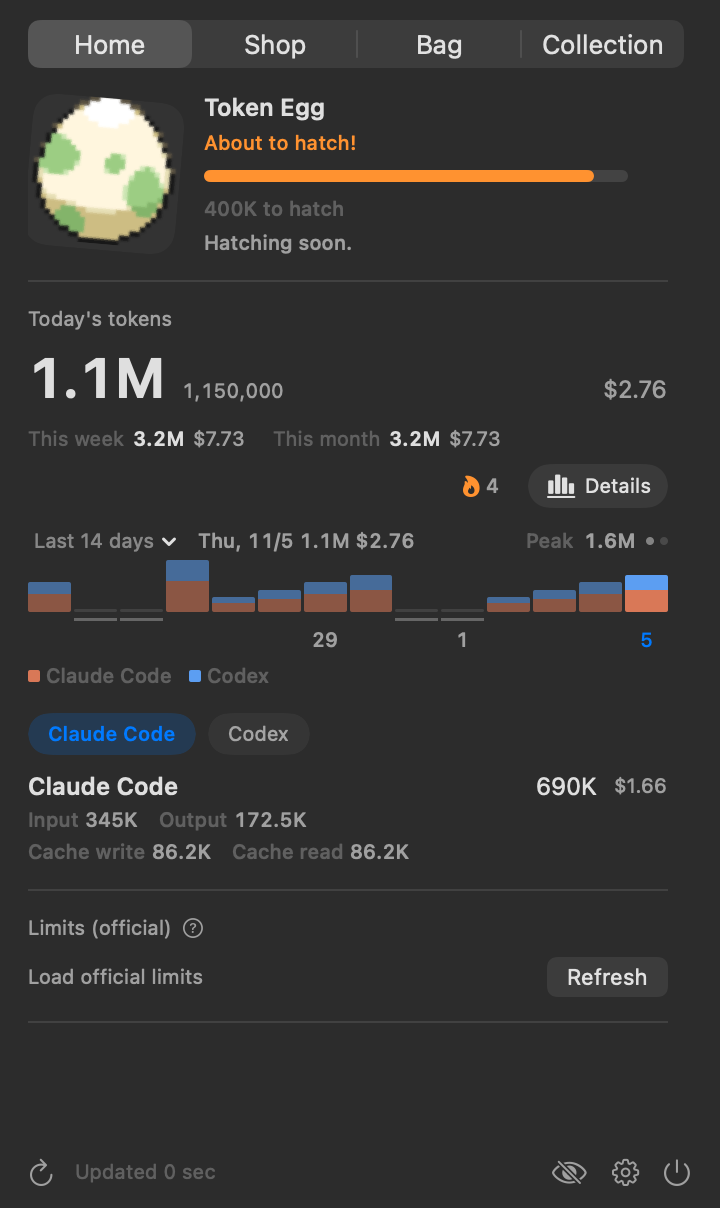
Tokens hatch an egg (default threshold: 5 million tokens) into a surprise Gen 1–5 Pokémon drawn from PokéAPI and weighted by official capture rates across four rarities. The partner evolves through its real multi-stage line and graduates into a permanent Pokédex. Difficulty is adjustable from 10% to 200%.
Every token already spent becomes spendable currency in the Token Shop. Buy Rare Candy to advance your companion, Mints to re-roll its nature, a Shiny Charm to permanently raise shiny hatch odds, or graded eggs (plain, Uncommon-guaranteed, Rare-guaranteed). Filling a 5-hour or weekly limit also earns Rare Candy automatically.
The companion can live on the desktop at any size from 48 to 384 px. Hovering shows today's usage; petted or prayed-to interactions are cosmetic. Optional URL-based hooks (documented Claude Code hooks or custom agent events) make the pet react while an agent is working, waiting for input, or finishing — setup is manual and the app never edits agent settings itself.
Stacked bar charts cover 7, 14, or 21 days or the current month, with per-provider breakdown on hover. Clicking the chart switches to a 16-week activity grid. Weekly, monthly, and yearly recaps are reachable from a labeled Home shortcut, and a flame badge marks usage streaks of at least two consecutive days.
Features
- 16-tool local log reader
- Official provider limits with reset countdowns
- Pokémon companion that grows with your tokens
- Token Shop and Rare Candy rewards
- Floating desktop pet and agent hooks
- Activity charts and usage recaps
How to install
brew install --cask chattymin/tap/poke-token-bar
Recommended for this setup
Strengths
- Privacy by design: All usage data is read from local files and never uploaded. Network access is limited to fetching official provider limits, Pokémon sprites and metadata from PokéAPI, and update checks — the app explicitly documents this in its FAQ.
- No extra cost or account required: PokeTokenBar is free and open-source (MIT). Shop items are purchased with tokens already spent on coding, not real money. No PokeTokenBar account is needed to use any feature.
- Broad tool coverage in one app: Supporting 16 AI coding tools in a single menu-bar item eliminates the need to check each tool's own dashboard. Per-provider tabs appear automatically when two or more tools are detected, with a combined total always visible.
- Adjustable pace for every usage level: Growth thresholds and shop prices are independently configurable from 10% to 200%, so light users on 10 million tokens per day and agent-fleet operators on 300 million tokens per day can both reach evolution milestones at a satisfying cadence.
Trade-offs
- macOS 14+ only: The app requires macOS Sonoma or later and runs only on Apple Silicon or Intel Macs. There is no Windows, Linux, or browser-based equivalent.
- Self-signed binary requires a manual Gatekeeper step on direct download: Downloading the ZIP and moving the app to Applications triggers a macOS Gatekeeper warning on first launch. The installation guide documents the workaround; installing via the Homebrew cask avoids this because Homebrew removes the quarantine attribute automatically.
- Agent activity hooks require manual setup: The floating pet's working, waiting, and done reactions while a coding agent runs are opt-in and require manually adding Claude Code hooks or sending URL events from another agent. PokeTokenBar never installs hooks or edits agent configuration files on its own.
- Pokédex is cosmetic, not functional: The companion system, Pokédex completions, regional badges, and shiny collection are cosmetic milestones. They do not change the underlying token-tracking functionality and require sustained, long-term token usage to fill out rare and legendary slots.
Tech stack
FAQ
No. Usage logs stay on your Mac. The app uses the network only to fetch official provider limits, Pokémon data and sprites from PokéAPI, service status, and update information.
No. The companion grows by reading usage from your supported coding tools. No additional model turns are made.
Every token you have already spent on AI coding becomes spendable shop currency. You can buy Rare Candy to advance your companion, Mints to re-roll its nature, a Shiny Charm to raise shiny hatch odds permanently, or graded eggs. There are no real-money purchases.
PokeTokenBar requires macOS 14 (Sonoma) or later and runs on both Apple Silicon and Intel Macs. It is a free download, with no account required.
Yes. The Swift 6 source code, build instructions, and issue tracker are available on GitHub at github.com/chattymin/PokeTokenBar under the MIT license.