
Paperless-ngx
Self-hosted document archive with OCR indexing and full-text search.
Replaces Docuware, Laserfiche, M Files, Ecodms, Filecenter
Who it's for
Individuals who receive regular paper mail (utility bills, tax forms, bank statements, medical letters) can scan and auto-index everything into a searchable archive. Search retrieves any document by content within a second; no filing system to maintain.
Your household document volume is very low (under 50 documents per year) or you prefer a managed cloud service. Paperless-ngx requires a server to run, so a simple cloud folder may be more practical at minimal scale.
Small businesses that receive paper invoices, contracts, and correspondence can route all incoming documents through Paperless-ngx for automatic tagging by correspondent and document type. Full-text search surfaces any specific invoice or clause without maintaining manual folders.
Your business has compliance or audit requirements (HIPAA, SOC 2, etc.). Paperless-ngx does not provide the audit trails, encrypted storage, or access controls that regulated workflows require.
Paperless-ngx integrates naturally into home lab environments running other self-hosted services. Docker Compose deployment slots into existing setups, and the API allows integration with automation tools for document routing.
You do not already run any self-hosted services and are not comfortable managing Docker containers.
The project is the official successor to both Paperless and Paperless-ng. Existing users can migrate by swapping the Docker image without losing their indexed archive, document types, correspondents, or tags.
You are a new user with no prior Paperless installation. New users start with the standard Docker Compose setup; the migration path is specifically for existing Paperless-ng users.
The problem
Paper documents pile up over time: tax returns, utility bills, invoices, contracts, medical records. Finding a specific document means physically sorting through folders and cabinets, with no way to search across them. Digitizing everything manually is slow, and generic file storage offers no OCR, no automatic tagging, and no cross-document search. For households and small offices, commercial document management systems are overbuilt and expensive. DocuWare and M-Files target enterprise compliance workflows with per-seat pricing that makes no sense for a home archive or small team. The gap leaves individuals paying cloud storage fees for unindexed scans they still cannot search, or maintaining paper filing systems that grow more unwieldy every year.
How it works
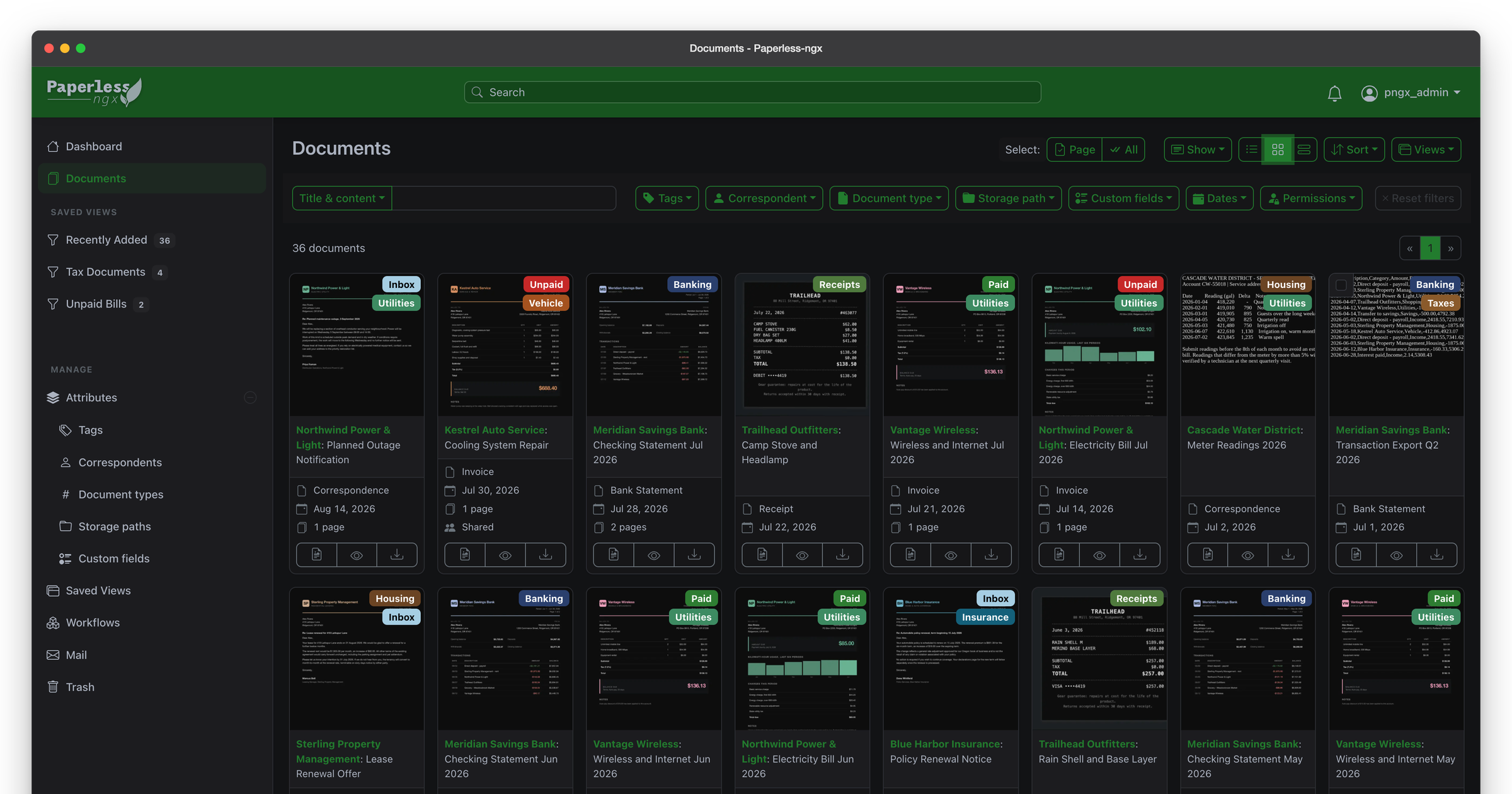
Runs optical character recognition on every scanned document, extracting text that becomes searchable across the full archive. PDFs, images, and multi-page documents are all processed server-side. Once indexed, any word from any document surfaces in search results immediately.
Documents can be auto-assigned to correspondents, document types, and tags using rules based on OCR content. The LLM integration extends rule-based classification to handle documents that do not match static patterns. This reduces the manual work of organizing a large archive.
Every indexed document is searchable by content, correspondent, date, tag, or type. The search interface runs in the browser via an Angular frontend, returning results across hundreds or thousands of documents in under a second for most deployments.
The project ships Docker Compose files targeting the GitHub container registry image, with an install script that sets up the full stack. A running instance requires only Docker and Docker Compose; no separate database setup is needed beyond what the compose file provides.
Accepts PDFs, images (JPEG, PNG, TIFF), and other document formats through watched folders, the web upload interface, or a mobile companion app. The consumption pipeline normalizes all inputs through the OCR engine before indexing.
Paperless-ngx is the official successor to the original Paperless and Paperless-ng projects, designed to distribute maintenance responsibility across a team. The repo has over 47,000 GitHub stars, and translation support runs through Crowdin in many languages.
Features
- OCR document indexing
- Automatic tagging and classification
- Full-text search across the archive
- Docker Compose deployment with install script
- Multi-format document consumption
- Community-maintained with active development
How to install
The install script sets up a docker compose environment on your server.
curl -L https://raw.githubusercontent.com/paperless-ngx/paperless-ngx/main/install-paperless-ngx.sh | bashRecommended for this setup
Strengths
- GPL-3.0 license with full self-hosting: Licensed under GPL-3.0, Paperless-ngx can be deployed on your own hardware with no software costs. Unlike DocuWare or M-Files, which require vendor licensing agreements, the GPL means you can run, modify, and redistribute the code. Self-hosting gives you complete control over where documents are stored and who can access them.
- 47,000+ stars and a very low open issue count: With over 47,000 GitHub stars and only 4 open issues, Paperless-ngx has one of the healthiest community signals in self-hosted document management. The project is actively maintained, and the multi-team structure (frontend, CI/CD, etc.) distributes maintenance so no single contributor's workload stalls the project.
- Official successor to an established project lineage: Paperless-ngx is the officially recognized successor to the original Paperless and Paperless-ng projects, inheriting years of production use and community feedback. Users migrating from Paperless-ng can drop in the new Docker image without data loss, and the history means the feature set reflects real user needs over a long period.
- Runs on low-cost home hardware: A basic deployment runs on a local server or NAS device; the project explicitly recommends a home server for the best security posture. This makes it accessible to individuals using hardware like a Raspberry Pi or a repurposed desktop, without the cloud infrastructure costs of managed DMS services.
Trade-offs
- No encryption at rest: Documents are stored in clear text without encryption. The README explicitly warns that Paperless-ngx should never be run on an untrusted host, and recommends running it only on a local server with backups. Users handling highly sensitive documents (financial, legal, medical) should implement filesystem-level encryption themselves before deploying.
- Not built for enterprise compliance workflows: The project targets households and small offices, not enterprise deployments. It lacks the compliance workflow automation, audit trails, and role-based access controls that regulated industries require from commercial DMS platforms like DocuWare. Large organizations with document compliance requirements will find the feature set limited.
- Requires Docker and server administration knowledge: Deploying Paperless-ngx requires familiarity with Docker Compose and basic server administration. The install script simplifies setup, but troubleshooting storage, networking, or OCR performance issues requires comfort with containers and Linux. Non-technical users are better served by managed alternatives.
Tech stack
FAQ
Yes. Paperless-ngx is GPL-3.0 licensed and entirely self-hosted, so the software costs nothing. You pay only for the hardware or server you run it on. There is no cloud subscription tier or managed hosted version.
The easiest path is Docker Compose using the official install script from the GitHub repository. The script configures and launches the full stack in one command. Detailed step-by-step guides for alternative installation methods are in the official documentation at docs.paperless-ngx.com.
It depends on your deployment. The project stores documents in clear text without encryption and explicitly warns against running it on untrusted hosts. The recommended deployment is a local server on your home network with backups. For sensitive legal, financial, or medical records, add filesystem-level encryption to your storage volume before storing documents.
Paperless-ngx covers core document capture, OCR indexing, and search for personal and small team use at no software cost. DocuWare is an enterprise DMS with workflow automation, compliance modules, and vendor-managed hosting, which is a better fit for larger organizations with regulatory requirements. Paperless-ngx is the better choice when you want self-hosted control without enterprise pricing.
Yes. Paperless-ngx is the official successor to Paperless-ng and is designed as a drop-in upgrade. Replace the Docker image with the Paperless-ngx image; your existing database, indexed documents, correspondents, and tags carry over without data loss.