Pangolin
Zero-trust network access, reverse proxy, and AI gateway, self-hosted.
Replaces Cloudflare Zero Trust, Zscaler Private Access, Twingate, Teleport, Ngrok
Who it's for
Give developers access to staging databases, internal APIs, Kubernetes clusters, and production SSH servers through zero-trust resource access instead of network-wide VPN. Pangolin's per-resource policy model means a developer working on one service only reaches that service, not the entire internal network. The AI gateway also centralizes coding agent access to both cloud and self-hosted models.
Teams requiring a fully managed control plane with no infrastructure to maintain are better served by Cloudflare Zero Trust or Twingate. Pangolin requires at least one server running the control plane plus site connectors deployed on each target network.
Access a homelab's NAS, router admin panel, Plex server, and self-hosted apps from anywhere without exposing any port to the internet. Pangolin's NAT traversal handles carrier-grade NAT and ISP-managed networks where a static IP is unavailable. Browser-based access means family and friends use homelab services from any device without installing a VPN client.
Users who need a simple single-service tunnel (one app, one port) may find Tailscale or plain WireGuard simpler to set up than a full SASE stack.
Teams migrating off a commercial SASE vendor get Pangolin's equivalent zero-trust resource access model, identity provider integration, and audit logging on their own infrastructure. The browser-based reverse proxy covers the same HTTPS application access use case as Cloudflare Tunnels, without traffic leaving your network. RBAC and SSO map directly to what Cloudflare One and Twingate users already know.
Enterprises with complex multi-region setups, dedicated support SLAs, or existing Cloudflare CDN and WAF integrations may find Cloudflare Zero Trust the more integrated choice.
Engineering teams with unpredictable OpenAI and Anthropic API spend can route all requests through Pangolin's AI gateway to enforce per-user budgets, audit session logs, and add keyless access for desktop clients. Self-hosted models (Ollama, vLLM) and cloud models share the same gateway endpoint, so switching models or adding a new provider is a configuration change, not a code change.
Teams that only need basic API key management without network-level access control should evaluate dedicated AI gateway tools instead of deploying a full SASE platform for this use case alone.
The problem
Corporate networks are no longer bounded by a physical office. Teams work from home, contractors need database access, and developers SSH into production servers from anywhere. Traditional VPN software solves the connectivity problem but creates a new one: once a user connects to the VPN, they have broad network access. A developer granted VPN access to reach one internal service can often reach everything on that segment, which creates real lateral movement risk in the event of a compromised credential. The managed SASE platforms built to fix this, including Cloudflare Zero Trust, Zscaler Private Access, and Twingate, enforce access at the application and resource level rather than the network level. That is a real improvement. But those platforms route your traffic through the vendor's infrastructure, charge per-seat subscription fees that grow with the team, and lock policy enforcement into a cloud control plane you cannot audit or customize. For teams that need enterprise-grade access control without trading data sovereignty for convenience, the only option has been to build something custom from scratch or accept those constraints.
How it works
Site connectors create gateways into private networks by punching through restrictive firewalls using outbound WireGuard tunnels. No public IP address or open inbound port is required. Any networked resource behind the connector becomes accessible to authorized users, with strict network segmentation enforced. Connectors deploy as a binary or container on any platform.
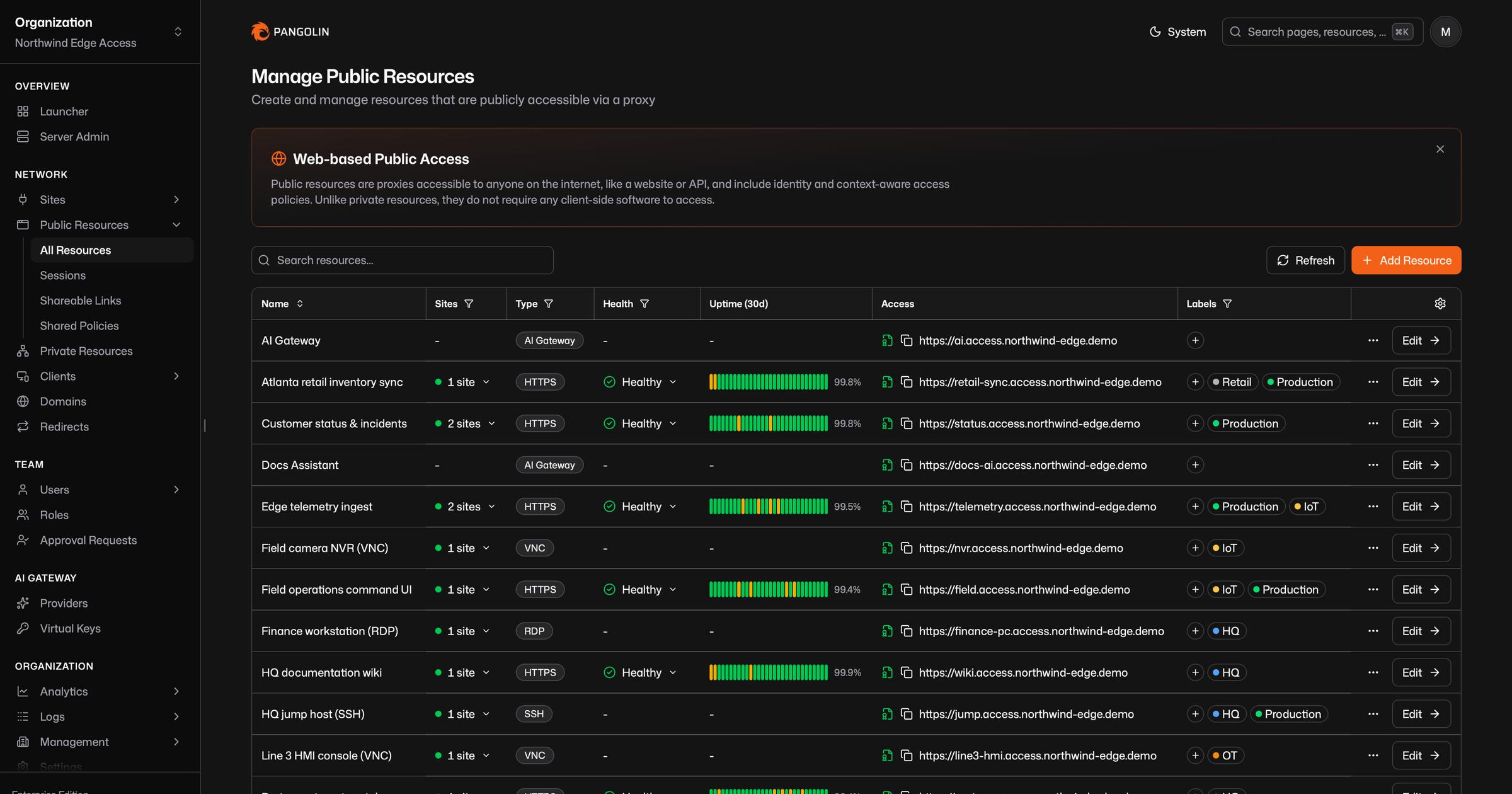
Expose web apps, VNC desktops, RDP sessions, and SSH terminals entirely in the browser through tunneled reverse proxies. Users authenticate and access resources without installing a client. Additional controls include PIN codes, passcodes, email OTP, geoblocking, and IP allow-lists. Pangolin handles SSL certificates automatically.
Pangolin clients for macOS, Windows, Linux, iOS, and Android connect to private resources such as SSH servers, databases, RDP desktops, and entire network ranges through peer-to-peer WireGuard tunnels. Intelligent NAT traversal works through restrictive firewalls. DNS aliases give friendly names to resources across all connected sites.
Proxy cloud model APIs (OpenAI, Anthropic, Gemini) and self-hosted model servers (Ollama, vLLM, Mistral) through a single Pangolin endpoint. Access can be keyless when users authenticate through the Pangolin desktop client, or key-based with personal API keys per user. Token budgets, session history, and usage analytics sit in front of every call, which helps control AI costs across a team.
Connect an existing identity provider and sync users and roles to Pangolin through OIDC. Access is granted per resource, not per network: a user gets exactly the apps, services, and routes you define. Full audit logs capture every access event. The built-in users system is available as a fallback when no external IdP exists.
Users get a personalized landing page listing the resources they can access, grouped by site or label, searchable, and filterable. Grid and list views are available. Saved views capture filters, grouping, and layout as personal or organization-wide defaults, so common access patterns are one click away.
Features
- NAT traversal and site connectors
- Browser-based reverse proxy with VNC, RDP, and SSH
- Client-based access to private resources
- Identity-aware AI gateway
- RBAC with identity provider integration
- Resource launcher for end users
Recommended for this setup
Strengths
- Unified identity model across all access types: Sites, reverse proxy, client VPN, RBAC, and the AI gateway all share one identity and policy model. This matters because access policy set once in Pangolin applies across VPN connections, browser proxies, SSH sessions, and AI gateway calls without separate configuration per access type. Users and their permissions are managed in one place regardless of which resource they are accessing.
- NAT traversal without public IPs or open inbound ports: Outbound WireGuard tunnels bypass the need for a static IP or firewall rule changes on the private network side. This matters in home networks, ISP carrier-grade NAT, and corporate environments with strict outbound-only firewall policies. Plain WireGuard deployments require manual peer configuration and a reachable server endpoint on each side.
- 23,000+ stars and active maintenance since 2024: With over 23,000 GitHub stars since its first release in September 2024, Pangolin has grown faster than most networking tools in this space. The last commit was November 4, 2026, with active development across the TypeScript codebase. A Discord, Slack, and YouTube channel provide community adoption support.
- Enterprise edition free for small teams: The Fossorial Commercial License allows personal users, hobbyists, and businesses with under $100K annual gross revenue to run the Enterprise Edition at no cost. Organizations that outgrow that threshold can negotiate a written commercial agreement. This pricing model gives smaller teams access to advanced features without upfront licensing costs.
Trade-offs
- AGPL-3.0 source disclosure requirement on the core: The core is licensed under AGPL-3.0, which requires distributing source code for any modified version run as a network service. For teams running an unmodified deployment this is not an issue. Teams that customize the codebase and offer Pangolin as a managed service to others must release their modifications under the same license.
- Enterprise features restricted under Fossorial Commercial License: Advanced enterprise features are not covered by AGPL-3.0. The Fossorial Commercial License permits self-hosting free for personal use, hobbyists, and businesses under $100K annual gross revenue. Using enterprise features commercially above that threshold requires a paid written agreement with Fossorial. Teams cannot resell Pangolin-based hosted networking services without such an agreement.
- Self-hosting a full SASE stack requires planning: Pangolin is not a single container install. A production deployment includes the control plane server plus site connectors deployed on each private network. The quick install guide walks through the process, but administrators unfamiliar with server management and WireGuard-based networking will need time to understand the architecture before the platform feels manageable.
- 77 open issues as of November 2026: The project carries 77 open issues as of November 2026, which is normal for an actively developed tool with significant adoption, but it does mean rough edges exist. As a project first released in 2024, some edge cases around multi-site configurations, enterprise IdP integrations, and the AI gateway are still being worked out. The issue tracker and Discord are active channels for getting help.
Tech stack
FAQ
Yes, with nuance. The Community Edition is AGPL-3.0 licensed and free for all uses, with source disclosure required for modified versions run as network services. The Enterprise Edition uses the Fossorial Commercial License, which is free for personal use, hobbyists, and businesses with under $100K annual gross revenue. Organizations above that threshold need a paid written commercial agreement. Pangolin Cloud, the fully managed option, has its own pricing.
No. Site connectors use outbound WireGuard tunnels with intelligent NAT traversal to make private networks accessible without a public IP or open inbound ports. This works through carrier-grade NAT, home networks, and corporate firewalls with strict outbound-only policies. The control plane needs a reachable server, but the private networks being connected to it do not.
The Community Edition covers the core tunnel proxy, reverse proxy, and basic access control under AGPL-3.0. The Enterprise Edition adds advanced features under the Fossorial Commercial License, and is free for personal, hobbyist, and small business use under $100K annual revenue. Both editions are self-hostable. Pangolin Cloud provides the Enterprise Edition as a fully managed service for teams that prefer not to manage the control plane.
For most use cases, yes. Pangolin provides client-based access to private resources through WireGuard under the hood, so it handles the same connectivity scenarios as a traditional VPN. The difference is that Pangolin enforces access at the resource level (specific apps, servers, or port ranges) rather than granting network-wide access. Teams migrating from WireGuard or OpenVPN gain RBAC, audit logging, SSO, and browser-based access without changing the underlying tunnel protocol.
Pangolin's identity-aware AI gateway acts as a proxy in front of both cloud model APIs (OpenAI, Anthropic, Gemini) and self-hosted model servers (Ollama, vLLM, Mistral). Users or coding agents make API calls to the Pangolin endpoint. Access can be keyless if the user authenticates through the Pangolin desktop client, or key-based with personal API keys issued per user. Token budgets and session logs apply to all models equally.