
Openpencil
AI-native vector design tool with concurrent agents and code export
Replaces Figma, Uizard, Flowstep Ai
Who it's for
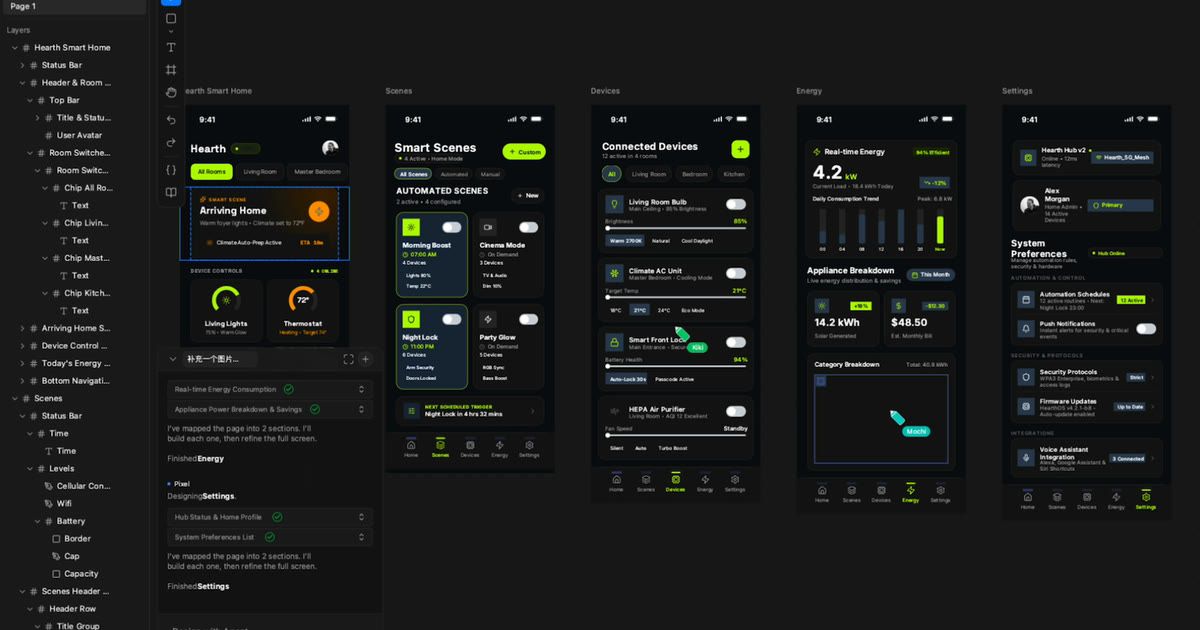
The concurrent agent teams generate an entire multi-screen product flow in one session, with each screen's sections designed in parallel. Teams can iterate on individual sections by selecting elements and chatting, then export the full flow to React or Vue for implementation.
Skip if your prototyping workflow depends on Figma and you need tight design-dev handoff with an existing Figma component library and plugin ecosystem. Openpencil's third-party component coverage is smaller than Figma's as of October 2026.
Openpencil's MCP server connects directly to Claude Code, Codex, OpenCode, and Copilot CLIs. A developer can describe a UI in a terminal prompt, have it generated on canvas, and receive `.op` file output that exports to React + Tailwind without switching between tools.
Skip if your codebase targets a framework not in the export list (e.g. Angular or Blazor). Code export covers React, Vue, Svelte, Flutter, SwiftUI, Jetpack Compose, and React Native, but not every stack.
The MIT license and JSON-based file format let teams build automation around `.op` files: CI pipelines that design-check commits, custom MCP tools that generate components from a spec, or SDK-embedded viewers for stakeholder review. No license fees or vendor approval required.
Skip if the team has no AI provider access or budget. Openpencil requires external LLM API keys (Anthropic, OpenAI, Google, DeepSeek, or similar) to run AI generation.
Code export to Flutter, SwiftUI, Jetpack Compose, and React Native means a solo developer can go from prompt to a native mobile UI skeleton in one pass. The style guide library covers glassmorphism, brutalist, retro, and other visual styles, applying them consistently across generated screens.
Skip if you need pixel-perfect fidelity over a large existing component library. AI-generated UIs need manual refinement for production-quality mobile apps; Openpencil accelerates the sketch-to-wireframe phase more than it replaces the production implementation phase.
The problem
AI-assisted design tools generate a single UI from a single prompt, then leave you with a monolithic result that takes as long to refine as drawing from scratch. Most paid tools in this category are cloud-only with metered generation, and they lock design files in binary or proprietary formats that cannot be tracked in version control without a paid collaboration account. The deeper pain for engineering-led teams is the gap between design and code: you generate a mockup, export assets, and rebuild the UI from scratch in React or Flutter. A design canvas and a code editor stay two separate worlds with no shared file format. Teams that want AI-driven UI generation built into their coding workflow, checkable in Git and exportable directly to component code, have no established paid option that satisfies all three constraints.
How it works
Multiple AI agents work on different screen sections simultaneously, with an orchestrator decomposing complex pages into spatial sub-tasks. Per-member canvas indicators stream each agent's output in real time, so a hero section, features block, and footer generate in parallel rather than in sequence.
Describe any UI in natural language; the design streams onto the infinite canvas in real time with SSE animation. Select existing elements and describe changes in natural language to modify them. Vision input lets you attach screenshots or mockups as reference for reference-based generation.
One `.op` file exports to React + Tailwind, HTML + CSS, Vue, Svelte, Flutter, SwiftUI, Jetpack Compose, and React Native. Design variables become CSS custom properties, so the export reflects the design system defined on canvas rather than a static snapshot.
A one-click install connects Openpencil to Claude Code, Codex, OpenCode, Kiro, or Copilot CLIs via the `--mcp` flag or the live HTTP endpoint at `127.0.0.1:<port>/mcp`. Design files can be read, created, and modified from any MCP-compatible agent without opening the desktop app.
Openpencil automatically adapts prompts and timeouts per model tier: Claude receives full prompts with thinking mode enabled; GPT-4o and Gemini run at standard tier; smaller models (MiniMax, Qwen, Llama, Mistral) get simplified nested-JSON prompts tuned for reliable output. Nine or more provider presets are available, plus Claude Code via local OAuth.
`.op` files are plain JSON: human-readable, Git-friendly, and diffable. The format supports design variables that generate CSS custom properties, is importable via an embeddable web SDK (`op-web-sdk`), and can be opened by double-click file association on macOS, Windows, and Linux.
Features
- Concurrent Agent Teams
- Prompt-to-Canvas Design
- Multi-Platform Code Export
- Built-in MCP Server
- Multi-Model Intelligence
- Design-as-Code File Format
How to install
Install the desktop app via Homebrew on macOS or use the install script on Linux.
# macOS (Homebrew)
brew tap zseven-w/openpencil
brew install --cask openpencil

# macOS / Linux (install script)
curl -fsSL https://raw.githubusercontent.com/ZSeven-W/openpencil/main/scripts/install-op.sh | bash
Recommended for this setup
Strengths
- MIT License with Full Self-Hosting: The entire codebase is MIT licensed, so the tool runs on your infrastructure without seat fees, metered generation costs, or vendor lock-in. Unlike Figma (cloud-only, proprietary format) or Uizard (SaaS with paid tiers), you own the server, the files, and the pipeline.
- Concurrent Agent Architecture: The orchestrator-plus-team model generates separate screen sections in parallel, which is faster than single-shot AI generation and produces designs where each section is independently refinable. No other open source design tool as of October 2026 uses this concurrent team architecture.
- Git-Native Design Files: `.op` files are JSON and can be stored in version control, diffed, and merged using standard Git tooling. Design changes become trackable commits, fitting engineering teams that already use Git for code and want design history in the same repository.
- Single Binary, No Browser Engine: The desktop app is a single Rust binary with no embedded Chromium or Electron overhead. It installs via Homebrew on macOS, Scoop on Windows, or AppImage/deb on Linux, and runs the same rendering core as the web host.
Trade-offs
- Early-Stage Project with Potential API Changes: Openpencil launched in February 2026 and carries 29 open issues. As an early-stage project, APIs and file format details may change between releases. Teams building automation around `.op` files or MCP tooling should plan for migration work as the project stabilizes.
- Requires External AI Provider Keys: The tool requires users to supply their own API keys for AI providers, or to connect Claude Code, Codex, or another CLI agent. There is no bundled model or built-in free tier for AI generation; teams self-hosting must manage their own provider credentials and associated costs.
- CLI Agents Unavailable in Docker Deployment: The web host (Docker image) supports only built-in API-key agents. Claude Code, Codex, OpenCode, and Copilot CLI tooling are not available in Docker; they require the native desktop binary. Teams running Openpencil as a shared server lose access to the CLI agent integrations.
Tech stack
FAQ
Yes. Openpencil is MIT licensed and free to self-host. You supply your own AI provider API keys, which you pay for directly (e.g. Anthropic or OpenAI). There is no per-seat or per-generation fee from Openpencil itself. The Docker image and desktop binaries for macOS, Windows, and Linux are all freely available.
Figma's AI features work within its proprietary cloud-based canvas and require a paid Figma subscription. Openpencil is MIT licensed, runs on your own infrastructure, and uses a concurrent agent team architecture where multiple AI agents design different screen sections simultaneously. Design files are plain JSON, not a proprietary format, so they work with standard Git tooling.
Openpencil ships with nine or more built-in provider presets including Anthropic, OpenAI, Google, and DeepSeek, selectable from a region switcher. It also connects natively to Claude Code (via the Claude Agent SDK with local OAuth), Codex CLI, OpenCode, and GitHub Copilot. Model prompts and timeouts adjust automatically per tier.
Yes. A single `.op` file exports to React + Tailwind, HTML + CSS, Vue, Svelte, Flutter, SwiftUI, Jetpack Compose, and React Native. Design variables become CSS custom properties in the export. The CLI (`op`) can drive exports from the terminal without opening the desktop app.
Openpencil launched in February 2026 and is under active development with 29 open issues. The `.op` format is JSON and stable enough for daily design work, but the project is early-stage and breaking changes between versions are possible. Check the GitHub releases page before building production automation around the format.