
Openfilm
AI video agent for coding agents, with a local editor and no account.
Replaces Remotion
Who it's for
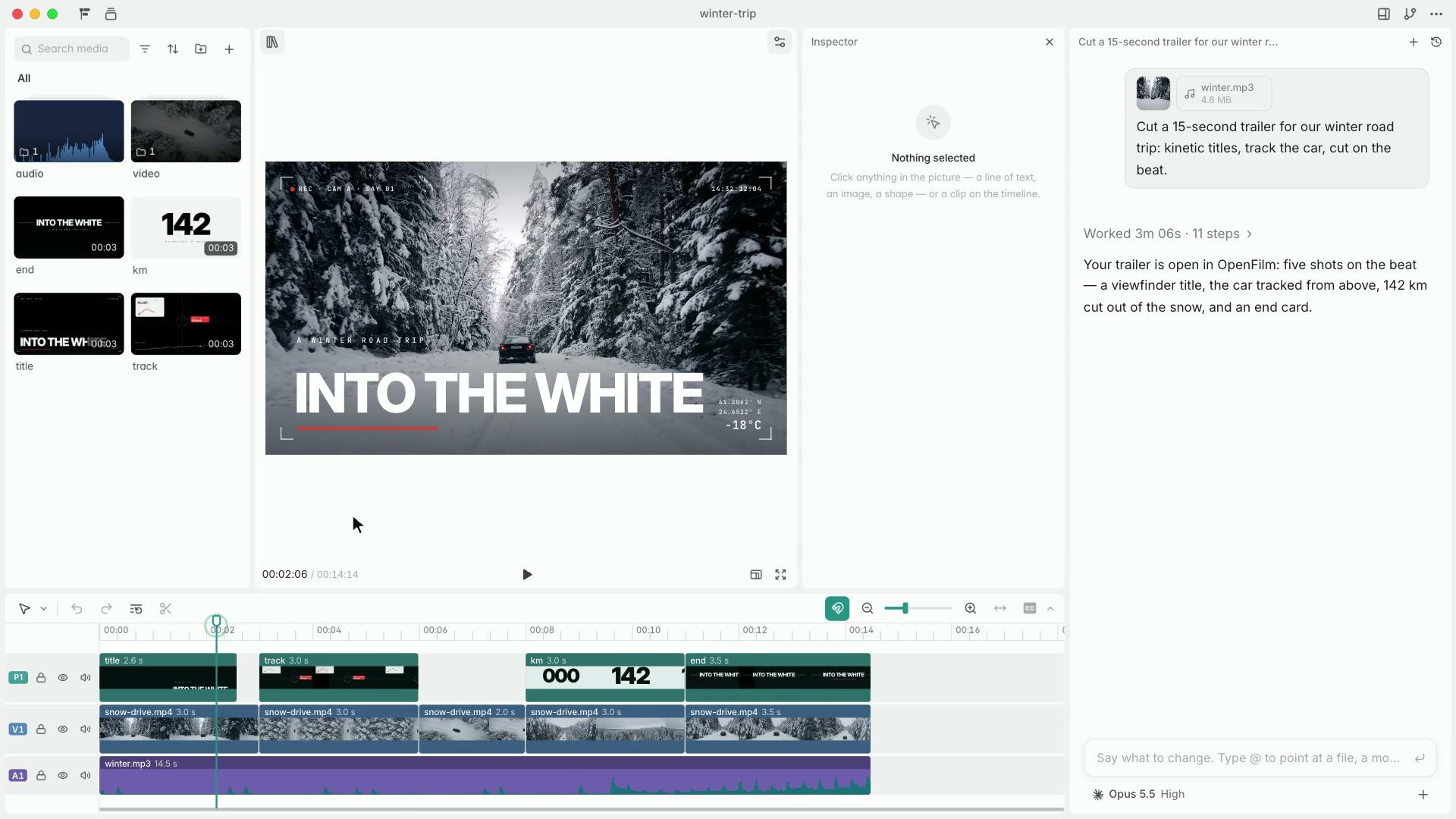
Ask an agent to produce a 30-second product demo from a one-sentence brief. OpenFilm writes the shots, Studio renders a preview, and the developer adjusts timing and copy by hand without leaving the browser. The agent can be asked to revise specific shots while the developer keeps manually edited sections unchanged.
If the team needs broadcast-quality motion graphics with frame-by-frame manual control, a professional NLE like Adobe Premiere or DaVinci Resolve is a better fit. OpenFilm targets agent-generated films, not frame-precise manual animation.
OpenFilm exposes a CLI and a MANUAL that agents can read, making it composable with larger agent workflows. An agent can generate a film, check it with `openfilm look`, and render it to MP4 without any human interaction in between.
If the agent pipeline generates frames as images from a video diffusion model, those frames come in as video or image clips. OpenFilm handles the assembly and rendering, but the frame-generation step is upstream and separate.
Video editing tasks like footage highlights, music sync, captions, and motion graphics are handled by the agent with brief prompts. Studio shows the result and allows direct tweaks to timing, text, and layout without rebuilding the film from scratch.
Teams that need licensed music libraries, rights-cleared stock footage, or a brand approval workflow built into the editor will need additional tooling around OpenFilm. It provides the authoring format and editor, not a media licensing service.
The film format (SPEC.md) is openly documented, making OpenFilm a foundation for building custom players, renderers, or editors. The source is available on GitHub and the repository includes the desktop app, CLI, and Studio as separate packages that can be developed independently.
If the goal is a quick screen recording or a slide-based presentation, a dedicated screen capture tool or presentation software is faster to set up. OpenFilm's value is in agent-authored films with custom web-based shots.
The problem
Video production sits outside the normal coding workflow. Getting a coding agent to generate a video requires either a complex media framework the agent has to learn from scratch, a paid SaaS service with account requirements and per-export costs, or manual editing in a separate tool after generation. Most agents end up producing still images or presentation slides rather than real video output because no accessible video format matches what they can write. The missing piece is a video format that a coding agent can author with web technologies it already knows, paired with an editor the developer can open without installing anything extra. Without those two things, teams either skip video entirely or pay for managed services that keep them locked out of the source files.
How it works
Any coding agent that can run a command becomes a video creator. The agent receives OpenFilm's full manual via `npx skills add openfilm/openfilm`, then writes shots as web pages. Claude Code, Codex, Cursor, GitHub Copilot, Gemini CLI, OpenCode, Windsurf, Cline, Amp, and Devin are all confirmed compatible.
A film is a folder on disk with a `film.html` that cuts tracks of clips together. Each shot is a web page with a single `frame(t)` function. Agents already know HTML, CSS, and JavaScript, so no new framework is needed. Any web drawing primitive works: three.js, WebGL, Canvas, SVG, CSS, GSAP.
Studio runs in a browser at localhost and shows the film taking shape as the agent writes it. Text, colors, layers, clips, timeline position, subtitles, and playback speed can all be changed by hand. Edits write back to the film's files, so the agent sees and keeps them. Exports include MP4, GIF, transparent video, and timeline files for Final Cut Pro, Premiere Pro, and DaVinci Resolve.
Making, editing, and rendering films is entirely free and local. For generated voice, music, images, and video, the user connects external services (ElevenLabs, OpenAI, Google, fal, and others) in Studio's Settings using their own API keys. OpenFilm itself never bills for these operations.
The `openfilm render` command exports to MP4 with all frames computed in parallel, up to 4K. The `look` command detects rendering problems early by drawing every frame twice in shuffled order and flagging any that changed between passes, along with font-load failures, missing media files, and text clipped by the frame boundary.
The film format is an open spec (SPEC.md), so any player, renderer, or editor can implement it. A desktop app for macOS and Windows bundles Studio alongside a chat panel for connected agents, including ffmpeg and a headless browser, so no additional installs are needed on those platforms.
Features
- Agent-native video authoring
- Film format built on plain web standards
- Studio: local browser editor
- No account required for core editing and rendering
- Frame-accurate parallel rendering
- Open format and desktop app
How to install
Install the CLI with npm, Node 22.2+ and ffmpeg required.
npm install -g openfilmRecommended for this setup
Strengths
- MIT license with no cloud dependency: The CLI, Studio, and the format are all MIT licensed. Films live entirely on disk with no vendor cloud account to authenticate against, no subscription for rendering, and no data sent to OpenFilm servers. Teams can fork the codebase and extend it without restriction.
- Works with every major coding agent: One installation step adds the skill to whichever agent the team uses. Claude Code, Codex, Cursor, GitHub Copilot, Gemini CLI, OpenCode, Windsurf, Cline, Amp, and Devin are all confirmed compatible. Any agent that can run a shell command works with no further configuration.
- Round-trip editing between agent and developer: Studio writes edits back into the film's source files, so the agent and the developer can work on the same film in turns. Named version saves let the developer roll back to a previous state. This differs from generated-output tools where the human and the agent each own a separate artifact with no shared editing history.
Trade-offs
- Node 22.2 and ffmpeg required: The first run downloads a headless Chromium browser (about 100 MB). ffmpeg must be on the PATH, and Node 22.2 or later is required. The desktop app for macOS and Windows includes ffmpeg and the headless browser, removing those prerequisites on those platforms, but Linux users need to manage them separately.
- Very new project with limited community history: The repository was created in October 2026 and has 19 open issues at launch. There are no long-term community discussions, third-party tutorials, or production deployments documented yet. Teams adopting it early should expect API changes and gaps in documentation for edge cases.
- Media generation billed separately by external providers: Generated voice, music, images, and video are not handled by OpenFilm itself. The user connects ElevenLabs, OpenAI, Google, fal, or similar services with their own API keys, and those providers charge independently. A complex film with heavy AI-generated media can accumulate costs across multiple provider accounts that OpenFilm has no visibility into.
Tech stack
FAQ
Yes, any agent that can run a shell command works. Claude Code, Codex, Cursor, GitHub Copilot, Gemini CLI, OpenCode, Windsurf, Cline, Amp, and Devin are all confirmed compatible. The agent reads OpenFilm's MANUAL, which contains everything it needs to write a film without further instruction.
No. The CLI, Studio, and the format are MIT licensed and free. For generated voice, music, images, and video, you connect external services (ElevenLabs, OpenAI, Google, fal, and others) with your own API keys. Those providers bill you directly under your own plans. OpenFilm itself has no billing.
Node 22.2 or later, ffmpeg on the PATH, and macOS, Windows, or Linux. The first run downloads a headless Chromium browser (about 100 MB). The desktop app for macOS and Windows includes ffmpeg and Chromium, so no separate installs are needed on those platforms. Git is also needed for Studio's saved version feature.
Remotion is a paid video framework. OpenFilm targets coding agents rather than developers working with a full framework layer: an agent writes shots as plain web pages using a single `frame(t)` function, and Studio lets the developer edit the result visually. OpenFilm is MIT licensed and free.
Yes. Studio exports MP4, GIF, transparent WebM or MOV, subtitles, still frames, and a timeline file compatible with Final Cut Pro, Premiere Pro, and DaVinci Resolve. The audio export includes individual stems, so post-production mixing in an external tool is straightforward.