
Oh My Android
Missing control panel for the Android Emulator
Replaces —
Who it's for
Run the ⇧⌘A audit in the Layout Inspector to number every TalkBack stop, find unlabelled interactive elements, and flag touch targets below 48 dp -- all without leaving the emulator or typing adb commands.
you do not develop Android apps
Switch the emulator locale to Arabic RTL, a pseudo-locale like ar-XB to surface hard-coded strings, or any other language from the panel menu to verify layout mirroring and text expansion in one click instead of running adb locale commands.
your app targets a single locale only
Connect Claude Code, Cursor, or Codex CLI to the MCP server so the agent can screenshot the emulator in dp, read the UI tree, tap through flows, switch dark mode or font scale, and read logcat -- letting it build a screen, run it, observe the result, and fix issues autonomously.
you do not use an MCP-compatible AI coding agent
Use the network speed profiles (LTE, 3G, EDGE, GPRS) and GPS city presets alongside the snapshot save and restore to set up repeatable test states quickly, without searching emulator settings menus or maintaining a cheat sheet of adb commands.
The problem
Android developers testing an app must repeatedly switch dark mode, enlarge fonts, change the locale to Arabic for RTL checks, enable TalkBack, and throttle the network to 3G. Each action is buried in emulator settings or requires an adb shell command that has to be looked up every time. There is no always-visible panel that shows the device's actual state and changes it in one click, and AI coding agents have no standard way to see or drive the emulator during development.
How it works
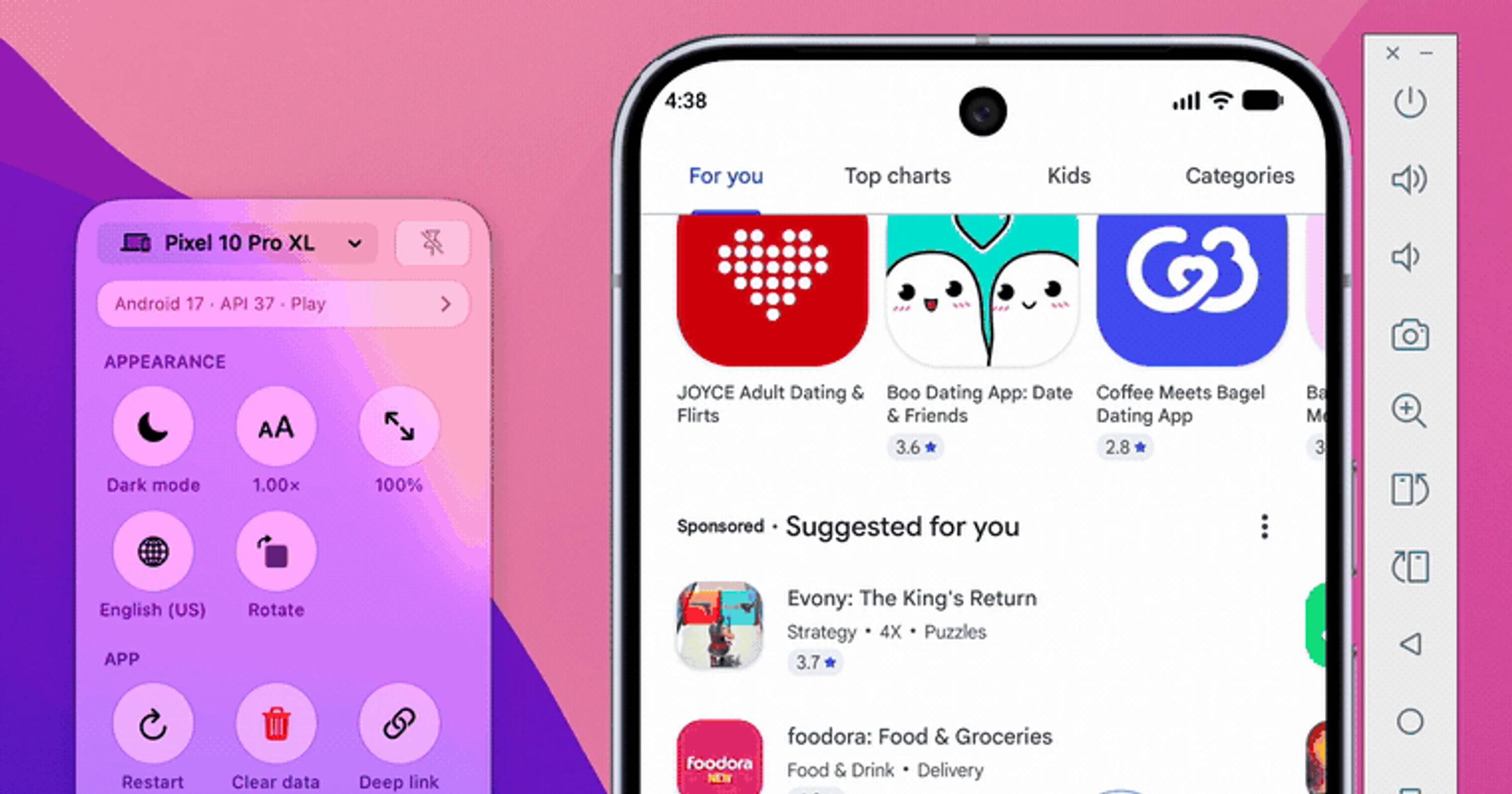
Nearly 50 test actions in a floating panel: dark mode, font scale from 0.85x to 2x, display size, language and locale including RTL and pseudo-locales, TalkBack, bold text, layout bounds, show taps, animations off, network speed profiles (LTE to GSM), GPS by city or coordinates, incoming call and SMS, and emulator snapshots.
Freeze the screen and hover any view to read its size and surrounding gaps in dp. Click one element and hover another to measure the distance between them. Works with Jetpack Compose and classic Views. Includes an 8 dp grid, a colour picker, estimated text size in sp, and a Figma PNG overlay for pixel-by-pixel design comparison.
Press ⇧⌘A in the Layout Inspector to number every TalkBack stop in approximate reading order and flag unlabelled buttons, images missing content descriptions, and touch targets smaller than 48 x 48 dp.
A built-in MCP server exposes 18 tools so agents like Claude Code, Codex CLI, Cursor, and VS Code can take screenshots scaled to 1 px per dp, read a compact UI tree, tap by reference or coordinates, type text, switch device settings, read logcat, and run read-only SQL against an app's SQLite database. Access is set to Off, Read only, or Full control from the menu bar and is checked on every call.
Browse SharedPreferences and SQLite databases of any debuggable app without adb. Tables show the first 500 rows with search. Access uses adb shell run-as, the same mechanism Android Studio uses, so release builds are not exposed. The inspector is read-only and deletes database copies on reload and quit.
Written in SwiftUI, event-driven, with no Electron and no telemetry. The only network request is an optional once-a-day update check that reads the GitHub releases feed and sends nothing about the user or connected devices. Signed with a Developer ID, hardened runtime, and notarized by Apple.
Features
- One-click test toggles
- Layout Inspector in dp
- Accessibility audit
- MCP server for AI agents
- Data Inspector
- Native and private
How to install
brew install --cask ateymoori/tap/oh-my-android
Recommended for this setup
Strengths
- Eliminates repetitive adb lookups: Commands like `adb shell cmd uimode night yes`, `adb emu network speed edge`, and `adb emu geo fix` are replaced by single icon clicks. Every icon reflects the device's real current state, so there is no need to remember what was last set.
- MCP server output is model-friendly: The compact UI tree is roughly 10x smaller than raw uiautomator XML, and all 18 tool definitions fit in about 3k tokens. Coordinates and sizes are in dp, matching the units developers use in layout code, so agents can reason about measurements directly.
- Works with real phones, not just emulators: Most panel actions work over USB or Wi-Fi adb with a physical Android device. Only emulator-exclusive features -- GPS simulation, battery level, incoming calls and SMS, network speed throttling, and snapshots -- require an emulator.
- Zero-dependency MCP binary: The MCP server is a single native binary with no runtime and no network requirement. Homebrew places ohmyandroid-mcp on the PATH automatically, and the app does not need to be open for an agent to start the server.
Trade-offs
- macOS only, Apple silicon required: Oh My Android is a native SwiftUI app that requires macOS 26 Tahoe or later and Apple silicon. There is no Windows or Linux version.
- Requires the Android SDK: The app controls the emulator and connected phones through the Android SDK's adb tooling. It bundles no emulator and no SDK; Android Studio or the Android command-line tools must already be installed.
- Not in the Mac App Store: App Store sandboxing prevents an app from starting adb, so Oh My Android is distributed through Homebrew and GitHub Releases as a signed and notarized package rather than through the store.
Tech stack
FAQ
Most actions work over USB or Wi-Fi adb with a physical device. The exceptions are emulator-only features: GPS simulation, battery level and charging control, incoming call and SMS simulation, network speed throttling, and emulator snapshots.
Any agent that supports MCP over stdio, including Claude Code, Claude Desktop, Codex CLI, Cursor, VS Code with GitHub Copilot, Windsurf, Gemini CLI, JetBrains AI, and Zed. The app does not need to be open; the agent starts the server when it needs it.
Yes. It reads the Compose semantics tree through uiautomator, the same mechanism used for classic Views, so dp measurements, the 8 dp grid, and the TalkBack audit all work with Compose screens.
No. The only outbound network request is an optional once-a-day update check that reads the GitHub releases feed. It sends nothing about the user, connected devices, or app usage. The update check can be turned off in Settings.
Open the menu bar icon, choose AI Agents, and set the access level to Off, Read only, or Full control. The server checks this setting on every tool call, so a change takes effect immediately without restarting the agent.