
MoneyPrinterTurbo
AI-powered short video generation from topic to publish
Replaces Invideo Ai, Heygen, Pictory, Synthesys
Who it's for
Producers running TikTok, Instagram, or YouTube Shorts channels can input a topic list, run batch generation overnight, and wake up to a set of completed videos ready to review and publish. The one-click publish step to all three platforms removes the manual upload-and-caption workflow entirely.
You need branded video templates, on-screen text animations, or motion graphics. MoneyPrinterTurbo produces narration-over-footage videos without visual effects layers or template-based compositions.
Marketers can write custom scripts and feed them into MoneyPrinterTurbo for voiceover, footage matching, and subtitle generation without touching a video editing tool. Multi-language output means the same script can produce videos in multiple languages using different TTS voices.
Your videos require on-screen text overlays, lower-thirds, brand logo placement, or precise motion timing. Those production elements are outside the current feature set.
The REST API at port 8080 exposes the full generation pipeline programmatically, making it possible to integrate MoneyPrinterTurbo into a larger content workflow. Topics can be sourced from a database, scripts reviewed via webhook, and completed videos pushed to a CDN automatically.
Your pipeline requires frame-accurate timing, multiple speaker tracks, or complex scene transitions. MoneyPrinterTurbo's output targets short-form social formats, not broadcast or long-form production.
Multi-language script generation combined with multiple TTS voice providers means the same topic can produce videos in different languages in the same batch run. This serves international social media accounts that publish identical topics across multiple markets.
You need human-quality multilingual translation review. LLM-generated scripts and TTS voice output vary in quality across languages; high-stakes multilingual content still benefits from human review before publishing.
The problem
Creating short-form video content at scale requires coordinating five distinct production steps: writing a script, sourcing B-roll footage, generating or recording narration, adding synchronized subtitles, and publishing to multiple platforms. Each step is its own tool or expertise, and commercial platforms that bundle these charge per-minute rendering fees or monthly subscriptions that scale up fast with volume. For teams producing ten, twenty, or a hundred videos per week, the cost and manual effort compound quickly. Waiting on cloud rendering queues adds latency; proprietary platforms own your content pipeline so you cannot customize the script format, subtitle style, or footage sources. Most creators end up patching together multiple paid services with no automation between them.
How it works
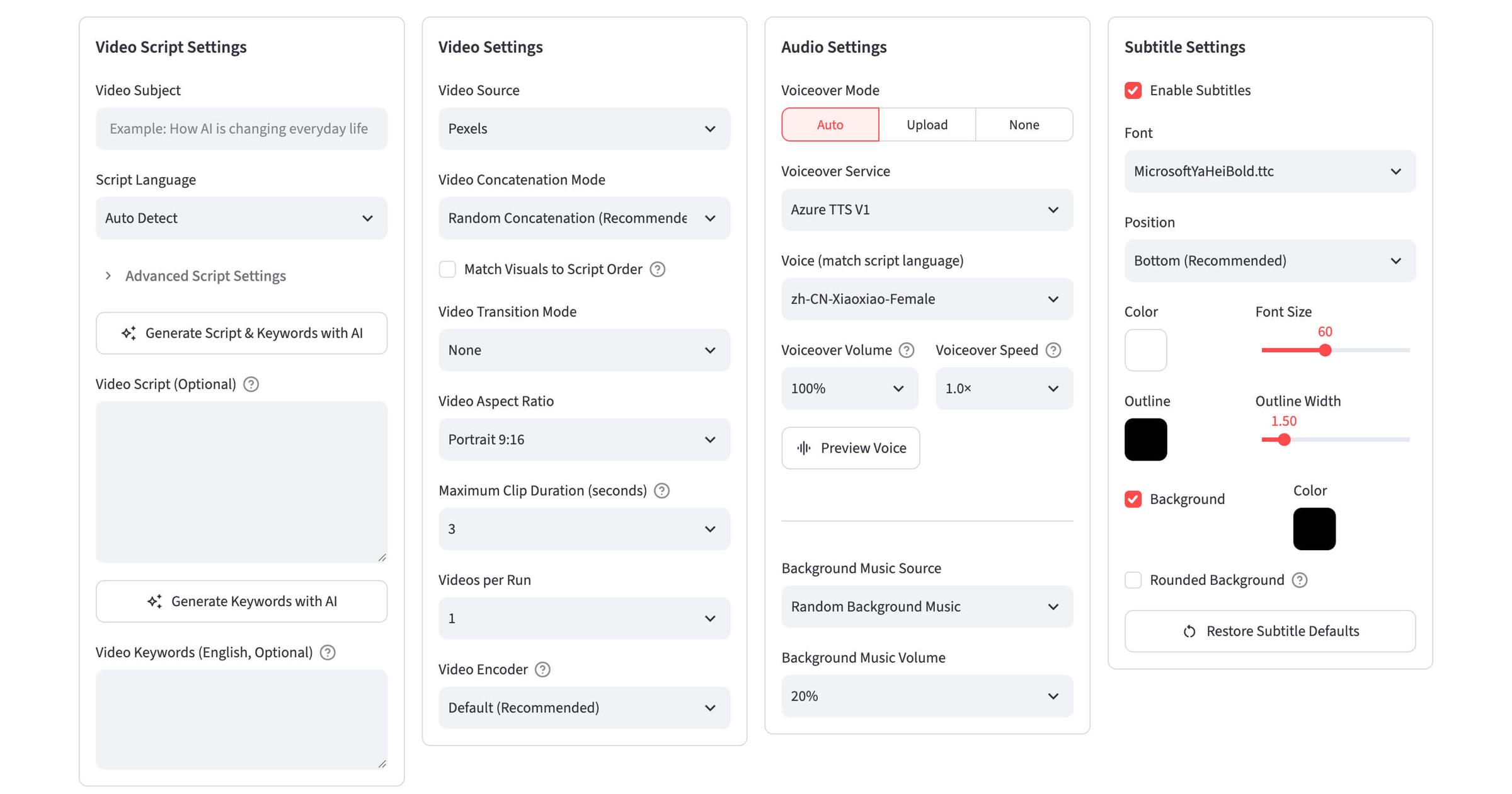
Generates video scripts from a single topic or keyword using configurable LLM providers including OpenAI, Google Gemini, DeepSeek, Kimi/Moonshot, Azure OpenAI, and a dozen others. Custom scripts are also supported, so you can write your own copy and use MoneyPrinterTurbo only for the media assembly steps.
Supports Edge TTS (free, no API key), Azure TTS V2, SiliconFlow TTS, Google Gemini TTS, ElevenLabs, and Chatterbox with real-time preview in the WebUI. Voices can be selected per language, enabling multi-language video output from the same project.
Generates subtitles via TTS timestamps (fast, no GPU needed) or via local faster-whisper (more accurate sync for complex audio). Font, position, color, size, stroke, and background style are all configurable in the WebUI.
Automatically matches video segments to the script using keyword queries against Pexels, Pixabay, and Coverr, all royalty-free sources. Local footage folders are also supported, so you can pipe in proprietary B-roll alongside public stock assets.
After generation, completed videos can be automatically uploaded to TikTok, Instagram Reels, and YouTube Shorts in one step. Batch generation lets you produce multiple takes from one topic and choose the best before publishing.
The WebUI runs on Streamlit at localhost:8501. A REST API is exposed at port 8080 with full OpenAPI docs. A CLI mode supports headless batch generation without a browser. An AI Agent mode lets compatible AI coding tools install and run the tool automatically from a published skill document.
Features
- Automated AI script generation
- Multi-provider voiceover synthesis
- Subtitle generation with full style control
- Stock footage sourcing from Pexels, Pixabay, and Coverr
- One-click publishing to TikTok, Instagram, and YouTube Shorts
- Four usage modes: WebUI, API, CLI, and AI Agent
How to install
Self-hosting uses Docker with a pre-built image from GitHub Container Registry.
git clone https://github.com/harry0703/MoneyPrinterTurbo.git
cd MoneyPrinterTurbo
docker compose -f docker-compose.release.yml up
Recommended for this setup
Strengths
- MIT license with no per-video fees: The entire codebase is MIT licensed, so there are no per-video rendering charges, no monthly subscription, and no usage caps. You pay only for the LLM API calls you make, which are typically cents per video at current provider rates. Unlike HeyGen or Pictory, there is no credit system gating batch output.
- Broad LLM provider compatibility: Works with over ten LLM providers including OpenAI, Google Gemini, DeepSeek, Azure OpenAI, Kimi/Moonshot, xAI Grok, MiniMax, and local Ollama instances. Switching providers requires only a config change, so you can route to the cheapest available model without modifying any workflow code.
- Batch generation for volume production: Generates multiple video variants from a single topic in one run, letting you review outputs and select the best. This fits content calendars and bulk social media scheduling workflows without manual per-video effort.
- 106,000+ GitHub stars with active development: The repository has over 106,000 stars and 16,000 forks, with the last code push in August 2026. Active development matters for a tool that depends on external LLM and TTS APIs that change frequently; a stale codebase breaks when upstream providers update their interfaces.
Trade-offs
- Setup complexity for non-technical users: The README explicitly notes that deployment has a certain threshold for beginner users. Docker is the easiest path, but configuring LLM provider API keys, TTS credentials, and stock media sources still requires working through several config steps. A hosted version (Reccloud) exists for users who prefer not to self-host.
- GPU not required but affects batch performance: Basic video generation runs on CPU, but enabling faster-whisper for accurate subtitles or running large batch jobs is noticeably slower without a GPU. The README recommends at least 4GB VRAM for faster local processing; cloud LLMs and TTS avoid this bottleneck but add API cost.
- LLM and TTS API keys required for full functionality: Edge TTS is free and requires no key, but quality LLM script generation via OpenAI, Gemini, or DeepSeek requires paid API credentials from those providers. The tool does not bundle any LLM inference; you supply the API access and absorb those token costs directly.
Tech stack
FAQ
Yes. The tool itself is MIT licensed and free to run on your own hardware. You do need API keys for the LLM provider you choose (OpenAI, Google Gemini, DeepSeek, etc.) and for higher-quality TTS services, which carry their own per-token or per-character costs. Edge TTS is built in and requires no API key. There are no per-video rendering fees from MoneyPrinterTurbo itself.
After generating a video, you can automatically publish it to TikTok, Instagram Reels, and YouTube Shorts in one step from the WebUI. This eliminates the manual upload-and-caption workflow for each platform separately.
No. Basic video generation runs entirely on CPU and requires no GPU. A dedicated GPU (4GB+ VRAM recommended) speeds up local faster-whisper transcription for more accurate subtitles and improves batch generation throughput. If you use cloud LLMs and TTS providers, CPU performance is the main bottleneck, not GPU.
Yes. MoneyPrinterTurbo supports local footage folders alongside Pexels, Pixabay, and Coverr. You can point the tool at a folder of your own video clips and it will match them to script segments alongside or instead of public stock sources.
HeyGen and InVideo AI are proprietary cloud platforms with monthly subscription pricing and rendering credit systems. MoneyPrinterTurbo runs on your own infrastructure, uses your chosen LLM provider, and has no per-video fees or platform lock-in. The tradeoff is that setup requires more technical effort than a guided web-based tool, and MoneyPrinterTurbo does not support AI avatar presenters or template-based layouts.