
Gearslip
In-car interface for Android phones that need no Google services.
Replaces —
Who it's for
GrapheneOS ships without Google Play Services, which means Android Auto is unavailable. Gearslip implements the same protocol from scratch, so navigation, music, calls, and messages all reach the car screen on a fully degoogled phone.
If your phone runs stock Android with Google Play Services and you have no privacy objection to Android Auto, the official app has better app compatibility, including Spotify's native car screen and Google Messages.
Organic Maps, OsmAnd, and Vela work on the car screen through Gearslip, keeping navigation entirely off Google's servers. Users already running these apps for privacy reasons get the same offline maps on the car display they use on the phone.
If you rely on Google Maps for real-time traffic, Gearslip passes Google Maps turn-by-turn instructions to the instrument cluster nav bar but cannot put Google Maps' full car screen on the display.
Gearslip can run as the launcher on an Android head unit or a spare phone mounted on the dash, through its 'Use as launcher' mode. It supports LIVI, the open-source head unit software used in homemade car dashboards.
If the head unit already runs official Android Auto natively and you are satisfied with it, adding Gearslip is redundant. It is most useful when the head unit is Android-based but cannot run the official client.
Even with Google Play Services present, switching to Gearslip keeps location, contacts, and music data off Google's servers during a drive. Users who keep Google on the phone for other apps but want the car interface to be independent can run Gearslip alongside the official app.
If you use Google Maps and Spotify's car interface actively, Gearslip does not currently support their native car screens. The tradeoff is real: privacy for the drive vs. feature completeness.
The problem
Android Auto has one client, and Google writes it. For users running GrapheneOS or any Android build without Google Play Services, the official app is unavailable. Even on stock Android, connecting a phone to a car head unit routes location data, music choices, and contacts through Google's servers on every drive. The car head unit speaks an open protocol. The phone's apps already know how to draw car screens. The gap is a client that speaks the same protocol without a Google account in the path, and without sending every drive's data to a commercial platform outside the driver's control.
How it works
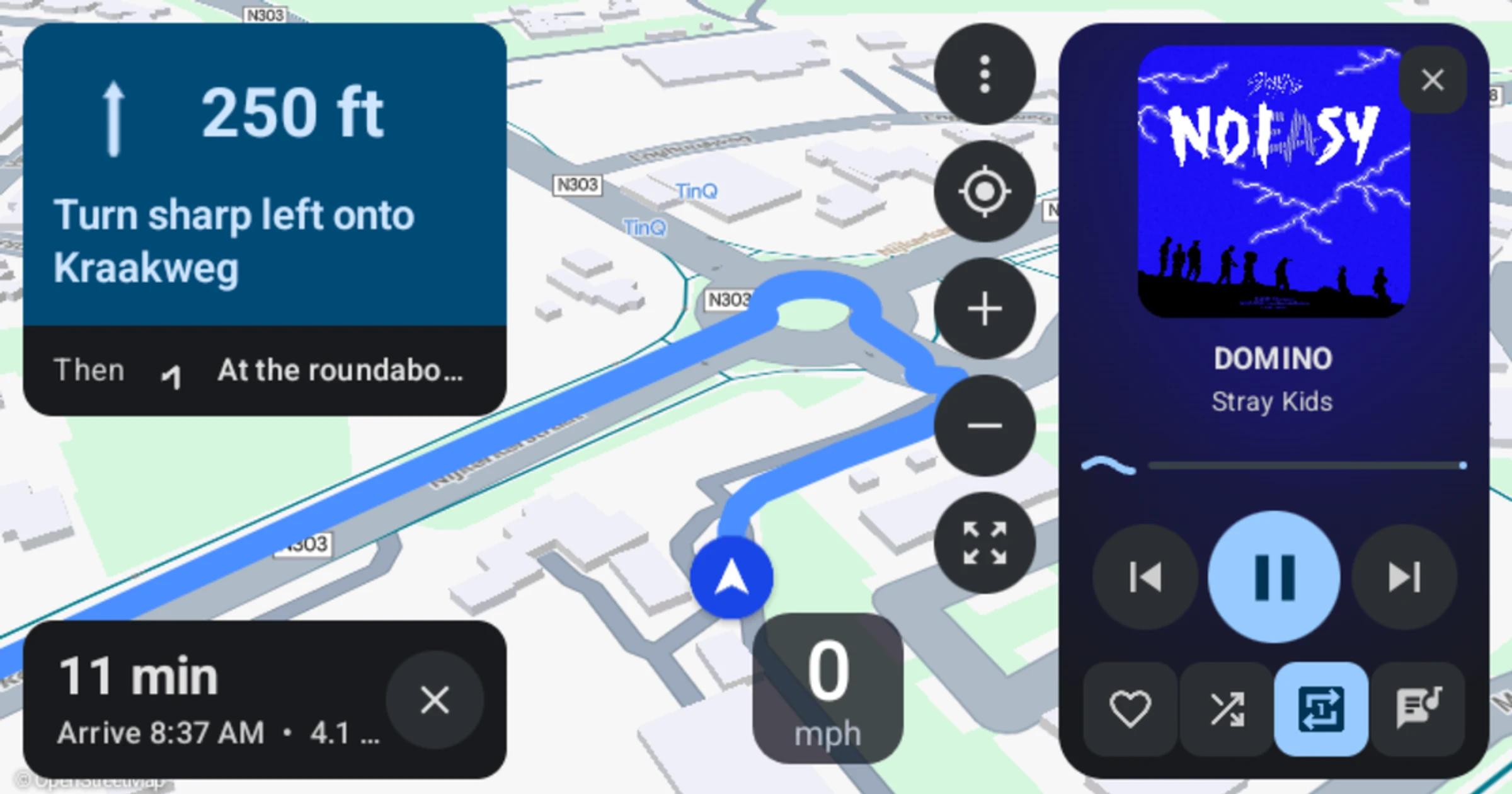
Navigation draws on Organic Maps, Vela, OsmAnd, Waze, Flitsmeister, MAPS.ME, and MapQuest. Turn-by-turn arrows, distances, and lane guidance appear on a large card while the map fills the rest of the screen. Turns from Google Maps or Waze on the phone appear in the nav bar and instrument cluster even without car-screen access.
Any app built for car screens works with Gearslip's player: Now Playing, Up Next, search, and lyrics that highlight word by word as the song plays. Spotify plays through Gearslip's built-in player. Type a search and apps that accept one play the best match.
Tap the mic or press the steering wheel's talk button to navigate, play music, or dial contacts by name. During a call, the nav bar shows who you're talking to and you can mute or hang up from there. Incoming messages are read aloud, with a voice reply or a quick-reply option.
Connects over USB or wirelessly to most cars. After the first wireless drive, Android asks once whether Gearslip may watch for that car's Bluetooth; from then on it connects automatically when the car's Bluetooth comes in range. Confirmed car models are listed in the project's CARS.md.
Every feature relies on an ordinary Android permission or an on-device consent dialog. No special Android access is needed. For audio routed through Gearslip rather than Bluetooth, two optional adb commands are offered in setup: one removes an audio confirmation prompt, the other keeps notifications visible during audio playback.
Gearslip can act as the home screen of an Android head unit, or of a spare phone or tablet mounted on the dash. Enable 'Use as launcher' in Settings > Connection. It also works with LIVI, the open-source head unit software used in homemade car dashboards.
Features
- Multiple map apps on the car screen
- Music playback with search and lyrics
- Voice commands, calls, and messages
- USB and wireless connection to most cars
- No root, adb, or Shizuku required
- Android head unit and launcher support
How to install
Download the Gearslip APK from GitHub Releases: https://github.com/twinksoftware/Gearslip/releases/latest
Recommended for this setup
Strengths
- No Google services on the data path: Unlike Android Auto, Gearslip sends nothing to Google. Maps, calls, music, and messages all stay between the phone and the car. Location data, music choices, and contacts never leave the phone via a Google service. This is the key reason GrapheneOS users choose it.
- AGPL-3.0 source, fully auditable: The full source is on GitHub under AGPL-3.0, so the privacy guarantees are verifiable rather than claimed. No hidden background service, no analytics by default. Optional usage notes (which cars connected, which Gearslip version, anonymized by a salted hash) are off unless you turn them on.
- Wide map app compatibility: Gearslip hosts Organic Maps, Vela, OsmAnd, Waze, Flitsmeister, MAPS.ME, and MapQuest on the car screen. Users who have already chosen a privacy-respecting map app keep using it in the car without switching to Google Maps.
- Automatic updates without an app store: Once installed, Gearslip checks for a new APK once a day, downloads it, verifies the SHA-256 against GitHub's published hash, and installs it through Android's own installer. Automatic checks can be turned off in Settings. No app store dependency.
Trade-offs
- Alpha software: connections can drop: The README's own warning: Gearslip can drop the connection, freeze the car screen, or fail to start, and a new release can break a car that worked before. Set it up while parked and keep another navigation method available. With 311 GitHub stars and 27 open issues as of November 2026, the project is active but still early.
- Spotify and Google Messages car screens are not supported: Spotify's native car screen and Google Messages' own car screen accept only the official Android Auto client. Spotify audio still plays through Gearslip's built-in player, but Spotify's car UI is unavailable. TIDAL also restricts library browsing to approved apps.
- Some newer cars require a certificate: Cars from about 2020 onward may require an Android Auto certificate to accept a third-party client. On first launch, Gearslip asks where the certificate comes from: download the one the aasdk project publishes, or import your own. This one-time step is not required for older cars.
- AGPL-3.0 with a separate commercial license: Gearslip is AGPL-3.0, which allows anyone to run, modify, and share it, including for internal commercial use. The source must be shared for any modified version deployed as a service. Twink Software LLC sells a separate commercial license for use cases outside the AGPL's terms, such as proprietary forks. Standard self-hosting for personal or team use falls squarely within the AGPL.
Tech stack
FAQ
It works on both. GrapheneOS users get the full benefit because Google Play Services are absent and the official Android Auto client is unavailable; Gearslip is their only option. On stock Android, Gearslip runs alongside the Google client. The setup process is the same either way: install the APK, follow the permission prompts, and connect via USB or Bluetooth.
Spotify audio plays through Gearslip's built-in media player: Now Playing, Up Next, and search all work. The limitation is Spotify's native car screen, which only the official Android Auto client can display; Gearslip cannot access it. TIDAL's library is similarly restricted to approved clients.
The README advises setting it up while parked and keeping another navigation method available, since it is alpha software that can drop the connection or freeze the car screen mid-drive. Voice commands, steering wheel controls, and touch all work, so the interface itself is designed for in-car use; the stability caveat is the reason to have a backup.
Gearslip ships without a certificate. On first launch, you choose: download the certificate the aasdk open-source project publishes, or import one of your own. The certificate stays on the phone; Gearslip never uploads or logs it. Some cars from around 2020 onward require this step; older cars typically do not.
Yes, for personal and team use. Gearslip is AGPL-3.0 licensed: you can run, modify, and share it freely, and self-hosting for personal or internal use is within the license's terms. The AGPL requires that you share source modifications if you offer a modified version as a service to others. Twink Software LLC also sells a separate commercial license for use outside the AGPL's terms.