
Ffmpeg Skill
FFmpeg skill for coding agents: 42 tools, MCP server, local-first
Replaces Rendi, Wireflow
Who it's for
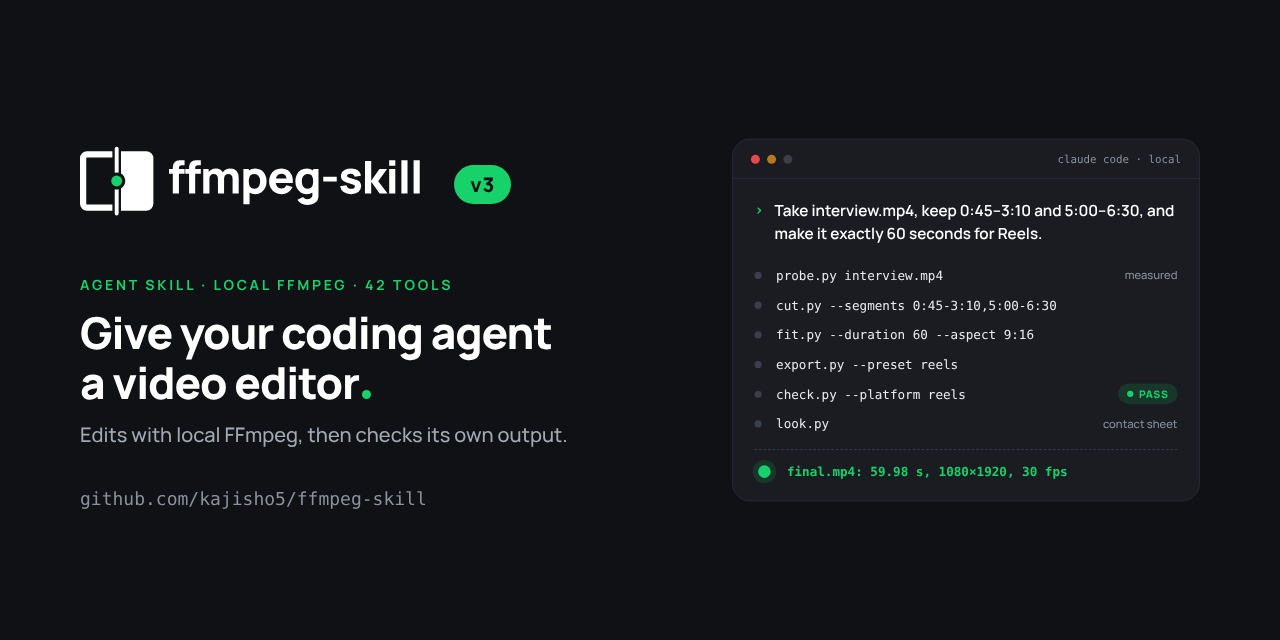
Use ffmpeg-skill to give Claude Code or Cursor a structured interface to FFmpeg: probe a file, cut segments losslessly, fit them to a duration and aspect ratio, and export to a platform preset in one agent session. The machine-readable contract means the agent reads every tool's input schema before it runs anything, so it does not guess at flags.
You need a managed cloud API with no server or FFmpeg installation. For that, a cloud FFmpeg service with no local setup is simpler.
`render.py --template tiktok` (or reels, shorts, youtube, x, linkedin, facebook) produces a platform-ready file from a single agent command: the template handles aspect ratio, caption positioning, loudness normalization to -14 LUFS, and a platform compliance check. Exporting to all seven video destinations at once is `--template all`.
You do not use a coding agent (Claude Code, Cursor, Codex) or an MCP client. ffmpeg-skill is a skill for agents; it is not a standalone GUI or no-code editor.
Because every operation runs locally with no cloud, no API keys, and no account required, ffmpeg-skill is appropriate for footage that cannot leave the organization's machines. The optional local speech transcription (faster-whisper, Parakeet) also processes audio entirely on the local machine.
You need a hosted, zero-maintenance service and data privacy is not a constraint. Cloud-based alternatives are simpler when footage can be uploaded freely.
The problem
An AI coding agent that writes FFmpeg commands still guesses at key inputs: it assumes a frame rate, picks a codec the container does not support, re-encodes a stream that only needed a copy, and reports success without measuring the result. The agent has no structured interface to FFmpeg: every invocation is a generated shell command with no typed inputs, no post-run verification, and no way to confirm that the output file meets the destination's requirements. For developers building video workflows with coding assistants, this means debugging outputs the agent reported as correct, re-encoding footage that did not need it, and writing prompt instructions that break each time the model interprets a flag differently. Cloud APIs for video processing charge per job and upload footage to remote servers, which is neither acceptable for high-volume work nor for footage that must stay on a local machine.
How it works
Cut, join, silence removal, captions, overlays, HDR-to-SDR, loudness normalization, platform exports, multicam, and whole-edit rendering are each a separate Python script with typed argparse flags. No shell string generation: every flag is validated before FFmpeg runs, and each tool returns structured JSON with a probe of the output.
The MCP server advertises 12 core tools by default, keeping agent context small. Setting `FFMPEG_SKILL_MCP_FULL=1` lists all 42. Tool names, order, and `inputSchema` in `tools/list` are translated from each tool's argparse parser at startup, so a new flag added to a script appears in MCP without editing `mcp/`.
Every job starts with `probe.py`, which measures duration, fps (with variable-frame-rate detection), resolution, rotation, bit depth, HDR format including Dolby Vision, colour tags, and every audio stream. `cut.py` and `loudness.py` stream-copy what they do not need to transcode, so quality is preserved wherever possible.
After every tool runs, `check.py` validates the output against a platform spec (reels, TikTok, YouTube, etc.) and `look.py` produces a contact sheet the agent can inspect before reporting success. The verified workflow is probe, edit, check, then verify: the agent never reports done without measuring the result.
`render.py --template tiktok` fills a shipped template: 9:16 crop, captions positioned above TikTok's description bar, -14 LUFS loudness, the tiktok export preset, and a platform check on the output. Templates ship for TikTok, Reels, Shorts, YouTube, X, LinkedIn, Facebook, podcast, and audiogram.
`caption.py --transcribe` and `silence.py --transcribe` use a locally installed speech engine (faster-whisper, Parakeet-MLX, or openai-whisper). The audio never leaves the machine. Without an engine installed, every other tool still works; `npx ffmpeg-skill doctor` lists the engine as missing optional.
Features
- 42 Typed FFmpeg Tools
- MCP Server with Contract-Derived Tool Specs
- Probe-First, Lossless-When-Possible Editing
- Post-Execution Verification
- Platform Delivery Templates
- Local Speech Transcription for Captions
How to install
Install the skill with npx; FFmpeg and Python 3 must be on your PATH first.
sudo apt install ffmpeg
npx ffmpeg-skill
Recommended for this setup
Strengths
- MIT License with No Runtime Dependencies: The MIT license means you can run it commercially, fork it, and modify it without restriction. The Python standard library is the only runtime dependency: no packages to install, no version conflicts, no extra steps beyond having FFmpeg and Python on the PATH.
- Machine-Readable Contract Keeps MCP in Sync: `contract --json` describes all 42 tools: input schema, output schema, role, required FFmpeg capabilities, verification tools to run afterward, and whether a visual check is required. The MCP surface derives from this contract, so a flag added to a script appears in `tools/list` automatically; CI fails the build if any definition drifts from its argparse parser.
- FFmpeg 6.1 Through 9 Tested in CI: The test suite runs against FFmpeg 6.1, 7.1, 8, and 9 on every push, so a build that passes CI is verified against the specific FFmpeg versions developers are likely to have installed on their machines.
- Offline Processing with No Upload Required: Every tool runs locally with no network calls and no cloud account. Footage stays on the machine. This directly addresses the main constraint of cloud-based alternatives like Rendi and Wireflow for teams with privacy requirements or upload-latency concerns.
Trade-offs
- FFmpeg Must Be Installed Separately: The skill does not ship a bundled FFmpeg binary. You install FFmpeg through the system package manager (apt, Homebrew, Chocolatey) or build it. A Homebrew-installed FFmpeg without the `subtitles` filter, or a build without libvidstab, makes `doctor`'s overall `ok` report false even though most tools still work. Check `doctor --json`'s per-tool `usable` field, not just the top-level `ok`.
- No Managed Cloud Fallback: When FFmpeg or Python 3 is not on the PATH, the skill cannot run. Teams that need a managed, always-available cloud API for video processing with no server setup or maintenance are better served by a cloud service like Rendi.
- 26 Open Issues on an Active Tracker: The repository had 26 open issues at the time of writing. Created in September 2026, the project is under active development; the issue tracker reflects ongoing iteration rather than neglect, but some tool behaviors may change as the API stabilizes.
Tech stack
FAQ
Yes. The MCP server uses the stdio JSON-RPC transport and works with any MCP client, not just Claude Code or Cursor. By default `tools/list` advertises 12 core tools to keep the client context window small. Setting `FFMPEG_SKILL_MCP_FULL=1` lists all 42 tools.
No packages are required to run the core tools. The Python standard library is the only runtime dependency. Optional local speech transcription (`caption.py --transcribe`, `silence.py --transcribe`) requires a separately installed speech engine: `pip install faster-whisper` is the simplest. The first run downloads the model, and audio never leaves the machine.
The skill probes the input first with `probe.py`, then uses stream copy wherever possible. `cut.py` and `loudness.py` copy streams they do not need to change. Re-encoding only happens when necessary: frame-accurate cuts, filters, format changes, or when a keyframe is farther from the cut point than the tolerance allows.
`npx ffmpeg-skill doctor` checks every FFmpeg component each tool needs and reports per-tool availability. Its overall `ok` is false if any filter is missing, but most tools still work. Check `doctor --json`'s `tools` field for per-tool `usable` status rather than relying on the top-level `ok`. A plain Homebrew FFmpeg without the `subtitles` filter is a common case where `ok` is false but the majority of tools are usable.
Yes. `caption.py` burns captions from a cue file (SRT or the skill's own `.cues` format) without a speech engine. The `--transcribe` flag, which generates the cue file from the audio, requires a local speech engine. Without one, `doctor` lists it as missing optional and `--transcribe` refuses with the install instructions for each supported engine.