
email-signature-generator
Open source email signature builder with no account or fees
Replaces Wisestamp, Newoldstamp, Syncsignature
Who it's for
Fill in your contact details, paste a logo URL, pick an accent color, and copy the result into Gmail or Outlook in under five minutes. Blank fields are hidden automatically, so a minimal name-and-title signature takes the same steps as a full signature with social icons and a CTA button.
Your organization requires all employees to use a centrally managed template. This tool has no admin push or enforcement feature; each person generates their own signature manually.
One Docker command deploys the generator on an internal server. The image runs on amd64, arm64, and arm/v7, so it fits a standard Linux VM or a Raspberry Pi. Team members visit the internal URL and generate their signatures in their browsers with no external account creation.
You need a managed SaaS with vendor support, uptime SLA, and centralized template push. This project is MIT-licensed open source with no commercial support tier.
For teams paying per-user signature fees, this tool covers the same core feature set: custom fonts, colors, logo, social icons, and CTA buttons, with setup instructions for every major email client. No account migration is needed; each team member re-enters their details and copies the new HTML.
Your current paid tool's admin dashboard manages and enforces signatures for many employees automatically. The per-user manual process here does not scale to large organizations without additional coordination.
Because the tool is a single HTML file with no build step, external dependencies, or server runtime, it can be copied into an HR portal, onboarding workflow, or employee directory without additional infrastructure. The MIT license permits unrestricted modification.
You need a programmatic API to generate signatures at scale or inject them automatically into an email system. This tool is UI-only with no headless or API mode.
The problem
Most email signature tools are paid SaaS products with per-user monthly fees. WiseStamp, NEWOLDSTAMP, and SyncSignature all follow this model: you pay for a feature set that is, functionally, an HTML form with a live preview. For a team of 20, that adds up to hundreds of dollars per year. Beyond cost, these tools require an account, which means your name, job title, company, phone number, and email address are stored on a third-party server. Many free tiers also inject the provider's own branding or backlinks into your signature output, which is not apparent until you inspect the generated HTML. For professionals in privacy-sensitive roles or regulated industries, the combination of data collection and opaque output is a genuine concern.
How it works
The entire tool runs as a single HTML file in your browser. No information is sent to any server; there are no cookies, no analytics, and no tracking scripts. Your name, job title, company, and contact details never leave your device.
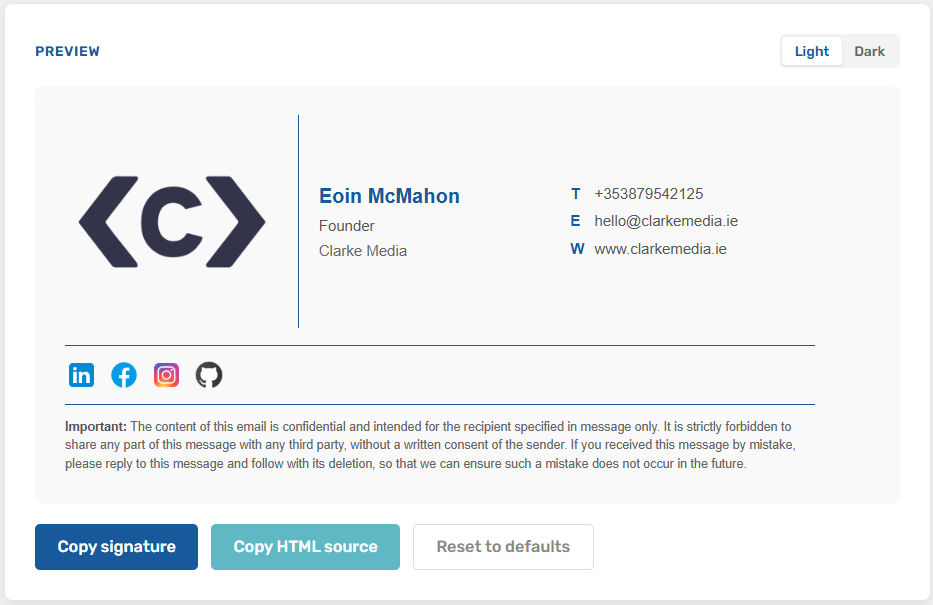
The signature preview updates in real time as you type. Toggle between light and dark mode to see how the output renders in both email themes before copying. Blank fields are automatically hidden from the output, so a minimal two-field signature looks as clean as a full one.
Choose from 13 web-safe fonts in four sizes, including Arial, Calibri, Georgia, and Garamond. Social icons cover LinkedIn, Twitter/X, Facebook, Instagram, GitHub, YouTube, TikTok, Pinterest, WhatsApp, and two custom slots. Add up to three call-to-action buttons with individual colors and links.
Built-in instructions cover Outlook (new interface, classic Windows, and Mac), Gmail, and Apple Mail. Each guide walks through the exact paste sequence for that client. The Outlook section includes an alternative path through Outlook on the Web for cases where the desktop paste does not preserve formatting.
A Docker image published at ghcr.io/clarkemedia/email-signature-generator supports linux/amd64, linux/arm64, and linux/arm/v7. One command starts the server on port 8080. Teams can also serve the single HTML file from any CDN or static host with no configuration beyond uploading the file.
Features
- Browser-only with no data transmission
- Live light and dark mode preview
- 13 fonts, social icons, and CTA buttons
- Step-by-step email client setup guides
- Docker deployment for team self-hosting
How to install
Deploy using Docker, or download and open the single HTML file in any browser.
docker run -d -p 8080:80 ghcr.io/clarkemedia/email-signature-generator:latestRecommended for this setup
Strengths
- MIT license with no per-user cost: The MIT license permits commercial use, modification, and redistribution with no restrictions. Unlike WiseStamp or NEWOLDSTAMP, there are no recurring fees regardless of team size. Self-hosting an instance for 100 employees costs the same as hosting it for one person.
- Zero data collection by design: Because the tool runs as a static file in the browser, data collection is not a configurable option that could change in a future update. It is structurally impossible for the hosted version to collect data; local and self-hosted deployments provide the same guarantee.
- Works with all major email clients: Generated signatures use table-based HTML with web-safe fonts, which renders correctly in Outlook (new, classic, and Mac), Gmail, and Apple Mail. The page includes tested paste instructions for each client, covering Classic Outlook's less reliable paste path as well.
- Active development with zero open issues: The repository was created in May 2026 and received its most recent commit on 2026-09-21. The open issue count is currently zero. The README lists active feature requests including additional email client instructions, image upload with base64 encoding, and alternative signature layouts.
Trade-offs
- No centralized team management: There is no admin console. Each user generates their own signature independently in their own browser. Organizations that need to push a single consistent template to all employees and enforce it centrally will need a separate process, such as distributing a pre-filled HTML file or using a paid tool with team management features.
- Logo must be hosted at a public URL: You can upload an image for the live preview, but the final copied HTML embeds the logo as an external URL rather than inline base64 data. If the hosting URL changes or goes offline, the logo will stop displaying in recipients' inboxes. The README notes this limitation and recommends hosting the image at a stable public URL before using it in the final signature.
Tech stack
FAQ
Yes. The tool is MIT-licensed and free to use, modify, and self-host with no trial period, feature gates, or per-user fees. The hosted version at signatures.clarkemedia.ie is also free with no sign-up required. The MIT license permits commercial use without restriction.
Yes. Generated signatures work with Microsoft Outlook (new interface, classic Windows, and Mac), Gmail, and Apple Mail. Built-in step-by-step instructions for each client are included on the page. For Classic Outlook, the guide includes an alternative paste path through Outlook on the Web, which is more reliable than the desktop paste for preserving formatting.
Yes. Run it with one Docker command or serve the single HTML file from any web server or CDN. The Docker image supports linux/amd64, linux/arm64, and linux/arm/v7. There are no per-user limits; each team member visits the internal URL and generates their signature in their browser.
Yes. You can upload an image for the live preview, but the final copied HTML embeds the logo as an external URL rather than inline base64 data. The image must be at a stable, publicly accessible URL for it to display in recipients' email clients. If that URL changes or the hosting goes offline, the logo will stop appearing.
Yes. The repository has been under active development since its creation in May 2026, with the most recent push on 2026-09-21. The open issues count is currently zero. The README lists active feature requests including base64 logo encoding, additional email client guides, and alternative signature layout templates.