
Claude Squad
Terminal manager for multiple AI coding agents in isolated workspaces
Replaces Conductor
Who it's for
If you are running a refactor in one AI session, a test addition in another, and a documentation pass in a third, Claude Squad keeps them in separate worktrees and surfaces all three diffs in one view. You review each one independently and push branches without leaving the terminal.
If you run only one AI coding session at a time, Claude Squad adds setup overhead with no benefit. A single terminal window with your preferred agent is simpler.
Claude Squad lets you give the same prompt to Claude Code in one session and Codex in another, then compare their diffs side by side. Because each session is in its own worktree, the approaches do not interfere with each other. You pick the branch you prefer and discard the others.
If you are committed to a single AI provider and have no interest in comparing outputs, the multi-agent profile system adds no value over running that agent directly.
With auto-accept mode enabled, Claude Squad sessions run to completion without input. You start several agents on independent tasks, let them run while you work on other things, and return to review the diffs. This suits teams that want to parallelize AI-assisted refactors or exploratory code generation.
If you need a human in the loop on every agent step, auto-accept mode is not the right workflow. Run agents interactively in their native interfaces instead.
The problem
Running multiple AI coding agents on the same repository without workspace isolation causes branch conflicts. When two agents edit the same files, their changes collide on the same branch and one session overwrites the other. The usual fix is to create separate git worktrees by hand, switch terminal windows, and track which agent is on which branch manually. That overhead grows with the number of parallel sessions and erases the speed gain from running agents in parallel. Reviewing agent output is a second problem. Each session may have drifted in a different direction before you check on it. Without a unified interface showing all active sessions and their diffs, catching a bad assumption early means constant context-switching between terminal windows.
How it works
Each agent session runs on its own git worktree, so changes on one branch never conflict with changes on another. Claude Squad creates the worktree automatically when you open a new session. You can review and merge branches independently without coordinating between sessions.
Any agent that runs as a CLI command can be launched from Claude Squad. The default is Claude Code, with Codex, Gemini CLI, Aider, OpenCode, and Amp configured via the profiles system or the `--program` flag. Each profile stores a launch command, and sessions inherit the profile's configuration.
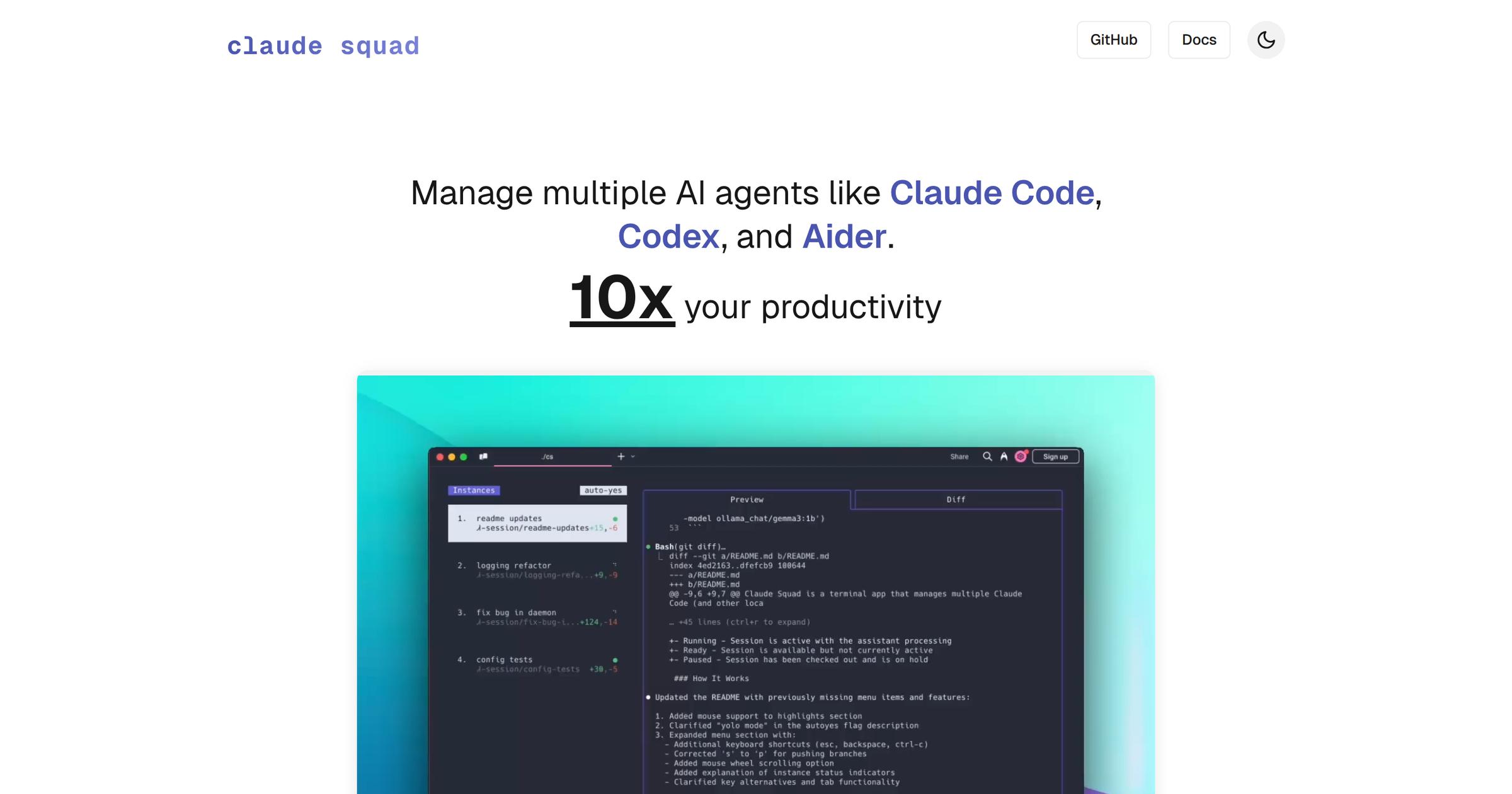
The interface shows a session list on the left and a live diff preview on the right. You switch between sessions with arrow keys or vi-style navigation, review changes in the diff tab before applying them, and attach to any session to send a follow-up prompt. The `tab` key toggles between the preview and diff views.
The `--autoyes` flag turns on auto-accept mode: agents automatically accept every prompt and run to completion without input. This is the vibe-coding flow where you start several sessions with different tasks, leave them running, and return to review the diffs. Each session's output is captured in its own terminal pane.
The config file at `~/.claude-squad/config.json` holds a `profiles` array. Each profile has a name and a launch command, so you can store separate configurations for Claude Code, Codex, and Aider and pick among them when creating a new session. The profile picker appears at session creation when more than one is defined.
The `s` key commits and pushes the current session's branch to GitHub without leaving Claude Squad. The `c` key checkouts and pauses a session, committing changes and stopping the agent. These keyboard shortcuts cover the common review-and-ship flow: finish, check the diff, push, and open a pull request in the browser.
Features
- Isolated git worktrees per session
- Support for Claude Code, Codex, Gemini, Aider, OpenCode, and Amp
- Split TUI with diff preview
- Auto-accept background mode
- Named profiles for multi-agent setups
- Push branches to GitHub from the TUI
How to install
Install Claude Squad via Homebrew; the official shell script is the alternative for non-Homebrew setups.
brew install claude-squadRecommended for this setup
Strengths
- Runs anywhere tmux runs, including Linux and SSH: Because Claude Squad is a terminal TUI built on tmux, it works on macOS, Linux, and any remote server you can SSH into. You are not restricted to a desktop app. This matters for teams whose CI runners or development servers run Linux, and for engineers who prefer a consistent workflow across local and remote environments.
- AGPL-3.0 with no cloud dependency: Claude Squad runs entirely as a local binary. There is no cloud service to authenticate against, no subscription, and no usage data sent to a third party. The only network calls are to the AI agents you configure, which you control. Teams running it on shared infrastructure face no licensing cost for internal use.
- 8,700+ GitHub stars with active maintenance: Claude Squad reached 8,732 GitHub stars since its March 2025 launch and has 623 forks. The repository received its last push in August 2026, and the Go codebase has 16 open issues. The star count in this category reflects genuine developer adoption rather than speculative interest.
- Works with any CLI-based agent: Claude Squad is not tied to one AI provider. Any agent that accepts prompts as a CLI command, including local models run through Aider's model flag (`aider --model ollama_chat/gemma3:1b`), works as a session. The `--program` flag and profiles system handle the configuration without editing source code.
Trade-offs
- Terminal-only: no GUI or mouse interface: Claude Squad is a keyboard-driven TUI. There is no graphical interface, no drag-and-drop session management, and no visual diff editor. Users who prefer a GUI workflow will need to stay in a terminal or use a different tool. Comfort with tmux key bindings and vi-style navigation is the minimum requirement.
- tmux and GitHub CLI are required prerequisites: Claude Squad requires tmux and the GitHub CLI (`gh`) to be installed before it works. On a fresh machine that is two additional installs before you can run your first session. The README documents both but does not automate their installation: you install tmux through your system package manager and `gh` separately.
- AGPL-3.0 restricts redistribution as a managed service: AGPL-3.0 is permissive for internal use but requires releasing source modifications if you offer a modified version of Claude Squad as a hosted service to external users. Teams running it internally for their own engineers are not affected. The restriction applies only to redistribution as a service to others.
Tech stack
FAQ
Claude Squad supports Claude Code, Codex, Gemini CLI, Aider, OpenCode, and Amp out of the box. Any agent that runs as a command-line program works: set it via the `--program` flag or define a named profile in `~/.claude-squad/config.json`. The default program is Claude Code (`claude`).
Yes. Claude Squad is a Go binary that runs on macOS and Linux. Because it uses tmux for terminal session management, it works on any system where tmux is available, including remote Linux servers over SSH. Install via the official shell script: `curl -fsSL https://raw.githubusercontent.com/smtg-ai/claude-squad/main/install.sh | bash`.
AGPL-3.0 is permissive for internal use. A team running Claude Squad on their own machines or servers for their own engineers has no licensing obligations. The copyleft clause applies only if you modify Claude Squad and distribute it as a service to external users. Internal use, including paid commercial team use, is unrestricted.
Claude Squad requires tmux (for terminal session management) and the GitHub CLI (`gh`, for branch operations). Both must be installed separately: tmux through your OS package manager and `gh` from cli.github.com. The Claude Squad binary itself installs via Homebrew or the official shell script. The error 'failed to start new session: timed out waiting for tmux session' usually means your underlying agent (such as `claude`) needs an update to its latest version.
Yes. Claude Squad is a local binary with no cloud component. It uses tmux and git worktrees entirely on your machine. The only network activity comes from the AI agents you configure (Claude Code calling the Anthropic API, Codex calling OpenAI, and so on). Claude Squad itself does not phone home or require an account.