
asm8086
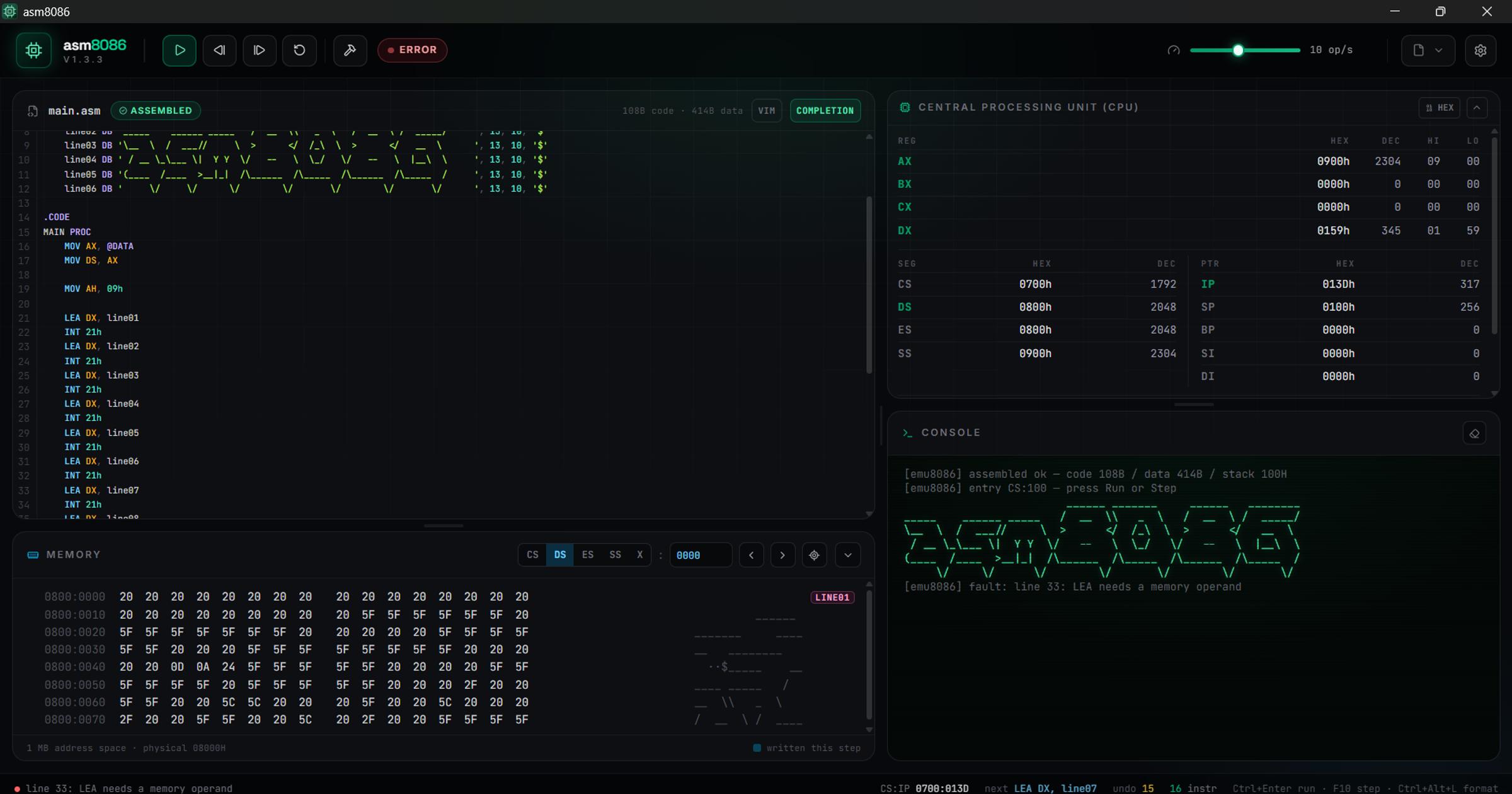
8086 assembly IDE with auto-completion, VIM keybindings, dark theme.
Replaces Emu8086
Who it's for
Get the Intel 8086 instruction set with a modern editor that shows CPU state in real time. The built-in examples run immediately; the step-back debugger helps when a register value is wrong and you need to trace execution backward.
If your course requires the specific interface and output format of EMU8086 for graded assignments, check with your instructor before switching tools.
Demo assembly execution on current hardware with a tool that projects well: dark theme, clean interface, and variable emulation speed let you slow execution to explain what each instruction does to the registers.
If your course materials include EMU8086-specific screenshots or assignment formats, switching tools mid-course requires updating those materials.
VIM keybindings mean you can write assembly without learning a new editor. Built-in examples show patterns like stack operations and loops with working code you can run and modify immediately.
If you need to produce machine code for real 8086 hardware or modern x86-64 targets, asm8086 is a simulator, not a production assembler toolchain.
The problem
Learning Intel 8086 assembly requires a development environment that simulates the processor, runs the full instruction set, and shows CPU registers and memory in real time. EMU8086 is the established commercial tool for this, but it ships without dark theme support, VIM keybindings, code auto-completion, meaningful error messages, or built-in example programs. Students and developers who want a modern editor experience when learning assembly have limited options. The absence of inline diagnostics slows iteration. Without code auto-completion and meaningful error messages, an error appears only after assembly, not as you type. Each misspelled opcode or missing operand means an extra assemble-and-debug cycle. For beginners working through assembly for the first time, the feedback loop matters more than it does in higher-level languages where tooling catches mistakes early.
How it works
Execution pauses at any point, advances one instruction at a time, or rewinds to an earlier state. The CPU register panel and memory view update live at each step. This lets you trace exactly how a register value changes across a sequence of instructions without resetting and re-running from the start.
The editor suggests instruction mnemonics and operands as you type, reducing misspelled opcode errors before assembly. Autoformatting (Ctrl+Alt+F) normalizes indentation and spacing across the file in one keypress. EMU8086 ships neither feature.
Execution speed is adjustable at runtime. Slowing it down lets you watch the memory and register panels update without pausing on every instruction. EMU8086 has only partial speed control, according to its feature comparison with asm8086.
Ships with example assembly programs that run immediately from the IDE. Students can open an example, step through it, and watch the CPU state change without sourcing code from outside the editor. EMU8086 ships no built-in examples.
The editor supports VIM modal keybindings for navigation and editing. Developers who already work in Vim or Neovim can write 8086 assembly without adopting a new editing model. EMU8086 has no VIM support.
Assembly programs execute directly from the editor buffer without requiring a save first. EMU8086 requires saving to a file before every run. This removes one step from the write-assemble-run cycle, which matters when iterating quickly on a code snippet.
Features
- Step-forward and step-back debugger
- Code auto-completion and autoformatting
- Variable emulation speed
- Built-in example programs
- VIM keybindings
- Run without saving to disk
How to install
Download the installer from GitHub Releases: https://github.com/arijit4/asm8086/releases/latest
Recommended for this setup
Strengths
- MIT license: no cost, no usage restrictions: MIT licensing means you can run asm8086 on any machine, fork the source, and distribute your version without restriction. No licensing fee and no usage limits, unlike commercial products that require a purchase.
- Modern editor features EMU8086 does not ship: Dark theme, VIM keybindings, code auto-completion, meaningful error messages, code autoformatting, and built-in examples are all present in asm8086 and absent from EMU8086. These features change the daily experience of anyone spending hours in the editor.
- Built on Tauri v2: native desktop app without Electron: Tauri produces a native desktop binary rather than an Electron wrapper, keeping the application lightweight. TypeScript powers the editor and UI; Rust handles the system layer. The result runs on the desktop without a browser runtime overhead.
Trade-offs
- Early-stage development with known gaps: The README explicitly notes the project is in early stages and that some features may not work as expected. The repo was created in October 2026 and has 9 stars and 1 open issue, meaning minimal community testing. Users relying on this tool for coursework should test their specific programs against it and report any issues.
- No package manager or auto-update path: The README documents no package manager distribution for asm8086. Installation requires manually downloading the binary from GitHub Releases, and updates require repeating that download. There is no auto-update mechanism documented.
Tech stack
FAQ
Yes. Asm8086 is MIT licensed and free to download and use. It covers the same Intel 8086 instruction set and adds features EMU8086 does not have: dark theme, VIM keybindings, code auto-completion, and built-in example programs. EMU8086 is a commercial product; asm8086 has no cost and no licensing restrictions.
Built with Tauri v2, asm8086 compiles to native desktop applications. The available installer formats for each platform are listed on the GitHub Releases page at https://github.com/arijit4/asm8086/releases/latest.
The README notes the project is in early stages and that some features may not work as expected. With the repo created in October 2026 and active development ongoing as of November 2026, users doing graded coursework should test their specific assembly programs against it before committing to it. Report issues at the GitHub issues tracker.
The README lists complex assembly code simulation as a supported feature, alongside CPU and memory visualization. For exact instruction coverage, check the GitHub repository or the open issues list for any reported gaps, since the project is in active development.
Asm8086 is a simulator for learning and development; it models the 8086 processor in software for desktop use. It is not documented as a hardware-targeting assembler toolchain. For producing machine code targeting real 8086 or x86 hardware, standard tools like NASM are the typical choice.