
Orchestrator
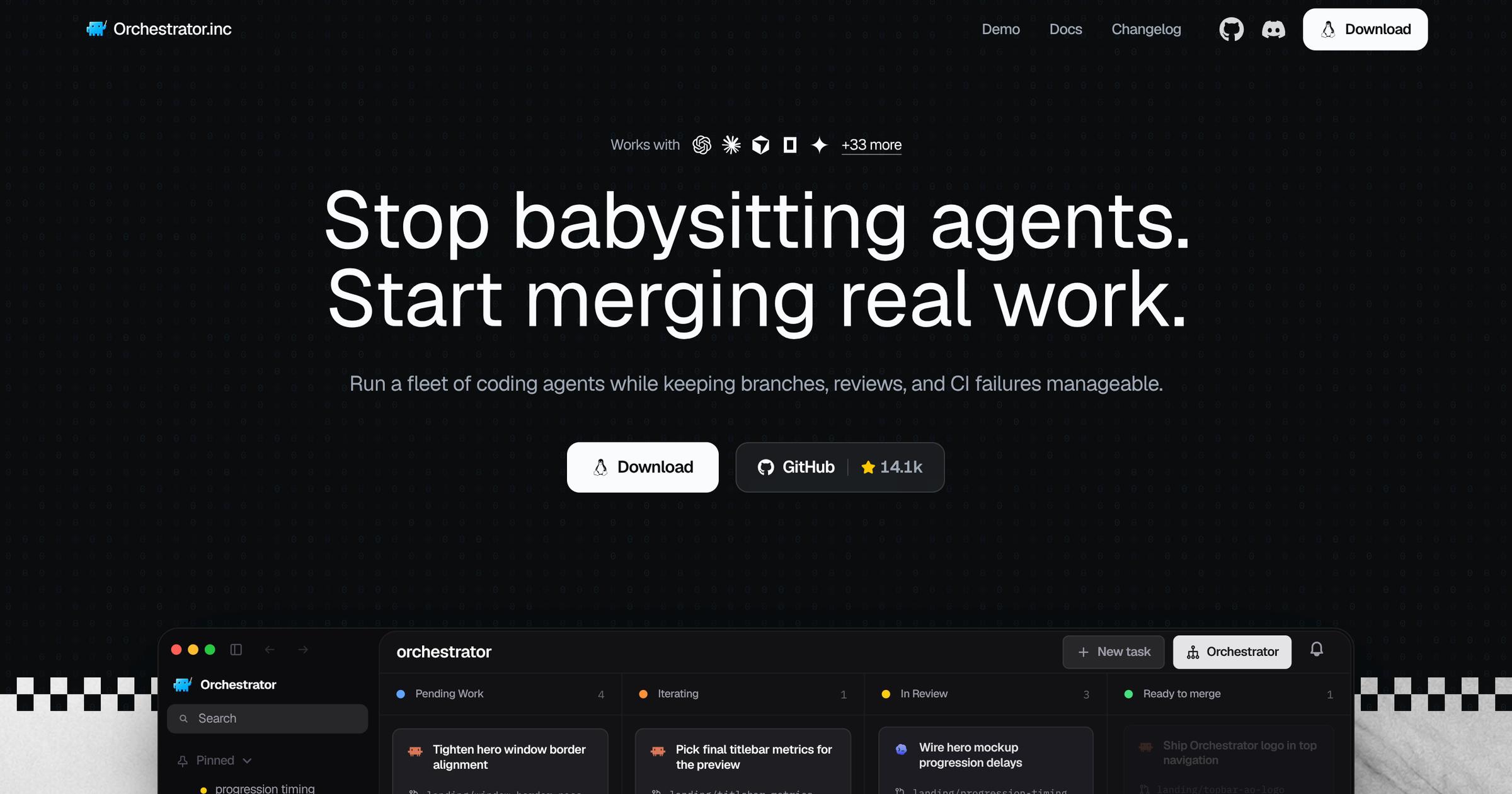
Run a parallel coding agent fleet from one desktop workspace.
Replaces Conductor
Who it's for
Orchestrator handles the branching and merging overhead when a feature needs multiple parallel tracks. The main agent breaks the work into pieces, workers run in separate worktrees, and failed CI routes to the right session without manual triage. No context switching between multiple terminal tabs.
Your tasks are sequential rather than parallel, or you typically run one agent at a time. Orchestrator adds overhead (the daemon, the board, the worktree setup) that only pays off when parallel agent work is the norm.
Orchestrator's review routing sends review comments back to the session that wrote the code, so the author agent can respond rather than the developer having to relay context. Teams using a mix of agents (some members on Claude Code, others on Cursor) can standardize on one board.
Your team has a review and CI process that agents already plug into directly. Orchestrator wraps that process; if the existing workflow already works, adding a board layer may not add value.
The Starter and Pro cloud plans run workers in hosted environments, so tasks continue after the laptop closes. Pair with the mobile app and you get push notifications when an agent needs input, then reply from your phone.
Your agents need persistent access to local files, local databases, or development hardware that is not reachable from a hosted workspace. Cloud workers run in hosted environments and cannot access resources only available on your machine.
Orchestrator wraps Claude Code and Codex in a GUI that adds worktrees, a kanban board, and PR routing without changing how those agents work. If you currently open multiple Claude Code terminal sessions in separate worktrees and manually track their PRs, Orchestrator replaces that manual coordination with a single board.
You prefer working directly in the CLI without a GUI layer. Orchestrator adds a desktop app to your workflow; developers who live in the terminal may find the overhead unnecessary.
The problem
Running multiple coding agents in parallel creates a coordination problem that individual agents cannot handle alone. Each agent works in isolation: it does not know that another session on the same repository just changed a file it depends on, that a CI check just failed on a branch it did not write, or that a reviewer left a comment that belongs to a different session. The result is constant context switching. You pull up each agent in turn to check status, copy error output from a CI notification into the right chat, relay reviewer comments to the right session, and manually track which branches are ahead, behind, or waiting. The overhead compounds when agents run in parallel on the same codebase. Git worktree conflicts, stale branches, and duplicate work on overlapping files are hard to catch until a merge fails. Without something tracking each session's PR lifecycle and routing feedback automatically, the number of agents you can run effectively is limited not by compute but by how many browser tabs you can keep open.
How it works
Tell a project's main agent what to build. It plans the work, creates a worker for each piece in its own Git worktree, and returns to you only when something needs a decision. Workers can use Claude Code, Codex, Cursor, Aider, or any of the 35+ supported agents.
Every worker session appears on a kanban board with lanes driven by live data: the agent's current action, its pull request on GitHub, CI check results, and pending reviews. Lane placement is automatic; there is no status field to update.
When a CI check fails, Orchestrator sends the failing check name, the error log, and a link to the run to the agent that owns that branch. Reviewer comments go back to the same session that wrote the code, with the full review thread attached.
Pick the agent and model for each individual task. Work with it in Orchestrator's structured chat timeline, or open its native terminal UI in the same worktree. Supported agents include Claude Code, Codex, Cursor, Aider, GitHub Copilot, Grok, Kimi, Cline, Goose, Devin, and more.
Pair the free iPhone, iPad, or Android app with your desktop by scanning a QR code. Get a push notification when an agent asks a question or needs approval, reply in chat, start a new task, or check a pull request from anywhere on your home network or through the managed HTTPS tunnel.
Run worker sessions in hosted workspaces (Starter: 2 at once, 8 sessions, 20 hours/week at $20/month; Pro: 10 at once, 25 sessions, 80 hours/week at $40/month) so tasks keep running after the laptop closes. Cloud workers run in instant VMs or Coder dev workspaces; the local desktop app monitors them like any other session.
Features
- Main Agent Orchestration
- Status-Derived Kanban Board
- Automatic CI and Review Routing
- 35+ Coding Agent Support
- Mobile Companion App
- Cloud Agents (Starter and Pro)
How to install
Download the signed installer (macOS, Windows, or Linux) from GitHub Releases: https://github.com/OrchestratorInc/agent-orchestrator/releases/latest
Recommended for this setup
Strengths
- Apache-2.0 license, free for local use with your own API keys: The local path is fully free and open source. Download the installer, point it at a repository, and run as many parallel sessions as your machine handles. Your API keys go directly to the agent providers; no data passes through Orchestrator's infrastructure for local sessions.
- 14,100 stars and active development since February 2026: The repository reached 14,100 stars and 1,900 forks in roughly nine months (created February 13, 2026, with the last commit on November 5, 2026). Active commits and an active Discord community mean issues and feature requests get picked up at a rate that matters for a workflow-critical tool.
- 35+ agent integrations on one board, mixing agents per task: Supports over 35 coding agents including Claude Code, Codex, Cursor, Aider, GitHub Copilot, Grok, Kimi, Cline, Goose, and Devin. Each task can use a different agent and model, so you can mix high-reasoning agents for complex pieces with faster agents for boilerplate, all tracked on the same board.
- PR lifecycle handled end-to-end, without manual relay: From branch creation through CI checks, review comment routing, and merge, Orchestrator passes feedback to the right session automatically. Failed checks go to the owning agent with the error log; reviewer comments go back to the session that wrote the code. No copy-pasting error output between browser tabs.
Trade-offs
- 432 open issues as of November 2026: The repository had 432 open issues on November 5, 2026, which is high for a tool that has been public since February. For a workflow tool handling multiple active branches simultaneously, bugs in routing logic or PR status detection can interrupt a session at a critical point.
- Desktop app only; no headless or server deployment mode documented: Orchestrator runs as a desktop application. The daemon runs locally (or in cloud workspaces for Starter/Pro sessions), but there is no documented headless path for running the orchestrator in a CI environment or on a remote server without a desktop session.
- Cloud agents require a paid plan: Keeping agents running after the laptop closes requires the Starter ($20/month) or Pro ($40/month) plan. Local use is free and covers the full board, CI routing, and PR lifecycle features, but async or overnight work depends on the paid cloud tier.
Tech stack
FAQ
The local version is free and open source under Apache-2.0. Download the installer for macOS, Windows, or Linux, use your own API keys, and run as many sessions as your machine handles with no account or subscription required. Cloud agents, which keep workers running after your laptop closes, require the Starter plan at $20/month or Pro at $40/month. Enterprise plans are available for larger teams.
Orchestrator supports over 35 agents including Claude Code, Codex, Cursor, Aider, GitHub Copilot, Grok, Kimi, Cline, Goose, and Devin. Each task can use a different agent and model. The agent setup guides at docs.orchestrator.inc list the current matrix of which agents support worker, chat, and reviewer modes, since support varies by agent.
Orchestrator monitors every pull request it opens. When a CI check fails, it sends the check name, the error output, and a link to the failing run to the worker that owns that branch. The agent sees the failure in context and can push a fix immediately. Review comments work the same way: they return to the session that wrote the code, with the full review thread attached.
No server or cloud account is required for local use. The installer includes the daemon; the desktop app starts it for you. The optional Starter and Pro plans add hosted worker environments, but the full local feature set, including the board, CI routing, PR review, and mobile pairing, works with no cloud account.
Running agents manually means managing multiple terminal sessions, tracking which branch each agent is on, copying CI failure output into the right chat, and relaying reviewer comments yourself. Orchestrator automates the routing: failed CI checks go to the owning agent, review comments return to the session that wrote the code, and the kanban board shows live status across all sessions from one place.