
starling
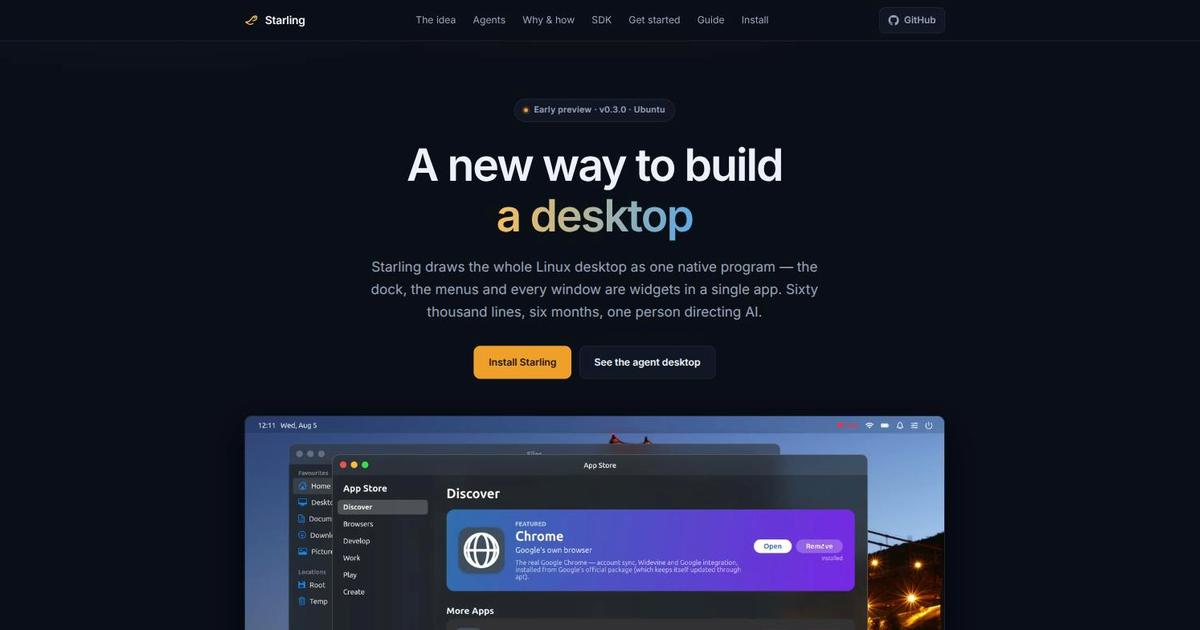
A unified native Linux desktop experience
Replaces —
Who it's for
Ideal for developers seeking a streamlined workspace without distractions.
If you require extensive third-party application support.
Perfect for AI researchers needing a dedicated environment for their agents.
If you need a fully-featured desktop with all traditional applications.
The problem
Starling addresses the complexity and performance issues of traditional Linux desktop environments by providing a unified, native solution.
How it works
Starling combines all desktop elements into a single application, enhancing performance and usability.
Built in Swift, Starling eliminates web technologies from the rendering path for faster performance.
Provides a dedicated workspace for AI agents, ensuring they operate independently from user applications.
Optimized for low memory usage and efficient GPU rendering, keeping system resources minimal.
Easily installable via a .deb package on Ubuntu, making it accessible for users.
Features
- Unified Desktop Environment
- Native Performance
- AI Agent Integration
- Lightweight Design
- Simple Installation
How to install
curl -fLO https://github.com/starling-build/starling/releases/download/v0.3.0/starling_0.3.0_amd64.deb && sudo apt install ./starling_0.3.0_amd64.deb
Recommended for this setup
Strengths
- Single Application Architecture: Reduces complexity by integrating all desktop components into one application.
- High Performance: Native rendering ensures fast and responsive user interactions.
- AI-Friendly: Designed to support AI agents with dedicated workspaces.
- Lightweight: Maintains a small memory footprint, optimizing system resource usage.
Trade-offs
- Early Development Stage: Currently in early development (v0.3.0), expect rough edges and potential bugs.
- Limited App Store: The App Store catalog is small, with only a few first-party apps available.
Tech stack
FAQ
Starling is a new Linux desktop environment that integrates all components into a single native application.
You can install Starling using a .deb package on Ubuntu with a simple command.
Starling supports native Wayland and X11 applications, including Chrome and Zoom.