
OpenResearch
Local-first workspace for parallel research agents and experiments.
Replaces Conductor
Who it's for
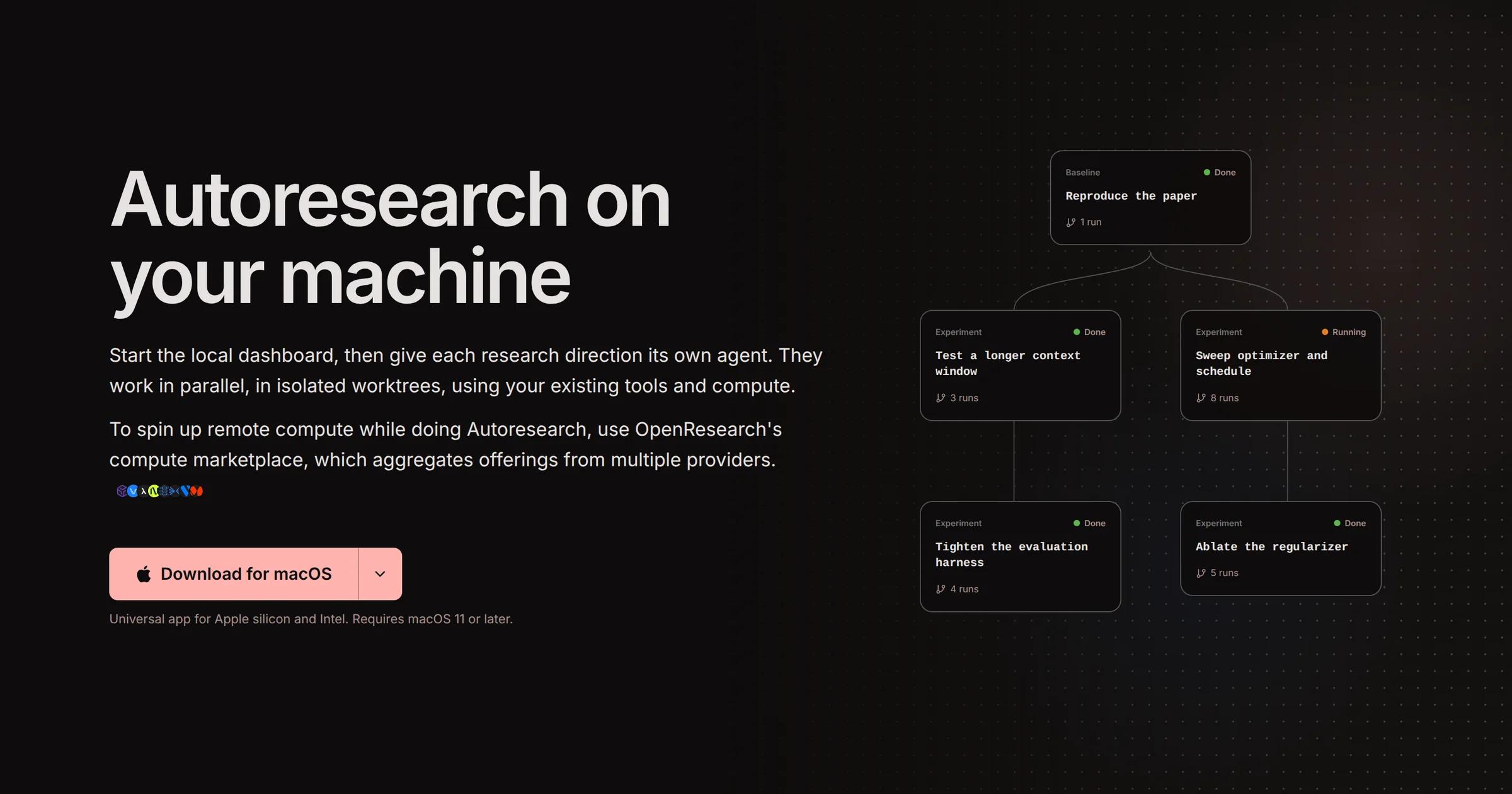
OpenResearch assigns each hypothesis its own agent session and git worktree, so you can test a longer context window in one branch while ablating a regularizer in another. The experiment tree records every run's exact code state and output, making it possible to reproduce past results or revisit abandoned directions without reconstructing the environment.
Skip if your experiments are primarily data transformations or batch jobs with no agent-driven code changes. OpenResearch is built around coding agents; pure data pipeline work fits standard ML orchestrators better.
The autoresearch mode runs the full cycle without manual intervention: propose, code, experiment, inspect evidence, and decide what to try next. Multiple agents can explore different directions in parallel on local hardware or remote compute via SSH or cloud job runners.
Skip if you need a shared team dashboard accessible to collaborators without SSH access. OpenResearch's local-first model is designed for individual researchers or small teams working in the same codebase.
Every experiment run is stored as an immutable git commit archive, including code, logs, diffs, and output artifacts. This makes it straightforward to reproduce a specific result for a paper submission or audit trail without reconstructing the exact environment from memory.
Skip if your institution requires a centralized experiment-tracking server that other lab members can access independently. Experiment data stays on your machine by default; sharing requires a shared server or managed compute.
The problem
Running multiple AI agent sessions for research is fragmented by default. When agents work in the same directory, they overwrite each other's code changes, and there is no structured record of which code state and agent prompt produced which experimental result. Reproducing a past finding means reconstructing the exact environment from memory. Cloud experiment-tracking services help with logging but they send your code and model outputs to third-party servers, which creates difficulties for proprietary research, sensitive datasets, or organizations with data residency requirements. Teams that avoid cloud services fall back to manual logs in notebooks or spreadsheets, which scale poorly once experiments multiply across parallel directions.
How it works
Each research direction gets its own agent session and git worktree, so multiple agents modify code simultaneously without conflicts. The experiment tree tracks each branch independently, preserving the exact code state that produced each result.
Every experiment run is recorded as an immutable commit archive. You can return to any past run and reproduce it exactly, including the code state, agent logs, and output artifacts. No separate database or tracking server is required.
In autoresearch mode, OpenResearch runs the full research cycle without manual intervention: it proposes an idea, modifies the code, launches an experiment, inspects the evidence, and decides what to try next. Multiple agents can explore different directions in parallel while the tree preserves their lineage.
OpenResearch works with Claude Code, Codex, and OpenCode as backing agents. The backing agent and model are selected per session, so you can run different agents across parallel experiments. OpenCode also connects to local models via LM Studio, Ollama, or a custom endpoint.
The same committed source snapshot runs locally, over SSH, or on Slurm, Kubernetes, Ray, Hugging Face Jobs, Modal, Tinker, and managed OpenResearch compute. Run the workspace on your laptop while compute runs next to remote GPUs: `orx up --remote user@host`.
All projects, conversations, experiments, runs, logs, code, and artifacts stay on your machine in a local SQLite store. Creating a project or launching a run does not publish your code. Official builds send opt-out telemetry tied to a random installation ID, with no code, prompts, file contents, paths, or project identifiers. Disable with `orx telemetry off`.
Features
- Parallel agent sessions with isolated git worktrees
- Git-native experiment tree with immutable run archives
- Autoresearch autonomous loop
- Claude Code, Codex, and OpenCode support
- Compute flexibility across local, SSH, and cloud runners
- Local SQLite store with opt-out telemetry
How to install
Install the CLI on macOS or Linux, then start the local dashboard.
curl -LsSf https://openresearch.sh/install.sh | sh
orx up
Recommended for this setup
Strengths
- MIT license with no data leaving your machine by default: The MIT license means you can run OpenResearch on your own infrastructure with no licensing fees and no restrictions on commercial use. All project data stays on your machine by default. No account is needed for the core local workflow, and creating a project or run does not publish your code.
- Reproducibility built on git, not a proprietary format: Experiment reproducibility is built on git commit archives rather than a proprietary database. Any developer familiar with git can inspect, replay, or branch from any past run without learning a custom experiment format or running a separate tracking service.
- Works with existing coding agents and compute infrastructure: OpenResearch wraps Claude Code, Codex, or OpenCode as the backing agent and runs on whatever compute you already have: local hardware, SSH, Kubernetes, or cloud job runners including Ray, Modal, and Hugging Face Jobs. No new agent or compute provider is required.
- Rapid community adoption since June 2026 launch: The repository was created in June 2026, written in Rust, and reached 1,281 stars and 94 forks by September 2026. Active development continues with 11 open issues and regular pushes, the last on September 12, 2026.
Trade-offs
- Windows support is still in beta: The macOS and Linux CLI is the primary supported install path. Windows support is available through GitHub releases but is labeled beta and requires Git for Windows installed. Windows users should read the Windows notes in the documentation before deploying.
- Remote service has no application-level authentication: When running the workspace on a shared host with `orx up --remote user@host`, the remote service binds to loopback but has no application-level authentication. Other users logged into the same host can reach the OpenResearch dashboard. Shared multi-user servers require additional network-level access controls.
- Managed compute and organizations require an account: The core local workflow runs without an account. Managed OpenResearch compute, organizations, and email updates require creating an account at openresearch.sh. Teams needing centralized compute management or collaborative features across machines need to sign up.
Tech stack
FAQ
Yes. OpenResearch is MIT licensed and free to run on your own machine or infrastructure with no licensing fees. A free account at openresearch.sh is needed only for managed compute and organization features. The core local workspace, CLI, and desktop app work without an account.
OpenResearch works with Claude Code, Codex, and OpenCode as backing agents. The backing agent and model are selected per session, so you can run different agents across parallel experiments. OpenCode also connects to local models via LM Studio, Ollama, or a custom endpoint for fully offline use.
No. The local workspace runs on 127.0.0.1 with a local SQLite store. Creating a project or launching a run does not publish your code. Official release builds send opt-out telemetry tied only to a random installation ID, with no code, prompts, file contents, paths, or project identifiers. Telemetry can be disabled with `orx telemetry off`.
Yes. The same committed source snapshot runs on Slurm, Kubernetes, Ray, Hugging Face Jobs, Modal, Tinker, and managed OpenResearch compute. You can also point the workspace at a remote SSH host with `orx up --remote user@host`, accessing the dashboard from your local browser while compute runs remotely. SSH config aliases and custom ports are supported.
macOS (Apple silicon and Intel, macOS 11 or later) is fully supported via the desktop app and CLI. Linux is supported via the CLI. Windows is available through GitHub releases but is labeled beta and requires Git for Windows. The documentation includes Windows-specific notes for beta users.