NocoDB
Turn any database into a no-code spreadsheet. Self-hostable.
Replaces Airtable, Retool, Softr, Forest Admin, Appsheet, Monday Com
Who it's for
If your team tracks inventory, vendors, customer records, or any operational data in Postgres or MySQL, NocoDB adds a non-technical editing interface without rebuilding the backend. Non-technical teammates can update records, apply filters, and export views without filing tickets to engineering. Role-based permissions keep each person limited to what they need to see or change.
Skip if your data is not already in a relational database. NocoDB requires an existing Postgres, MySQL, or SQLite database to connect to. If you need to create a brand-new data store from scratch, a hosted tool or simple spreadsheet is faster to start with.
NocoDB can share a specific view publicly via a password-protected link, letting clients browse or submit data through a form view without needing a NocoDB login. The form view generates a shareable URL that writes records directly to your database. This is useful for client intake forms, status portals, or any scenario where clients need read or write access to a subset of your data.
Review the Sustainable Use License before using NocoDB for client-hosted or white-labeled deployments. Offering it as a managed service to clients may require a commercial license from NocoDB.
NocoDB gives product managers, operations leads, and customer success teams read or edit access to live database records through a familiar spreadsheet interface. Role-based permissions let you give each team member exactly the access they need, from view-only to full edit, without granting SQL database credentials to non-technical staff.
Skip if your production database is locked down for compliance reasons and the additional attack surface of a web UI connected directly to it is a concern. Evaluate NocoDB's access control model against your security requirements before connecting a production database.
The problem
Most teams manage data in two places at once: developers interact with the actual database using SQL, while everyone else works from exports, spreadsheets, or bespoke admin panels that someone on the engineering team built months ago and now barely maintains. The spreadsheet exports go stale. The admin panel lacks filtering. When a non-technical teammate needs to update a record, they file a ticket. When someone wants a custom view, it takes a sprint. The data lives in a properly structured Postgres or MySQL database, but the cost of accessing it without SQL knowledge is either a full engineering project or a paid hosted tool that migrates your data into a closed format behind per-seat pricing.
How it works
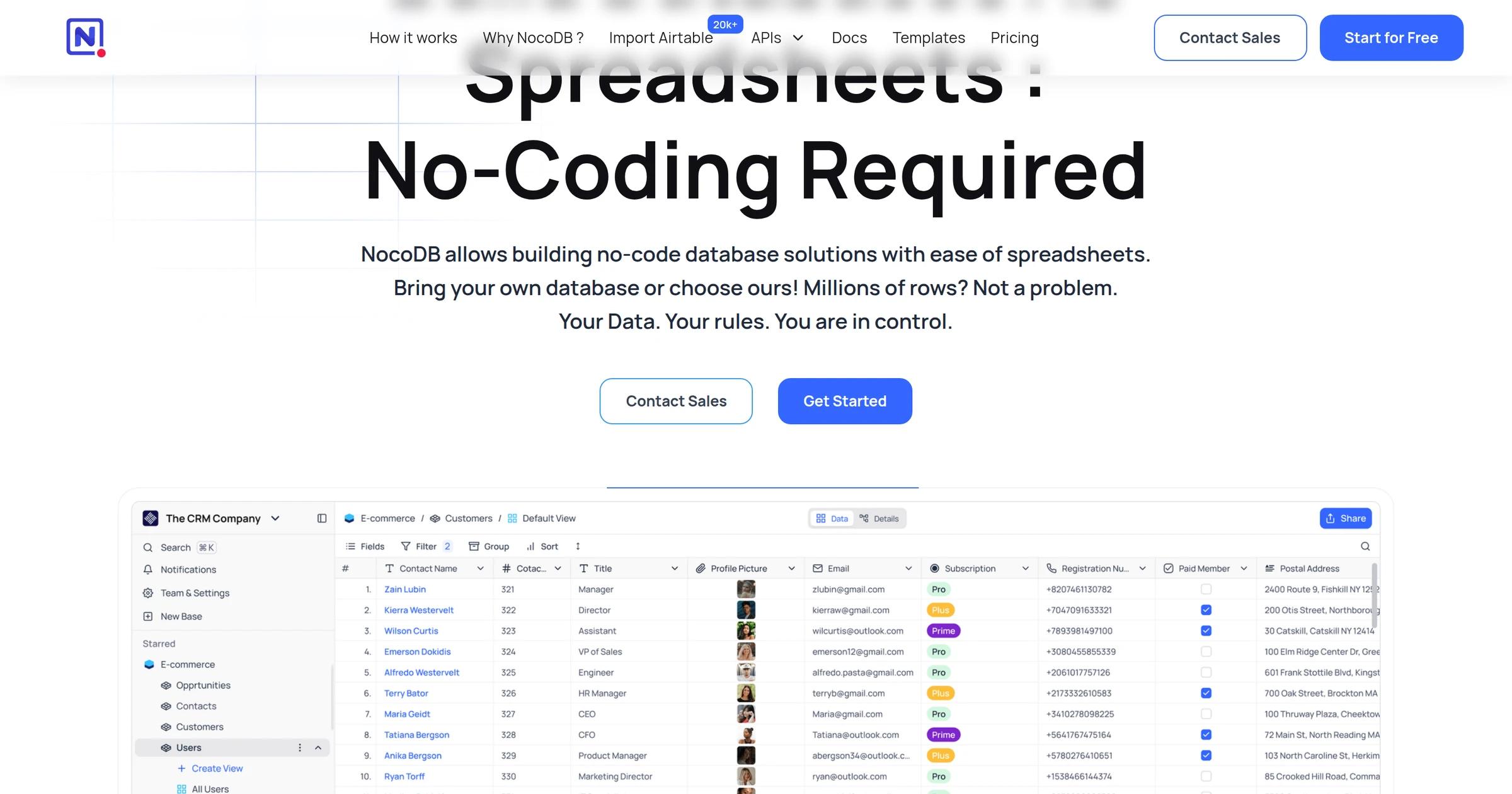
Switch between grid, kanban, gallery, form, and calendar views without duplicating data. Grid is the default and works like a spreadsheet; kanban organizes records by a field value; gallery shows records as visual cards; form view generates a shareable URL for data entry; and calendar view plots records on a date or date-time field. Multiple views per table can be created and locked for read-only sharing.
Connect NocoDB to an existing Postgres or MySQL database instead of migrating data to a proprietary format. NocoDB reads your actual schema, builds a no-code interface from it, and writes changes back to your database in real time. SQLite is also supported for local or lightweight deployments. Your data never leaves your infrastructure and remains queryable directly via SQL independent of NocoDB.
When you connect a database or create tables, NocoDB automatically generates a versioned REST API for every table with full CRUD operations, filtering, sorting, and pagination. The current API is v3; v2 is available but will be deprecated. A JavaScript and TypeScript SDK is also provided. Your team gets both a visual interface and a programmatic API from the same source of truth without writing API code.
NocoDB's App Store integrations let you trigger notifications and sync data when records change. Supported channels include Slack, Discord, and Mattermost for chat; AWS SES, SMTP, and MailerSend for email; and AWS S3, Google Cloud Storage, and Minio for file storage. Webhooks let you push record events to any external service, enabling custom automation pipelines outside the built-in integrations.
Define access levels per workspace, base, or view. Collaborators can be assigned viewer, commenter, editor, or owner roles, limiting what each person can read or modify. Specific views can be locked so they are read-only for all users, or shared publicly via a password-protected link without requiring a NocoDB account. This enables controlled data access for clients, stakeholders, or read-only reviewers.
Import existing tables directly from Airtable exports, CSV files, or Excel spreadsheets. This covers the most common migration paths for teams moving away from Airtable or spreadsheet-based workflows, and populates an existing NocoDB table or creates a new one from the imported structure. The Airtable import path is documented specifically, targeting teams switching from that platform.
Features
- Five database view types on the same data
- Bring-your-own-database connectivity
- Auto-generated REST API and SDK
- Workflow automations via App Store
- Role-based access control per view and base
- Import from Airtable, CSV, and Excel
How to install
Self-hosting uses Docker and mounts a local data directory on port 8080.
docker run -d --name noco -v "$(pwd)"/nocodb:/usr/app/data/ -p 8080:8080 nocodb/nocodb:latestRecommended for this setup
Strengths
- Your data stays in your own database: Unlike Airtable, monday.com, and other proprietary platforms that store data in their own systems, NocoDB mounts on top of your existing Postgres, MySQL, or SQLite. Your data is never locked into a vendor format, and you can query it directly with SQL when needed, independently of NocoDB. This matters for compliance, data portability, and teams that already have database infrastructure.
- Handles millions of rows without an enterprise plan: NocoDB handles millions of rows in a single table, a threshold where Airtable bases cap at 50,000 rows on most plans. The product website reports customers managing millions of rows without contacting sales for a higher tier. Performance scales with the underlying database, so adding hardware or upgrading Postgres handles growth without a forced plan change or a sales conversation.
- 64,000+ GitHub stars and 35,000+ organizations: With over 64,000 GitHub stars and more than 35,000 organizations using it, NocoDB has broad community validation. Docker pulls exceed 20 million. This adoption level indicates active long-term development, a growing ecosystem of community guides, and reduced risk of abandonment for teams building internal tools on top of it.
- One-command Docker install with auto-configured production stack: The standard self-hosting path is a single Docker run command. For production, the auto-install script automatically provisions PostgreSQL, Redis, Traefik, and SSL with only a domain name as input. This is significantly simpler than comparable no-code tools that require Kubernetes or manual multi-service orchestration, and the script re-runs cleanly to upgrade NocoDB to the latest version.
Trade-offs
- Sustainable Use License: not OSI-approved open source: NocoDB's master branch is licensed under the Sustainable Use License, a fair-code license that permits free internal self-hosting but restricts offering NocoDB as a managed service to third parties without a commercial license agreement. This is the same license family as n8n. Teams that need a permissively licensed (MIT or Apache 2.0) database UI tool will need to look elsewhere; teams self-hosting for internal use are not affected by this restriction.
- Production self-hosting requires ongoing operational overhead: Running NocoDB in production means managing a Postgres database, configuring backups, handling upgrades, and monitoring uptime. The auto-install script simplifies initial setup, but ongoing maintenance falls on your team. Organizations without dedicated infrastructure staff may find the operational burden meaningful compared to a fully managed SaaS tool where the vendor handles reliability.
- No native iOS or Android application: NocoDB's interface is responsive and usable on mobile browsers, but there is no dedicated iOS or Android application. The product website describes this as a responsive view rather than a native app. Teams whose members frequently work from phones or tablets may find the mobile browser experience less convenient than the native mobile apps offered by Airtable or monday.com.
Tech stack
FAQ
NocoDB is source-available but not open source under the OSI definition. The master branch is licensed under the Sustainable Use License, which permits free internal self-hosting but restricts using NocoDB to offer a managed database service to third parties without a commercial license. This is the same license family used by n8n. The source code is publicly available on GitHub, but redistribution and commercial hosting rights are limited by the license terms.
Yes. Self-hosting NocoDB on your own server or cloud instance is free under the Sustainable Use License for internal use. The quickest path is a single Docker command that runs NocoDB with SQLite as the backend in under five minutes. For production, the auto-install script provisions Postgres, Redis, and SSL automatically. The license restriction applies only to offering NocoDB as a managed service to third parties, not to internal self-hosting.
Yes. NocoDB connects directly to an existing Postgres or MySQL database and reads its schema to build a no-code interface from it. You do not need to migrate data into NocoDB's format. SQLite is also supported for simpler local deployments. Changes made through the NocoDB interface write back to your actual database tables in real time, and your database remains directly queryable via SQL independently of NocoDB.
NocoDB and Airtable offer similar spreadsheet-style interfaces for structured data, but differ fundamentally on where your data lives. Airtable stores your data in Airtable's proprietary cloud; NocoDB connects to your own Postgres, MySQL, or SQLite database and leaves the data there. NocoDB also handles millions of rows per table, while Airtable caps most plans at 50,000 rows per base. The tradeoff is operational: Airtable is fully managed with no setup required, while NocoDB requires self-hosting and ongoing maintenance.
Offering NocoDB as a managed hosted service to third parties falls outside the free-use rights of the Sustainable Use License and may require a commercial license from NocoDB. Internal self-hosting for your own team or organization is permitted without a commercial agreement. If your use case involves providing NocoDB as a hosted product to clients or end users, contact NocoDB directly about their commercial licensing options before building on it.