Neon-Vision-Editor
Native Apple text and Markdown editor with safe file sync
Replaces Bbedit
Who it's for
Neon keeps Markdown source and rendered preview side by side on Mac and iPad. Shared-file sync means the same document in iCloud Drive can be opened on multiple devices without risking an overwrite of an in-progress edit. Toolbar presets let writers switch between a focused writing layout and a review layout without leaving the document.
Skip if you need Windows or Linux access to the same files, or if your Markdown workflow already runs in a web-based editor that works on any device.
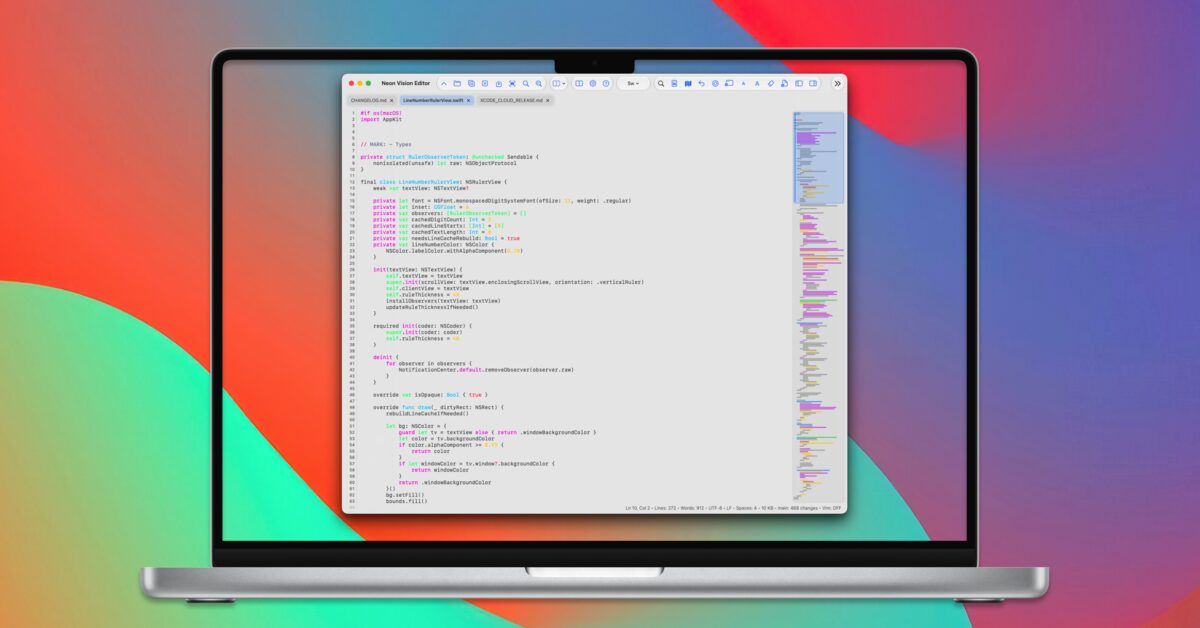
Syntax highlighting, Quick Open via Cmd+P, a project sidebar with Git status and terminal, and regex Find and Replace cover scripts, HTML, SVG, and config edits without loading a full IDE. The file-backed architecture keeps large files responsive. The optional nve command-line helper opens files from the terminal.
Skip if your workflow requires a debugger, integrated test runner, build system, or full IDE features. Neon explicitly does not target those workflows.
The plain-text-to-Markdown conversion workflow turns copied notes, meeting output, and rough outlines into a structured Markdown proposal without touching the original. Writers review the generated headings, lists, and emphasis before accepting changes. On supported Macs, Apple Intelligence can power the conversion, or a separately configured provider can be used.
Skip if you already start from clean Markdown. The conversion feature targets unstructured plain text; there is no benefit when your source is already formatted.
PDFs can be highlighted with attached Markdown notes so context stays connected to the source document. Project card previews show PDFs and Markdown files in a responsive overview before opening them. This suits research workflows where reference material and working notes need to stay in the same project view without switching applications.
Skip if your annotation needs include form filling, PDF editing, or comments visible to PDF readers. Neon's PDF support covers highlights and attached notes only.
The problem
Lightweight text editors on Apple platforms tend to pick a lane: either they handle Markdown writing cleanly with preview support, or they handle code with syntax highlighting, but rarely both without crossing into IDE territory. The bigger operational problem is file handling. Editors that buffer documents in memory can silently miss external changes to the same file from another device or another app, leading to overwritten work. Users who keep documents in iCloud Drive or on network shares encounter this regularly, and the current workaround is manual: close the tab, reopen, and hope nothing was lost. Converting unstructured text to Markdown is an additional friction point. Notes, meeting output, and copied content often have implied structure that needs manual formatting before it becomes useful documentation.
How it works
When a file open in Neon changes on another device or in another app, the editor detects it and refreshes the clean tab in place, preserving cursor position, scroll position, and preview source. If the tab has unsaved edits, Neon keeps the local version protected and presents the choice: keep local, reload from disk, or compare. No silent overwrites.
Converts plain text, copied notes, or rough outlines into a Markdown draft for deliberate review rather than silently replacing the original. On supported Macs, conversion can use Apple Intelligence; a separately configured provider can also be used. The result is always a proposal: headings, lists, and emphasis are visible before anything is applied to the document.
Documents are edited against the file on disk through a bounded virtual viewport, not a full in-memory buffer. Syntax highlighting and line layout work only on the visible range, keeping performance consistent as file size grows. Files at 100MB or larger open as a clearly labelled read-only partial preview so they remain inspectable without risk.
Markdown, HTML, and SVG source files have a rendered preview that can sit beside the editor on Mac and iPad. On iPhone it opens as a focused reading view. PDF files support highlights with attached Markdown notes, and PDF and PNG cards display in a project overview without loading full artwork until the card is in view.
Syntax highlighting covers Swift 6, TeX/LaTeX, HTML, SVG, and general source file types. The code minimap is off by default and toggleable. Vim mode is available for hardware-keyboard workflows. Find and Replace supports regular expressions across the open document and across project files.
Five workspace presets (standard, focused, developer, review, and complete) configure the toolbar and project sidebar without requiring manual settings edits. Compact symbols keep macOS and iPadOS toolbars readable. The project sidebar on macOS integrates file navigation, search, Git status, and a terminal session in direct builds.
Features
- Safe shared-file sync
- Reviewable Markdown conversion
- File-backed large-document editor
- Multi-format source previews
- Syntax highlighting and editing tools
- Workspace presets and project sidebar
How to install
Neon Vision Editor installs on macOS via the official Homebrew cask or the curl install script from GitHub Releases.
brew install neon-vision-editorRecommended for this setup
Strengths
- Apache 2.0 license with no telemetry: The source is Apache 2.0, which allows personal and commercial use, modification, and distribution without restriction. No telemetry is collected by default. AI features are opt-in, and credentials stay in the device's existing secure storage flow. This places it clearly against paid closed-source editors in the same category.
- Native Swift across four Apple platforms: Built using AppKit, UIKit, and SwiftUI, so it follows platform conventions on macOS, iPadOS, iOS, and visionOS without a cross-platform runtime layer. Tab management, toolbar composition, and appearance changes respond immediately using native platform controls, including visionOS where no paid editor in this category currently ships.
- External-change detection that protects unsaved work: Most lightweight editors either poll for file changes on a timer or ignore them entirely. Neon watches open documents for filesystem events and applies the update only when the tab is clean, preserving unsaved work in all other cases. This is a concrete differentiator for anyone editing the same file from multiple devices through iCloud Drive.
- Actively maintained with frequent releases: The repository shows active releases through September 2026, with the README last updated 2026-09-10 for v1.7.2. The v1.7.x cycle refined tab transitions, surface theming, and AI assistant panel alignment across platforms. Only 4 open issues are recorded, suggesting a low outstanding backlog for a tool at this stage.
Trade-offs
- Apple-platform only: There is no Windows or Linux version. The tool is built on AppKit, UIKit, and SwiftUI and runs exclusively on macOS, iOS, iPadOS, and visionOS. Teams or developers who need to edit the same files on non-Apple systems cannot use Neon as a shared editor.
- App Store versions lag the direct build: The direct GitHub and Homebrew macOS release (v1.7.2) is ahead of the iOS/iPadOS App Store release (v1.6.4 as of late August 2026) and the visionOS listing (v1.6.1). New features reach the direct macOS build first and may take weeks to clear Apple review for mobile platforms.
- Intel Mac support untested: The README notes that Apple Silicon is tested and Intel is not. Users on older Intel hardware may encounter visual or performance bugs that are not caught in the release workflow. The direct DMG and Homebrew cask ship a universal binary, but Intel-specific issues may go unreported.
Tech stack
FAQ
Yes. The source is released under Apache 2.0, which allows free personal and commercial use. The direct macOS build, Homebrew cask, and App Store version are all free downloads. There is no subscription, paid tier, or in-app purchase.
Neon Vision Editor supports macOS 15 (Sequoia) and later, iOS, iPadOS, and visionOS. The direct macOS build targets Apple Silicon; Intel Macs receive a universal binary but are not tested. App Store availability and version numbers vary by platform because each update goes through Apple review separately.
No telemetry is collected by default, per the privacy policy. AI features are opt-in, and AI credentials are stored in the device's existing secure storage. The app does not require background services, accessibility access, full disk access, or administrator permission.
Both. Neon handles plain text, Markdown, HTML, SVG, and general source files with syntax highlighting, including Swift 6 and TeX/LaTeX. It includes Quick Open, a project sidebar with Git status, and regex Find and Replace. It is not a full IDE: there is no debugger or integrated build system, but it covers editing scripts and config files without IDE overhead.
Neon watches open documents for filesystem events. When a file is updated externally and the open tab has no unsaved edits, Neon refreshes the tab in place, preserving cursor position, scroll position, and preview source. When the tab has unsaved edits, Neon keeps the local buffer protected and presents three options: keep local, reload from disk, or compare.