
Mlx Serve
Local LLM server for Apple Silicon, faster than LM Studio
Replaces Lm Studio
Who it's for
MLX Serve integrates with Claude Code, Codex, OpenCode, and Cursor via `mlx-serve launch claude` and standard OpenAI/Anthropic API configuration. The server uses the model's real context window rather than a capped default, so agent loops that echo file contents into edits benefit directly from the speculative decoding speedup.
Your coding agent setup is already stable on another inference server and performance is not a bottleneck. Switching inference servers requires reconfiguring every tool that points at it.
Document RAG is built into the app: drag a folder of PDFs, text files, or notes into the chat and ask questions about the contents. Nothing leaves the machine. The embeddings endpoint is available on the API for teams who want to build their own retrieval layer against the local model.
Your RAG pipeline runs on cloud infrastructure where Apple Silicon is not the deployment target. MLX Serve's primary advantage is on-device inference for macOS-based workflows.
Existing Ollama-compatible tools connect to MLX Serve unchanged. The model library carries over if you use 4-bit MLX weights, since the same Hugging Face model identifiers work. The switch gains Anthropic API support, faster decode speed, and media generation without breaking existing tooling.
You rely on LM Studio's model browser as your primary interface for discovering and downloading models. MLX Serve's app has model selection but the discovery UX is more minimal than LM Studio's dedicated browser.
On 96 GB and larger Macs, DeepSeek V4 Flash (284B parameters) and Qwen3.8-Flash-Next (125B with about 6B active per token) are available as one-click downloads. Two 64+ GB Macs connected over Thunderbolt 5 can share a single model for configurations that exceed a single machine's memory.
Your research requires CUDA-specific libraries, Python-based training workflows, or models that only ship in PyTorch checkpoint format without an MLX or GGUF conversion available.
The problem
Running large language models locally on macOS means navigating a slow, fragile inference stack. Most local inference tools are built on Python runtimes: model loading takes longer than necessary, dependencies conflict, and the Python layer clips the GPU throughput that Apple Silicon can actually deliver. For developers building agent loops, coding assistants, or RAG pipelines, token generation speed is the bottleneck, and the performance gap between what the hardware can do and what these tools deliver is significant. The API compatibility problem adds another layer of friction. A developer who wants to route Claude Code or Cursor to a local model typically has to manage separate tool versions for the OpenAI and Anthropic protocols, or run a translation proxy on top of their inference server. That is one more process to monitor, one more failure point, and one more reason the local inference setup breaks at the worst moment.
How it works
MLX Serve is written in Zig and calls Apple's MLX framework and llama.cpp directly via C bindings. There is no Python runtime in the call path, which cuts model load time and removes the dependency management overhead that affects Ollama and LM Studio on macOS.
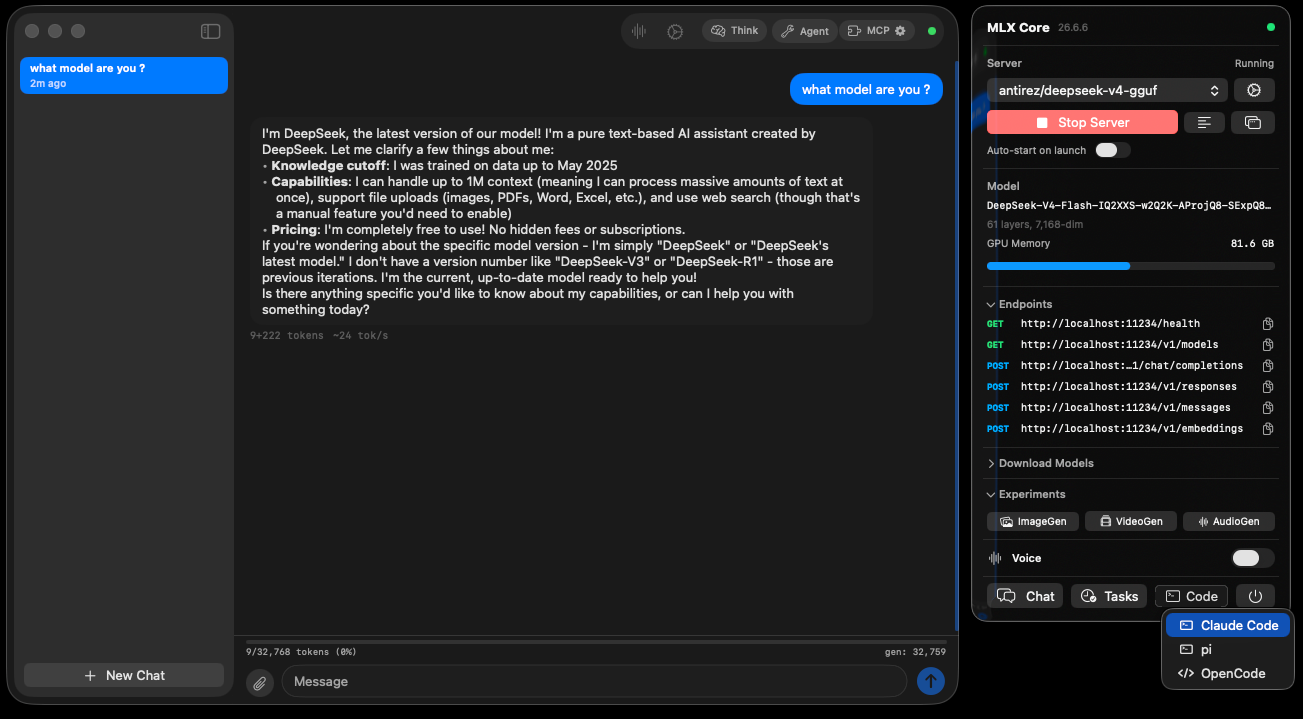
The server listens on port 11234 and handles OpenAI chat completions, Anthropic Messages, and Ollama list/generate/chat requests on the same endpoint. Tools built for any of these three protocols connect without reconfiguration. Streaming, tool calling, JSON schema outputs, embeddings, and WebSocket support are included on every surface.
Prompt Lookup Decoding works on any model architecture with no extra downloads. The Gemma 4 Drafter uses a cross-attention drafter that reuses the target model's K/V cache for up to 65% faster code completion. Native Qwen MTP uses the model's own multi-token prediction head for up to 2x on code and agent edits. Adaptive gates disable drafting when drafts stop landing so there is no quality cost.
Models like GLM-5.3-Flash, MiMo-V2.6-Flash, and DeepSeek-V4.1-Flash run on 128 GB Macs by reading expert layers from the SSD on demand. Two Macs connected over Thunderbolt 5 can split a single model between them, and any Mac on the local network can serve models to other devices.
The macOS app includes image generation with FLUX.2, Qwen-Image, and Krea; video generation with LTX-Video and MiniMax-H3; music generation with ACE-Step and YuE2; and 3D model export from a single photograph with Hunyuan3D. All models run on-device with no cloud calls or watermarks.
Agent mode gives the model file system access confined to a folder you choose, or an isolated Linux VM. MCP tool calling works on every model, including DeepSeek V4 Flash. Schedules let you hand the agent a recurring task in plain English; a Telegram integration lets you message your local model from anywhere through a private bot.
Features
- No Python inference stack
- OpenAI, Anthropic, and Ollama APIs on one port
- Three speculative decoding modes
- Models larger than available RAM via SSD streaming
- Media generation: images, video, music, and 3D
- Agent mode with MCP and a sandboxed shell
How to install
Install the macOS app via Homebrew or download the signed DMG installer from GitHub Releases.
brew tap ddalcu/mlx-serve https://github.com/ddalcu/mlx-serve
brew trust ddalcu/mlx-serve
brew install --cask mlx-serve
Recommended for this setup
Strengths
- 81% geomean faster than LM Studio on identical model weights: On M4 Max hardware with identical 4-bit MLX weights, MLX Serve decodes 81% faster geomean than LM Studio in benchmarks published on the project site. The advantage holds across Gemma 4, Qwen 3.8, and Llama 3 families. Speculative decoding extends the lead further: code completion on Qwen3.6-27B reaches 78 tok/s versus 28 tok/s without the MTP drafter.
- MIT license, free for commercial use: The full codebase is MIT licensed, including the server and the macOS app. There is no open-core split, no paywalled feature tier, and no per-seat pricing. Third-party bundled components use Apache-2.0, BSD 3-Clause, and MIT as noted in the NOTICE file. You can run it in a commercial product, modify it, and ship it to customers without restriction.
- Single binary with no external dependencies: The server ships as one self-contained binary with no Python, no Node.js, and no separate runtime to install. On first launch the app downloads whichever model fits your hardware and is ready to answer in seconds. There are no setup scripts and no gigabyte runtime downloads before the first response.
- Drop-in replacement for Ollama-compatible tools: MLX Serve speaks the Ollama protocol natively, so tools built for Ollama connect unchanged: same models, same endpoints, same configuration. Raycast, Obsidian, Enchanted, and Open WebUI work without reconfiguration. The command `mlx-serve run gemma4` downloads, serves, and opens a chat session in one step, matching Ollama's workflow exactly.
Trade-offs
- macOS 26.2 or later required: The app and server require macOS 26.2 or later on Apple Silicon. Macs running earlier macOS versions cannot run the app until they upgrade. Linux builds for NVIDIA GPUs are available but are not shipped as prebuilt installers, and Windows support requires building from source using a provided script.
- New project with 47 open issues: The repository was created in February 2026 and had 47 open issues at the time of this writing. As a relatively new project, some edge cases in model compatibility and API surface coverage are still being worked through. Teams with production-critical inference requirements should test thoroughly against their specific model and workload before committing.
- Media generation requires GPU memory headroom: Video generation (LTX-Video, MiniMax-H3) and 3D reconstruction (Hunyuan3D) are separate model downloads. Running media generation concurrently with a large language model on a 16 GB Mac is likely to exhaust available unified memory. Users who primarily want media features should account for this when choosing which language model to keep loaded.
Tech stack
FAQ
Yes. On M4 Max hardware with identical 4-bit MLX weights and default settings, MLX Serve decodes 81% faster geomean than LM Studio, according to benchmarks published on the project site at mlxserve.com. The advantage comes from a native Zig backend that calls Apple's MLX framework directly without a Python intermediary, plus speculative decoding modes that LM Studio does not offer.
Yes. Running `mlx-serve launch claude` starts Claude Code configured to use your local model with its real context window. Cursor, Zed, Continue, and OpenCode connect via the OpenAI-compatible endpoint on port 11234. Tools that use the Anthropic Messages API also connect natively, since MLX Serve exposes both OpenAI and Anthropic surfaces on the same port.
Any Apple Silicon Mac (M1 through M5) running macOS 26.2 or later. The app suggests a model for your specific hardware on first launch: 16 GB Macs start with Gemma 4 E4B, 32 GB Macs with Qwen 3.8 27B, and 96 GB Macs can run Qwen3.8-Flash-Next (125B). Models bigger than your available unified memory stream expert layers from the SSD on 128 GB and 256 GB configurations.
Partially. Linux builds for NVIDIA GPUs ship with every release: x64 for RTX 20 through 50 series cards and arm64 for DGX Spark, GH200, and Jetson Thor. Windows support requires building from source with a provided script. The macOS app and media generation features are Apple Silicon only; the server binary itself targets supported GPU platforms.
Yes. The full codebase is MIT licensed with no open-core split. Third-party bundled components keep their own licenses (Apache-2.0, BSD 3-Clause, and MIT), listed in the NOTICE file. The README states "Nothing is paywalled: it's MIT now and stays MIT." You can run it commercially, fork it, and modify it without restriction.