
Microduck
Open-source biped robot you train with RL
Replaces —
Who it's for
Use the MuJoCo training environment and ONNX export pipeline to prototype new locomotion or manipulation policies and validate sim-to-real transfer on physical hardware without building a robot from scratch.
You need industrial-scale hardware or payload beyond a small desktop robot.
The fully open training stack, seven published reference policies, and documented architecture make Microduck a concrete learning platform for PPO and sim-to-real RL on a robot that actually moves.
You want a no-code or purely visual environment for learning robotics.
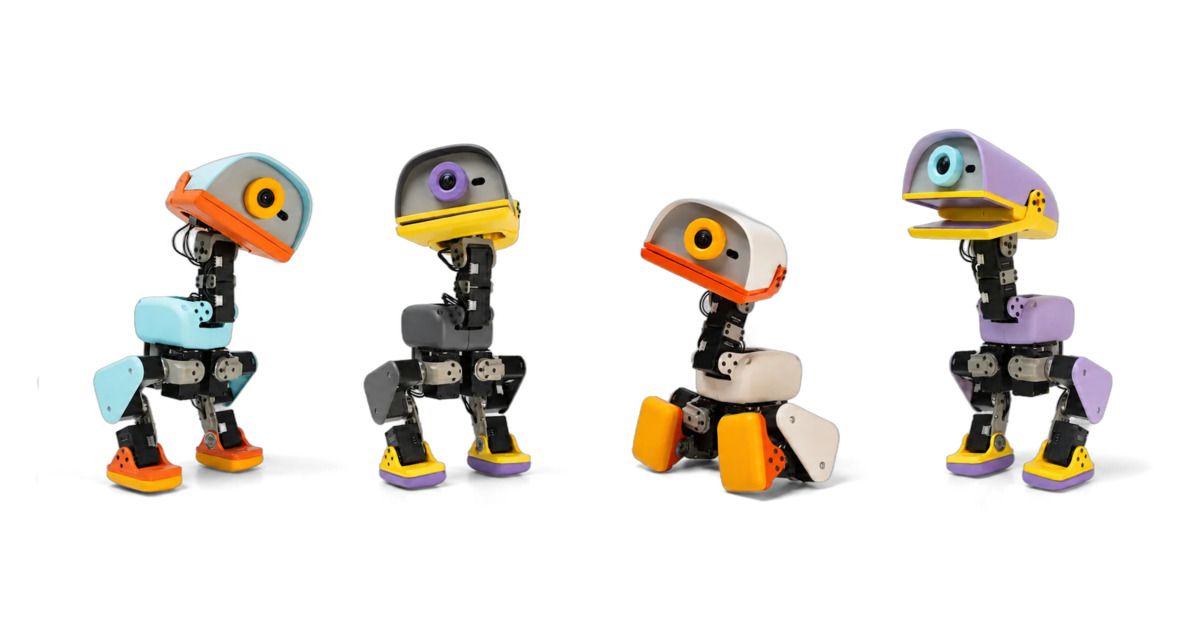
Microduck ships playable with a gamepad and four colourway options. The open firmware and community policy library mean customization scales from swapping pre-trained behaviors to writing new ones.
You have no interest in software and want a purely entertainment toy.
The Apache 2.0 stack, simulation environment that needs no hardware, and community Discord provide a full teaching platform for bipedal robotics, control systems, and applied machine learning.
Your curriculum requires a larger or wheeled robot platform.
The problem
Consumer robots either lock users into closed firmware with no path to customization, or require deep robotics expertise before anything interesting can happen. Microduck addresses both ends: it works with a gamepad immediately on unboxing, while exposing the full reinforcement learning pipeline so anyone can train new behaviors in simulation and deploy them to real hardware without a robotics research background.
How it works
Behaviors are trained as neural policies in MuJoCo using PPO reinforcement learning, exported to ONNX, and loaded directly onto the robot. The simulated twin runs the real robot daemons, so policies tested in simulation deploy with one step.
The 25 cm, 800 g frame is driven by fifteen servo motors with a 50 Hz onboard policy loop on a Rockchip RK3566. Sensors include a camera, LiDAR, and two IMUs.
Ships with a velocity-tracking walk, sit-and-stand, a one-shot kick, a beak-to-floor grab, roller skating locomotion when skates are attached, and a self-recovery routine that takes the robot from flat on its back to standing.
A gamepad pairs over Bluetooth and drives the robot immediately. The `duckctl` tool also lets you operate the robot from a laptop without a network connection.
The `updaterd` daemon installs signed releases and rolls them back automatically if a robot comes up unhealthy after an update. Every update is verified and health-gated before it is committed.
The SDK, simulation environment, and RL training stack are published under the Apache 2.0 license. The robot firmware is written in Rust with no framework dependency, and all daemon IPC uses a single JSON-RPC contract on Unix sockets.
Features
- Sim-to-real RL training
- 15-motor biped hardware
- Seven pre-trained behaviors
- Gamepad-ready out of the box
- Reversible OTA updates
- Full Apache 2.0 stack
How to install
# Connect to your Microduck over SSH ssh microduck # Check robot status robotctl monitor # Configure the robot robotctl configure # Install updates robotctl update
Recommended for this setup
Strengths
- No-hardware-needed development: The `scripts/duck-sim` tool runs the real robot daemons against a MuJoCo body in a window, letting you develop and test policies without a physical robot. You can run up to four simulated robots as machines you log into.
- Community policy sharing: Trained policies are publishable to the community. Pre-trained moves ship as published, retrainable policies, and the Discord community exists specifically for sharing builds and swapping policies.
- Transparent, auditable firmware: Every daemon the robot runs is readable on GitHub. The Rust codebase has no framework dependency, and the design documents in `docs/design/` explain the architectural decisions rather than just the API.
- Incremental workflow: The train-deploy-refine loop is explicit: train in simulation, push a branch build over SSH in about a minute, tune the simulation parameters, retrain, and redeploy. Each step is documented separately with its own cheat sheet.
Trade-offs
- Pre-order hardware, not yet shipping: Pre-orders opened August 27, 2026 at $399 before taxes and shipping. Buyers are committing to a product that is not yet in hand.
- Reinforcement learning background helps: While the robot works out of the box with a gamepad, training new policies requires familiarity with MuJoCo, PPO, and the sim-to-real workflow. The tooling is documented, but this is not a no-code experience.
- Small physical payload: At 25 cm tall and 800 g the robot is a desktop device. The grasping beak is designed for small objects at ground level; it is not suitable for tasks requiring significant reach, payload, or height.
Tech stack
FAQ
Microduck has 15 servo motors, a camera, LiDAR, and two IMUs in a 25 cm, 800 g frame. The compute is a Rockchip RK3566 running the control loop at 50 Hz.
Policies are trained in MuJoCo using the companion `microduck_rl` repository, which provides the PPO setup, domain randomization, and ONNX export. You can train on your own machine or via Hugging Face Jobs, then push the ONNX file to the robot over SSH.
Yes. The `scripts/duck-sim` script runs the real robot daemons against a MuJoCo body in a window. You can run one or four simulated robots as machines you SSH into, which lets you develop and test policies entirely on your laptop.
The entire software stack, including the SDK, simulation environment, and RL training stack, is published under the Apache 2.0 license.
The $399 robot ships with the robot itself, a battery, a USB-C cable, and a game controller. Optional packs include a Charger Pack ($39, dual charger and two batteries), a Dev Pack ($119, spare motors, cables, batteries, NFC tags, and Hugging Face credit), and an Accessory Pack ($39, laser pointer, NFC polaroid, rollers, and a ball).