
Lyrimuse
Word-by-word lyrics for Mac, nine players, Last.fm built in
Replaces Verse, Musixmatch Premium
Who it's for
Lyrimuse covers the same word-by-word lyrics use case as Musixmatch Premium across Apple Music and Spotify, at no cost. It also adds QQ Music, NetEase, and Kugou support, and runs entirely on your Mac with no subscription renewal.
If you need lyrics on iOS or Android alongside your Mac, Musixmatch Premium's mobile apps cover that. Lyrimuse is desktop-only and has no mobile companion.
LyricsX stopped shipping updates in April 2022 and does not support Chinese-language players or modern macOS features like Dynamic Island. Lyrimuse picks up where LyricsX left off and adds Last.fm scrobbling, translation, and nine players.
If you are on macOS 13 or earlier, Lyrimuse requires Sonoma (14). LyricsX or another app is the fallback for those systems.
QQ Music, NetEase Cloud Music, Kugou, and Soda Music are fully supported players with their own lyrics sources. Cantonese songs get Jyutping romanization; Japanese and Mandarin get romaji and Pinyin respectively, all decided line by line.
If you only listen through Apple Music or Spotify and have no interest in Chinese-language services, simpler alternatives may cover your needs with less setup.
Lyrimuse connects to Last.fm and ListenBrainz, saves plays locally before upload, and shows top artists, albums, and tracks in the app itself with a year-long heatmap. It replaces the need for a standalone Mac scrobbler while also handling lyrics.
If you scrobble from multiple devices and need mobile coverage, you still need Last.fm or ListenBrainz's mobile apps for iPhone plays. Lyrimuse only tracks plays on the Mac.
The problem
Synced lyrics on macOS are dominated by a handful of apps that either stopped shipping updates years ago or gate the features most users want behind a subscription. LyricsX was the go-to open source option, but its last release was April 2022, and it does not support the Chinese-language music services that hundreds of millions of users rely on. Musixmatch Premium has the catalog depth, but it requires a monthly subscription for word-by-word timing, works only with the players it officially supports, and keeps your listening data on its servers. For users who follow music across Apple Music, Spotify, and Chinese platforms like QQ Music or NetEase Cloud Music, there has been no single app that covers all of them with word-by-word accuracy. Finding lyrics manually, switching between apps for different services, or losing listening history when a subscription lapses are the recurring pain points this space produces.
How it works
Queries NetEase Cloud Music, QQ Music, Kugou, Kuwo, Migu, Musixmatch, LRCLIB, LyricFind, Deezer, AMLL, Soda Music, and Apple Music's native lyrics in one pass. Every result is scored by timing quality, content match, and album match; the best candidate wins automatically. If the result is wrong, manual search lets you pick and lock any candidate.
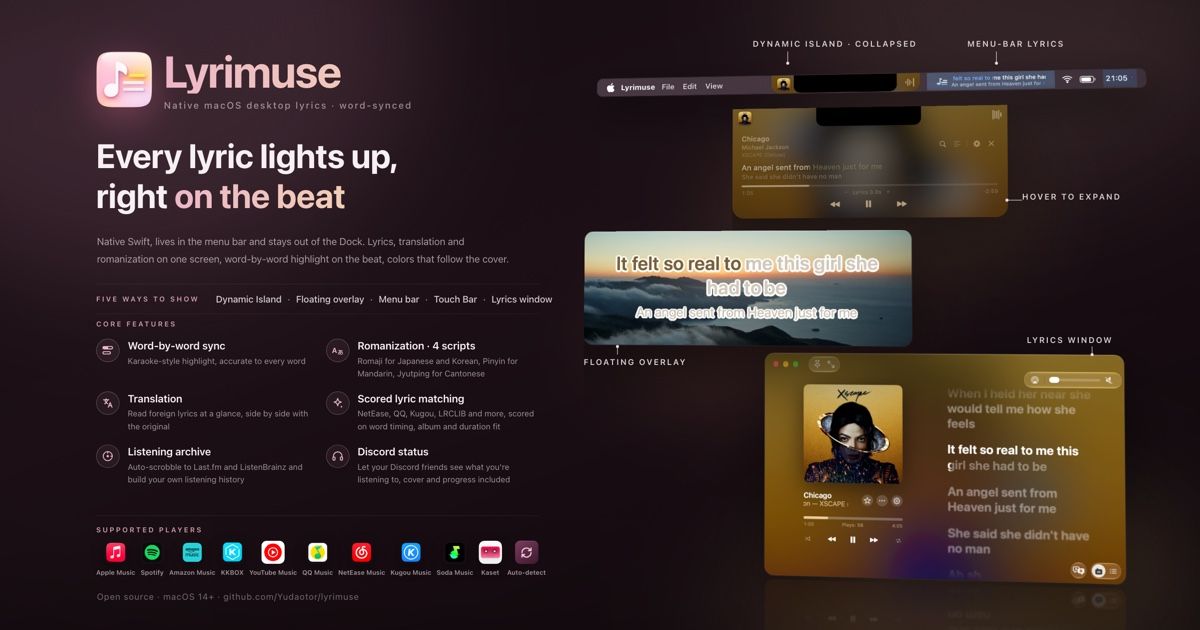
Shows lyrics as a floating overlay you can drag anywhere, a Dynamic Island-style capsule under the notch, the menu bar, the Touch Bar, or a full resizable Lyrics Window modeled on Apple Music's lyrics page. Each surface has independent font, color, width, and behavior settings with a live preview.
Translations sit below the original line; romanizations (Pinyin, Jyutping, Japanese romaji) appear under the exact words they belong to, decided line by line. System translation on macOS 15 keeps foreign-language lyrics local; a network fallback steps in when the OS cannot handle the language. Seventeen target languages supported.
Connects to Last.fm and ListenBrainz from the Accounts section with no token to copy. The app saves every play locally first, so you can connect Last.fm after the fact and recover recent plays. A built-in Footprint tab shows a year-long heatmap, daily average, streaks, and an 'On This Day' history.
Works with Apple Music, Spotify, Kaset (a YouTube Music client for Mac), KKBOX, Amazon Music, QQ Music, NetEase Cloud Music, Kugou, and Soda Music, plus web players in the browser. Apple Music and Spotify require Automation access; the others use macOS's MediaRemote and need no extra permissions.
No sign-up, no analytics, no data leaves the Mac about what you play or who you are. Lyrics fetch over each source's own API for the song currently playing; translation defaults to Apple's on-device framework on macOS 15. The privacy policy lists every server the app contacts.
Features
- Twelve-source lyrics engine
- Five display surfaces
- Translation and romanization
- Last.fm and ListenBrainz scrobbling
- Nine-player support
- No account, no telemetry
How to install
Install via Homebrew, which also handles the one-time Gatekeeper setup on first launch.
brew tap yudaotor/lyrimuse
brew trust --cask yudaotor/lyrimuse/lyrimuse
brew install --cask lyrimuse
Recommended for this setup
Strengths
- Actively maintained replacement for LyricsX: LyricsX shipped its last release in April 2022. Lyrimuse reached v1.10.0 in October 2026 and adds six more players, scored lyric matching, Jyutping and Japanese romaji, and Last.fm scrobbling that LyricsX never had. Development is ongoing, with the most recent push on October 10, 2026.
- First-class Chinese-language player support: QQ Music, NetEase Cloud Music, Kugou, and Soda Music are fully supported players, each with their own lyrics source in the matching engine. Cantonese songs get Jyutping romanization that works at the word level rather than character by character.
- GPL-3.0 with no premium tier: The full feature set ships under GPL-3.0; there is no premium tier, no credit system, and no subscription. Running it for personal or team use costs nothing beyond the Mac itself.
- Offline lyrics with no account: No sign-up is required and no data about your listening leaves your Mac. Lyrics are cached locally after the first fetch, so songs play offline without a network request once they have been looked up once.
Trade-offs
- macOS 14+ only, no mobile companion: Lyrimuse requires macOS Sonoma (14) or later. Users on Macs running macOS 13 or earlier cannot install it. There is no mobile app; scrobbling from iPhone requires a separate Last.fm or ListenBrainz client. Intel Macs use a separate build from Apple Silicon.
- Not notarized by Apple: The app is not signed with an Apple Developer certificate, so the first launch from the DMG triggers a Gatekeeper warning. You must manually approve it in System Settings > Privacy and Security. Homebrew's brew trust step handles this automatically, but users who download the DMG directly face a one-time manual step.
- On-device translation requires macOS 15: The translation path that keeps lyrics fully local requires macOS Sequoia (15). On macOS 14 the app falls back to an online translator. Users who need fully local translation of foreign-language lyrics must be on Sequoia or later.
Tech stack
FAQ
No account is required to get lyrics or to use the app. Lyrics are fetched directly from sources including Musixmatch, NetEase, QQ Music, and others without any sign-in. Last.fm and ListenBrainz connections are optional; the app scrobbles only if you link an account in Settings.
Lyrimuse runs on macOS Sonoma (14) or later, on both Apple Silicon (M1 and later) and Intel Macs. Apple Silicon and Intel builds are separate downloads. On-device translation requires macOS Sequoia (15); on macOS 14 the app falls back to an online translator.
For the desktop macOS use case, yes. Lyrimuse is GPL-3.0 licensed, free to use, and covers word-by-word lyrics for Apple Music, Spotify, and several players Musixmatch does not support. It does not have mobile apps, so it does not replace Musixmatch on iPhone or Android.
It queries up to twelve sources (Musixmatch, NetEase, QQ Music, Kugou, LRCLIB, and others), scores each result by timing accuracy, duration match, and content corroboration, then applies the highest-scoring candidate automatically. You can override any decision and lock your choice in Lyrics Manager.
Lyrics found previously are cached on your Mac and display without a network connection. The first lookup for a new song requires connectivity, as does real-time online translation. Scrobbles queue locally and sync to Last.fm or ListenBrainz when the connection returns.