
Labelme
Image annotation with offline AI, no cloud uploads, no subscription
Replaces Roboflow Annotate, Labelbox, V7 Labs, Encord
Who it's for
Labelme covers the full annotation loop: AI-assisted shape drafting, manual correction, review flagging, and export to YOLO or VOC. The local-only model means sensor data, medical scans, or proprietary images never leave the team's infrastructure during labeling.
If your team needs concurrent annotation across dozens of annotators with queue management and inter-annotator agreement tracking, Labelme lacks those coordination features. A cloud platform like Labelbox handles that scale better.
The open source package is free and pip-installable, which fits research budgets. The plain JSON output integrates with standard Python computer vision scripts without extra dependencies. The 21-language interface and ten-year maintenance history make it a known quantity in academic labs.
If your institution has a managed annotation platform already integrated with your HPC cluster or data pipeline, switching to a desktop tool for annotation may add friction rather than remove it.
The three-day free trial and $79 one-time Pro license fit a solo budget. The offline AI makes quick work of drafting shapes without drawing from scratch. Plain JSON output connects directly to Ultralytics YOLO, PyTorch, and other popular training frameworks.
If your dataset is small enough to annotate by hand in a few hours, the AI-assist adds little value. The free open source package covers manual annotation with no payment required.
The problem
Annotating images for computer vision model training is time-consuming by design: every shape drawn by hand is time a team could spend on model development. The main paid annotation platforms (Roboflow Annotate, Labelbox, V7 Labs, Encord) are cloud services that require uploading images to their infrastructure. For medical imaging, satellite data, industrial inspection, or any work under a data handling agreement, that upload is a blocker. Even teams without data restrictions face cost pressure. Annotation platforms charge per seat or per usage, and those costs scale with dataset size. Teams building a first dataset or training a hobby model often hit the free-tier limits before their dataset is usable.
How it works
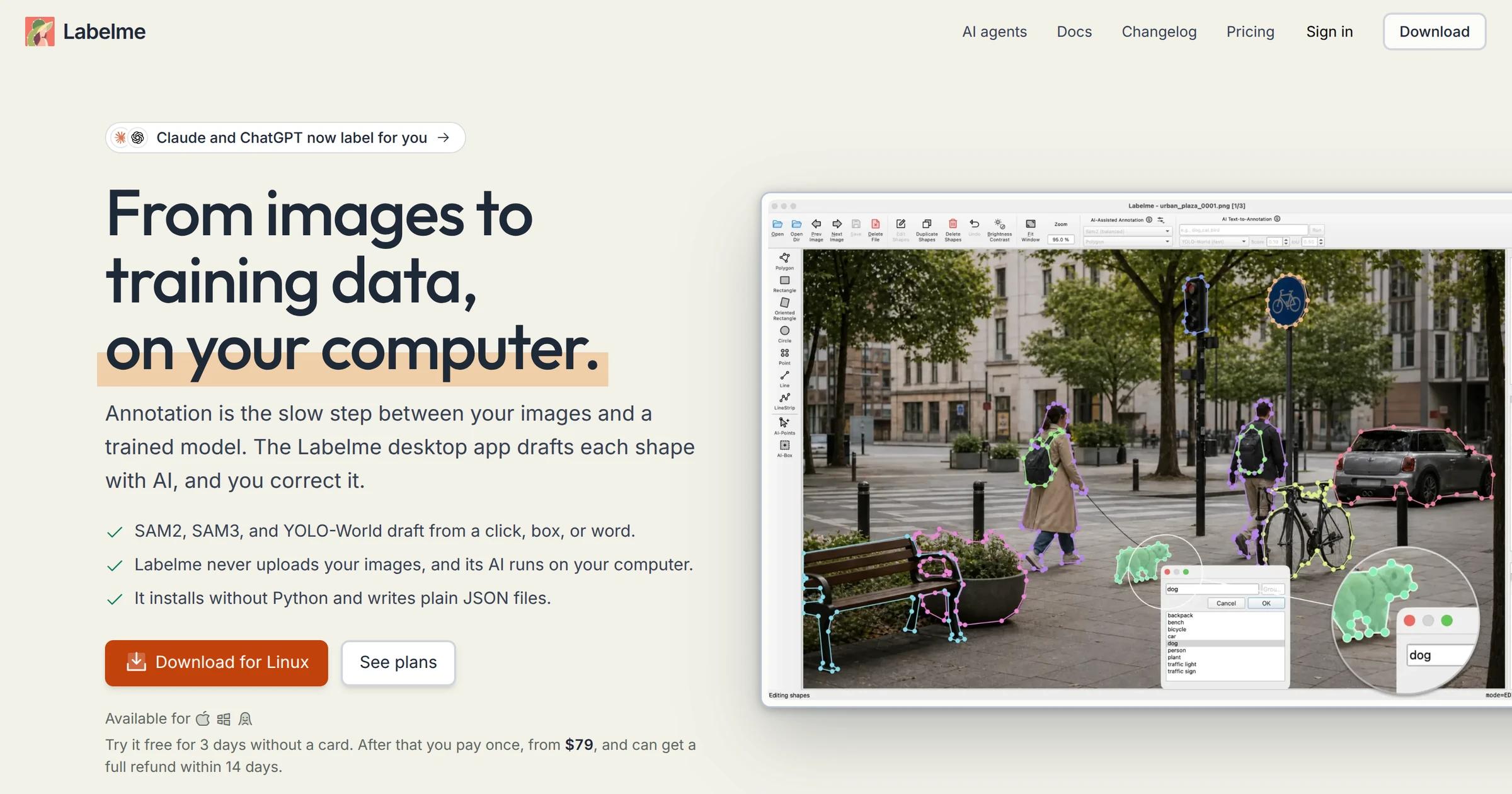
SAM2 turns a click or Shift-click into a polygon that updates as you refine the selection. SAM3 accepts a rough bounding box or a text prompt and annotates matching objects across the image. YOLO-World handles open-vocabulary detection: type a class name and it draws boxes. All three models run on your computer after a one-time download.
Polygon, rectangle, oriented rectangle (OBB), circle, point, line, and line strip cover the full range of computer vision annotation formats. Oriented bounding boxes are useful for overhead imagery and objects at non-horizontal angles. The tool draws one shape per click then returns to the last-used tool, keeping repetitive annotation fast.
Each annotation saves as a JSON file in the same folder as the image, with the label, shape type, and polygon points. The format is stable and documented: scripts can consume it without importing labelme as a library. Pro adds export to YOLO, YOLO-OBB, and Pascal VOC for direct use with PyTorch, Ultralytics YOLO, TensorFlow, and PaddlePaddle training stacks.
The Pro app exposes an MCP server so ChatGPT, Claude, Claude Code, and Codex can read the open image, create shapes, delete duplicates, and select annotations by description. The connection is set once from File > Connect AI Agent. An agent's model may run in the cloud; a local model keeps the entire workflow offline.
The interface ships in 21 languages including English, Japanese, Korean, Simplified and Traditional Chinese, German, French, Spanish, and 13 others. Annotations save on every edit and on each image switch with no manual save step. Keyboard shortcuts (D for next image, A for back, T to hide shapes) keep one-handed annotation fast.
Features
- AI-assisted annotation with SAM2, SAM3, and YOLO-World
- Seven shape types for any annotation task
- Plain JSON output readable by any script
- AI agent integration via MCP server (Pro)
- 21-language interface with auto-save
How to install
The open source package installs via pip on Python 3.12 or later.
pip install labelmeDownload the standalone desktop app (no Python required) from GitHub Releases: https://github.com/wkentaro/labelme/releases/latest
Recommended for this setup
Strengths
- No uploads: images and annotations stay on your computer: Labelme never transmits images, annotations, or model outputs to a remote server. The app's built-in AI runs locally; the annotation files write to the same folder as the source images. This makes it one of the few annotation tools that works in air-gapped environments, behind firewalls, or on data covered by HIPAA, GDPR, or government classification.
- GPL-3.0 open source package with 16K+ GitHub stars: The core annotation tool is GPL-3.0 and freely available via pip. With over 16,000 GitHub stars and a ten-year maintenance history from the same author (PhD from Imperial College London, formerly computer vision lead at Mujin), the codebase has the kind of community health and longevity that cloud services cannot match.
- One-time payment for the Pro app, no subscription: The standalone Pro app costs $79 once, includes a year of tested builds, and keeps working after that year with no additional charge. Pro Lifetime includes every future update. Cloud annotation platforms charge monthly or annually per seat; Labelme's one-time model eliminates recurring cost entirely for small teams and solo annotators.
- Works offline and air-gapped after initial setup: AI models download once from labelme.io's mirror (or from an offline pack on request). After that, the app and its models work with no internet connection. For networks that restrict external traffic, the Pro app needs to allow only one host; the open source package can be fully isolated after the initial pip install.
Trade-offs
- No team collaboration or queue management: Labelme is a single-user desktop tool. It has no built-in annotation queue, label assignment, or multi-annotator review workflow. Teams that need concurrent annotation across a large dataset, inter-annotator agreement tracking, or a project manager view will need a workflow layer on top, or a different tool. Cloud platforms like Labelbox are specifically built for that coordination work.
- Dataset export to YOLO and VOC requires the Pro app: The open source package outputs Labelme JSON only. Converting to YOLO or Pascal VOC requires running a separate Python script. The Pro app adds a one-click export toolkit, but it costs $79. Teams on the free open source tier who need YOLO-formatted training data must handle the conversion step themselves.
- 160 open issues, best-effort maintenance on the open source tier: The GitHub tracker shows 160 open issues. The project receives regular commits (last push November 2026). The maintenance model is best-effort for the open source package; Pro users receive priority email support.
Tech stack
FAQ
The open source package (pip install labelme, GPL-3.0, free) includes all annotation tools and AI models but requires a Python setup and outputs only Labelme JSON. The Pro app installs without Python, adds the MCP server so AI agents (ChatGPT, Claude, Cursor) can annotate alongside you, includes export to YOLO, YOLO-OBB, and Pascal VOC, and mirrors AI model downloads through labelme.io so a filtered network needs to allow only one host. Pro costs $79 once and includes a year of updates; Pro Lifetime includes every future update.
No. Labelme's desktop app never uploads images or annotations. The built-in AI models (SAM2, SAM3, YOLO-World) run on your computer after a one-time download. If you connect an AI agent using the Pro MCP server, the agent's model may run in the cloud (ChatGPT, Claude), but the image is not sent by Labelme; review your chosen agent's data handling. Connecting a local model keeps the full workflow offline.
Labelme ships with SAM, SAM2, SAM3, and EfficientSAM for segmentation (point-to-polygon and box-to-polygon), and YOLO-World for text-prompt object detection. SAM2 responds to include/exclude clicks that refine a polygon in real time. SAM3 accepts a rough bounding box and annotates every matching object in the image. YOLO-World accepts a text label and draws detection boxes. Every model runs on your computer with no API key.
Yes. Download the AI model weights on a connected machine first, then copy them to the air-gapped environment, or email support@labelme.io for the offline pack. After that, neither the annotation tool nor its AI models require an internet connection. The Pro app mirrors model weights from a single labelme.io host, which simplifies firewall rules; the open source package downloads weights from GitHub and Hugging Face by default.
No. The open source package (pip install labelme) is free and GPL-3.0 licensed. The Pro standalone app is a one-time payment starting at $79 and includes a year of updates; your version keeps working after that year. Pro Lifetime includes every future update. There are no monthly or annual fees.