FlClash
Ad-free Clash Meta proxy client for Android and desktop, GPL-3.0.
Replaces Shadowrocket, Surge, Quantumult X
Who it's for
Import a Clash profile from your proxy provider's subscription URL and use rule-based routing to send only specific traffic through the proxy. TUN mode captures all system traffic without per-app configuration. WebDAV sync keeps settings consistent across Android and desktop devices.
If you need proxy access only on iOS and already use Shadowrocket or Quantumult X there, FlClash does not support iOS and will not replace those apps on that platform.
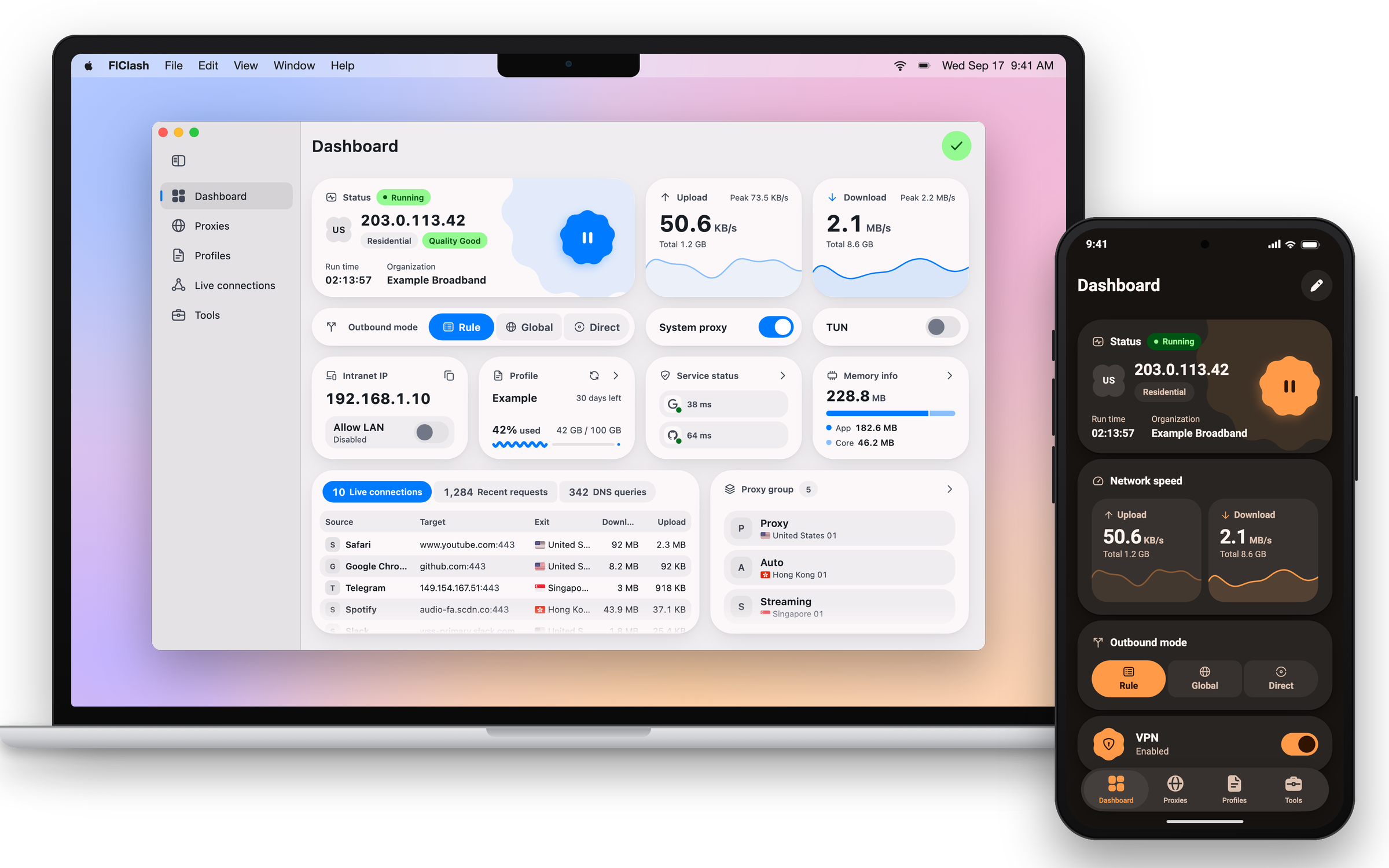
The live connection, DNS and request panels show which proxy node each app uses in real time. Sortable tables make it easy to filter by destination or proxy group. TUN mode gives network-level visibility without setting a system proxy in each individual app.
If your network debugging workflow requires traffic rewriting or scripting tools, FlClash's live views cover logging only and do not match purpose-built network debuggers.
One FlClash installation on Android and another on a Windows or Linux machine can share the same subscription URL and stay in sync via WebDAV backup. Profile QR codes transfer configurations between devices without manual export steps. A single profile with rule routing covers all platforms without per-platform customization.
FlClash has no iOS support. A team where some members use iPhones for proxy access needs a separate iOS client alongside FlClash on Android and desktop.
The problem
The most widely used proxy clients for Clash-compatible profiles are proprietary apps sold on Apple's App Store. Shadowrocket, Surge and Quantumult X all require upfront purchases, run only on iOS or Mac, and provide no path to inspect or modify the source code. Users who need a proxy client on an Android phone and a Windows or Linux machine must manage multiple apps with no shared configuration path. Even on the platforms these paid tools support, configuration lives on the device with no cross-device backup mechanism beyond the vendor's own sync. Switching phones or reinstalling after a system reset means re-importing every subscription and rule set by hand. There is no open source audit path for users with privacy or compliance requirements who need to verify how the app handles traffic.
How it works
The mihomo (Clash Meta) core handles proxy group selection, latency testing, and rule-based traffic routing. TUN mode captures all system traffic at the network level, including traffic from apps that do not honor system proxy settings. Proxy groups let you define fallback chains, load-balanced sets and URL-test groups in the same profile.
FlClash ships native packages for all four platforms from a single Flutter codebase. Desktop builds include x64 and ARM64 binaries for Windows, macOS and Linux; Android builds cover arm64-v8a, armeabi-v7a and x86_64. A macOS DMG covers both Apple Silicon and Intel Macs. The Linux package ships as .deb, .rpm and AppImage.
Import a Clash-compatible profile from a subscription URL, a local file, or a QR code. The built-in editor lets you add override scripts, custom rules and local proxy groups on top of the imported subscription without modifying the source. Profile QR codes let you transfer a configuration between devices by scanning.
Back up proxy configuration and app settings to any WebDAV server, including self-hosted Nextcloud or similar storage. Restore on a new device without re-importing subscriptions or rebuilding custom rule sets. Restores never apply halfway, so a failed restore does not leave the app in a partially migrated state.
A live connections panel shows every open proxy connection with source, destination and proxy node. The DNS log records each lookup with the resolver used and the result. Sortable tables for connections, requests and DNS queries let you trace a specific app's traffic in real time.
Features
- Mihomo core with rule routing and TUN mode
- Native builds for Android, Windows, macOS and Linux
- Clash subscription import with built-in profile editor
- WebDAV backup and cross-device restore
- Live connection, DNS and request views
How to install
Install FlClash on macOS via Homebrew, or download the installer for Windows, Android, or Linux from GitHub Releases.
brew tap chen08209/tap
brew install --cask flclash
Recommended for this setup
Strengths
- GPL-3.0, no ads and no analytics: FlClash is released under GPL-3.0 and requires no account to use. Version 0.9.1 removed the Firebase analytics and crash reporter from the Android build. You can audit the source, fork it and use it commercially without paying a license fee.
- 58,000+ stars and 103 releases since April 2024: The repository reached 58,820 stars since August 2023, with 3,829 forks and 103 releases since April 2024. Version 0.9.2 landed on October 24, 2026, and updates ship roughly every one to two weeks. Active development is visible in the changelog, which covers core updates, UI refinements and platform-specific fixes.
- Covers Android, Windows and Linux where paid tools do not: Shadowrocket, Surge and Quantumult X support only iOS or Mac. FlClash adds Windows and Linux as first-class supported platforms, with ARM64 binaries for Snapdragon and other ARM laptops on Windows. The Android build is also available on F-Droid without requiring Google Play.
- Automation and unattended deployment support: On Android, Tasker or MacroDroid can start, stop or toggle the proxy using documented broadcast actions. Desktop builds accept a FLCLASH_ACCEPT_DISCLAIMER=1 environment variable to skip the first-run prompt, which lets FlClash run in containers or headless servers without an interactive click.
Trade-offs
- Source builds require Flutter, Go and Rust: Building from source requires Flutter 3.47, Go 1.27 and Rust via rustup, plus platform-specific toolchains: the Android NDK for Android builds, Xcode for macOS, and MinGW-w64 for Windows. The build compiles both the Go-based mihomo core and a Rust bridge library as part of the Flutter build. Pre-built binaries from GitHub Releases skip this, but any fork or custom build carries significant toolchain overhead.
- Breaking changes between versions: Several recent releases include breaking changes that require manual migration. Version 0.9.1 changed desktop TUN key behavior; version 0.9.0 removed DNS and NTP override toggles and custom overwrites, requiring custom profiles to be rebuilt. Users who stay on older versions to avoid migration work will fall behind on core updates.
- No iOS support: FlClash has no iOS version and no stated plan for one. Users who need proxy access on iPhone or iPad must use a separate iOS app such as Shadowrocket or Quantumult X alongside FlClash on their other devices.
Tech stack
FAQ
Yes. FlClash is GPL-3.0 licensed and free to download from GitHub Releases, F-Droid (Android) or Homebrew (macOS). There is no paid tier, no subscription and no ads. You are responsible for the cost of any proxy server or service you connect it to.
No. FlClash supports Android, Windows, macOS and Linux only. For iOS, proxy clients such as Shadowrocket or Quantumult X read the same Clash profile format but are separate paid apps and are not part of the FlClash project.
FlClash uses the mihomo (Clash Meta) core, which supports Shadowsocks, VMess, VLESS, Trojan, Hysteria and the other protocols included in that core. The exact protocol list depends on the mihomo version bundled with the release; version 0.9.2 ships with mihomo v1.19.3.
FlClash requires accepting a disclaimer on first launch before it starts the proxy core. For headless use, set the environment variable FLCLASH_ACCEPT_DISCLAIMER=1 before the first launch. After that, the app runs without any interactive prompt required.
FlClash supports WebDAV backup. Connect any WebDAV-compatible server, including self-hosted Nextcloud, in the app settings and trigger a backup. Restore on a new device by connecting to the same WebDAV server and selecting restore from the backup list.